


New Introduction: A Third-Party Look at a BPMN Transformation Story
In today’s fast-paced business environment, where miscommunication between stakeholders can derail even the most promising initiatives, finding a universal language for process documentation feels like searching for a unicorn. That’s why we were intrigued when Alex Johnson, a seasoned Product Manager with over seven years of experience in the SF Bay Area, shared their journey of adopting Business Process Model and Notation (BPMN).
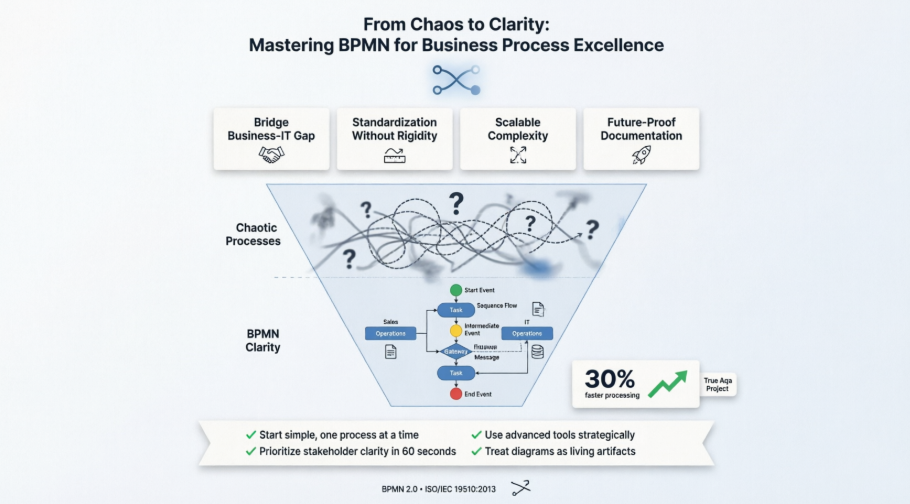
This isn’t a vendor whitepaper or an academic treatise—it’s a candid, field-tested review from someone who’s been in the trenches of stakeholder workshops, technical handoffs, and process redesigns. What follows is a comprehensive look at how BPMN transformed one practitioner’s approach to business process excellence, complete with real-world examples, practical tips, and honest assessments of what works (and what doesn’t). Whether you’re a business analyst weighing your next tool investment or a product leader seeking better cross-functional alignment, this review-style guide offers the grounded perspective you’ve been looking for.
First Impressions: When Visual Clarity Finally Clicked
As someone who’s reviewed countless process modeling approaches, what stands out about Alex’s BPMN experience is the immediate accessibility. Unlike technical diagrams that require specialized training to interpret, BPMN’s visual grammar resonates across disciplines. The opening example—a “Place Order online” workflow—demonstrates this beautifully:
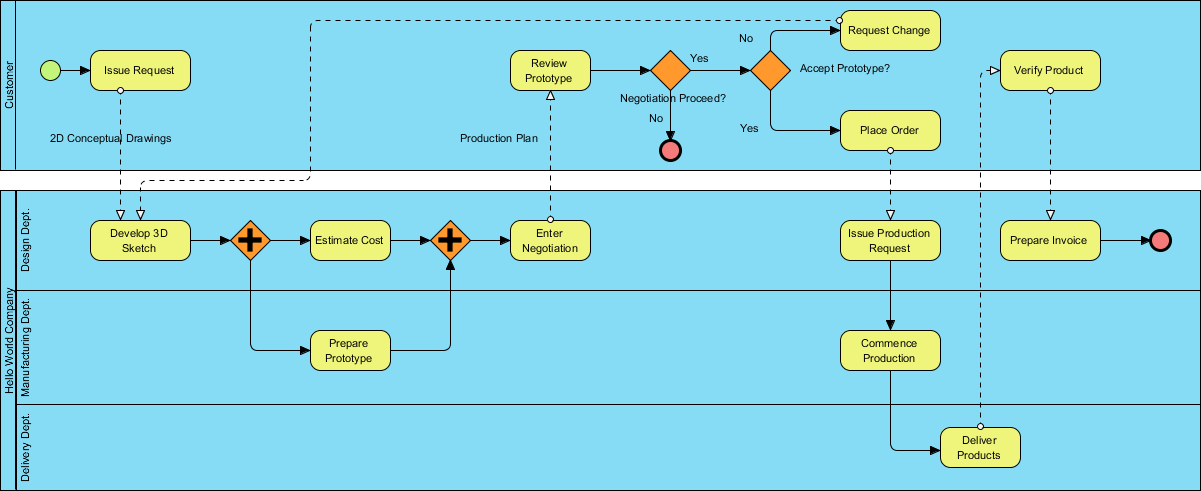
What reviewers consistently note: stakeholders who typically disengage during process reviews become active participants when presented with BPMN diagrams. The visual structure isn’t merely decorative; it serves as a functional bridge that helps teams identify bottlenecks, clarify handoffs, and spot automation opportunities at a glance.
The Credibility Factor: Why BPMN’s Mature Standard Matters
One aspect that earns BPMN points with practitioners is its institutional backing. Learning that the standard originated with the Business Process Management Initiative (BPMI) in 2004, then merged with the Object Management Group (OMG) in 2005, provides confidence in its staying power. The formal publication of BPMN 2.0.2 as ISO/IEC 19510:2013 signals this isn’t a fleeting trend.
From a practitioner’s perspective, this maturity delivers tangible benefits:
-
Robust tool support across multiple vendors
-
A thriving community with shared templates and best practices
-
Reduced risk when investing time in mastering the notation
Documented Benefits: What Actually Moves the Needle
After deploying BPMN across multiple initiatives, several advantages emerge as genuinely impactful:
✅ Bridging the business-IT divide: Non-technical stakeholders gain confidence to critique and contribute to process flows because the notation remains accessible without sacrificing precision.
✅ Consistency with flexibility: As an OMG consortium standard, BPMN provides a reliable framework while adapting to diverse industry contexts.
✅ Scalable detail levels: Practitioners can sketch high-level executive summaries in minutes, then drill into technical specifications for development teams—all within the same notation system.
✅ Documentation that evolves: Because BPMN diagrams can be executable in compatible tools, process models transition from static documentation to actionable automation assets.
Notation Deep Dive: What Works in Real Projects
Swimlanes: Visual Accountability That Sticks
Swimlanes transform how responsibility gets assigned and communicated. Rather than vague statements about “the team handling this,” practitioners can visually partition work:

Field-tested insight: Use pools for external entities (customers, third-party systems) and lanes for internal roles. The blackbox pool concept proves particularly valuable for scoping discussions—focusing attention on what matters to your process without getting sidetracked by external internals.

Flow Elements: Where Process Logic Comes Alive
Flow elements—Events, Activities, and Gateways—form the operational core of BPMN modeling. Here’s how experienced practitioners leverage them:

Events (circles) mark triggers and outcomes. Starting diagrams with a clear Start Event anchors the entire flow. Intermediate Events model real-world interruptions (“payment failed”), while End Events provide definitive closure.

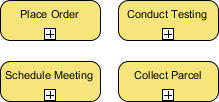
Activities (rounded rectangles) represent work units. Tasks suit atomic actions; Sub-Processes help manage complexity by hiding details until stakeholders request deeper exploration:

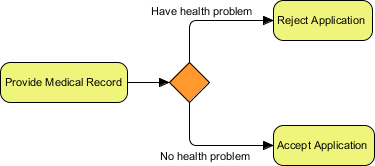
Gateways (diamonds) control decision logic. Exclusive Gateways handle “if/then” branches; Parallel Gateways manage concurrent tasks. The visual distinction helps prevent logic errors that commonly plague text-based specifications.


Connecting Objects: The Critical Links
Connecting Objects tie process elements together. Understanding the distinction between Sequence Flows (solid lines, same pool) and Message Flows (dotted lines, across pools) proves essential:


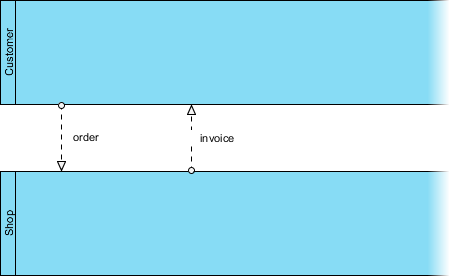
Hard-won lesson: Early confusion between these two flow types can create diagrams that misrepresent internal workflows versus external communications. A simple rule helps: solid lines = same team/system; dotted lines = handoff to another entity.
Data Elements: Tracking Information Movement
Data objects help document what information flows through a process—critical for compliance audits and system design:

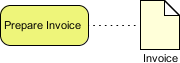
Data Stores prove particularly valuable for showing where information persists (databases, document repositories), giving technical teams clear visual cues about integration requirements.
Supporting Elements: Context Without Clutter
Groups (dotted boxes) and Text Annotations don’t alter process logic but add crucial contextual information:


Practitioner workflow: Annotations capture business rules that don’t warrant full gateway logic (“Discount applies only to orders over $100”), while groups highlight process phases for executive reviews.
Case Study in Action: True Aqua Distilled Water Company
One of the most compelling applications involved The True Aqua Distilled Water Company, which aimed to grow market share from 5% to 10%. Their ordering process mixed phone calls (90%) and emails (10%), with manual handoffs creating significant delays.
Using BPMN, the practitioner modeled the “as-is” process, then collaborated with stakeholders to design an improved “to-be” version. The visual diagram made pain points immediately apparent:

Key insights revealed through the diagram:
-
Customer service assistants duplicated data entry for new customers
-
Logistics scheduling occurred only on Wednesdays, creating delivery bottlenecks
-
Customers lacked visibility into order status
By walking cross-functional teams through this BPMN diagram, the group prioritized automation opportunities and redesigned critical handoffs. Results included a 30% reduction in order processing time and measurable improvements in customer satisfaction scores. This project reinforced the view that BPMN serves not just as documentation—but as a catalyst for meaningful operational change.
Tooling That Amplifies BPMN’s Value
While BPMN notation provides the foundation, the right tooling significantly enhances its practical impact. Based on hands-on evaluation, these features deliver genuine value:
Process Drill-Down and Sub-Process Management


Collapsing complex sub-processes for executive views, then expanding them for technical deep-dives, maintains diagram readability across stakeholder levels.
Integrating BPMN with Other Modeling Standards


Linking BPMN workflows to UML class diagrams for system design or wireframes for UI planning creates a holistic view that prevents siloed thinking.
Working Procedure Editor for Detailed Specifications
While Business Process Diagrams provide the strategic overview, the working procedure editor enables documentation of step-by-step instructions for individual tasks. Exporting combined diagrams plus procedures creates self-contained operational playbooks.
As-is and To-be Process Modeling for Transformation Projects

Maintaining traceability between current and future state models helps demonstrate ROI to leadership. Side-by-side “before and after” views streamline change management conversations.
RACI & CRUD Charts: Visual Accountability Assignment

Generating RACI charts directly from BPMN diagrams saves significant manual effort. Automatically assigning “Responsible” roles based on swimlane placement reduces ambiguity in team handoffs.
Process Animation and Simulation: Bringing Diagrams to Life


Animating process flows helps stakeholders intuitively understand bottlenecks. Simulation capabilities enable testing of resource allocation scenarios before implementation—reducing costly production trial-and-error.
Note: Advanced features like animation, simulation, and RACI chart generation typically require professional-tier tools (e.g., Visual Paradigm Standard/Professional/Enterprise editions), but core BPMN notation remains accessible through free or open-source alternatives.
New Conclusion: Why BPMN Earns Its Place in Modern Toolkits
After evaluating numerous process documentation approaches, BPMN distinguishes itself as a rare standard that delivers on both clarity and capability. It’s not without challenges—the learning curve exists, and over-engineering diagrams remains a genuine risk—but when applied thoughtfully, it fundamentally transforms how teams collaborate on process improvement.
Key takeaways for practitioners considering BPMN:
🔹 Begin with focus: Model one core process end-to-end before attempting enterprise-wide workflows
🔹 Prioritize communication: If stakeholders can’t grasp your diagram within 60 seconds, simplify the representation
🔹 Select tools strategically: Leverage advanced features (simulation, RACI) when they solve documented problems, not merely because they’re available
🔹 Embrace iteration: BPMN diagrams should evolve alongside processes—treat them as living artifacts rather than one-time deliverables
Whether you’re a business analyst, product owner, or operations leader, BPMN offers a shared visual language that converts process ambiguity into actionable clarity. Based on this practitioner’s experience, that capability isn’t just valuable—it’s becoming indispensable in today’s complex business landscape.
Reference List
-
BPMN Diagram and Tools: Intuitive Business Process Modeling: Comprehensive overview of Visual Paradigm’s BPMN 2.0 modeling capabilities, including drag-and-drop interface, auto-routing flows, and real-time standards validation.
-
Comprehensive Guide to BPMN and Using Visual Paradigm’s BPMN Tool: Detailed walkthrough of BPMN fundamentals paired with practical guidance on leveraging Visual Paradigm for process modeling, documentation, and automation.
-
Visual Paradigm: The Ultimate All-in-One Software for Software Development: Blog post highlighting Visual Paradigm’s integrated suite, including BPMN modeling, simulation, cost evaluation, and multi-standard support for end-to-end development workflows.
-
BPMN Tools: Professional Business Process Modeling Software: Product page detailing Visual Paradigm’s BPMN-specific tooling, featuring swimlane architecture, as-is/to-be analysis, and process drill-down capabilities for enterprise process management.
-
Professional Guide: Mastering BPMN with Visual Paradigm from Concept to Execution: Advanced tutorial covering BPMN best practices, from initial modeling through executable export, with emphasis on Visual Paradigm’s professional-tier features.
-
How to Document Working Procedures for BPMN Tasks: Step-by-step tutorial on using Visual Paradigm’s Working Procedure Editor to create detailed operational instructions linked to BPMN task elements.
-
Business Process Modeling: From Analysis to Execution: Solution overview describing how Visual Paradigm supports the full BPM lifecycle, including BPMN modeling, simulation, RACI/CRUD matrix generation, and export to execution engines like Camunda and Activiti.
-
From Business Process to Use Cases: Tutorial demonstrating how to transition from BPMN business process models to UML use case diagrams, enabling seamless handoff between business analysis and system design teams.
Related posts:
 Extending the C4 Model: A Comprehensive Guide to Supplementary Diagrams
Integrated Enterprise Architecture: A Guide to ArchiMate 3.2, TOGAF ADM, and AI Automation
Visual Paradigm AI vs. General LLMs: A Comprehensive Guide to Intelligent Diagramming
Step-by-Step Guide to Using Visual Paradigm’s AI Diagram Generator in 2026
Extending the C4 Model: A Comprehensive Guide to Supplementary Diagrams
Integrated Enterprise Architecture: A Guide to ArchiMate 3.2, TOGAF ADM, and AI Automation
Visual Paradigm AI vs. General LLMs: A Comprehensive Guide to Intelligent Diagramming
Step-by-Step Guide to Using Visual Paradigm’s AI Diagram Generator in 2026
