


As a software architect who has spent years toggling between complex GUI-based modeling tools and messy whiteboard sketches, I’ve always searched for a workflow that keeps documentation as agile as the code itself. Recently, I dove into Visual Paradigm’s VPasCode, a tool that promises to merge Artificial Intelligence with Diagram-as-Code (DaC) methodologies.
After putting it through its paces, I found that VPasCode isn’t just another diagramming tool; it’s a bridge between high-level system requirements and clean architectural implementation. By treating diagrams as pure text (specifically PlantUML) and leveraging AI to handle the heavy lifting, it allows teams to design, iterate, and track system documentation directly within their Git repositories. Here is my comprehensive review of how this ecosystem transforms software development.
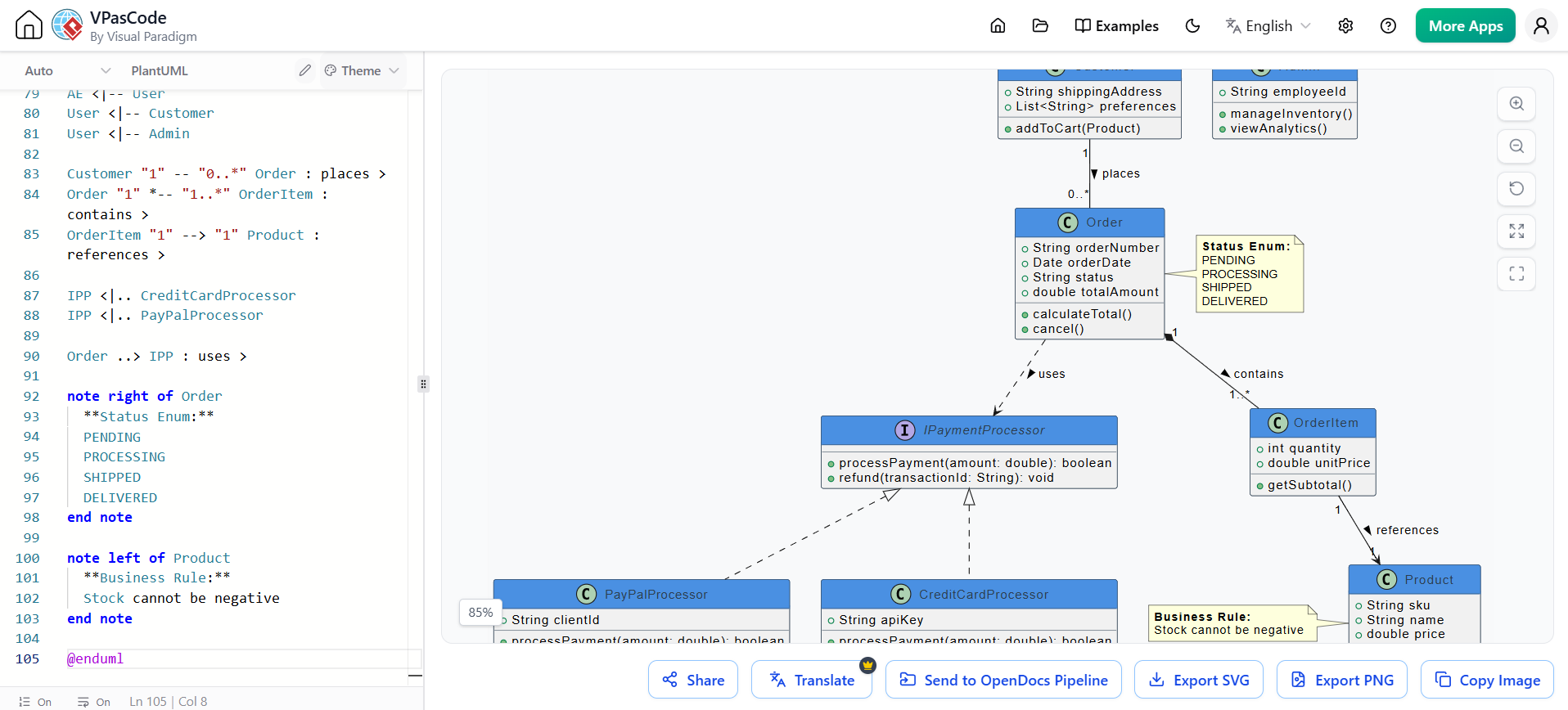
The Core Philosophy: Diagram-as-Code Meets AI
The traditional approach to architecture documentation often involves dragging and dropping shapes in a proprietary format that doesn’t play well with version control. VPasCode flips this script. It allows you to write plain-English descriptions or raw PlantUML code, which the AI then converts into production-ready diagrams.
Key Capabilities That Streamlined My Workflow
-
Prompt-to-Diagram Generation: Instead of memorizing syntax, I can describe my application logic in natural language. The integrated AI instantly generates the corresponding PlantUML code. This is a game-changer for rapid prototyping.
-
Automated Syntax Fixing: We’ve all been there—one missing bracket breaks the entire render. VPasCode’s AI continuously monitors the editor, automatically finding and fixing typos or broken structural definitions on the fly.
-
Layout Optimization: Complex relationships often result in spaghetti-like visuals. The AI re-orders text structures to produce clean, easily readable system visuals without manual tweaking.
-
Living Documentation via Git Integration: Because diagrams are managed as text code, I save
.pumlfiles directly inside Git repositories alongside application code. This makes design reviews a standard part of normal pull requests, ensuring documentation never drifts from reality.
Practical Examples: Building Systems with VPasCode
To truly understand the power of this tool, let’s look at how it handles different stages of the software development lifecycle. Below are rewritten examples demonstrating how AI prompts translate into structured architectural artifacts.
1. Requirements Tracking: Use Case Diagram
Early in a project, defining user roles and functional boundaries is critical. VPasCode helps generate an early system overview without getting bogged down in UI details.
AI Prompt:
“Create a PlantUML use case diagram for a Healthcare Portal where a Patient can book appointments and view records, and a Doctor can update diagnoses. Booking includes insurance verification.”
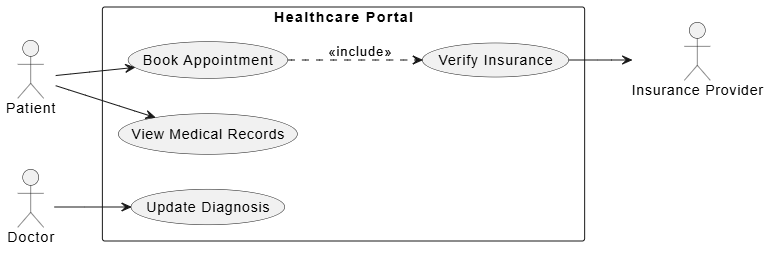
@startuml
left to right direction
skinparam packageStyle rectangle

actor "Patient" as patient
actor "Doctor" as doctor
actor "Insurance Provider" as insurer

rectangle "Healthcare Portal" {
    usecase "Book Appointment" as UC1
    usecase "View Medical Records" as UC2
    usecase "Update Diagnosis" as UC3
    usecase "Verify Insurance" as UC4
}

patient --> UC1
patient --> UC2
doctor --> UC3
UC1 ..> UC4 : <<include>>
UC4 --> insurer
@enduml
2. Structural Design: Class Diagram
Once requirements are clear, teams need to establish object-oriented code architecture and domain models. VPasCode excels at translating business entities into technical class structures.
AI Prompt:
“Generate a PlantUML class diagram for a Library Management System involving Books, Members, and Loans. Include attributes like ISBN, due dates, and methods for checking out items.”
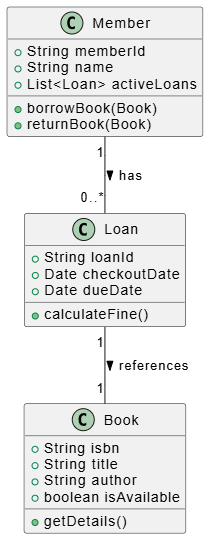
@startuml
class Book {
    +String isbn
    +String title
    +String author
    +boolean isAvailable
    +getDetails()
}

class Member {
    +String memberId
    +String name
    +List<Loan> activeLoans
    +borrowBook(Book)
    +returnBook(Book)
}

class Loan {
    +String loanId
    +Date checkoutDate
    +Date dueDate
    +calculateFine()
}

Member "1" -- "0..*" Loan : has >
Loan "1" -- "1" Book : references >
@enduml
3. Behavioral Design: Sequence Diagram
For complex interactions, engineers need to outline precise component behaviors and asynchronous API communication paths. VPasCode makes visualizing these flows intuitive.
AI Prompt:
“Create a sequence diagram for a food delivery order flow involving a Customer App, Order Service, Restaurant Interface, and Driver App.”
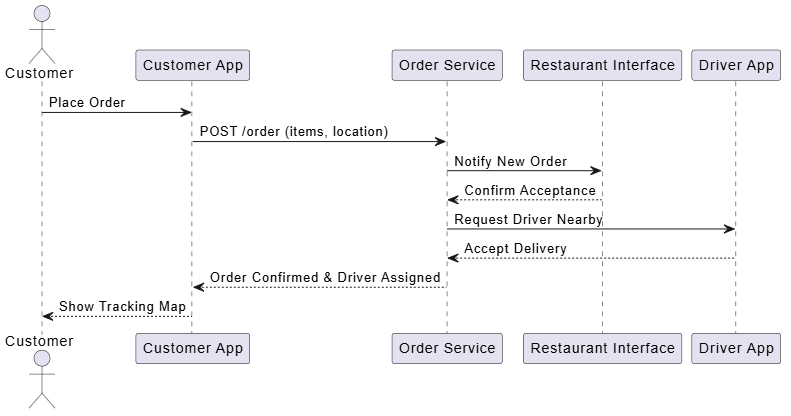
@startuml
actor Customer
participant "Customer App" as App
participant "Order Service" as OS
participant "Restaurant Interface" as RI
participant "Driver App" as DA

Customer -> App : Place Order
App -> OS : POST /order (items, location)
OS -> RI : Notify New Order
RI --> OS : Confirm Acceptance
OS -> DA : Request Driver Nearby
DA --> OS : Accept Delivery
OS --> App : Order Confirmed & Driver Assigned
App --> Customer : Show Tracking Map
@enduml
4. Deployment Architecture: Component Diagram
Beyond code structure, understanding how services deploy and interact in infrastructure is vital. VPasCode supports C4 model elements and deployment views.
AI Prompt:
“Draw a deployment diagram for a microservices architecture with a Web Client, API Gateway, User Service, and Payment Service running on Kubernetes pods.”
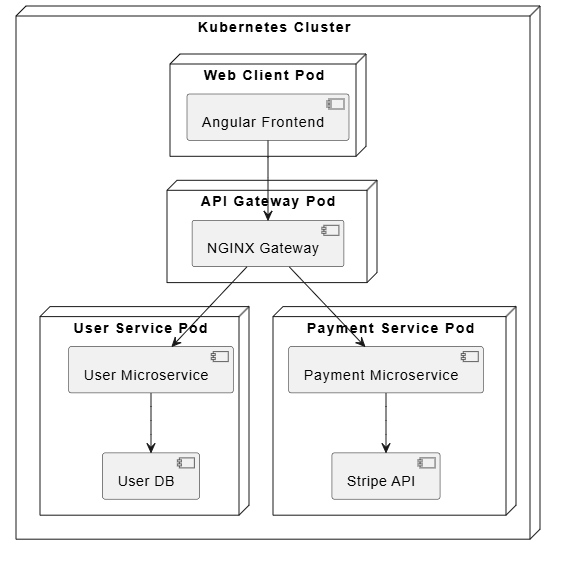
@startuml
node "Kubernetes Cluster" {
    node "Web Client Pod" {
        component [Angular Frontend]
    }

    node "API Gateway Pod" {
        component [NGINX Gateway]
    }

    node "User Service Pod" {
        component [User Microservice]
        database [User DB]
    }

    node "Payment Service Pod" {
        component [Payment Microservice]
        cloud [Stripe API]
    }
}

[Angular Frontend] --> [NGINX Gateway]
[NGINX Gateway] --> [User Microservice]
[NGINX Gateway] --> [Payment Microservice]
[User Microservice] --> [User DB]
[Payment Microservice] --> [Stripe API]
@enduml
The Integrated Workflow: VPasCode, AI, Pipeline, and OpenDocs
What sets Visual Paradigm apart is not just the individual features, but how they integrate into a cohesive pipeline.
1. VPasCode Editor
This is the heart of the experience. It provides a seamless interface for writing PlantUML with real-time AI assistance. The editor feels lightweight yet powerful, offering syntax highlighting and immediate visual feedback.
2. AI Chatbot Integration
The AI isn’t just a code generator; it’s a collaborative partner. If I’m stuck on how to represent a specific relationship, I can ask the chatbot for suggestions. It understands context and can refactor existing diagrams to improve clarity or adhere to best practices.
3. Visual Paradigm Pipeline
For teams serious about DevOps, the Pipeline feature automates the generation of documentation. It can be triggered via CI/CD processes to ensure that every commit updates the architectural diagrams. This eliminates the “documentation debt” that plagues most projects.
4. OpenDocs
OpenDocs extends the value of your diagrams by turning them into publishable documentation sites. It pulls from your Git repository, renders the PlantUML files, and creates a navigable knowledge base. This means stakeholders who don’t read code can still access up-to-date architectural insights through a clean web interface.
Conclusion
VPasCode by Visual Paradigm represents a significant leap forward in how we approach software architecture. By combining the precision of Diagram-as-Code with the creativity of AI, it removes the friction traditionally associated with maintaining documentation.
For developers and architects who value agility, version control, and clean design, this tool offers a compelling solution. It transforms documentation from a chore into an integral part of the development workflow, ensuring that your system’s blueprint evolves alongside your code. Whether you’re sketching out initial requirements or documenting complex microservices deployments, VPasCode provides the clarity and efficiency needed to build better software faster.
References
-
Comprehensive Guide to VPasCode by Visual Paradigm: An in-depth overview of VPasCode features and capabilities.
-
Mastering VPasCode: The Ultimate Guide to AI-Powered Diagram-as-Code with Multi-Engine Support: Detailed instructions on leveraging AI and multiple engines within VPasCode.
-
How the Visual Paradigm AI Chatbot and VPasCode Function as an Integrated Ecosystem for Diagramming: Explains the synergy between the AI chatbot and VPasCode editor.
-
From Prompt to Pattern: Mastering UML Class Diagrams with AI and Diagram-as-Code: Focuses on generating class diagrams using AI prompts.
-
VPasCode Category Overview: General category information and articles related to VPasCode.
-
Visual Paradigm Online: The online platform for accessing Visual Paradigm tools.
-
Architecting the Agile Way: A Beginner’s Guide to C4 Modeling, Diagram-as-Code, and AI: Introduction to C4 modeling and DaC principles.
-
VPasCode Features Page: Official feature list for VPasCode.
-
From Code to Clarity: A Beginner’s Guide to Seamless Diagramming with VPasCode and OpenDocs: Guide on using VPasCode with OpenDocs for documentation.
-
Mastering Modern UML: A Beginner’s Guide to Diagram-as-Code and AI-Driven Design: Basics of modern UML with AI assistance.
-
From Diagram to Documentation: A Beginner’s Guide to the Visual Paradigm Pipeline: How to automate documentation generation using the Pipeline.
-
Architecting the Agile Future: A Beginner’s Guide to UML Diagram-as-Code and AI-Powered Design: Future-focused guide on agile architecture with AI.
-
From Prompt to Production: A Beginner’s Guide to AI-Enhanced UML and Diagram-as-Code with Visual Paradigm: End-to-end guide from idea to implementation.
-
UML Use Case Diagram Tool: Online tool for creating use case diagrams.
-
PlantUML for Developers: A Practical Approach: Practical tips for using PlantUML in development.
-
Use Case Diagramming Examples: Collection of use case diagram examples.
-
UML Mastery for Beginners: Your Visual Blueprint to Clean Software Architecture: Beginner’s guide to UML and clean architecture.
-
VPasCode Documentation: Official documentation for VPasCode.