
Mastering Use Case AI: Generating UML Diagrams with Visual Paradigm
In the realm of software architecture, clarity is currency. A well-documented Use Case Diagram serves as the blueprint for system requirements, bridging the gap between non-technical stakeholders and the engineering teams building the solution. Visual Paradigm’s AI Diagram Generation feature revolutionizes this process by allowing architects to skip the tedious manual drawing phase and jump straight to high-level conceptualization.
This tutorial explores how to utilize the AI-powered generation tool within Visual Paradigm Desktop to instantly model a complex system: an Online Food Delivery Platform. We will analyze the inputs required, the AI’s logic in identifying actors, and the resulting system architecture.
Step-by-Step: AI-Driven Modeling
The workflow for generating a diagram using AI in Visual Paradigm is designed to be as intuitive as a conversation. Instead of manually dragging “stick figures” and connecting them to ovals, you simply describe the system’s purpose.
1. Accessing the AI Interface
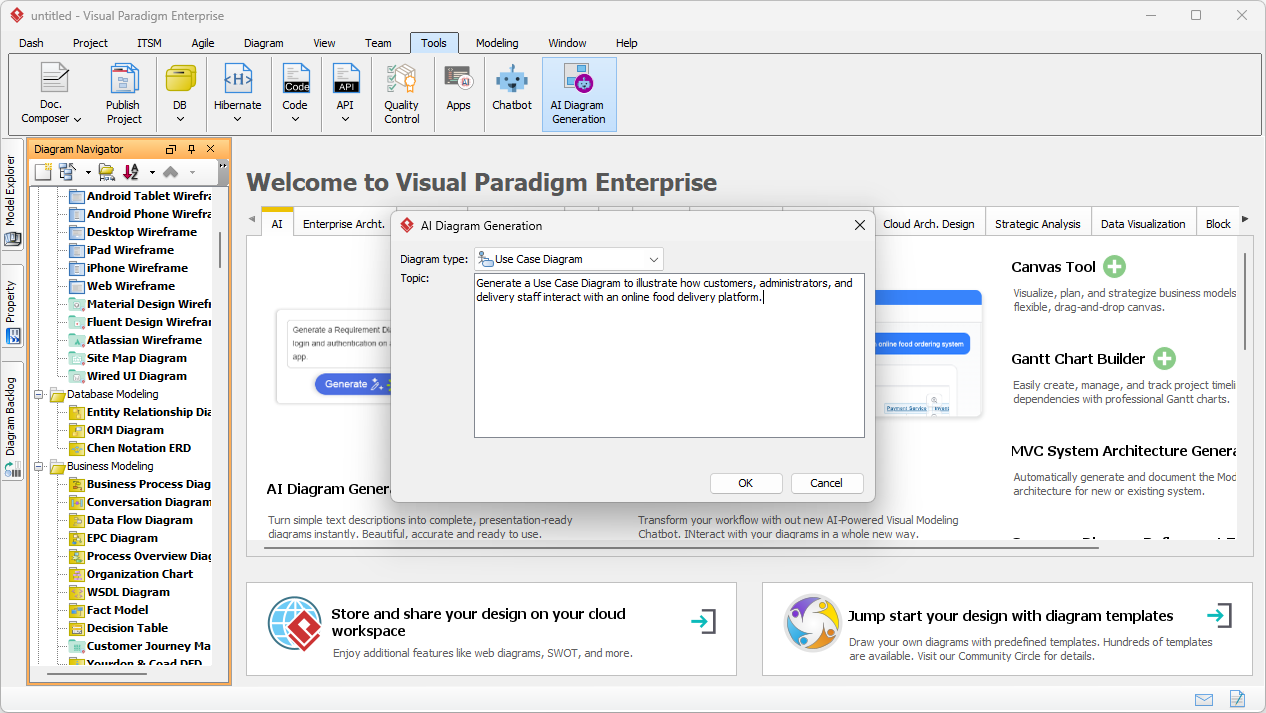
Open your Visual Paradism Desktop application and navigate to the Tools menu located in the top ribbon. From the dropdown, select AI Diagram Generation. This action launches the dedicated generation dialog box, providing a clean workspace for your prompt.
2. Defining the Diagram Type
The AI engine needs context to understand the specific type of diagram you require. In the Diagram type dropdown menu, select Use Case Diagram. This instructs the engine to focus on functional requirements, actors, and their interactions rather than data structures (like ERD) or deployment nodes (like Cloud Arch).
3. Crafting the Prompt
The most critical step is the Topic field. This is where you define the scope of your system. For this example, we are modeling a food delivery ecosystem. A robust prompt should explicitly mention the key entities involved.
Enter the following description:
Generate a Use Case Diagram to illustrate how customers, administrators, and delivery staff interact with an online food delivery platform.Technical Note: By including specific roles (customers, admin, delivery staff) and the domain (online food delivery platform), you guide the AI to generate a comprehensive actor set rather than a generic one.
Understanding the Architecture: The Food Delivery Ecosystem
Once you click “Generate,” the AI analyzes your prompt and constructs a logical model. Let’s break down the architectural components typically generated for this specific scenario.
The Actors
Based on the prompt, the AI identifies three primary actors:
- Customer: The end-user who places orders.
- Administrator: The system manager overseeing operations.
- Delivery Staff (Rider): The logistical component responsible for fulfillment.
The System Boundary
The AI draws a rectangular boundary representing the System (the platform itself). Everything outside is an actor; everything inside is a Use Case (a functional unit of behavior).
Key Use Cases
The AI infers standard industry behaviors for this domain:
- Place Order: The core function for the Customer.
- Manage Menu/Orders: Functions likely accessible by the Administrator.
- Update Delivery Status: A specific function for the Delivery Staff.
Refining the Model
While the AI provides an excellent starting point, professional modeling requires iteration. The generated diagram serves as a “Draft” that can be refined using the standard Visual Paradigm tools.
- Add Relationships: Check for specific associations. Does the Admin need to “Approve Orders” or just “View Orders”? The AI might default to a generic “Manage” function, which you can split into specific sub-uses.
- Define Inclusions: Complex flows often share common steps. For example, both “Place Order” and “Register” might require “Authenticate User.” You can convert this to an
<<include>>relationship. - Define Extensions: Consider exception flows. If a “Place Order” fails due to low stock, that is an extension point.
Conclusion
By leveraging Visual Paradigm’s AI capabilities, architects can transform a simple text description into a structured architectural diagram in seconds. This tool is particularly powerful for rapid prototyping, allowing teams to visualize the scope of projects like food delivery platforms before diving into detailed coding or database design.