
Mastering Process Modeling with VP AI Ecosystem and OpenDocs
In the rapidly evolving landscape of business process management and software development, the ability to visualize complex workflows is not just a luxury—it is a necessity. Whether you are a Process Engineer documenting Standard Operating Procedures (SOPs) or a Developer mapping system decision logic, clarity is paramount. This tutorial explores the advanced ecosystem of tools and practices required to build robust, maintainable, and intelligent process models.
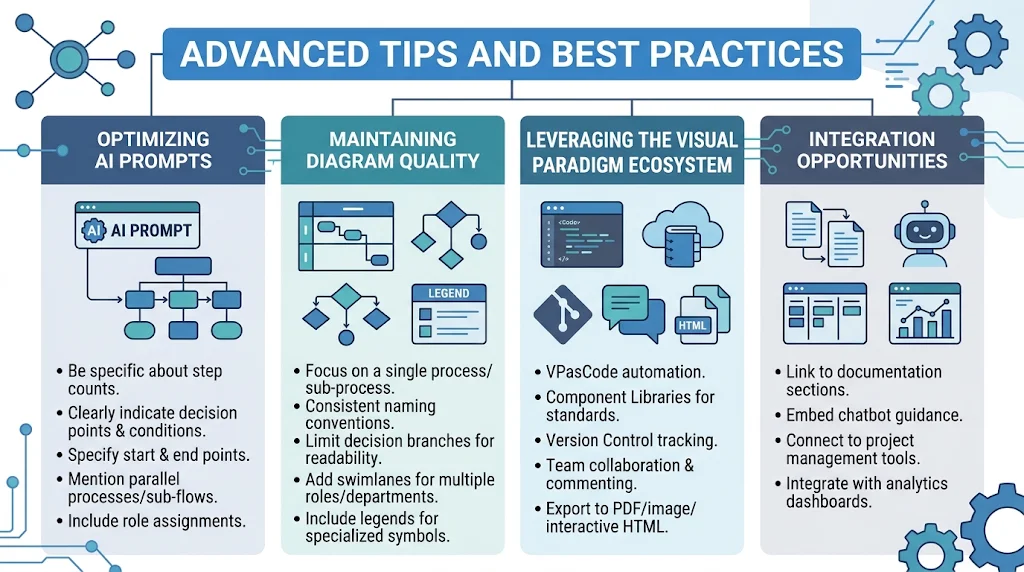
We will dive deep into four critical pillars of effective modeling: optimizing AI prompts for accuracy, maintaining diagram quality for readability, leveraging the Visual Paradigm ecosystem for automation, and exploring integration opportunities to bridge the gap between documentation and execution.
1. Optimizing AI Prompts for Precision
Artificial Intelligence has revolutionized how we generate technical documentation. However, the quality of the output is entirely dependent on the quality of the input. When interacting with AI Chatbot Tools or prompt-driven diagram generators, ambiguity is the enemy.
To ensure the AI generates a process flow that accurately reflects reality, you must structure your prompts with specific constraints and logical boundaries. A generic prompt like “Create a hiring process flowchart” will result in a generic, potentially flawed diagram. Instead, you must be granular.
Key Elements of a High-Value AI Prompt
- Step Count Specificity: Explicitly state the number of steps or stages involved to prevent the AI from hallucinating or omitting critical actions.
- Decision Logic Definition: Clearly indicate decision points. Don’t just say “check application”; specify the conditions (e.g., “IF salary > 50k THEN approve ELSE escalate”).
- Boundaries: Define the strict starting and ending points of the process to ensure the flow is self-contained.
- Parallelism: Mention any parallel processes or sub-flows. Real-world processes often happen simultaneously, and AI needs to know this.
- Role Assignment: Assign specific roles to actions. This is crucial for creating Swimlanes later.
2. Maintaining Diagram Quality and Readability
Once a diagram is generated, the burden shifts to the modeler to ensure it remains a clear communication tool. A flowchart that is too complex defeats its purpose. The following principles act as a checklist for maintaining high-quality visual documentation.
The Golden Rules of Flowchart Design
Single Process Focus
Keep flowcharts focused on a single process or a distinct sub-process. If a diagram becomes cluttered with too many unrelated activities, it is often a sign that the scope is too broad. Break complex systems down into child diagrams.
Consistency and Naming
Use consistent naming conventions for similar actions across the diagram. If you call an action “Submit Form” in one part of the chart, do not call it “Submit Application” in another. This consistency aids in scanning and understanding.
Branch Management
Limit decision branches to maintain readability. A diamond with ten outgoing lines is a readability nightmare. If a decision point has too many outcomes, consider grouping them or using a separate sub-process diagram to handle the complexity.
Visual Aids: Swimlanes and Legends
Swimlanes: Always add swimlanes when multiple roles, departments, or system components are involved. This visually separates responsibilities and clarifies hand-offs.
Legends: Include legends for any specialized symbols. While standard flowchart symbols are well-known, custom icons or specific industry symbols need explanation for the diagram to be universally understood.
3. Leveraging the Visual Paradigm Ecosystem
Modern process modeling is not just about drawing shapes; it is about creating a living ecosystem of documentation. The Visual Paradigm suite offers advanced capabilities for those who want to move beyond manual drawing.
Automating with VPasCode
VPasCode (Visual Paradigm as Code) allows developers and technical analysts to define diagrams programmatically. Instead of manually dragging and dropping elements, you write code to generate or modify flowcharts. This is particularly powerful for:
- Generating diagrams from existing code repositories.
- Creating dynamic visualizations of system logic.
- Version-controlling diagrams alongside software code.
Standardization and Collaboration
To maintain organizational standards, utilize Component Libraries. These allow you to build a library of pre-approved process patterns that teams can reuse, ensuring that a “Purchase Order” process looks the same in every department.
Furthermore, leverage Version Control and Collaboration Features. Just as developers use Git for code, process modelers should track changes to critical process documentation. This enables team reviews, commenting, and the ability to roll back changes if a process update causes issues.
4. Integration Opportunities and Future-Proofing
Documentation should not exist in a silo. The most effective process models are those that integrate seamlessly with the tools teams use every day. The ecosystem supports deep integration to create a connected workflow environment.
Connecting to the Digital Twin
- Documentation Linking: Link flowcharts directly to related documentation sections. A click on a “Risk Assessment” step could open the full risk management policy.
- Chatbot Embedding: Embed chatbot interfaces for interactive process guidance. Employees can query the process documentation conversationally (e.g., “How do I handle a customer refund?”) and get answers based on the flowchart logic.
- Project Management: Connect diagrams to project management tools (like Jira or Azure DevOps) for status tracking. This allows stakeholders to see the progress of implementation directly on the map.
- Analytics: Integrate with analytics dashboards. By connecting the diagram to performance metrics, you can visualize bottlenecks in real-time, turning a static map into a dynamic operational dashboard.
Export and Accessibility
Finally, ensure your work is accessible. The ecosystem supports robust Export Options, allowing you to generate PDFs for formal handbooks, high-resolution images for presentations, or interactive HTML versions for intranets. This flexibility ensures that your process models reach the right audience in the right format.
Conclusion
By mastering the art of prompt engineering, adhering to strict diagram quality standards, utilizing automation tools like VPasCode, and integrating with broader organizational systems, you transform static diagrams into powerful engines of operational efficiency. Whether you are onboarding new hires or mapping complex API workflows, these best practices ensure your process models are accurate, maintainable, and valuable.