
Mastering Embedded AI for Rapid Diagram Modeling in Visual Paradigm VPasCode
In the modern landscape of software architecture and systems engineering, the bottleneck is often not the design concept, but the translation of that concept into executable code or visual models. Visual Paradigm’s VPasCode addresses this by offering a text-based diagramming environment that integrates Artificial Intelligence directly into the user workflow. This tutorial explores the architectural shift from manual coding to AI-assisted modeling, focusing on the new centralized interface designed to streamline diagram generation, refinement, and localization.
The core philosophy behind this update is the reduction of cognitive load. By consolidating AI actions into a single, accessible menu, VPasCode allows architects and developers to focus on the logic and structure of their systems rather than the syntax of the markup language. This guide details how to leverage the three pillars of this AI-enhanced workflow: Generation, Modification, and Translation.
The Centralized AI Interface
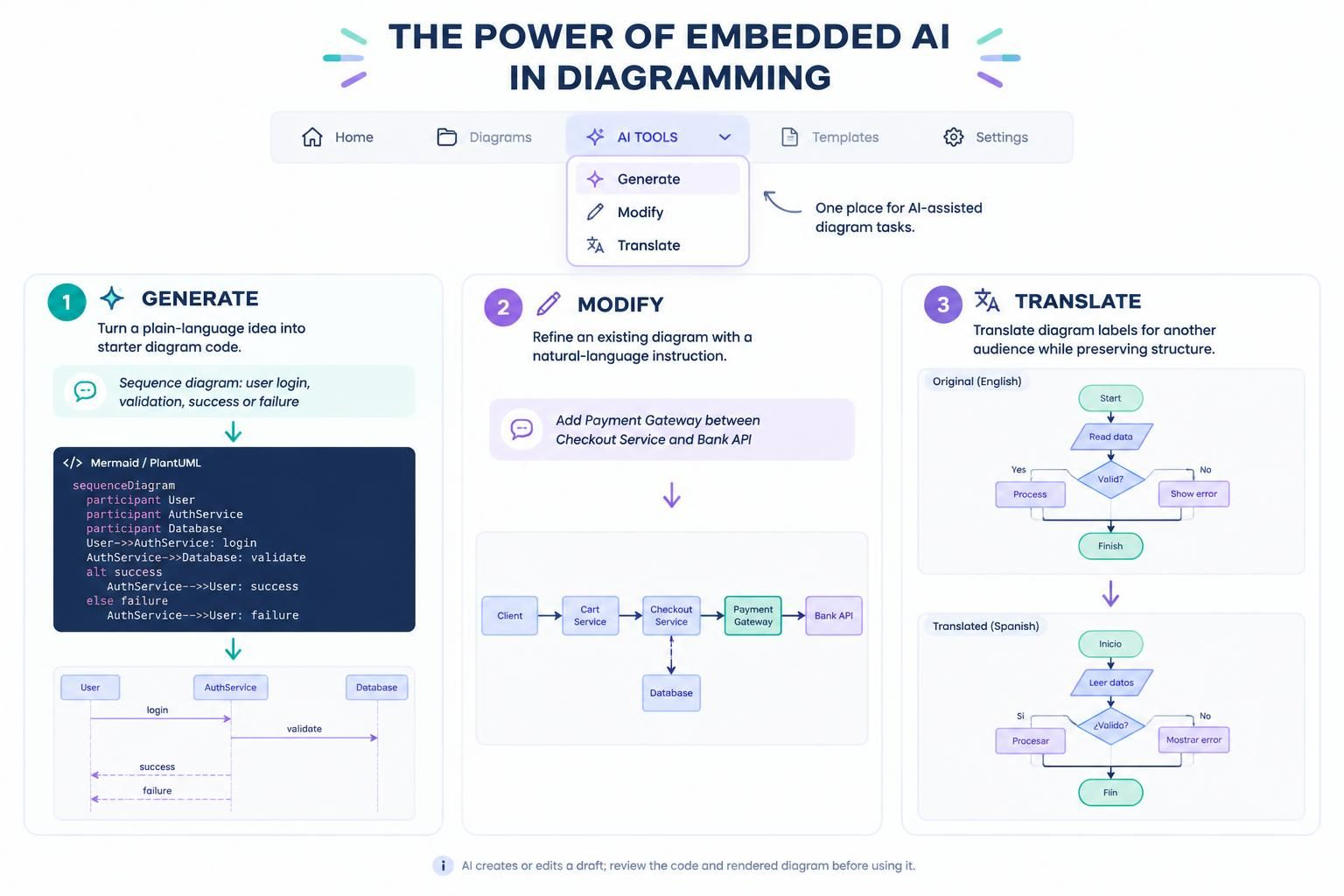
The foundation of this new capability is the AI Tools menu, a drop-down component located within the main application bar. This interface acts as the command center for all AI-driven tasks, eliminating the need to search through multiple settings or external prompts. It groups the three primary AI functionalities—Generate, Modify, and Translate—into a unified ecosystem.
- Streamlined Access: Instead of switching contexts between a chat window and a coding editor, the AI tools are embedded directly into the canvas environment.
- Intuitive Interaction: The interface uses natural language processing (NLP) to interpret user commands, bridging the gap between high-level business requirements and low-level diagrammatic syntax.
Pillar 1: AI Diagram Generation
The most transformative feature of VPasCode is the ability to transform abstract ideas into structured diagram code instantly. Traditionally, creating a sequence diagram or a flowchart requires a deep understanding of specific syntax rules (e.g., Mermaid or PlantUML syntax). With AI generation, this barrier is removed.
Workflow Concept
The process begins with a plain-language description of the system behavior. The AI interprets the semantic intent of the text—identifying actors, processes, and data flows—and constructs the corresponding code skeleton. This provides a solid foundation that the user can then refine, rather than starting from a blank, intimidating canvas.
Use Case: Sequence Diagrams
Consider a scenario where an architect needs to visualize a user authentication process. Instead of writing code, the user inputs a natural language request describing the flow.
Example Scenario
User Input: “Create a sequence diagram for a user logging into a system, including steps for entering credentials, server validation, and either success or failure responses.”
System Output: The AI parses the request to identify the key entities (User, Auth Service, Database) and the interaction logic (login, validation, conditional success/failure). It then generates the initial code structure, rendering a visual sequence diagram that accurately reflects the described logic.
Pillar 2: AI Diagram Modification
System design is an iterative process. As projects evolve, diagrams must adapt to reflect new requirements. Manual modification of diagram code can be tedious and prone to syntax errors, especially in complex diagrams. The AI Modification tool allows for dynamic, conversational updates to existing models.
Workflow Concept
Users can instruct the AI to make specific adjustments using natural language. The AI identifies the relevant nodes or edges in the diagram and updates the underlying code to reflect the change, instantly refreshing the visual representation. This is particularly powerful for adding components or restructuring relationships without breaking the diagram’s syntax.
Use Case: Component Diagrams
Imagine a user has a component diagram representing a checkout process and realizes a critical third-party integration is missing.
Example Scenario
User Input: “Add a new ‘Payment Gateway’ component between the ‘Checkout Service’ and the ‘Bank API’ in my current component diagram.”
System Output: The AI analyzes the current structure, locates the ‘Checkout Service’ and ‘Bank API’ nodes, and inserts the ‘Payment Gateway’ component in the logical path between them. It establishes the necessary connections, updating the code and the visual view simultaneously.
Pillar 3: AI Diagram Translation
In global development teams and international stakeholder presentations, consistency and accessibility are paramount. Diagrams often need to be localized without altering their structural logic. The AI Translation feature automates this process, breaking language barriers by translating text content while preserving the underlying code integrity.
Workflow Concept
This tool allows users to convert labels, notes, and descriptions within a diagram into a target language. Unlike simple text replacement, the AI understands the context of the diagram node, ensuring that the translation fits the technical semantics of the diagram.
Use Case: Flowchart Localization
For a project targeting a Spanish-speaking market, a technical flowchart originally written in English needs to be localized.
Example Scenario
User Input: “Translate all labels in this flowchart from English to Spanish.”
System Output: The AI scans the diagram nodes (e.g., “Start,” “Read data,” “Valid?”) and translates the text content to Spanish (“Inicio,” “Leer datos,” “¿Valido?”). Crucially, it leaves the diagram’s structure, decision logic, and code syntax intact, ensuring the diagram remains valid and functional.
Conclusion
Visual Paradigm’s integration of AI into VPasCode represents a significant leap forward in model-driven engineering. By centralizing AI tools for generation, modification, and translation, the platform empowers users to work faster and more intuitively. Whether you are building a complex sequence diagram from scratch, adding a new component to an architecture, or localizing a process map for a global audience, the AI-assisted workflow ensures that your focus remains on the system design, not the syntax.