


1. Purpose of a UML Deployment Diagram
A Deployment Diagram shows the physical/runtime architecture of a system:
- Hardware nodes (servers, devices, cloud instances)
- Software artifacts deployed on those nodes
- Execution environments (containers, runtimes)
- Communication paths between nodes (protocols, connections)
For a Simple Online Food Ordering System, it visualizes how:
- Customer & restaurant web UIs are served
- Business logic runs
- Data is stored
- External services (payment, notifications) are integrated
It helps developers, DevOps, and stakeholders understand deployment topology, scaling points, security boundaries, and dependencies.
2. Key UML Elements in Deployment Diagrams
| Element | UML Notation (PlantUML) | Meaning / When to Use | Stereotype examples |
|---|---|---|---|
| Node | node “Name” | Computational resource (physical or virtual) that can host artifacts | <<device>>, <<cloud>> |
| Device | node “Name” <<device>> | Physical or virtual hardware (server, mobile, router) | <<device>>, <<server>> |
| Execution Environment | node “Name” <<executionEnvironment>> | Software runtime/container (Tomcat, Node.js, Docker, JVM) | <<executionEnvironment>>, <<container>> |
| Artifact | artifact “filename.war” | Deployable unit (executable, .jar, .js bundle, database schema, config file) | <<executable>>, <<file>>, <<database>> |
| Component | component “Name” | Logical software unit (optional in deployment diagrams; often realized by artifacts) | <<web>>, <<service>> |
| Communication Path | –, –>, ..> | Network connection between nodes (can have protocol label) | HTTP/HTTPS, WebSocket, RMI |
| Dependency / Call | ..>, –> | Usage/dependency (e.g. frontend calls backend) | <<calls>>, <<accesses>> |
| Manifestation / Realization | ..> with <<realizes>> or ..> | Artifact realizes / is deployed as a component | <<realizes>>, <<manifest>> |
| External system | node “Name” <<external>> | Third-party service outside your control | <<external>>, <<SaaS>> |
3. Best Practices for Deployment Diagrams (especially for web systems)
- Keep it simple & readable — avoid overcrowding; one diagram per major environment (dev/staging/prod optional)
- Use meaningful node grouping (nest nodes inside nodes) to show clusters/cloud regions
- Prefer concise notation — show filenames/configs only when relevant; skip redundant stereotypes
- Clearly show boundaries — internal cloud vs external services
- Label protocols on paths (HTTP/HTTPS, WebSocket, TCP, etc.)
- Use left to right direction for web systems (client → server → DB flow feels natural)
- Differentiate device (hardware) vs executionEnvironment (runtime)
- Show realization only when it adds value (artifact → component)
- Use skinparam in PlantUML for better colors/readability
- For small/medium systems: 4–8 nodes maximum
4. Recommended Structure for Simple Online Food Ordering System
A clean, modern layout for this system:
- Client side → Browser (implicit) talks to Web Server/CDN
- Web Server/CDN hosts static + SPA artifacts for customer site and restaurant panel
- API Server (execution env) runs backend logic
- Database Server hosts PostgreSQL
- External Payment & Notification services
Typical nodes:
- Web Server / CDN <<device>>
- API Server <<executionEnvironment>>
- Database Server <<executionEnvironment>>
- Payment Gateway <<external>>
- Notification Service <<external>>
5. Diagram Generated by Visual Paradigm AI Chatbot
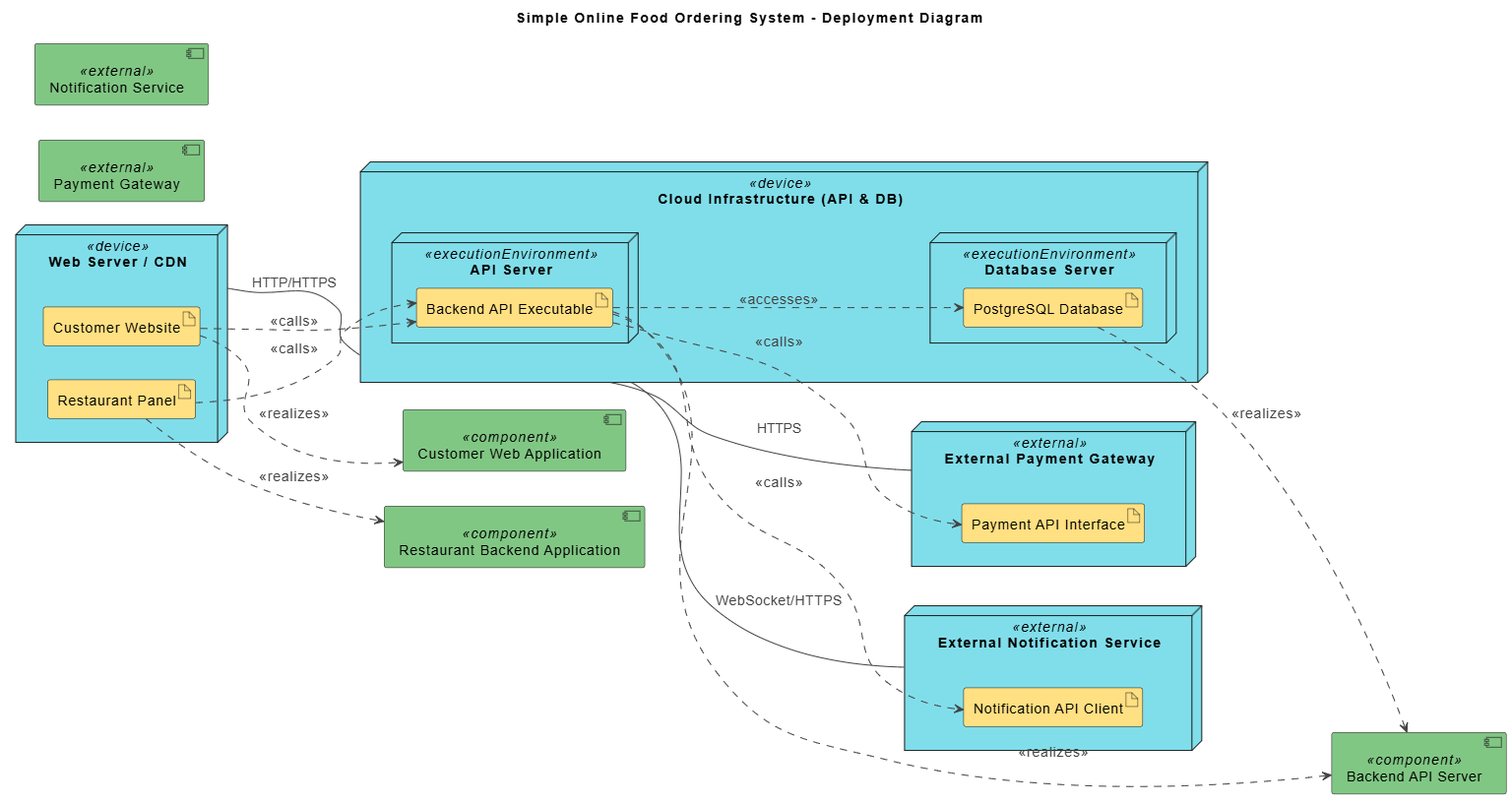
Improved & Cleaned PlantUML Code (with explanations)
PlantUML
Edit PlantUML in VPasCode
@startuml

title Simple Online Food Ordering System - Deployment Diagram

left to right direction

skinparam {
ArrowColor #424242
ArrowFontColor #424242
DefaultFontSize 14
shadowing false
stereotypeCBackgroundColor #ADD1B2
stereotypeIBackgroundColor #ADD1B2
}

' ── Nodes ────────────────────────────────────────────────

node "Web Server / CDN" <<device>> as WebServer {
[Customer Website HTML/JS/CSS] #..# (Customer SPA)
[Restaurant Admin Panel HTML/JS/CSS] #..# (Restaurant SPA)
}

node "Cloud Backend" <<device>> as Cloud {
node "API Server" <<executionEnvironment>> as APIServer {
artifact "backend-api.jar / main.exe" as BackendArtifact
}

node "PostgreSQL Server" <<executionEnvironment>> as DBServer {
database "PostgreSQL Database" as Postgres <<database>>
}
}

node "Payment Gateway" <<external>> as Payment {
[Payment API] as PaymentAPI
}

node "Notification Service" <<external>> as Notification {
[WebSocket / Push API] as NotifyAPI
}

' ── Relationships ─────────────────────────────────────────

WebServer --> Cloud : HTTPS (API calls)

Cloud --> Payment : HTTPS (checkout)

Cloud --> Notification : WebSocket / HTTPS (status updates)

' Artifact → component realization (optional but clear)
(Customer SPA) ..> BackendArtifact : <<calls>>
(Restaurant SPA) ..> BackendArtifact : <<calls>>

BackendArtifact --> Postgres : <<JDBC / SQL>>

BackendArtifact --> PaymentAPI : <<HTTPS calls>>

BackendArtifact --> NotifyAPI : <<WebSocket / HTTPS>>

' Optional: show protocol on DB if you want
' BackendArtifact -right-> Postgres : <<JDBC>>

note right of Cloud
Typical small/medium setup:
• Single VM or small cluster
• API + DB can be on same machine (for simplicity)
or separate for better scaling
end note

@enduml6. Step-by-Step: How to Build Your Own Deployment Diagram
- List all execution targets (servers, containers, external services)
- List deployable artifacts (what actually runs: .js bundle, .jar, database)
- Group into nodes (nest when logical — e.g. API + DB in one cloud node)
- Decide direction (left to right works well for web → API → DB)
- Add communication paths with protocol labels
- Add key dependencies (<<calls>>, <<accesses>>)
- Apply skinparam for colors/readability
- Add notes for important decisions (single vs multi-instance, scaling notes)
- Validate: Can a DevOps engineer understand where to deploy each piece?
Summary – Quick Reference for Simple Food Ordering Deployment
| Part | Typical Node Type | Artifact Example | Connects via |
|---|---|---|---|
| Customer UI | Web Server / CDN <<device>> | SPA bundle (HTML/JS) | HTTPS → API |
| Restaurant Dashboard | Web Server / CDN <<device>> | Admin SPA bundle | HTTPS → API |
| Business Logic | API Server <<executionEnv>> | backend-api.jar / executable | JDBC → DB, HTTPS → external |
| Data Storage | PostgreSQL <<executionEnv>> | PostgreSQL data files + schema | — |
| Payments | External <<SaaS>> | Payment API endpoint | HTTPS |
| Real-time Updates | External <<SaaS>> | WebSocket / FCM / APNs | WebSocket / HTTPS |
This structure is realistic for MVP / small-to-medium scale deployments (1–3 servers + cloud DB + Stripe/PayPal + Firebase/Pusher).
Feel free to adjust nesting, protocols, or add scaling notes (e.g. load balancer, replicas) when the system grows.
🔗 Reference List
- AI Diagram Generator – Visual Paradigm: Official release notes detailing the launch and capabilities of Visual Paradigm’s AI Diagram Generator, including text-to-UML features for state diagrams.
- Create UML State Diagrams in Seconds with AI – Visual Paradigm: A step-by-step guide demonstrating how to generate UML state diagrams from plain text using AI, with real-world examples and use cases.
- What is a State Machine Diagram? – Visual Paradigm: A foundational article explaining the purpose, structure, and best practices for UML state machine diagrams.
- Mastering State Diagrams with Visual Paradigm AI – Cybermedian: A practical guide showcasing how AI-enhanced state diagrams are used in real-world systems like automated toll collection.
- Comprehensive Review: Visual Paradigm’s AI Diagram Generation: A detailed evaluation of the AI Diagram Generator’s accuracy, usability, and integration with development workflows.
- AI Chatbot – Visual Paradigm: Overview of the AI assistant that enables conversational editing of UML diagrams, including state diagrams.
- OpenDocs Update: AI State Diagram Generator – Visual Paradigm: Announcement of enhanced documentation integration, allowing state diagrams to be embedded and synchronized in technical documentation.
- Visual Paradigm AI State Diagram Tutorial – YouTube: A video tutorial demonstrating how to use the AI Diagram Generator to create a state diagram for an e-commerce order process.
- About State Diagrams – Visual Paradigm: A comprehensive overview of UML state diagrams, including their components, syntax, and real-world applications.
- Creating State Diagrams – Visual Paradigm User Guide: Detailed step-by-step instructions for building state diagrams, including composite states and guard conditions.
- Advanced State Machine Features – Visual Paradigm: A deep dive into advanced modeling techniques using Visual Paradigm, including nested states, orthogonal regions, and event handling.
- Compare with Previous – Visual Paradigm User Guide: Documentation on the change comparison feature, enabling teams to track and manage revisions in state diagrams over time.
