


Visual Paradigm’s AI Cloud Architecture Studio is a revolutionary, web-based, AI-driven platform designed to automate the creation of professional cloud architecture diagrams. By leveraging natural language input, the tool transforms plain English descriptions into fully realized, industry-compliant cloud diagrams for major providers such as AWS, Azure, Google Cloud, Alibaba Cloud, Oracle Cloud, IBM Cloud, Kubernetes, and DigitalOcean. This guide provides a complete, step-by-step walkthrough of the tool’s features, workflow, best practices, and integration capabilities—ideal for cloud architects, DevOps engineers, software developers, IT teams, and enterprise planners.
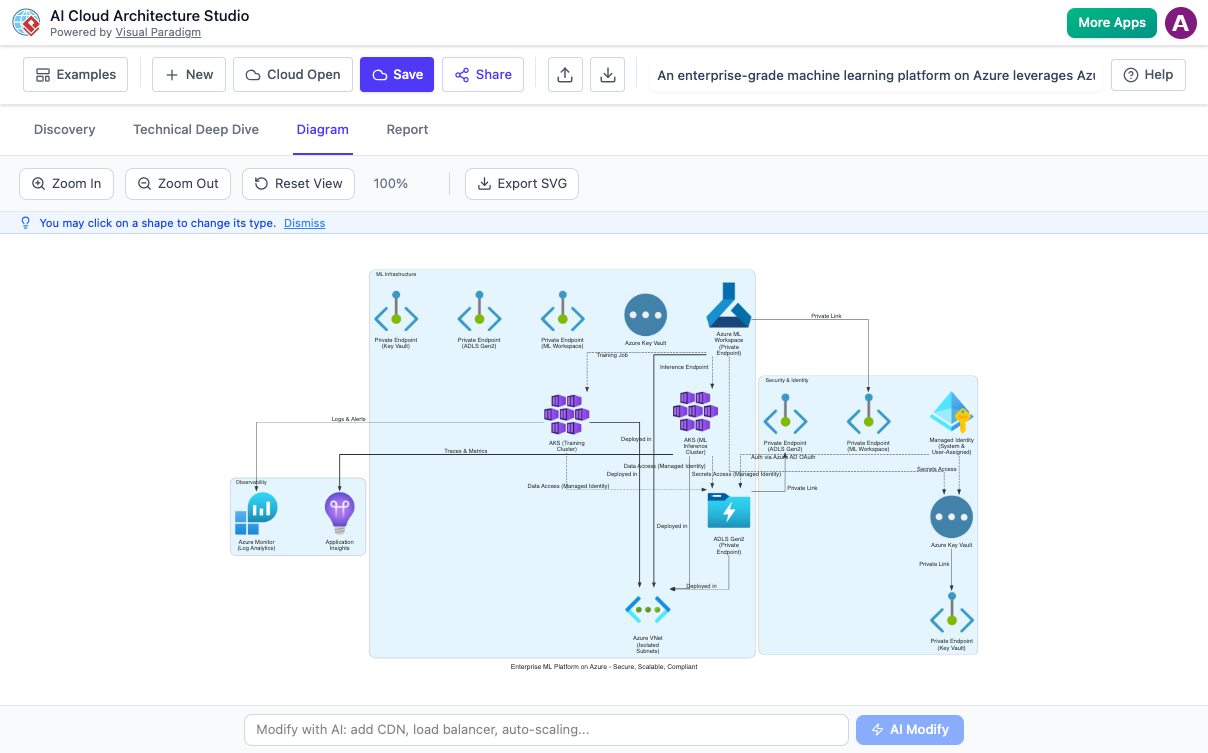
🔧 Overview: What Is AI Cloud Architecture Studio?
AI Cloud Architecture Studio is an intelligent, cloud-native tool that eliminates the manual effort traditionally associated with designing cloud infrastructure diagrams. Instead of spending hours dragging icons and connecting services, users simply describe their desired system in everyday language, and the AI generates accurate, visually appealing, and technically sound architecture diagrams.
The tool is part of Visual Paradigm’s broader AI-powered suite and is accessible via the Visual Paradigm Online (VP Online) platform. It supports multi-cloud environments, includes AI-guided clarification, iterative refinement, automated documentation, and seamless export options—making it a powerful asset for cloud design, planning, and communication.
✅ Ideal For:
Cloud architects designing scalable systems
DevOps teams planning deployments
Software developers documenting system architecture
IT managers presenting infrastructure to stakeholders
Educators teaching cloud concepts
⚠️ Note: Full functionality requires a paid subscription (e.g., VP Online Combo, VP Desktop Professional with valid maintenance).
🌐 Key Features & Core Concepts
1. Natural Language Input
Describe your cloud system in plain English—no technical jargon required.
Example:
“Build a secure, scalable e-commerce platform with user authentication, payment processing via Stripe, real-time inventory updates, and global access using serverless architecture.”
The AI parses intent, identifies components, relationships, and applies best practices automatically.
2. Multi-Cloud & Hybrid Support
Generate diagrams for:
-
AWS (Amazon Web Services)
-
Azure (Microsoft Azure)
-
Google Cloud Platform (GCP)
-
Alibaba Cloud
-
Oracle Cloud Infrastructure (OCI)
-
IBM Cloud
-
Kubernetes (for containerized workloads)
-
DigitalOcean
-
Huawei Cloud
The tool uses official, up-to-date icons and ensures correct service mapping across platforms.
📌 Tip: You can create hybrid or multi-cloud architectures by selecting multiple providers.
3. AI-Guided Clarification
When input is ambiguous, the AI asks targeted questions to refine the design.
Examples:
-
“What is your expected peak traffic volume?”
-
“Do you require disaster recovery across regions?”
-
“Should the database be relational or NoSQL?”
-
“Is compliance with GDPR or HIPAA required?”
You can answer manually or accept AI-recommended defaults based on industry standards.
4. Iterative Refinement & AI Modification
After initial generation, you can:
-
Click on any component to edit properties (name, type, region).
-
Use natural language commands to modify the architecture:
“Add a CDN to serve static assets and enable auto-scaling for the backend.”
“Replace the database with a managed PostgreSQL instance in AWS.”
The tool displays before-and-after views side by side for easy comparison.
5. Automated Documentation Generation
The AI generates a detailed markdown-formatted report covering:
-
Architecture overview
-
Component descriptions
-
Rationale for design choices
-
Security, scalability, and availability considerations
-
Compliance and cost optimization notes
This report is editable in the built-in editor and exportable as PDF for sharing with stakeholders.
6. Export & Integration Options
-
SVG Export: High-quality vector format ideal for embedding in presentations, wikis, or documentation.
-
PDF Export: Professional reports for sharing with non-technical teams or clients.
-
JSON Export: Full project backup or integration with CI/CD pipelines, custom tools, or other modeling platforms.
-
Save to VP Online Workspace: Securely store projects for future editing, collaboration, or version control.
7. Bundled Examples & Templates
Get started quickly with pre-built templates for common patterns:
-
Web Hosting (Static + Dynamic)
-
Serverless Applications
-
Data Processing Pipelines (ETL, Streaming)
-
Microservices Architecture
-
High Availability & Disaster Recovery
-
Multi-Region Deployment
These serve as excellent starting points and learning resources.
🛠️ Step-by-Step Workflow: How to Use AI Cloud Architecture Studio
Follow these steps to create a professional cloud architecture diagram in minutes.
✅ Step 1: Access the Tool
-
Go to Visual Paradigm Online or the dedicated AI portal: ai.visual-paradigm.com
-
Log in to your account (free trial available).
-
Click Create with AI → Browse AI apps.
-
Locate and launch AI Cloud Architecture Studio → Click Start Now.
💡 Pro Tip: Use the AI toolbox portal to explore all available AI-powered tools from Visual Paradigm.
✅ Step 2: Start a New Project
-
Enter a Project Name (e.g., “E-Commerce Platform – MVP”).
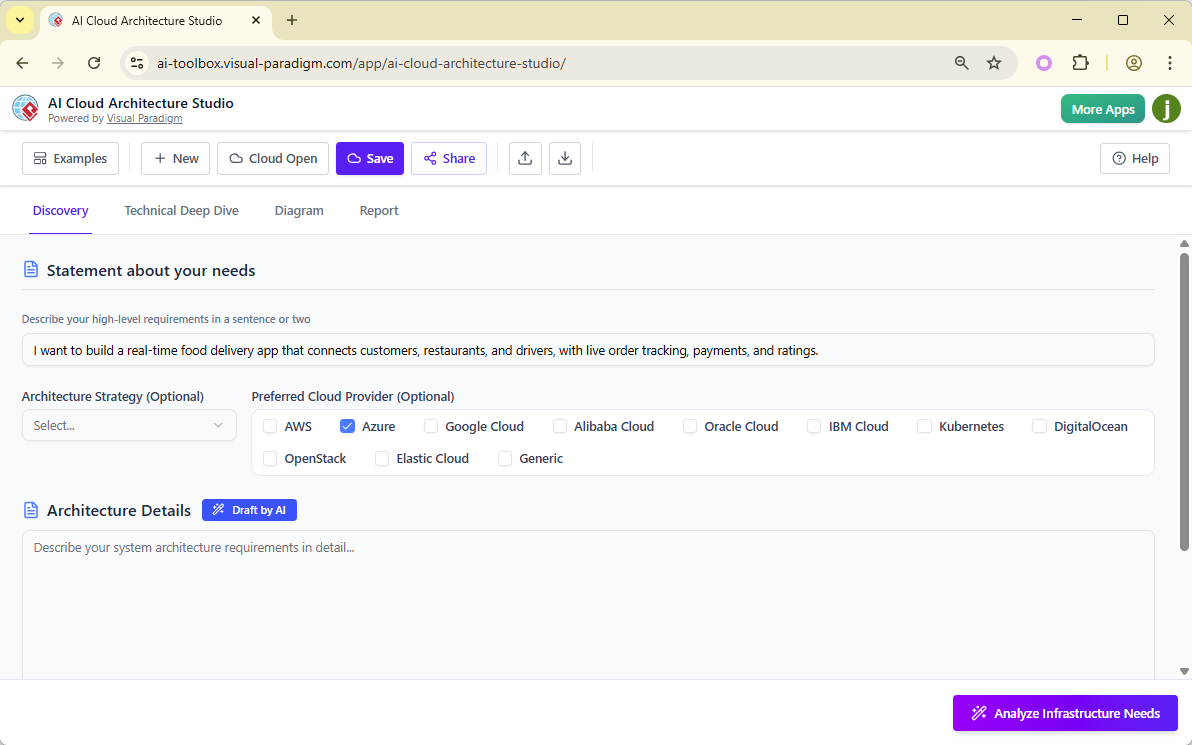
-
In the Description field, write a clear, structured requirement:
“Design a real-time food delivery app with user authentication, order tracking, live driver location updates, and integration with Stripe for payments. Use AWS and prioritize high availability and low latency.”
-
Optionally specify:
-
Preferred Cloud Provider(s): AWS, Azure, Multi-Cloud, etc.
-
Architecture Strategy:
-
High Availability
-
Cost-Optimized / MVP
-
Security-Focused
-
Serverless
-
Kubernetes-Based
-
-
✅ Step 3: Add Detailed Requirements
Expand on functional and non-functional needs:
-
Functional: User roles, data flows, third-party integrations (e.g., Stripe, Twilio).
-
Non-Functional: Scalability targets (e.g., 10K concurrent users), performance (latency < 200ms), compliance (GDPR, SOC 2), backup frequency.
✅ Use the AI Assist button to generate a draft based on your initial description—then refine it.
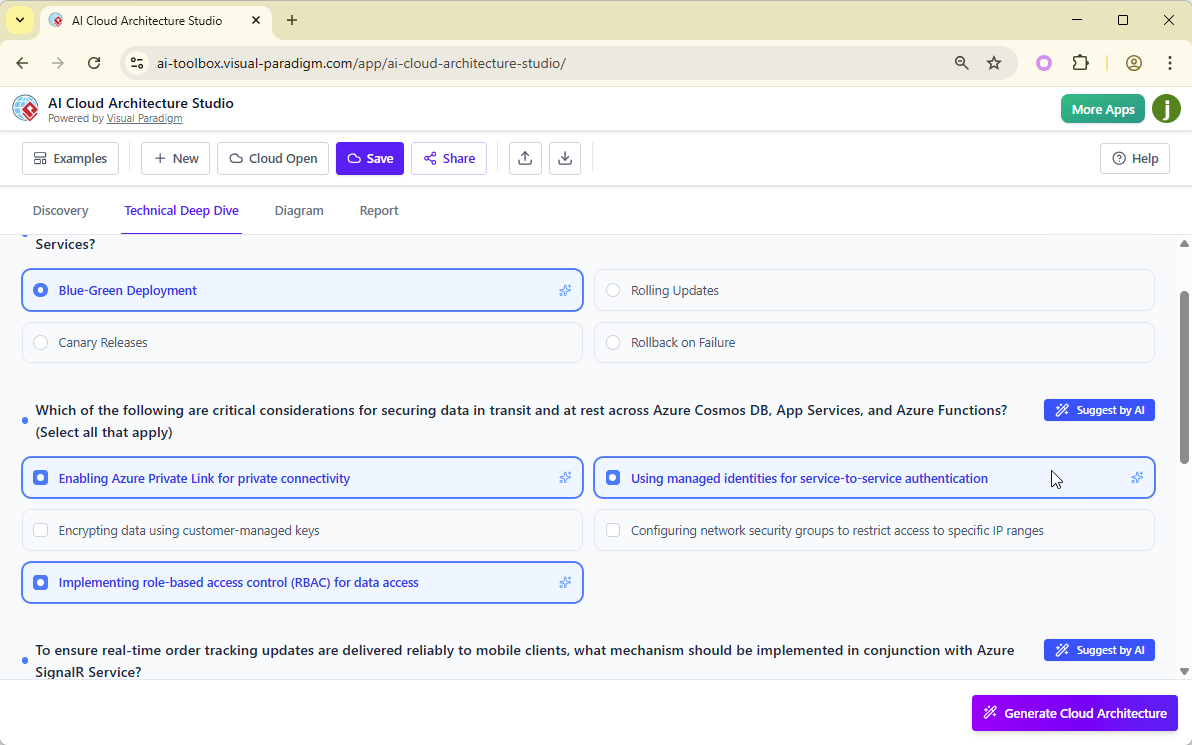
✅ Step 4: Analyze Infrastructure Needs
Click Analyze Infrastructure Needs.
The AI will:
-
Review your input.
-
Identify ambiguities.
-
Prompt you with follow-up questions (e.g., “Do you need cross-region replication?”, “Should the frontend be hosted via S3 or CloudFront?”).
Answer each question or let the AI suggest optimal solutions based on best practices.
✅ This step significantly improves accuracy and reduces rework.
✅ Step 5: Generate the Cloud Architecture
Once all clarifications are complete:
-
Click Generate Cloud Architectures.
-
The AI produces one or more architecture diagrams tailored to your strategy and constraints.
-
View the result in an interactive canvas:
-
Zoom in/out
-
Pan across the diagram
-
Hover over components for tooltips and details
-
📌 Diagrams include:
Correct service icons (from official cloud provider libraries)
Logical connections (e.g., API gateways, VPCs, load balancers)
Best-practice layout (modular, readable, consistent)
✅ Step 6: Refine and Iterate
Make changes using two methods:
🔹 Manual Editing
-
Click on any component to edit its name, type, or region.
-
Drag to reposition elements.
-
Modify connections.
🔹 AI-Powered Modifications
Use natural language to request updates:
“Add a Redis cache layer to reduce database load.”
“Enable encryption at rest and in transit for all data.”
“Switch from EC2 to Fargate for the backend service.”
The tool will:
-
Show original vs. updated diagram side by side.
-
Allow you to accept, reject, or further adjust the change.
Repeat until satisfied.
✅ Step 7: Generate and Edit Documentation
-
Navigate to the Report tab.
-
Click Generate Report.
-
The AI creates a comprehensive markdown document with:
-
Executive summary
-
Component breakdown
-
Design rationale
-
Security & compliance measures
-
Cost and performance analysis
-
-
Edit the report directly in the built-in editor.
-
Export as PDF for presentations or stakeholder reviews.
📄 Exported reports are ideal for:
Technical documentation
Architecture review meetings
Onboarding new team members
Audit trails
✅ Step 8: Export and Save Your Work
Finalize your project with these options:
| Export Type | Use Case |
|---|---|
| SVG | Embed in websites, slides, wikis, or documentation |
| Share with non-technical stakeholders, clients, or auditors | |
| JSON | Backup, version control, or import into other tools/scripts |
| Save to VP Online Workspace | Access later, collaborate with team members, or continue refining |
🔄 Collaboration Tip: Share project links with teammates for real-time feedback.
📌 Best Practices & Pro Tips
| Practice | Why It Matters |
|---|---|
| Be Specific & Structured | Clear inputs reduce ambiguity and AI clarification rounds. Include scale, constraints, and priorities. |
| Use Templates as Inspiration | Explore bundled examples to learn how to phrase requirements effectively. |
| Leverage AI Suggestions | Let the AI recommend best practices during clarification and modification. |
| Compare Multiple Variants | Generate different versions (e.g., cost-optimized vs. high-availability) and compare side by side. |
| Combine with Other AI Tools | Use Visual Paradigm’s AI Strategic Analysis or AI Business Model Canvas for holistic project planning. |
| Check Subscription Status | Ensure your plan includes access to AI Cloud Architecture Studio (VP Online Combo or higher). |
🧩 Use Cases & Real-World Applications
| Use Case | How AI Cloud Architecture Studio Helps |
|---|---|
| Startup MVP Planning | Rapidly prototype a minimal viable product with cost-optimized architecture. |
| Enterprise Cloud Migration | Visualize and document complex migration strategies across AWS/Azure. |
| DevOps Deployment Planning | Design scalable CI/CD pipelines with auto-scaling, monitoring, and logging. |
| Security & Compliance Audits | Document secure architectures with encryption, IAM policies, and audit trails. |
| Training & Education | Teach cloud concepts using real-world examples and interactive diagrams. |
📚 Reference List (Formatted in Markdown)
- Visual Paradigm Announces AI Cloud Architecture Studio Launch:
Official release announcement detailing the launch of the AI Cloud Architecture Studio, including key features, supported platforms, and integration with Visual Paradigm’s ecosystem. - Revolutionizing Cloud Design: A Deep Dive into Visual Paradigm’s AI Cloud Architecture Studio:
In-depth analysis of the tool’s capabilities, workflow, and impact on cloud architecture design, highlighting its role in accelerating cloud project planning. - AI Cloud Architecture Studio – Visual Paradigm:
Official product page for the AI Cloud Architecture Studio, featuring interactive demos, feature highlights, and direct access to the tool. - Visual Paradigm AI Cloud Architecture Studio – YouTube Tutorial:
Video walkthrough demonstrating the full workflow—from natural language input to final diagram export—with real-time examples. - Huawei Cloud Architecture Diagram Tool – Visual Paradigm:
Resource page highlighting Huawei Cloud support within Visual Paradigm’s suite, including iconography and integration details. - AI Cloud Architecture Studio: Generate Cloud Diagrams from Text – YouTube Tutorial:
Practical tutorial showing how to create a cloud architecture diagram using plain English, refine it with AI, and export documentation.
📝 Conclusion
Visual Paradigm’s AI Cloud Architecture Studio is a game-changer in cloud design. By combining natural language processing, intelligent clarification, and real-time collaboration, it transforms the traditionally tedious process of diagramming into a fast, intuitive, and strategic activity.
Whether you’re a seasoned cloud architect or a developer new to infrastructure planning, this tool empowers you to:
-
Design faster
-
Document smarter
-
Collaborate better
-
Focus on innovation, not mechanics
Start your journey today at ai.visual-paradigm.com and turn your ideas into professional, compliant, and scalable cloud architectures—automatically.
✅ Ready to Try It?
Visit: https://ai.visual-paradigm.com/tool/ai-cloud-architecture-studio
Explore the full AI toolkit: https://ai.visual-paradigm.com

