


1. Introduction & Diagram Overview
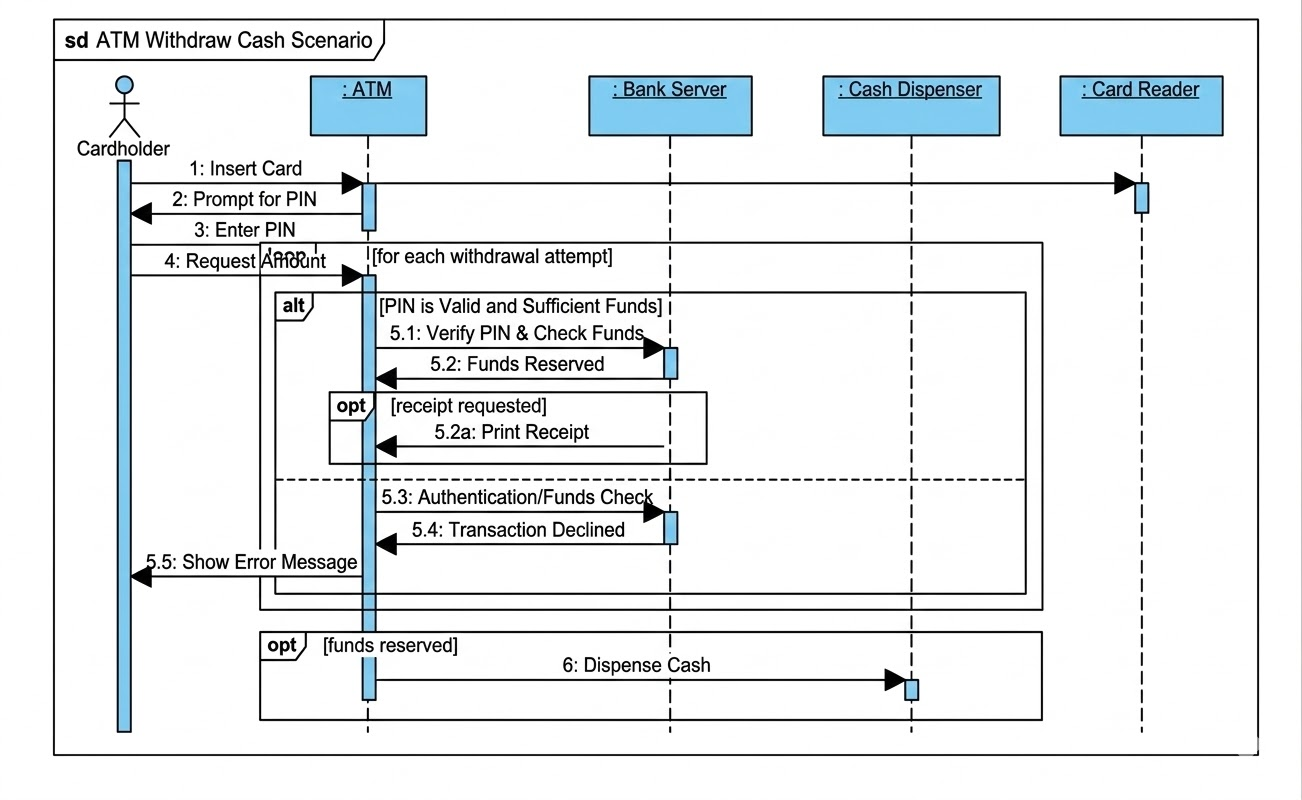
This UML Sequence Diagram illustrates the interactions between a human user (the Cardholder) and various software and hardware components (objects) involved in withdrawing cash from an Automated Teller Machine (ATM).
The diagram follows the UML 2.0 standard and is contained within a diagram frame with the stereotype “sd” (sequence diagram) and the title “ATM Withdraw Cash Scenario”.
Diagram Style and Key Components
The diagram utilizes distinct graphic styles consistent with standard modeling notation:
-
Blue-filled Header Blocks: Represent system object instances/lifelines (ATM, Bank Server, etc.).
-
Stick Figure: Represents an external actor (the human Cardholder).
-
Vertical Blue Rectangles (Activation Bars): Show the duration during which an object is actively processing a request or message.
-
Solid Line Arrows: Represent synchronous messages (calls) that expect a return.
-
Dashed Line Arrows: Represent return messages (or async responses).
-
Combined Fragments (Large Rectangles): Enclose complex logic, such as loops and conditions (
loop,alt,opt).
2. Participating Actors and Lifelines
The scenario involves five main entities, mapped onto vertical lifelines:
-
Cardholder (Actor): The human interacting with the ATM, initiating the transaction.
-
: Card Reader (Object): The hardware component that detects the card and reads its data.
-
: ATM (Object): The central controller and interface unit, coordinating the flow.
-
: Bank Server (Object): The remote financial institution’s system where user accounts, PINs, and funds are managed.
-
: Cash Dispenser (Object): The hardware component responsible for physical cash output.
3. Workflow Analysis: Flow of Messages
The scenario can be divided into distinct phases: Initialization, Authentication Loop, Transactional Decision, and Completion.
Phase 1: Initialization
-
Message 1 (
Insert Card): The Cardholder inserts the card. TheCardholdersends a message to the: Card Reader, activating it. -
Message 2 (
Prompt for PIN): The: ATM(not the card reader) responds to the card insertion detection by asking the Cardholder for authentication. -
Message 3 (
Enter PIN): The Cardholder provides the required PIN to the: ATM.
Phase 2: The Main Authentication and Transaction Loop
The diagram uses a large loop combined fragment with the guard text [for each withdrawal attempt]. This signifies that if the process fails (e.g., incorrect PIN), the workflow might allow multiple attempts to request an amount and authenticate.
-
Message 4 (
Request Amount): The user enters the desired withdrawal amount on the: ATM.
Phase 3: The Transactional Decision (The alt Fragment)
The defining complexity of this diagram is the nested alt (alternatives) fragment, which models the logic flow based on critical transaction variables. This alt is divided into two sections by a dashed horizontal line.
Scenario 3a: Success – PIN Valid and Sufficient Funds (Top Section)
The guard condition for this block is [PIN is Valid and Sufficient Funds].
-
Message 5.1 (
Verify PIN & Check Funds): The: ATMmakes a central call to the remote: Bank Server, providing the PIN and amount for simultaneous validation and balance check. -
Message 5.2 (
Funds Reserved): The: Bank Serverconfirms that the PIN is correct and the account has enough money. It reserves the funds and sends a synchronous response to the: ATM.
Phase 3a-Optional: The Nested opt Fragment
A nested opt (optional) fragment is included here. This block is executed only if the guard condition [receipt requested] is true.
-
Message 5.2a (
Print Receipt): If requested, the: ATMimmediately instructs its internal system to print a receipt for the Cardholder.
Scenario 3b: Failure – Invalid PIN or Insufficient Funds (Bottom Section)
The guard condition for this block is [Invalid PIN or Insufficient Funds]. This captures authentication failure or an overdrawn account.
-
Message 5.3 (
Authentication/Funds Check): The same verification request sent in 5.1 is shown here to define this failure path. -
Message 5.4 (
Transaction Declined): The: Bank Serverresponds to the: ATMwith a failure status. The activation bar on the server shows it processed the check and returned a negative result. -
Message 5.5 (
Show Error Message): The: ATMinforms the Cardholder of the decline. Note: The text overlap with theloopborder is an artifact of the generation process but visually conveys the flow.
Phase 4: Cash Dispensing and Completion (The Final opt Fragment)
Once the loop and alt logic concludes, the workflow moves to the bottom of the diagram. The transaction can only proceed to cash dispensing if funds are reserved in the success path (Message 5.2).
-
Message 6 (
Dispense Cash): This message is enclosed in anoptfragment with the guard[funds reserved]. It is sent from the: ATMto the: Cash Dispenser, which handles the physical output. The entiredispenseoperation takes place within an activation bar, indicating the time required for mechanical action.
4. Key Takeaways and Evaluation
Advanced Modeling Techniques Demonstrated
-
Nested Logic: The diagram cleverly places an
altinside aloopand anoptinside analt. This structure accurately represents iterative attempts to get money while handling complex decision trees at each attempt. -
State Separation: The logic clearly separates the logical reservation of funds (digital) from the physical dispensing of cash (hardware). This is a crucial distinction in real banking software to prevent fraud and handle hardware jams.
-
Clarity of Decision Points: The use of distinct guard conditions (e.g.,
[for each withdrawal attempt],[receipt requested],[funds reserved]) makes the diagram readable as a specification document for developers or testers.
Considerations and Areas for Enhancement
While comprehensive, there are minor points that could be clarified to make the model even more robust:
-
Wait and Print Time: The message
5.2a (Print Receipt)is drawn as a return message from the server but labeled as an instruction to print. In a strictly accurate diagram, the ATM should send a call message to its internal printing object, wait for a completion signal, and then continue. The current representation is a functional abstraction. -
Visual Artifact: The text overlap on message
5.5is the most noticeable stylistic flaw. In a final diagram, message arrows should be adjusted to clear all borders and text labels for readability. -
Card Handling: While card reader insertion is shown (Message 1), the diagram does not model the eventual return of the card. A proper sequence should end with the card reader activating to eject the card after the cash has been dispensed.
Conclusion
This case study demonstrates that UML sequence diagrams are indispensable tools for modeling not just simple interactions, but sophisticated business logic containing conditional paths, iterative loops, and optional steps. The ATM Withdraw Cash Scenario diagram effectively maps the physical world of a cardholder onto the digital processes of a banking system and its constituent hardware.
Resource
- AI-Powered Sequence Diagram Refinement Tool | Visual Paradigm: This resource highlights a tool that automatically improves and optimizes sequence diagrams using intelligent suggestions to enhance design accuracy and clarity.
- AI Use Case Description Generator by Visual Paradigm: This tool leverages AI to automatically generate detailed use case descriptions from user inputs, which significantly accelerates the process of system analysis and documentation.
- Visual Paradigm – AI-Powered UML Sequence Diagrams: This article explains how users can generate professional UML sequence diagrams instantly from text prompts using an advanced AI modeling suite.
- AI-Powered Sequence Diagram Refinement in Visual Paradigm: This resource explores the capability to transform existing use case descriptions into precise sequence diagrams with minimal manual intervention.
- Mastering Sequence Diagrams with Visual Paradigm: AI Chatbot Tutorial: A beginner-friendly tutorial that uses an e-commerce case study to demonstrate how to build effective interaction models through natural language instructions with an AI chatbot.
- Beginner’s Tutorial: Create Your First Professional Sequence Diagram in Minutes: A hands-on guide for quickly generating high-quality sequence diagrams using a conversational AI chatbot interface.
- AI Sequence Diagram Example: Video Streaming Playback Initiation: A case study showcasing how the AI chatbot acts as a collaborative modeling partner to refine system logic and interactions in real time.
- Automating Use Case Development with AI in Visual Paradigm: This article details how AI-powered generators reduce manual effort and improve consistency when documenting complex software requirements.
- Refining Sequence Diagrams with AI: A Smarter Way to Design Systems: This resource discusses how AI enhances the design process by intelligently refining sequence diagrams to provide better system modeling and clarity.
- Visual Paradigm Use Case Description Generator Tutorial: A step-by-step tutorial teaching users how to automatically produce detailed use case documents directly from their visual diagrams.

