


Introduction
In today’s competitive financial landscape, banks must balance speed, accuracy, and compliance when processing customer loan applications. The Apex Bank Loan Request Process, modeled using BPMN 2.0 (Business Process Model and Notation), exemplifies how structured process design can streamline operations while mitigating risk and ensuring regulatory adherence.
This case study provides a comprehensive analysis of the loan request workflow, highlighting its design strengths, adherence to BPMN standards, and opportunities for optimization. By examining the process through the lens of business objectives, organizational structure, and modeling best practices, we uncover key insights that can be applied to enhance efficiency, transparency, and customer experience across financial institutions.
1. Business Context & Strategic Objectives
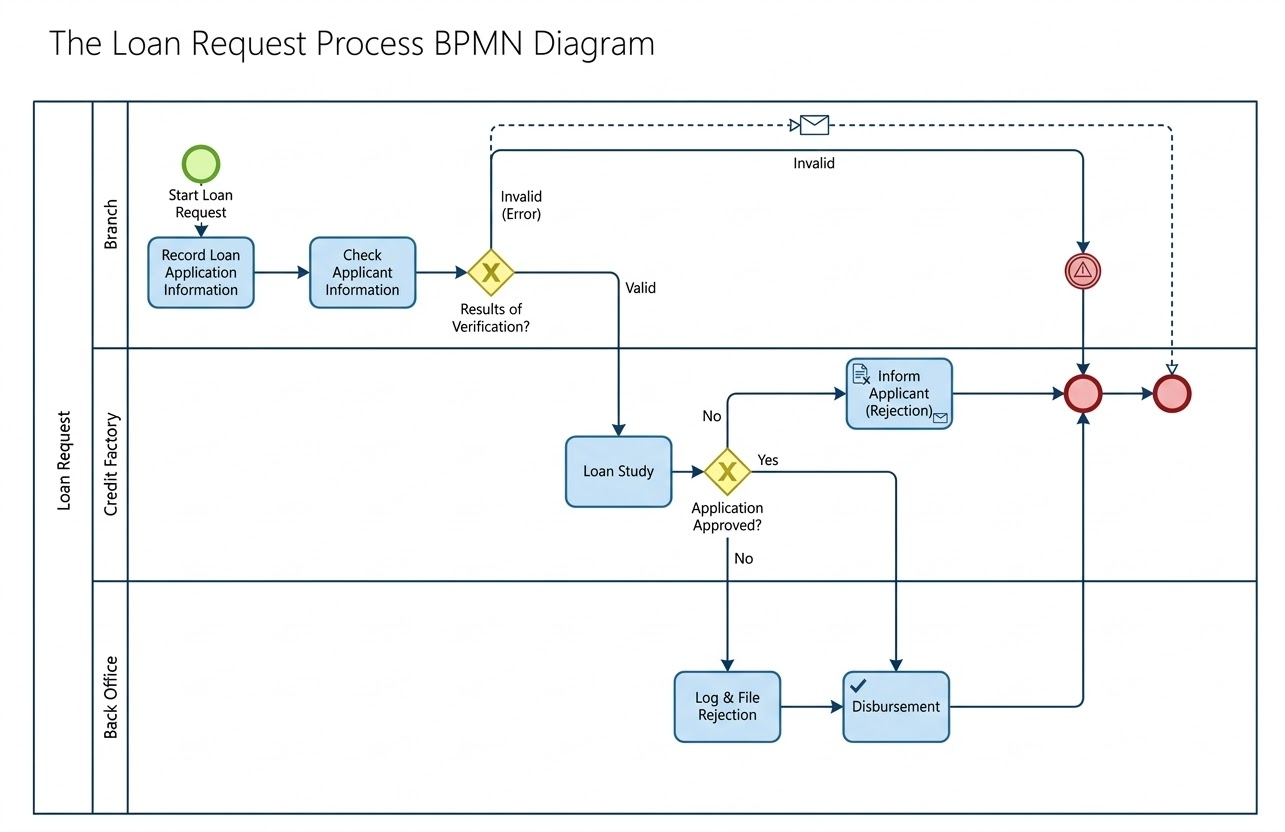
The Apex Bank Loan Request Process is designed to manage the end-to-end lifecycle of a personal loan application—from initial submission to final disbursement or rejection. Its success hinges on achieving three core business objectives:
-
Reduce Turnaround Time (TAT): Minimize delays between application intake and decision-making to improve customer satisfaction and competitive positioning.
-
Mitigate Risk: Implement rigorous credit analysis and validation steps to prevent lending to high-risk applicants.
-
Ensure Regulatory Compliance: Maintain a complete, auditable trail of all decisions, communications, and actions taken during the process.
These goals are not only operational imperatives but also critical to maintaining trust, reducing legal exposure, and supporting data-driven decision-making.
2. Organizational Structure: Swimlanes and Roles
The process is organized into a single Pool representing the bank’s operational domain, divided into three Swimlanes that reflect functional responsibilities:
| Swimlane | Responsibilities |
|---|---|
| Branch | Customer-facing intake, data collection, and preliminary validation. |
| Credit Factory | In-depth credit evaluation, risk assessment, and final approval/rejection decision. |
| Back Office | Administrative closure: fund disbursement or formal rejection logging. |
This segregation of duties ensures accountability, reduces bottlenecks, and supports role-based automation and performance tracking.
3. Comprehensive Process Walkthrough
Phase 1: Application Intake & Preliminary Check (Branch Lane)
The journey begins with a Start Event — a customer submitting a loan application.
-
Task 1: Record Loan Application Information
A branch employee inputs applicant details (name, income, loan amount, etc.) into the banking system. -
Task 2: Check Applicant Information
A basic validation is performed to ensure data completeness and correctness (e.g., valid SSN, consistent income figures). -
Exclusive Gateway: Results of Verification?
A decision point determines whether the application proceeds:-
Invalid (Error): If critical fields are missing or invalid, the process triggers an automated “Invalid” message flow to the applicant via email. The process terminates via the upper End Event.
-
Valid: If data passes validation, the application is forwarded to the Credit Factory.
-
✅ This early gatekeeping prevents unnecessary workload in downstream departments and improves TAT from the outset.
Phase 2: Credit Analysis & Decisioning (Credit Factory Lane)
Once validated, the application enters the Credit Factory for deep analysis.
-
Task 3: Loan Study
Credit officers assess:-
Credit score and history
-
Debt-to-income (DTI) ratio
-
Employment stability
-
Collateral (if applicable)
-
-
Exclusive Gateway: Application Approved?
The pivotal decision point:-
No: The application is rejected. Flow moves to the Rejection Path.
-
Yes: The application is approved. Flow proceeds to Fulfillment.
-
🔍 This gateway is clearly labeled with a business question, aligning with BPMN best practices for decision clarity.
Phase 3: Post-Decision Fulfillment (Cross-Lane Activities)
Rejection Path: Ensuring Accountability and Communication
-
Task 4: Inform Applicant (Rejection)
An automated message (envelope icon) notifies the applicant of the denial, including a reason (e.g., low credit score, high DTI). -
Handoff to Back Office
The rejection case is transferred for documentation. -
Task 5: Log & File Rejection
The Back Office records the rejection in compliance systems, tagging it with metadata (date, reason, reviewer, audit ID). -
End Event
Process concludes with a clear termination point.
Approval Path: Seamless Disbursement
-
Handoff to Back Office
The approved file is passed directly to the Back Office, bypassing rejection tasks. -
Task 6: Disbursement
Funds are released to the customer’s account. This may involve:-
Final contract signing
-
KYC (Know Your Customer) confirmation
-
Payment initiation
-
-
End Event
The process completes successfully.
🔄 Note: The approval path skips the rejection tasks entirely, demonstrating a clean, conditional flow based on business logic.
4. Key BPMN 2.0 Concepts Applied
The diagram demonstrates strong adherence to BPMN 2.0 standards, enhancing readability and maintainability:
| Element | Symbol & Color | Role in the Process |
|---|---|---|
| Start Event | Thin green circle | Triggers the process instance (“Start Loan Request”) |
| End Event | Thick red circle | Terminates both success and failure paths |
| Task (User/Manual) | Rounded blue rectangle | Manual actions like data entry and credit review |
| Task (Service/Message) | Icon-enhanced rectangle | Automated actions (e.g., email notification) |
| Exclusive Gateway | Yellow diamond with ‘X’ | Decision point with mutually exclusive paths |
| Sequence Flow | Solid blue line | Defines the primary execution order |
| Message Flow | Dashed blue line | External communication (e.g., automated email to applicant) |
These elements work together to create a visually intuitive and semantically rich model.
5. BPMN Guidelines & Best Practices: A Model of Excellence
The Apex Bank process exemplifies several industry-standard modeling principles:
✅ Directional Flow
-
The process flows naturally from top-left to bottom-right, following standard reading conventions.
-
Swimlanes are stacked vertically, and tasks progress in a logical sequence, minimizing confusion.
✅ Clear Gateway Usage
-
All gateways are labeled with actionable questions (“Application Approved?”, “Results of Verification?”).
-
Each outgoing path is explicitly labeled (“Yes”, “No”, “Valid”, “Invalid”), eliminating ambiguity.
✅ Single-Exit Pattern
-
Both the approval and rejection paths converge toward a single column of end events on the right.
-
This design promotes consistency, simplifies monitoring, and supports centralized reporting.
✅ Effective Iconography
-
Envelope icon on “Inform Applicant” signals automated communication.
-
Checkmark icon in “Log & File Rejection” suggests a rule-based or compliance-check step, reinforcing audit readiness.
📌 This attention to visual detail enhances model interpretability for stakeholders across IT, operations, and compliance teams.
6. Optimization Opportunities: Enhancing the Model
While the current model is robust, further refinements can elevate it from good to exceptional. Here are four strategic enhancements:
1. Clarify Task Types with Proper Icons
Improve model precision by using standard BPMN task icons:
| Task | Recommended Task Type | Why |
|---|---|---|
| Record Loan Application | User Task (hand icon) | Performed by a human employee |
| Check Applicant Information | User Task (hand icon) | Manual data validation |
| Loan Study | Business Rule Task (table icon) or Manual Task (hand icon) | If automated scoring engine is used, use table icon; if human underwriting, use hand icon |
| Inform Applicant (Rejection) | Service Task (rectangle with envelope) | Automated message delivery |
💡 Using correct icons improves communication with developers, analysts, and automation tools.
2. Add Boundary Events for Exception Handling
Introduce Timer Boundary Events to handle delays and exceptions:
-
Timer Boundary Event on “Loan Study” with a 30-day threshold:
-
If no response from the applicant (e.g., missing documents), the process auto-routes to “Log & File Rejection”.
-
Prevents indefinite holding of applications and improves TAT predictability.
-
🛠️ This transforms the process from passive to proactive, reducing manual follow-ups.
3. Refine the Disbursement Workflow
The current model assumes disbursement happens immediately after approval. To reflect reality, split the disbursement into steps:
-
Send Contracts to Customer → (Service Task with envelope icon)
-
Message Start Event: Customer Signs → (Triggered by customer action)
-
Execute Disbursement → (Back Office task)
🔄 This creates a cyclic, customer-interactive loop, improving transparency and legal enforceability.
4. Define Key Performance Indicators (KPIs)
To drive continuous improvement, embed performance expectations directly into the model:
| Task | Target TAT |
|---|---|
| Record → Check (Branch) | ≤ 2 hours |
| Loan Study (Credit Factory) | ≤ 48 hours |
| Disbursement (Back Office) | ≤ 24 hours post-approval |
| Rejection Notification | ≤ 1 hour after decision |
📊 These KPIs enable real-time monitoring, SLA tracking, and process optimization via analytics tools.
Conclusion: A Blueprint for Digital Transformation
The Apex Bank Loan Request Process is a prime example of how BPMN 2.0 can be leveraged to model complex financial workflows with clarity, compliance, and scalability. Its clean structure, logical flow, and adherence to standards make it a powerful foundation for digital transformation.
By implementing the suggested optimizations—enhanced task typing, exception handling, customer interaction modeling, and KPI integration—the bank can achieve:
-
Faster loan decisions
-
Reduced operational risk
-
Improved customer satisfaction
-
Stronger audit and regulatory readiness
🎯 Final Takeaway:
A well-modeled process is not just a diagram—it’s a living blueprint for operational excellence. The Apex Bank model proves that with the right tools and attention to detail, even traditional banking processes can become agile, intelligent, and customer-centric.
Appendix: Suggested Model Enhancements Summary
| Enhancement | Impact | Implementation Tip |
|---|---|---|
| Use correct BPMN task icons | Improves clarity and automation readiness | Update task symbols in BPMN tool (e.g., Camunda, Bizagi, Signavio) |
| Add Timer Boundary Event | Prevents process stagnation | Set 30-day timer on “Loan Study” |
| Split disbursement into stages | Reflects real-world workflow | Add “Send Contracts” → “Customer Signs” → “Disburse” |
| Define KPIs | Enables performance measurement | Add swimlane annotations or metadata tags |
BPMN Resource
-
BPMN Diagram and Tools – Visual Paradigm: This resource provides a comprehensive overview of BPMN diagramming capabilities and integrated tools designed specifically for business analysts and process designers.
-
What is BPMN? – Visual Paradigm Guide: An introductory guide explaining the purpose, structure, and benefits of Business Process Model and Notation (BPMN) in business process design.
-
BPMN Notation Overview – Visual Paradigm Guide: This guide offers a comprehensive overview of notation elements, including events, activities, gateways, and artifacts used to model professional business processes.
-
How to Draw a BPMN Diagram – Visual Paradigm Tutorial: A step-by-step tutorial on creating professional diagrams using an intuitive interface and modeling best practices.
-
Understanding Pools and Lanes in BPMN – Visual Paradigm User Guide: A detailed explanation of how to use pools and lanes to represent different departments, organizations, or roles within a process.
-
How to Create a BPMN Conversation Diagram in Visual Paradigm: A guide on creating and using Conversation Diagrams to model interactions between different business partners.
-
BPMN – A Comprehensive Guide: This article discusses the vision behind BPMN 2.0, aiming to establish a unified specification for notation, metamodels, and interchange.
-
Integrating BPMN and UML for Enhanced Modeling: A resource explaining how to combine BPMN and UML for more effective business and system modeling.
-
How to Animate Business Processes with Visual Paradigm: A tutorial on creating dynamic, animated business process diagrams for improved visualization and communication.
-
Comprehensive Guide to Visual Paradigm for Business Process Modeling: An in-depth guide on leveraging the platform for the end-to-end modeling lifecycle, from design to implementation and analysis.

