


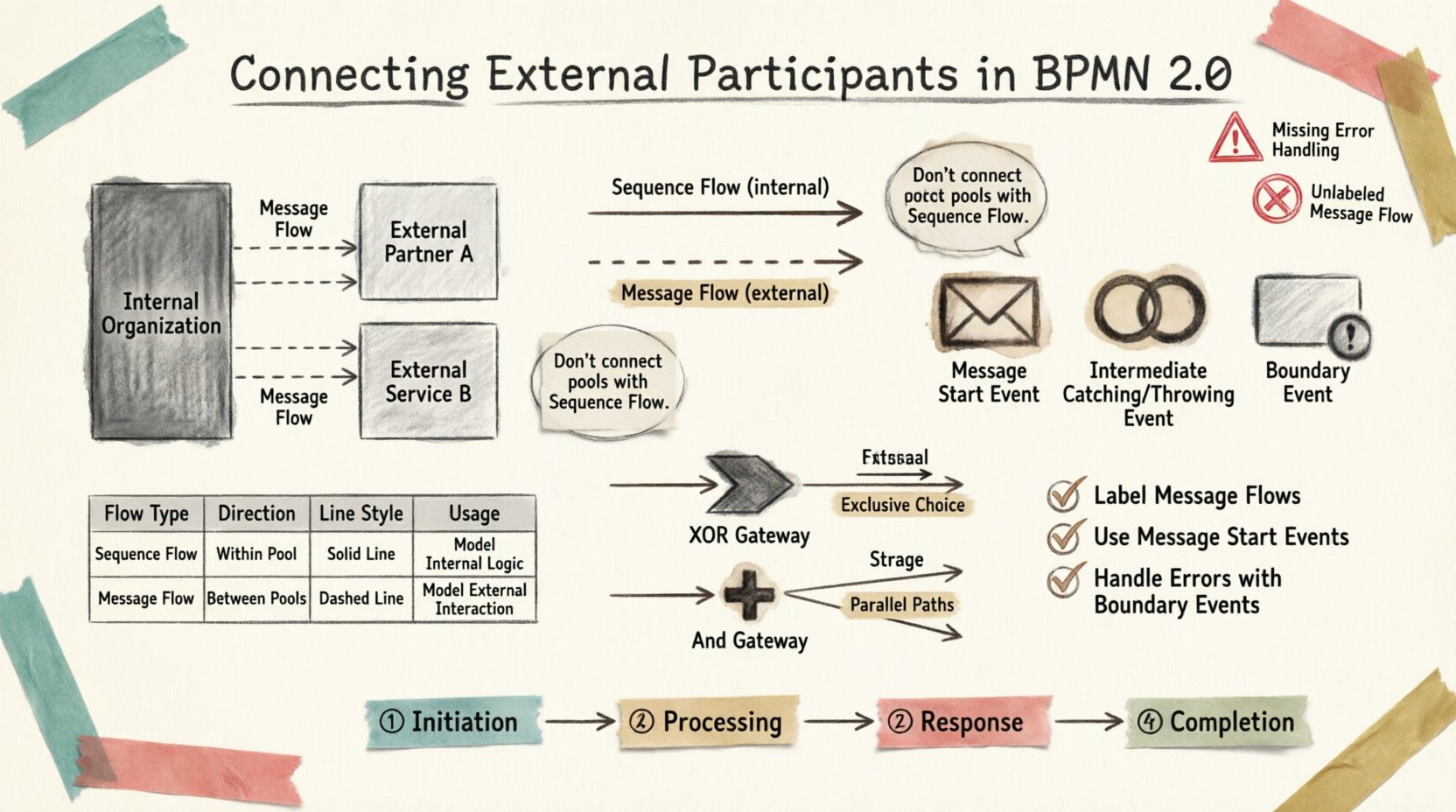
Business Process Model and Notation (BPMN) 2.0 provides a standardized language for describing workflows. While internal process steps are straightforward, integrating entities outside the organization requires specific modeling techniques. External participants include customers, partners, third-party systems, or regulatory bodies. Properly representing these interactions ensures accurate process execution and clear communication. This guide details the mechanics of connecting external participants within the BPMN 2.0 specification.
Understanding the Boundaries 🛑
The fundamental challenge in modeling external interactions lies in defining the boundary of the process. In BPMN, a Pool represents a participant. A process typically has a single pool representing the organization executing the workflow. Any entity outside this pool is considered external.
- Internal Pools: Contain the activities owned by the organization.
- External Pools: Represent participants who interact with the process but do not control its internal logic.
When you model a process involving external parties, you must distinguish between what happens inside the organization and what happens in the outside world. This distinction dictates the type of flow used to connect activities.
Message Flows vs. Sequence Flows 💬
One of the most critical distinctions in BPMN is the difference between Sequence Flows and Message Flows. Confusing these two can lead to models that are technically invalid or logically ambiguous.
- Sequence Flows: Represent the order of execution within a single participant (inside one Pool). These are solid arrows.
- Message Flows: Represent the exchange of information between two participants (between two Pools). These are dashed arrows.
When connecting external participants, you must use Message Flows. Using a Sequence Flow between two Pools is a modeling error. A Sequence Flow implies control, meaning the upstream activity directly triggers the downstream activity. A Message Flow implies communication, where one party sends a message and waits for a response or acknowledgment.
Visual Representation
| Flow Type | Direction | Line Style | Usage Context |
|---|---|---|---|
| Sequence Flow | Internal | Solid Line | Activity to Activity within one Pool |
| Message Flow | External | Dashed Line | Pool to Pool (Participant to Participant) |
| Association | Internal/External | Dotted Line | Linking Data Objects or Annotations |
Event Types for External Communication 📨
Events are the primary mechanism for initiating or terminating interaction with external participants. You can categorize these interactions based on timing and intent.
Start Events
A Start Event marks the beginning of a process. When an external participant triggers a process, the Start Event is typically an Message Start Event.
- This event indicates the process waits for an incoming message before proceeding.
- It is placed at the very beginning of the Pool.
- The incoming message flow connects directly to this event.
For example, an order confirmation sent by a customer initiates a fulfillment process. The process does not exist until the message arrives.
Intermediate Events
Intermediate events occur during the lifecycle of the process. They are useful for catching messages while the process is active.
- Intermediate Catching Message Event: The process pauses here until a specific message is received. This is common for asynchronous updates, such as a payment confirmation from a banking system.
- Intermediate Throwing Message Event: The process sends a message at this point. This is used when the process needs to notify an external party of a status change.
Boundary Events
Boundary events are attached to the boundary of an activity. They allow you to handle exceptions or timeouts without stopping the main flow immediately.
- Message Boundary Event: If an external party sends a cancellation request while the process is running, this event captures it.
- This allows the process to react to external interference without abandoning the current activity.
Gateways and Decision Making 🔀
External participants often introduce complexity through decision points. A process might need to branch based on a response received from an outside source. Gateways manage these paths.
XOR Gateways
An Exclusive Gateway (XOR) selects one path out of several options. In the context of external interaction, this is often used after receiving a response.
- If the external system returns a “Success” message, the process follows one path.
- If the message indicates “Error”, the process follows a different path.
- The incoming message flow must be connected to a Gateway or Event that precedes the decision.
AND Gateways
An Inclusive Gateway allows multiple paths to be taken simultaneously if conditions are met. However, with Message Flows, synchronization is key.
- A Joining Gateway waits for all incoming paths to complete.
- When communicating with external parties, delays are common. You must ensure the gateway waits for the necessary messages before proceeding.
Handling Asynchronicity ⏳
External interactions are rarely immediate. Systems may be offline, or responses may take time. BPMN 2.0 handles this through asynchronous behavior.
- Non-Blocking: When a process sends a message, it does not wait for an immediate reply unless explicitly modeled to do so.
- Message Retention: The process engine stores the message until it is received.
- Timeouts: If no response is received within a set time, a Timer Intermediate Event can trigger an escalation.
This is crucial for long-running processes. If a process waited synchronously for every external call, it would consume resources inefficiently. Asynchronous messaging allows the process to move to other tasks while waiting.
Data Exchange and Payloads 📦
Messages are not just signals; they carry data. In BPMN, data is represented by Data Objects and Data Inputs/Outputs.
- Data Objects: Visual symbols representing information used or produced by activities.
- Data Input: Information required to start an activity.
- Data Output: Information generated by an activity.
When connecting to external participants, the content of the message is vital. You should document the expected data payload in the message specification.
| Component | Function | External Relevance |
|---|---|---|
| Message | Container for data | Defines the interface contract |
| Data Object | Specific data item | Shows what is being transferred |
| Association | Links object to element | Clarifies data flow direction |
Common Pitfalls to Avoid ⚠️
Modeling external participants introduces specific risks. Common errors can render a process model invalid or difficult to execute.
- Connecting Pools with Sequence Flows: As mentioned, this is invalid. Always use Message Flows for cross-pool communication.
- Missing Message Start Events: If a process starts via external input, it must use a Message Start Event. A generic Start Event implies the process starts internally.
- Unreachable Paths: Ensure that every path involving external input has a corresponding response. Deadlocks occur if a process waits for a message that never arrives.
- Ignoring Error Handling: External systems fail. Always model error paths using Boundary Events or Error End Events.
- Overcomplicating Lanes: Do not create a Lane for every external entity. Keep the Pool for the external entity and use Lanes only for internal roles within that entity if necessary.
Best Practices for Clarity ✅
To maintain a model that is understandable for both technical teams and business stakeholders, follow these guidelines.
- Label Clearly: Name Message Flows explicitly (e.g., “Order Confirmation”, “Status Update”).
- Use Collab Diagrams: For complex multi-party interactions, a Collaboration Diagram is often clearer than a single large Pool.
- Separate Concerns: Model the internal process logic separately from the external interface logic where possible.
- Document Interfaces: Attach annotations or separate technical specifications for the data schema used in messages.
- Consistent Styling: Use the same line style and color coding for all Message Flows to make them stand out from Sequence Flows.
The Lifecycle of an External Interaction 🔁
Understanding the lifecycle helps in placing the correct elements. A typical interaction follows this sequence:
- Initiation: An external party sends a message. This triggers a Message Start Event.
- Processing: Internal activities process the data. Intermediate events may occur if further external data is needed.
- Response: The process sends a message back to the external party.
- Completion: An End Event marks the successful termination of the process.
If the process times out or receives an error, the lifecycle ends differently, often requiring a compensation or cancellation flow.
Conclusion on External Connectivity 🎯
Modeling external participants requires precision. The distinction between internal control and external communication is the foundation of valid BPMN 2.0 diagrams. By correctly applying Message Flows, appropriate Events, and clear Boundary definitions, you create a blueprint that accurately reflects business reality.
Attention to detail in these areas prevents execution errors and ensures that all stakeholders understand how the system interacts with the wider world. The goal is a model that is not just visually correct, but semantically robust.