


As software systems grow in complexity, the need for clear documentation and structural organization becomes critical. Large Unified Modeling Language (UML) models can quickly become unmanageable without proper compartmentalization. This is where package diagrams play a vital role. They provide the necessary scaffolding to keep high-level architecture visible while hiding implementation details until they are required. This guide explores the structural principles, dependency management, and organizational strategies that ensure a UML model remains scalable and understandable over time.
🏗️ Understanding Package Diagrams in System Architecture
A package diagram is a structural diagram in UML that shows the organization and dependencies between packages. It acts as a high-level view of the model, similar to a table of contents for a complex book. Instead of displaying individual classes or methods, it groups related elements into logical containers. This abstraction allows architects to focus on the relationships between major components of a system rather than getting lost in the minutiae of internal logic.
Think of a package as a namespace. It provides a context for the elements contained within it. When you place a class inside a package, that class is scoped to that package. This scoping mechanism is essential for preventing naming conflicts and defining visibility boundaries. In large-scale projects, multiple developers often work on different sections of the model simultaneously. Packages allow these sections to exist independently, reducing the likelihood of merge conflicts and structural collisions.
🔍 Primary Functions of Package Diagrams
- Logical Grouping: Grouping classes, interfaces, and use cases by functionality or domain.
- Namespace Management: Defining unique scopes for element names to avoid ambiguity.
- Dependency Visualization: Showing how different parts of the system rely on one another.
- Scalability: Enabling the model to grow without becoming a single, unreadable file.
- Access Control: Implicitly defining visibility boundaries through package boundaries.
📐 Designing a Scalable Package Structure
Creating a package structure is not merely about dumping elements into folders. It requires a deliberate strategy that aligns with the system’s architecture. A well-designed structure supports the separation of concerns, making it easier to maintain, test, and refactor the system. The goal is to create a hierarchy where the relationship between packages reflects the relationship between the software components they represent.
🗂️ Hierarchical Organization Strategies
There are several approaches to organizing packages. The choice depends on the nature of the project, the development methodology, and the specific domain. Below are common patterns used in enterprise modeling.
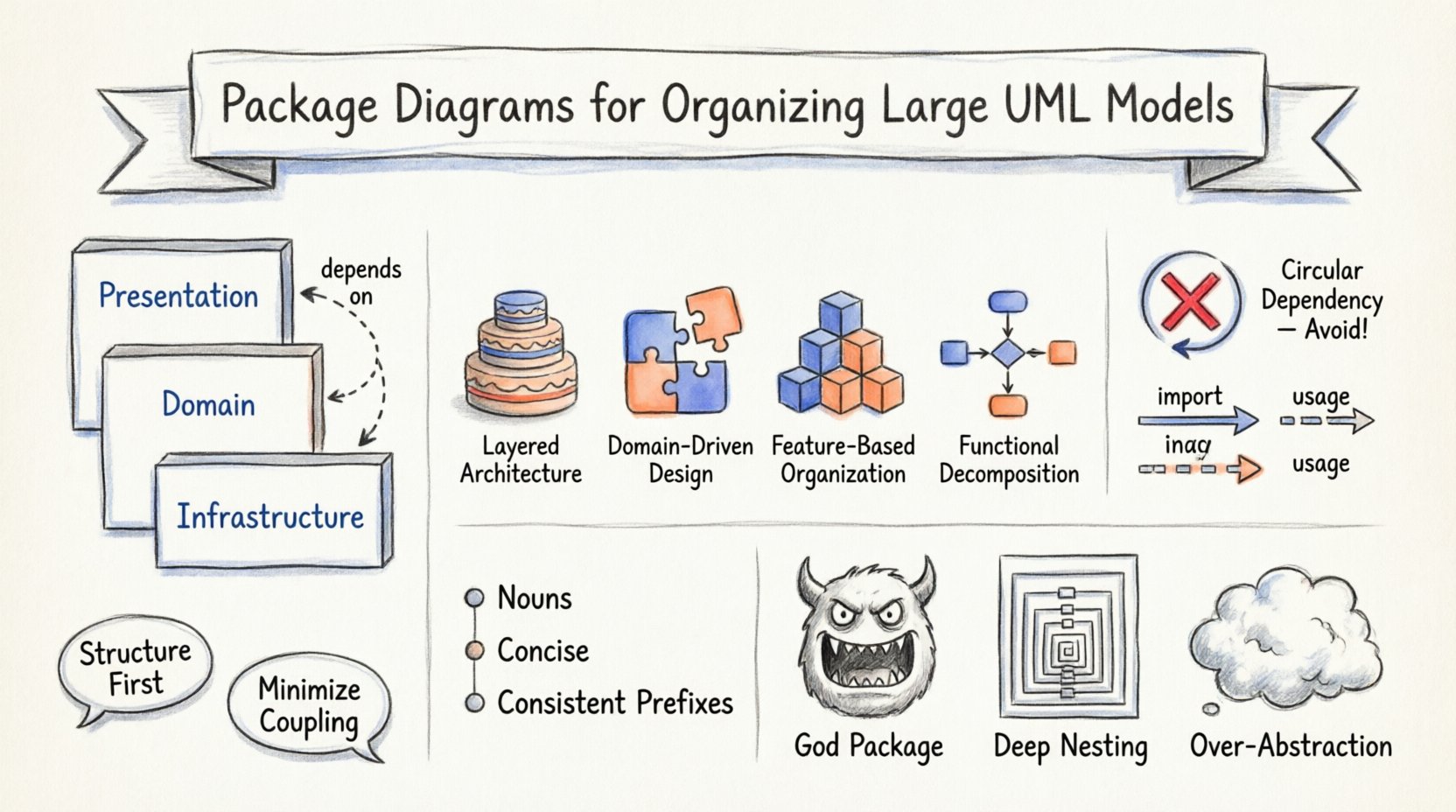
- Layered Architecture: Packages are organized by technical layers. Typical layers include Presentation, Application, Domain, and Infrastructure. This mirrors the physical flow of data through the system.
- Domain-Driven Design: Packages reflect business domains or sub-domains. This approach keeps business logic closely tied to its context, ensuring that the model reflects the actual business language.
- Feature-Based: Packages are grouped by specific features or capabilities. This is useful for systems where features are developed and deployed independently.
- Functional Grouping: Packages are organized by functional area, such as User Management, Billing, or Reporting.
When designing these hierarchies, avoid creating too many levels. Deep nesting can make navigation difficult. A structure that is three to four levels deep is often sufficient for most enterprise applications. If you find yourself needing more levels, it may indicate that a package is too broad and should be split.
🔗 Managing Dependencies Between Packages
Dependencies define how packages interact. In UML, dependencies are shown as dashed arrows pointing from the client package to the supplier package. Managing these dependencies is crucial for maintaining low coupling and high cohesion. High coupling between packages makes the system brittle; changes in one package may ripple through others unexpectedly.
🚫 Avoiding Circular Dependencies
Circular dependencies occur when Package A depends on Package B, and Package B depends on Package A. This creates a cycle that is difficult to resolve and can lead to runtime errors or infinite loops during initialization. In a modeling environment, these cycles often indicate a design flaw where responsibilities are not clearly separated.
To prevent circular dependencies:
- Extract Interfaces: Define interfaces in a shared package. Have both packages depend on the interface rather than each other.
- Reassign Responsibilities: Move the shared logic to a package that both depend on.
- Review Boundaries: Ensure that the boundary between the two packages is distinct and logical.
📉 Import vs. Usage Relationships
UML distinguishes between different types of dependencies. Understanding the distinction helps in documenting the nature of the relationship.
- Import: Used to make all public elements of a package visible within another package. This is often used for namespace management.
- Usage: Indicates that one package uses the public interface of another. This is the most common dependency type for architectural diagrams.
- Association: Represents a structural link between packages or elements within them. While less common for package-level diagrams, it can be used to show strong structural bonds.
📝 Naming Conventions and Standards
Clear naming is the foundation of readability. A package name should immediately convey the content and purpose of the elements within it. Inconsistent naming leads to confusion and slows down onboarding for new team members.
✅ Best Practices for Naming
- Use Nouns: Package names should generally be nouns or noun phrases (e.g., Customer Service, not Processing Customers).
- Keep it Concise: Avoid overly long names. If a name is longer than three words, consider if the package is too complex.
- Consistent Prefixes: Use consistent prefixes for specific domains (e.g., UI_, DB_, Logic_).
- CamelCase or Underscores: Choose a standard style for the project and stick to it.
- Avoid Acronyms: Unless they are industry-standard, spell out terms to ensure clarity.
📊 Comparison of Structural Approaches
Selecting the right structural approach can significantly impact the maintainability of the model. The following table outlines the characteristics of different structural patterns.
| Approach | Best For | Pros | Cons |
|---|---|---|---|
| Layered Architecture | Enterprise Applications | Clear separation of concerns; standard practice. | Can lead to tight coupling between layers if not managed. |
| Domain-Driven | Complex Business Logic | Aligns with business terminology; high cohesion. | Can result in many small packages if domains are granular. |
| Feature-Based | Modular Systems | Independent deployment; easy to isolate features. | May duplicate common code across feature packages. |
| Functional | Simpler Systems | Easy to understand; maps directly to UI or process. | May mix technical and business concerns. |
🛡️ Common Pitfalls in Package Organization
Even experienced architects can fall into traps when organizing models. Recognizing these pitfalls early can save significant time during the refactoring phase.
🚧 The “God Package” Problem
A “God Package” is a container that holds almost everything. It becomes the central hub for all dependencies. This usually happens when the model is not planned, and elements are added to the default package as they are created. The result is a monolithic structure that is hard to navigate and prone to conflicts.
Solution: Refactor the default package immediately. Move classes into logical groups based on their function or domain. Do not leave the default package populated in a production model.
🔄 Deep Nesting
Creating packages within packages within packages creates a tree that is difficult to traverse. Users often have to click through three or four levels just to find a specific class. This adds friction to the workflow.
Solution: Flatten the structure where possible. If a package contains only one sub-package, merge them. If a sub-package is empty, remove it.
🧱 Over-Abstraction
Sometimes, packages are created to abstract away implementation details that are not yet known. This leads to packages that contain little value or are used solely as placeholders. This creates noise in the diagram.
Solution: Only create packages when there is a clear logical boundary or when a specific set of elements needs to be grouped. Wait to define the structure until the requirements are clearer.
🔄 Maintenance and Evolution of the Model
A UML model is not a static artifact. It evolves alongside the software. As requirements change, packages may need to be split, merged, or renamed. Maintaining the integrity of the package diagram is an ongoing process.
📋 Refactoring Strategies
- Periodic Reviews: Schedule regular reviews of the package structure. Look for packages that have grown too large or have too many dependencies.
- Dependency Audits: Regularly check for circular dependencies or unused packages. Remove unused elements to keep the model clean.
- Version Control: Treat the model files like code. Use version control to track changes to the package structure over time.
- Documentation: Update the model documentation whenever a package is renamed or moved. This ensures that the narrative of the system remains accurate.
📉 Handling Legacy Packages
As systems age, some packages may become obsolete. However, simply deleting them can break dependencies elsewhere. A better approach is to deprecate them. Mark the package as deprecated in the model metadata and document the replacement package. This allows for a gradual migration without breaking existing integrations.
🎨 Visual Clarity and Diagram Layout
Even with a logical structure, a package diagram can look cluttered if the layout is not managed. The visual arrangement of packages on the canvas affects how quickly a reader can understand the architecture.
🖼️ Layout Principles
- Top-Down Flow: Arrange packages from general to specific. Start with the top-level architecture and drill down.
- Left-to-Right Dependencies: Where possible, draw dependencies flowing from left to right. This mimics the natural reading direction.
- Cluster Related Packages: Group packages that interact frequently close to each other. This reduces the length of dependency lines.
- Use Swimlanes: For complex systems, use swimlanes to separate different layers or domains visually.
🔑 Key Takeaways for Modelers
- Structure First: Define the package hierarchy before adding classes.
- Minimize Coupling: Design packages to minimize dependencies between them.
- Consistency is Key: Follow naming conventions and structural patterns consistently.
- Review Regularly: Treat the package diagram as a living document that requires maintenance.
- Focus on Clarity: The goal is to communicate the system structure, not to impress with complexity.
🏁 Final Thoughts on Model Organization
Organizing large UML models is a discipline that balances technical constraints with human cognition. A well-structured package diagram serves as a map for the development team, guiding them through the complexity of the system without getting lost. By adhering to sound architectural principles, managing dependencies carefully, and maintaining a clear naming standard, teams can ensure that their models remain valuable assets throughout the lifecycle of the software.
The effort invested in setting up a robust package structure pays dividends during the development and maintenance phases. It reduces cognitive load, prevents architectural drift, and facilitates collaboration among distributed teams. Ultimately, the clarity of the model reflects the clarity of the design.