


In the fast-moving world of software development, documentation often gets sacrificed at the altar of speed. However, complete absence of structure can lead to technical debt and miscommunication. Unified Modeling Language (UML) offers a standardized way to visualize system design, but traditional heavyweight UML adoption often clashes with agile principles. The goal is not to abandon modeling, but to adapt it. This guide explores how teams can integrate UML into agile workflows without slowing down delivery. We focus on practical application, visual clarity, and maintaining code quality while keeping velocity high. 🚀
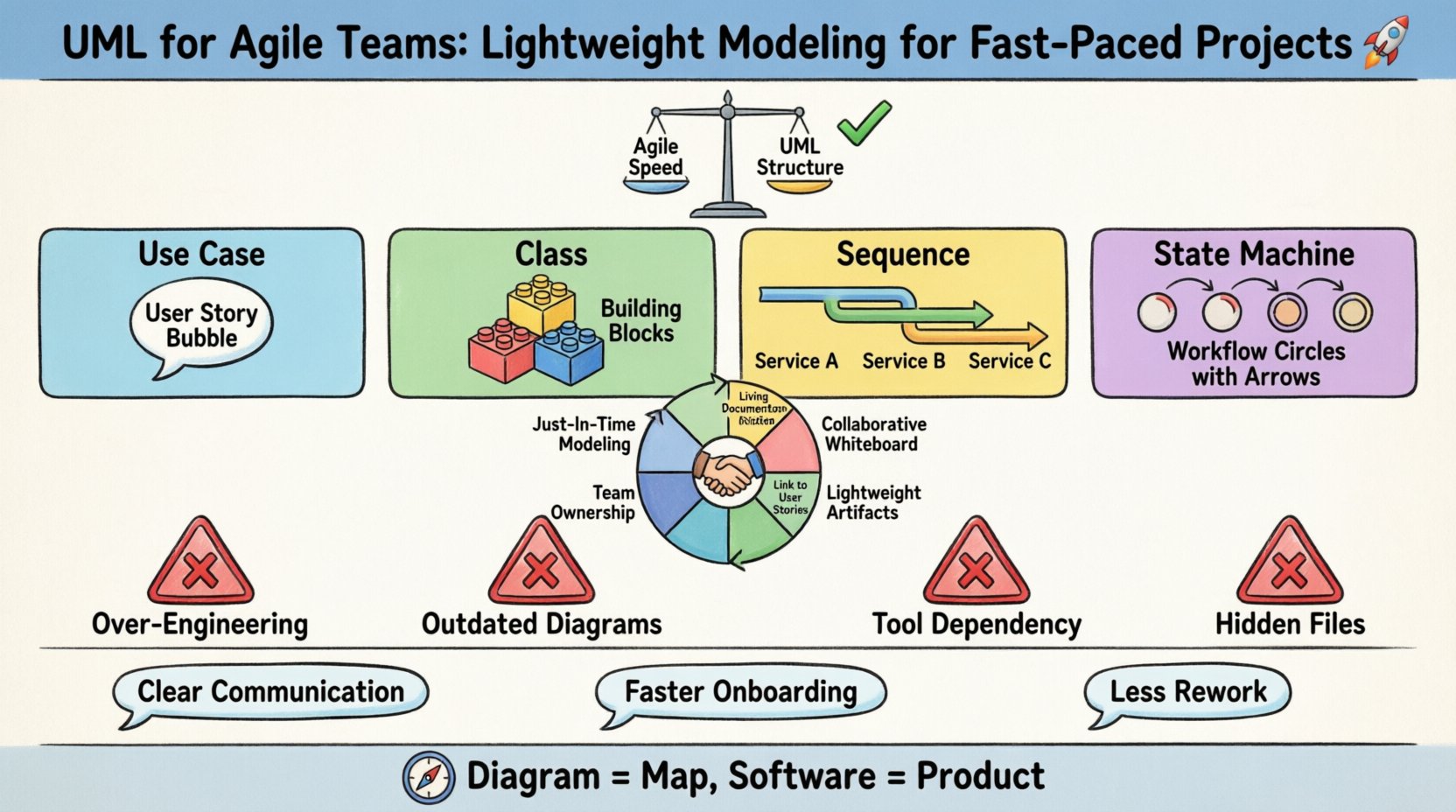
Understanding the Friction Between UML and Agile ⚖️
Agile methodologies prioritize working software over comprehensive documentation. This core tenet, found in the Agile Manifesto, creates a natural tension with UML. Historically, UML was associated with the Waterfall model, where detailed design preceded coding. In an agile environment, requirements evolve. A diagram created at the start of a sprint might be obsolete by the end. This perceived redundancy is why many agile teams reject modeling entirely. However, skipping visual planning can result in fragmented architecture and misunderstood requirements.
The solution lies in lightweight modeling. This approach treats diagrams as communication tools rather than permanent artifacts. The value of a diagram is measured by its ability to clarify a concept, not by its adherence to strict syntax standards. Teams must balance the cost of creating a model against the benefit of understanding. If a whiteboard sketch solves a complex integration issue in five minutes, that is the appropriate level of modeling. If a system requires multiple services to interact, a sequence diagram becomes essential to prevent race conditions.
Key Differences in Approach
- Traditional UML: Focuses on completeness, formal notation, and upfront design. Often stored in repositories separate from code.
- Agile UML: Focuses on just-in-time creation, informal notation, and living documentation tied to user stories.
- Goal: Traditional aims for specification; Agile aims for shared understanding.
When teams adopt agile modeling, they shift from creating a blueprint to creating a conversation aid. The diagram is a tool to facilitate discussion during grooming sessions or sprint planning. Once the discussion concludes, the diagram serves its purpose. It may be updated, archived, or discarded depending on the stability of the design. This fluidity reduces the burden of maintenance and keeps the team focused on value delivery. 📉
Core UML Diagrams for Sprints 🔄
Not all UML diagrams are created equal. In an agile context, some provide significantly more value than others. Teams should select diagrams based on the complexity of the problem and the specific information needed. Below are the most effective diagrams for fast-paced projects.
1. Use Case Diagrams 📋
Use Case diagrams define the functional requirements of a system from the perspective of an actor. In agile terms, these map directly to user stories. They help product owners and developers agree on the scope of a feature before writing code. By visualizing who interacts with the system and what they do, teams can identify missing functionality early.
- Best Used For: Defining scope during backlog refinement.
- Complexity: Low. Easy to draw and understand.
- Lifespan: Medium. Updated as features are added or removed.
2. Sequence Diagrams 📈
Sequence diagrams illustrate how objects interact over time. They are critical for backend development where multiple services or layers communicate. In a microservices architecture, understanding the flow of data is vital. A sequence diagram can reveal potential bottlenecks, error handling requirements, and synchronization issues. During sprint planning, developers use these to align on API contracts and timing.
- Best Used For: API design, event flow, and integration logic.
- Complexity: Medium. Requires understanding of object lifecycles.
- Lifespan: High. Often remains relevant as long as the interface exists.
3. Class Diagrams 🏗️
Class diagrams show the static structure of a system. They define classes, attributes, operations, and relationships. In agile teams, these are often used sparingly because code structure evolves rapidly. However, for complex domains, a class diagram helps establish a common vocabulary. It ensures that everyone agrees on what an entity represents. This is particularly useful when onboarding new developers or refactoring legacy code.
- Best Used For: Domain modeling and database schema planning.
- Complexity: High. Can become tedious to maintain.
- Lifespan: Variable. Often discarded when code is generated or refactored.
4. State Machine Diagrams ⏳
State diagrams describe the behavior of a single object within different states. This is highly effective for workflow engines, order processing systems, or any system with a complex lifecycle. It clarifies valid transitions and prevents invalid states. For example, an order cannot be “shipped” before it is “paid”. Visualizing these rules prevents logical bugs in the application.
- Best Used For: Workflow logic, permission states, and lifecycle management.
- Complexity: Medium to High.
- Lifespan: High. Business logic rarely changes once established.
Strategic Implementation in Sprints 🛠️
Integrating modeling into an agile workflow requires discipline. It is easy to let documentation slip when sprint deadlines loom. To maintain consistency, modeling must be embedded into the daily routine rather than treated as a separate task.
Just-In-Time Modeling
Do not model the entire system at the start of a project. Instead, create diagrams for the specific stories being worked on in the current sprint. This keeps the work relevant. If a story involves a new payment gateway, draw the sequence diagram for that interaction. Do not worry about the entire payment system. This approach ensures that the effort spent on modeling yields immediate value.
Collaborative Drawing Sessions
Modeling should not be a solo activity assigned to a senior architect. Pair programming extends naturally to pair modeling. Two developers working on a complex feature can sketch the architecture together. This promotes knowledge sharing and ensures that the design reflects the team’s collective understanding. Whiteboards are excellent for this. They are cheap, disposable, and encourage experimentation. Once the design is agreed upon, the team can decide if it needs to be saved digitally.
Integration with User Stories
Link diagrams to the backlog items that require them. In the task description, include a reference to the diagram. This creates a traceability link between the requirement and the design. It also helps in code reviews. When a developer submits a pull request, the reviewer can check if the implementation matches the agreed-upon model. This reduces the likelihood of architectural drift.
| Activity | Modeling Role | Frequency |
|---|---|---|
| Backlog Refinement | High-level Use Cases | Per Sprint |
| Sprint Planning | Sequence/Flow Diagrams | Per Story (Complex) |
| Development | Sketches/Whiteboard | As Needed |
| Code Review | Class/Structure Verification | Per Pull Request |
Avoiding Common Traps 🚧
Even with good intentions, teams often fall into patterns that hinder progress. Understanding these pitfalls helps in maintaining a sustainable modeling practice.
1. Over-Engineering the Model
It is tempting to create a perfect diagram that covers every edge case. This leads to analysis paralysis. The diagram becomes a barrier to entry for new team members rather than a guide. Keep the scope narrow. Focus on the happy path first. Secondary flows can be documented in comments or test cases. If a diagram takes more than an hour to create, it is likely too detailed for the current sprint.
2. Neglecting to Update
A diagram that does not match the code is worse than no diagram. It creates a false sense of security. If the code changes, the model must change. In agile, this is difficult because code changes frequently. The solution is to prioritize which diagrams are critical. If a diagram is not updated, it should be removed from the repository. Treat diagrams as living documents that must be maintained.
3. Tool Dependency
Using specialized modeling software can create friction. If the tool requires a license, complex setup, or specific skills, it will not be used. Teams should prefer tools that are accessible to everyone. Simple drawing tools, whiteboards, or even text-based description languages are often sufficient. The goal is communication, not pretty graphics. Avoid getting bogged down in formatting and layout.
4. Hiding the Diagrams
Diagrams should be visible to the whole team. Storing them in a private folder defeats the purpose of shared understanding. Make them accessible in the project management tool or a shared wiki. If a diagram is not visible, it cannot be referenced during a meeting. Visibility encourages accountability and collaboration.
Visual Communication Benefits 🗣️
The primary benefit of UML in agile is communication. Natural language is ambiguous. Words like “load”, “process”, or “send” can mean different things to different people. A visual representation removes this ambiguity. A sequence diagram shows the exact order of events. A state diagram shows the exact conditions required for a transition.
Bridging Technical and Business Gaps
Product owners often struggle to understand technical constraints. Simple UML diagrams can bridge this gap. A high-level architecture diagram helps stakeholders understand why certain features take longer to build. It visualizes dependencies and risks. This transparency builds trust between the business and the technical team. When stakeholders understand the complexity, they can make better prioritization decisions.
Onboarding New Members
When a new developer joins the team, reading the code is the standard way to learn. However, code is implementation details. A class diagram or system architecture diagram provides the context. It shows how the pieces fit together before diving into the logic. This accelerates the ramp-up time. A well-documented model can save days of investigation for a new hire.
Reducing Rework
Discovering architectural flaws during testing is expensive. Catching them during design is cheap. Modeling forces the team to think through the logic before writing code. This “fail fast” approach within the design phase saves time in the long run. It is better to spend 30 minutes redrawing a sequence diagram than 30 hours refactoring code to fix a design flaw. ⏱️
Future-Proofing Documentation 📚
As projects grow, the need for documentation increases. However, the form of that documentation must evolve. Agile teams should consider how their modeling practice scales. What works for a team of five may not work for a team of fifty. The principles of lightweight modeling remain the same, but the tools and processes may need adjustment.
Version Control for Diagrams
Just as code is version controlled, diagrams should be too. Store model files in the same repository as the source code. This ensures that when a branch is created, the model is available. It also allows for code review processes to include model changes. This keeps the design and implementation in sync. It also provides an audit trail of how the system evolved over time.
Text-Based Diagrams
One effective trend is using text-based description languages. These allow diagrams to be written in code. This makes them easier to version control and diff. It also allows for automation. Scripts can generate diagrams from the codebase to ensure accuracy. This approach reduces the maintenance burden significantly. It shifts the focus from drawing to defining.
Final Thoughts on Modeling in Agile 🧭
UML does not have to be a burden. When applied with judgment, it becomes a powerful asset for agile teams. The key is to focus on value. Does this diagram help us build better software? Does it help us communicate better? If the answer is yes, it is worth the effort. If it is just for compliance, it is waste.
Teams should experiment to find the right balance. Start with whiteboard sketches. Move to digital tools only when the complexity demands it. Encourage a culture where drawing is seen as thinking, not just documentation. By adopting lightweight modeling practices, teams can maintain the speed of agile while ensuring the stability of their architecture. The result is a product that is built fast, but built right. 🛠️
Remember, the diagram is not the product. The software is the product. The diagram is merely the map. Do not let the map replace the journey. Use it to navigate the complexities of modern software development without getting lost in the details. With the right approach, UML remains a vital skill for any serious technical team operating in a dynamic environment. 🌐