


Introduction
In today’s digital landscape, static content simply doesn’t cut it anymore. Whether you’re a marketer, educator, or business professional, you need content that captivates, engages, and provides measurable results. Animated flipbooks have emerged as a powerful solution, combining the familiarity of traditional page-turning experiences with modern interactive elements. But creating stunning flipbooks is only half the battle—understanding how your audience interacts with them is equally crucial.
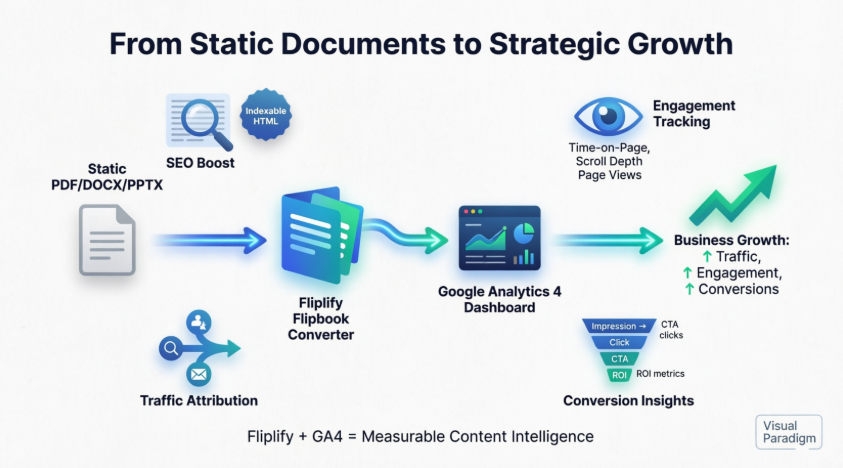
This comprehensive guide will walk you through the entire journey: from creating engaging animated flipbooks that drive traffic and boost SEO, to implementing Google Analytics tracking—the most effective and economical way to measure your success. By the end of this guide, you’ll have the knowledge to create, publish, and track flipbooks that deliver real results.
Part 1: Creating Engaging Animated Flipbooks That Drive Traffic
Why Animated Flipbooks Matter
Offer a more engaging user experience to display your flipbooks with motions.

Animated flipbooks aren’t just visually appealing—they’re strategic tools for increasing user engagement, dwell time, and ultimately, conversions. When readers interact with animated elements, they spend more time with your content, which signals to search engines that your material is valuable, thereby improving your SEO rankings.
Rich Collection of Effects
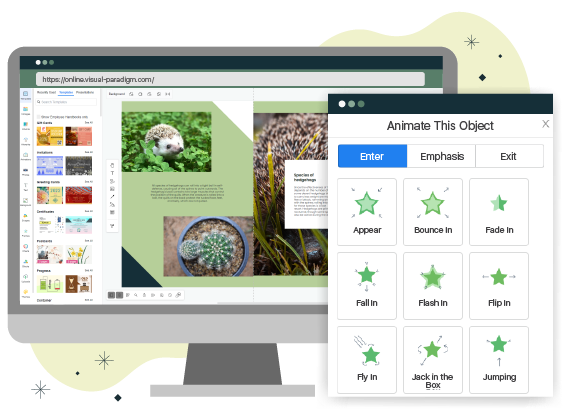
We have a wide range of animations to choose from. Each animation offers its own set of settings for adjustment and customization. Select an animation, click to apply, and the animation is ready.
The key to effective animation is variety and purpose. Don’t just add animations for the sake of it—each movement should serve a function, whether it’s drawing attention to key information, guiding the reader’s eye, or creating memorable moments that enhance comprehension.
Pre-made Animations: Your Shortcut to Professional Results

Don’t feel like designing yourself? We have got you covered—we also have a collection of pre-made animations library. Simply drag and drop these animated assets to your flipbook and you’re ready to go.
Pre-made animations are perfect for:
-
Time-strapped professionals who need quality results quickly
-
Non-designers who want professional-looking content
-
Teams that need consistency across multiple flipbooks
-
Beginners learning the ropes of animated content creation
Mastering the Timeline for Perfect Timing

Tweak each animation’s time frame with our intuitive timeline. Drag and drop the time frame to make adjustments to the animation’s occurrence.
Timeline Best Practices:
-
Stagger animations to avoid overwhelming readers
-
Sync animations with content flow for natural progression
-
Test timing on different devices to ensure smooth playback
-
Keep it snappy—animations should enhance, not delay, content consumption
Animation Types for Every Element

There are specific animations for each type of element. Whether it’s an object, shape, text, or photo, we have designed animations specifically for each of those elements, which will offer different animation variations for each type of element.
Element-Specific Animation Strategies:
-
Text Animations: Use for headlines, key statistics, and calls-to-action
-
Image Animations: Perfect for product showcases and before/after comparisons
-
Shape Animations: Great for highlighting important sections or creating visual hierarchy
-
Object Animations: Ideal for interactive elements and navigation cues
You Are in Control: Strategic Animation Triggers
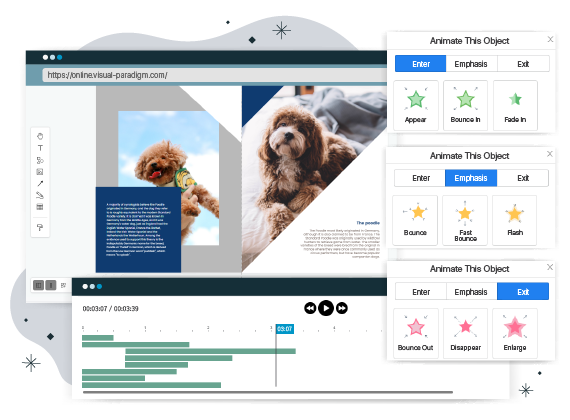
There’s always a start and a finish to every book—this is also true for animations. You can select an animation designed for a specific trigger point. They are: entrance, emphasis, and exit. This will help set the flow of how the animations should appear and when they should be emphasized.
Understanding Animation Triggers:
-
Entrance Animations:
-
Introduce new content smoothly
-
Create anticipation and interest
-
Guide readers through the narrative flow
-
-
Emphasis Animations:
-
Highlight critical information
-
Draw attention to key data points
-
Reinforce important messages
-
-
Exit Animations:
-
Provide smooth transitions between sections
-
Create satisfying closure for each page
-
Maintain engagement as readers progress
-
Let’s See It in Action: The Interactive Advantage
Interactive flipbooks will encourage your users to engage with your content. This experience is fun and easy for everyone while maintaining a high interactive level from the audience.
Benefits of Interactive Flipbooks:
-
Increased dwell time: Readers spend 3-5x longer with interactive content
-
Better retention: Interactive elements improve information retention by up to 70%
-
Higher shareability: Engaging content is 40% more likely to be shared
-
Improved SEO: Longer engagement signals quality to search engines
Collaboration and Accessibility Features
Team Collaboration
Work together alongside other team members to produce the best results. Communicate and collaborate in real-time with other team members.
Real-time collaboration ensures:
-
Consistent branding across all flipbooks
-
Faster production cycles
-
Quality control through peer review
-
Knowledge sharing among team members
Mobile Ready
These animated flipbooks will work on any mobile device and still remain interactive. Anyone with a link will be able to view the flipbook on any of their devices.
With mobile traffic accounting for over 50% of web traffic globally, mobile optimization isn’t optional—it’s essential. Our flipbooks automatically adapt to:
-
Various screen sizes
-
Touch interactions
-
Different orientations (portrait/landscape)
-
Varying connection speeds
Easy Sharing and Distribution
Share your stunning creations with your friends and co-workers. You can also embed your creation by simply copying and pasting the embedded codes onto your site.
Distribution Options:
-
Direct link sharing via email or social media
-
Embed codes for websites and blogs
-
QR codes for print materials
-
Integration with LMS and CMS platforms
Step-by-Step: How to Create Your Animated Flipbook
01. Create a Flipbook
Start from scratch by using our online editor, or upload and convert a document to flipbook.
Pro Tip: If you’re converting from PDF, ensure your source document is well-formatted with clear headings and properly sized images for the best results.
02. Customize
Browse through our collection of animations. Click and apply animation to the selected element.
Pro Tip: Less is more. Apply animations strategically to key elements rather than animating everything on the page.
03. Publish and Share
Once your flipbook is published, share it via a link or embed it on a site.
Pro Tip: Before publishing, preview your flipbook on multiple devices to ensure optimal viewing experience across all platforms.
Part 2: Tracking Success with Google Analytics Integration
Why Tracking Matters: The Most Effective and Economical Approach
Do you want to gain a better understanding of flipbooks’ view count and reader behavior? You can do this now with Visual Paradigm Online’s Google Analytics integration. By integrating Google Analytics, you can gain valuable insights into your flipbook’s view count, user engagement, and traffic sources, empowering you to make informed decisions for optimizing your content strategy.
Why Google Analytics is Your Best Choice:
-
Cost-Effective: Free to use with powerful features
-
Comprehensive: Track everything from page views to user behavior
-
Industry Standard: Trusted by millions of businesses worldwide
-
Actionable Insights: Data that directly informs your content strategy
-
Scalable: Grows with your needs from startup to enterprise
Without tracking, you’re essentially publishing content in the dark. Google Analytics integration is the most effective and economical way to illuminate your content’s performance, understand your audience, and maximize your ROI.
How to Integrate Visual Paradigm with Google Analytics 4
Part 1: Setting up Google Analytics
Begin by ensuring you have a Google Analytics account. Follow these steps to initiate the integration:
Step 1: Access Admin Settings
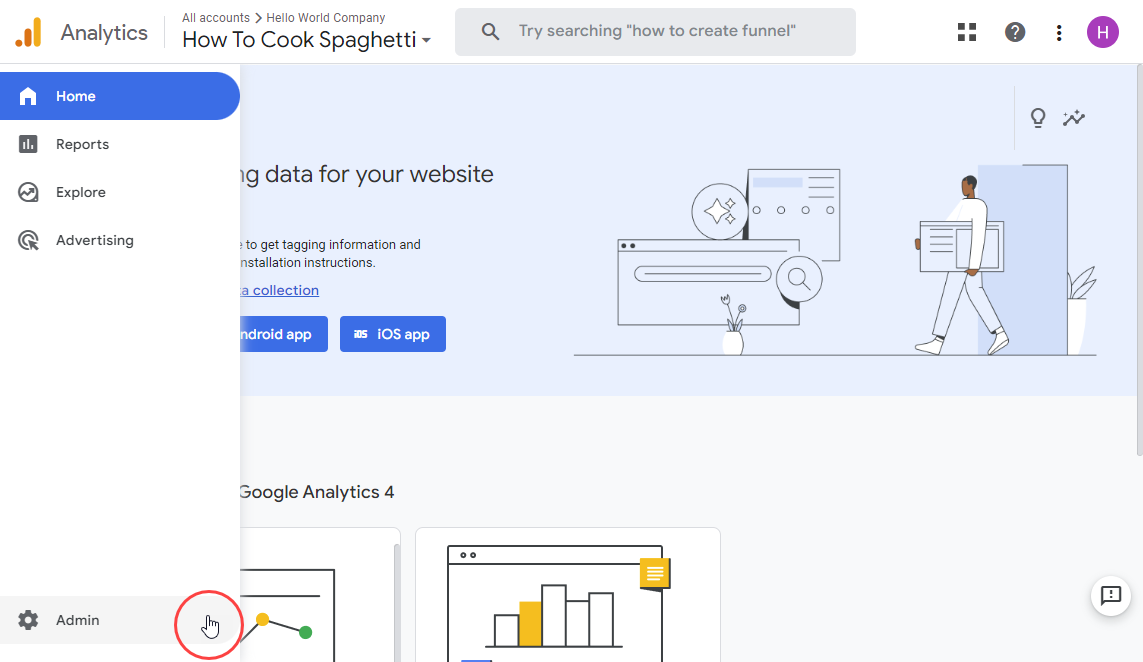
Log in to your Google Analytics account and navigate to the Admin page from the bottom left corner.
Step 2: Select Account and Property
Select the desired account and property for integrating your flipbook.
Best Practice: Create a separate property for your flipbooks if you’re tracking multiple content types. This keeps your data organized and makes analysis easier.
Step 3: Navigate to Data Streams
Beneath your GA4 property in the Analytics admin section, locate and click on Data Streams.
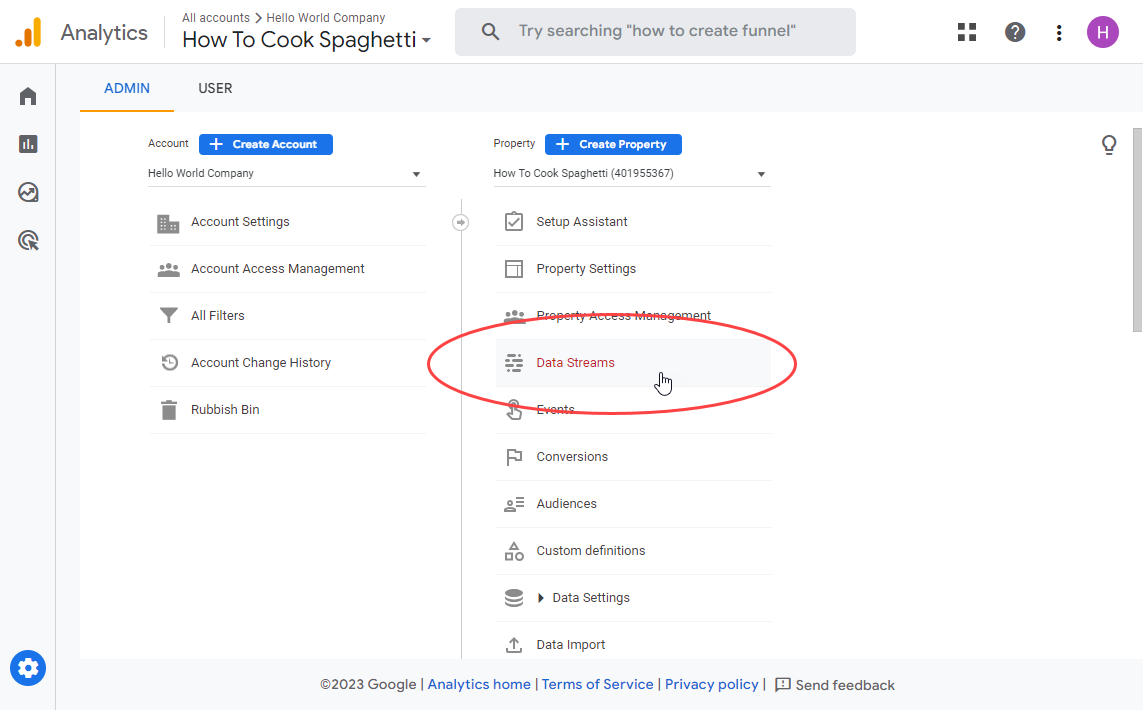
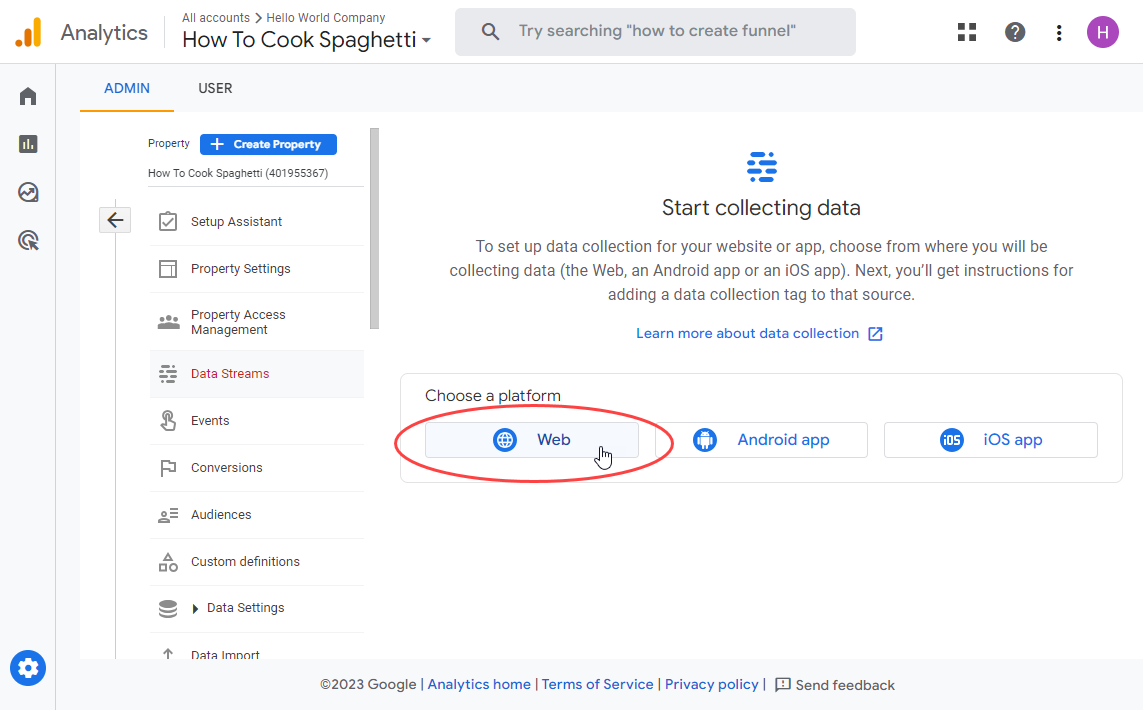
Step 4: Create Web Stream
Choose Web if you don’t currently have a stream added. If not, click Add Stream and then choose Web.
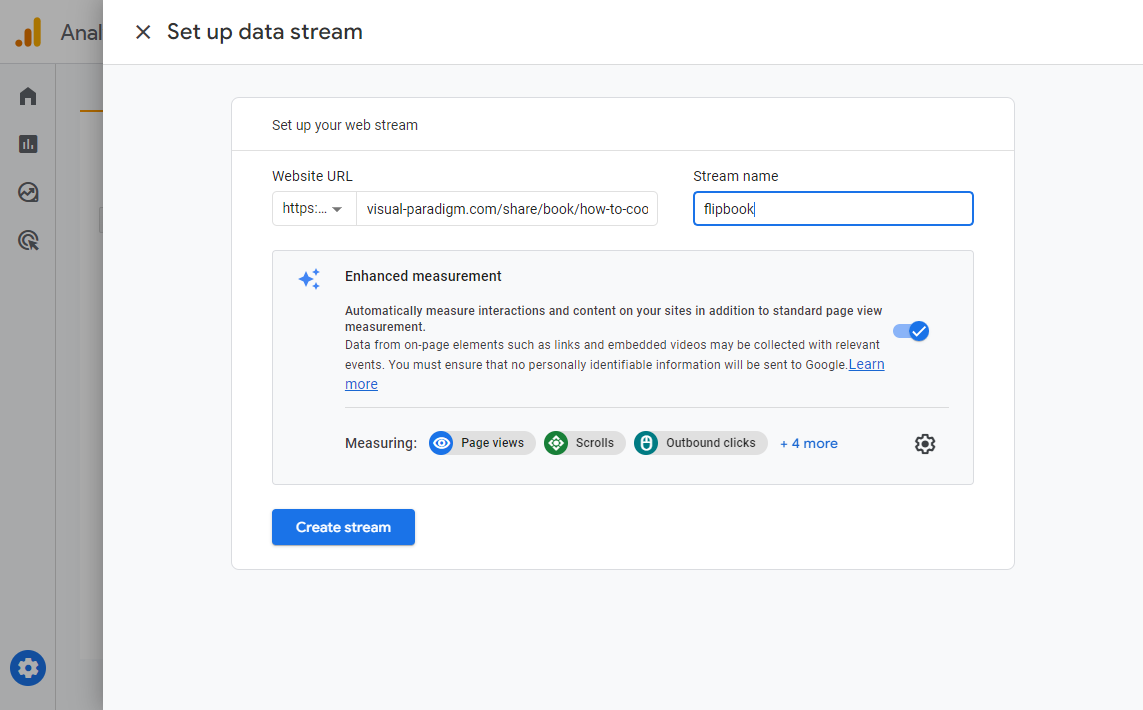
Step 5: Configure Stream Details
Provide the URL of your flipbook’s website and assign a meaningful Stream name, such as ‘flipbook’ for easy identification. Click Create stream to proceed.
Pro Tip: Use descriptive names that include the content type and date (e.g., “Product Catalog Flipbook 2024”) for easier management.
Step 6: Copy Your Measurement ID
Copy the unique measurement ID starting with “G-” along with the associated alphanumeric string.
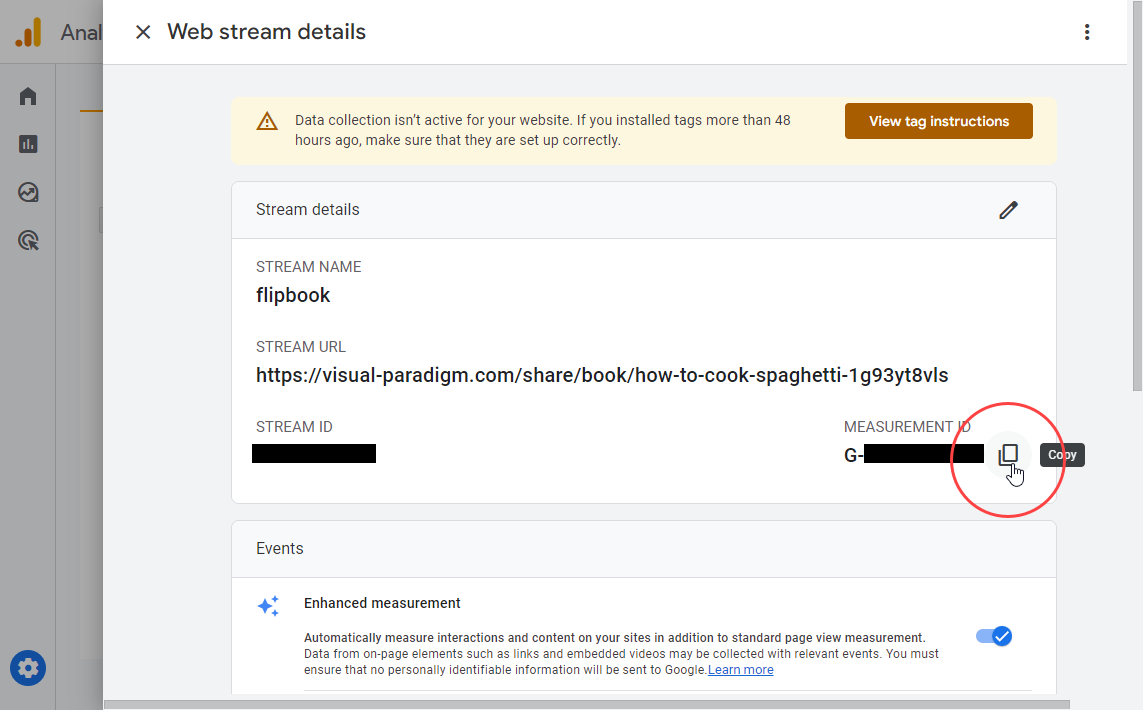
Important: Keep this ID secure. You’ll need it for the next phase of integration.
Part 2: Setting up Flipbooks in Visual Paradigm
Once you’ve obtained the measurement ID from Google Analytics, seamlessly incorporate it into your flipbook settings. Keep in mind that Google Analytics may take 24-48 hours to process data from your flipbook’s website or app.
Step 1: Access Your Workspace
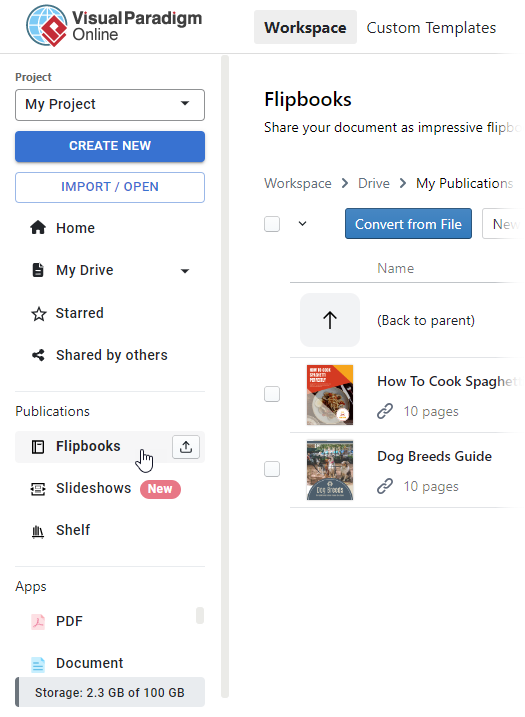
Navigate to your workspace page and access the Flipbooks section from the left-hand menu.
Step 2: Locate Your Flipbook
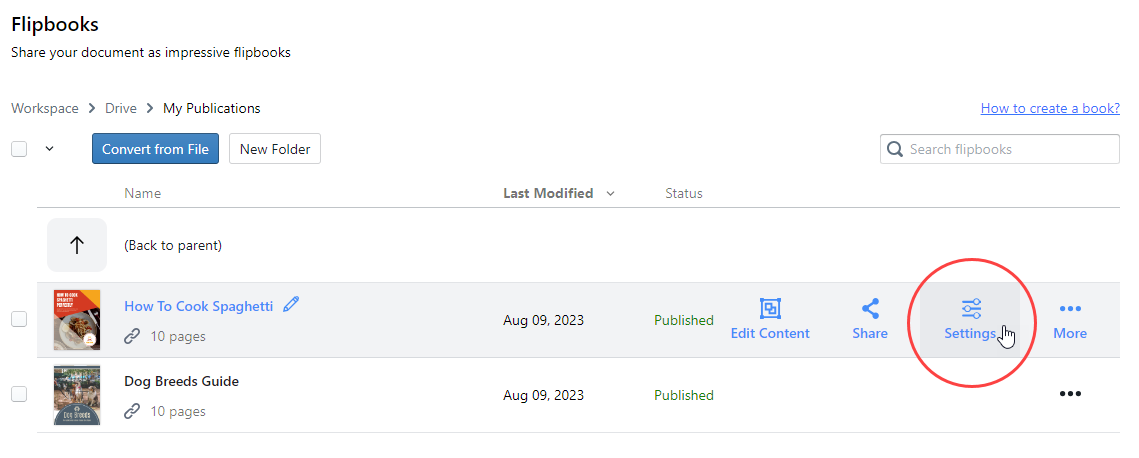
Locate the flipbook for which you want to track view data and click on the Settings button.
Step 3: Configure Analytics
In the left-side categories within the Settings page, click on Analytics. Paste the Google Analytics measurement ID in the provided field. Once pasted, click Finish.
Verification Checklist:
-
✓ Measurement ID is correctly formatted (G-XXXXXXXXX)
-
✓ No extra spaces before or after the ID
-
✓ Settings saved successfully
-
✓ Flipbook published after adding analytics
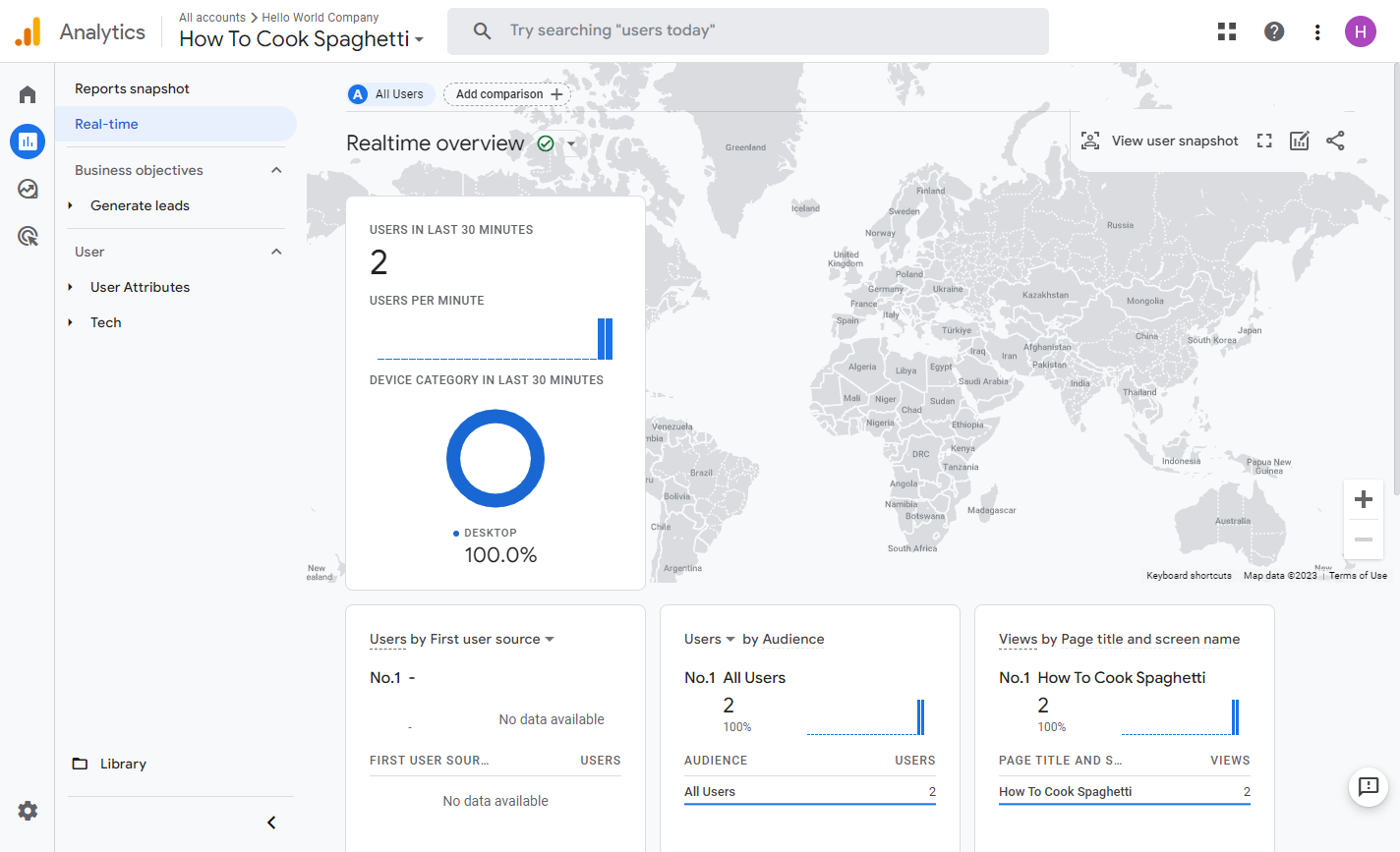
And there you have it! Your flipbook’s statistics are now available on Google Analytics. While real-time data will be accessible shortly after implementing the code, please note that historical traffic data might take up to a day to populate.
Maximizing Your Analytics Data
Key Metrics to Monitor
Once your integration is complete, focus on these critical metrics:
1. Page Views and Unique Visitors
-
Understand your reach
-
Identify popular content
-
Track growth over time
2. Average Session Duration
-
Measure engagement quality
-
Identify content that holds attention
-
Optimize underperforming sections
3. Traffic Sources
-
Discover where your audience comes from
-
Optimize marketing channels
-
Allocate resources effectively
4. User Behavior Flow
-
See how readers navigate your flipbook
-
Identify drop-off points
-
Improve content structure
5. Device and Browser Data
-
Ensure cross-platform compatibility
-
Optimize for most-used devices
-
Improve user experience
Turning Data into Action
Weekly Review Routine:
-
Check overall performance trends
-
Identify top-performing pages
-
Note any unusual traffic spikes or drops
-
Review user feedback and behavior patterns
Monthly Strategy Adjustments:
-
Double down on what works
-
Revise or remove underperforming content
-
Test new animation strategies
-
Optimize distribution channels
Quarterly Deep Dives:
-
Comprehensive ROI analysis
-
Audience segmentation review
-
Competitive benchmarking
-
Strategic planning for next quarter
Advanced Tips for Success
SEO Optimization for Flipbooks
-
Optimize Titles and Descriptions: Use relevant keywords naturally
-
Add Alt Text: Describe images for accessibility and SEO
-
Create Shareable Content: Encourage backlinks and social shares
-
Mobile Optimization: Ensure fast loading on all devices
-
Regular Updates: Keep content fresh and relevant
Engagement Boosters
-
Add Interactive Elements: Quizzes, polls, and clickable hotspots
-
Include Clear CTAs: Guide readers to next steps
-
Use Storytelling: Create narrative flow through pages
-
Incorporate Multimedia: Videos, audio, and animations
-
Personalize Content: Tailor experiences to audience segments
Distribution Strategies
-
Email Marketing: Embed flipbooks in newsletters
-
Social Media: Share snippets with links to full version
-
Website Integration: Embed on relevant landing pages
-
Partner Collaborations: Co-create and cross-promote
-
Paid Advertising: Target specific audiences with promoted content
Troubleshooting Common Issues
Issue: Analytics Data Not Showing
-
Solution: Wait 24-48 hours for data processing. Verify measurement ID is correct.
Issue: Animations Not Playing Smoothly
-
Solution: Reduce animation complexity. Check file sizes. Test on different devices.
Issue: Flipbook Not Loading on Mobile
-
Solution: Ensure responsive design. Test on multiple devices. Check internet connection requirements.
Issue: Low Engagement Rates
-
Solution: Review content relevance. Add more interactive elements. Simplify navigation.
Conclusion
Creating animated flipbooks and tracking their performance with Google Analytics represents one of the most effective and economical strategies for modern content marketing. You now have the complete roadmap:
✓ Create engaging animated flipbooks with rich effects and pre-made animations
✓ Customize every element with precise timeline control
✓ Publish across multiple platforms with mobile-ready responsiveness
✓ Track performance with Google Analytics integration
✓ Optimize based on real data and user behavior insights
The combination of compelling animated content and data-driven optimization creates a powerful feedback loop. Each flipbook you create becomes smarter than the last, as analytics reveal what resonates with your audience and what doesn’t.
Remember, the most successful flipbook creators aren’t those who make the flashiest animations—they’re the ones who consistently measure, learn, and improve. With Google Analytics as your guide, you’re equipped to make informed decisions that drive real results.
Start creating, start tracking, and start seeing the difference that data-driven animated content can make for your business, education, or marketing goals. Your audience is waiting—give them an experience they’ll remember and share.
References
- Why Visual Paradigm Online’s Flipbook Maker Stands Out: Explores the unique advantages and differentiating features of Fliplify compared to other flipbook solutions.
- Reference List for Learning Fliplify of Visual Paradigm Online: A curated resource guide to help users master Fliplify’s tools and functionalities.
- The Complete Tutorial to Visual Paradigm Flipbook Maker: A third-party walkthrough detailing Fliplify’s core capabilities and use cases.
- Transforming Digital Content: The Comprehensive Guide to Visual Paradigm’s Fliplify Flipbook Maker: Original source article covering Fliplify’s features, benefits, and applications.
- Discover the Power of Searchable Flipbooks with Visual Paradigm Online: Details how Fliplify enhances SEO through searchable, indexable flipbook content.
- Visual Paradigm Flipbook Maker: Elevate Your Digital Presence with Dynamic and Engaging Flipbooks: Official blog post highlighting strategic benefits of using Fliplify for brand growth.
- The Ultimate Guide to the Visual Paradigm Online Platform’s Bookshelf: Explains how to organize and showcase flipbooks using Fliplify’s digital bookshelf feature.
- Comprehensive Guide to Fliplify: Creating Interactive Flipbooks with Visual Paradigm: In-depth resource covering creation workflows, customization, and publishing strategies.
- How to Improve Customer Experience with Digital Flipbooks: Focuses on leveraging analytics to refine flipbook content for better user experiences.
- Flipbook Maker Category Archive: Collection of related articles and updates from Visual Paradigm’s official blog.
- How Google Analytics Helps You Track Website Growth: External resource explaining GA4’s role in measuring and optimizing digital performance.
- Track the Performance of Your Flipbook Using Google Analytics: Official tutorial on setting up and interpreting GA4 data for Fliplify publications.
- Google Analytics Help: Measurement Code Data Collection: Official Google documentation on how GA4 collects and processes user interaction data.
- Google Analytics Integration Guide: Step-by-step technical guide from Visual Paradigm for connecting GA4 to Fliplify.
- Tracking Flipbook Views with Google Analytics Integration: Case study and best practices for monitoring flipbook engagement via GA4.