


Transforming unstructured business requirements into a clear, actionable software design is a critical but often time-consuming task. The AI-Powered Textual Analysis Tool in Visual Paradigm revolutionizes this process, enabling users to generate a complete class diagram directly from a simple problem description. This deep dive explores how the tool, using a Student Registration System as an example, automates the complex journey from textual input to a structured UML model, showcasing its power as an intelligent design assistant. The process begins with a simple prompt, and through a series of AI-driven steps, it delivers a professional-grade class diagram ready for further development.
Quick Summary
-
Visual Paradigm’s AI Textual Analysis Tool converts natural language into structured software design.
-
It automates the entire process from problem description to a complete UML class diagram.
-
Key steps include generating a problem description, identifying candidate classes, defining class details, establishing relationships, and generating the final diagram.
-
The tool intelligently extracts entities, attributes, operations, and their relationships from text.
-
It significantly reduces the time and effort required for manual analysis and design.
Step 1: Input the Problem Domain
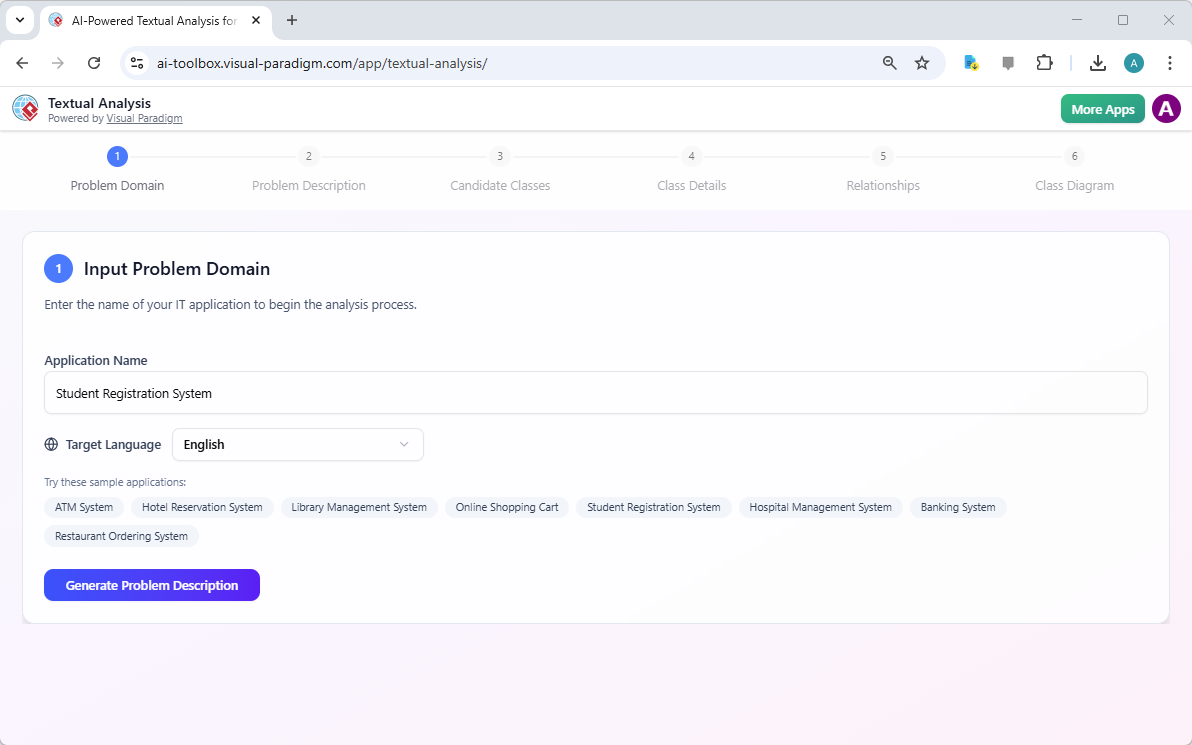
The journey begins with a simple input. In Step 1, the user defines the application’s name, such as “Student Registration System,” and selects the target language. The tool provides a list of sample applications, which can serve as inspiration. Once the application name is entered, the user clicks the “Generate Problem Description” button. This initial step is crucial as it sets the context for the AI to understand the domain. The tool then uses its natural language processing capabilities to analyze the provided name and generate a comprehensive problem description that outlines the system’s purpose, key functionalities, and business needs. This AI-generated description serves as the foundational text for all subsequent analysis.
Step 2: Generate and Review the Problem Description
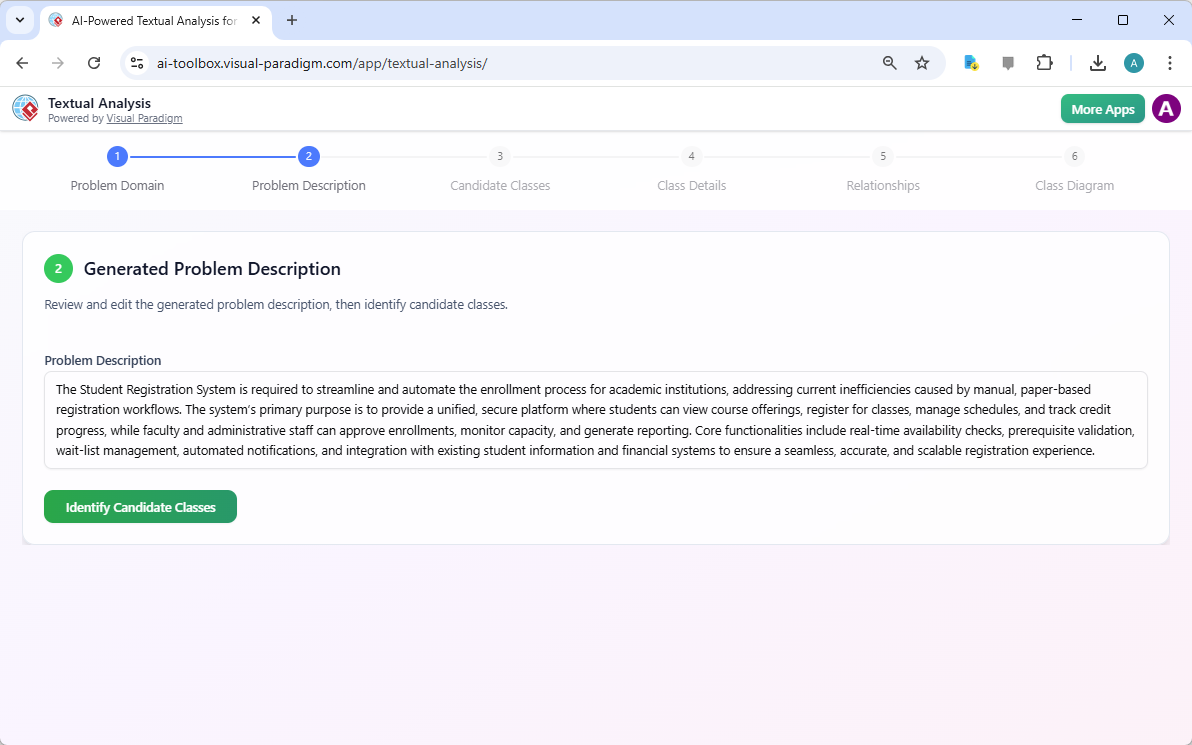
In Step 2, the AI presents the generated problem description. This text is a detailed summary of the system’s requirements, written in natural language. It explains the need to streamline enrollment, automate workflows, and provide a secure platform for students and staff. The description highlights core functionalities like real-time availability checks, prerequisite validation, and reporting. The user can review this text to ensure the AI has correctly understood the problem domain. This step is vital for accuracy, as the quality of the final design depends on the accuracy of this initial analysis. The user can edit the description if necessary before proceeding to the next stage of identifying the system’s core components.
Step 3: Identify Candidate Classes
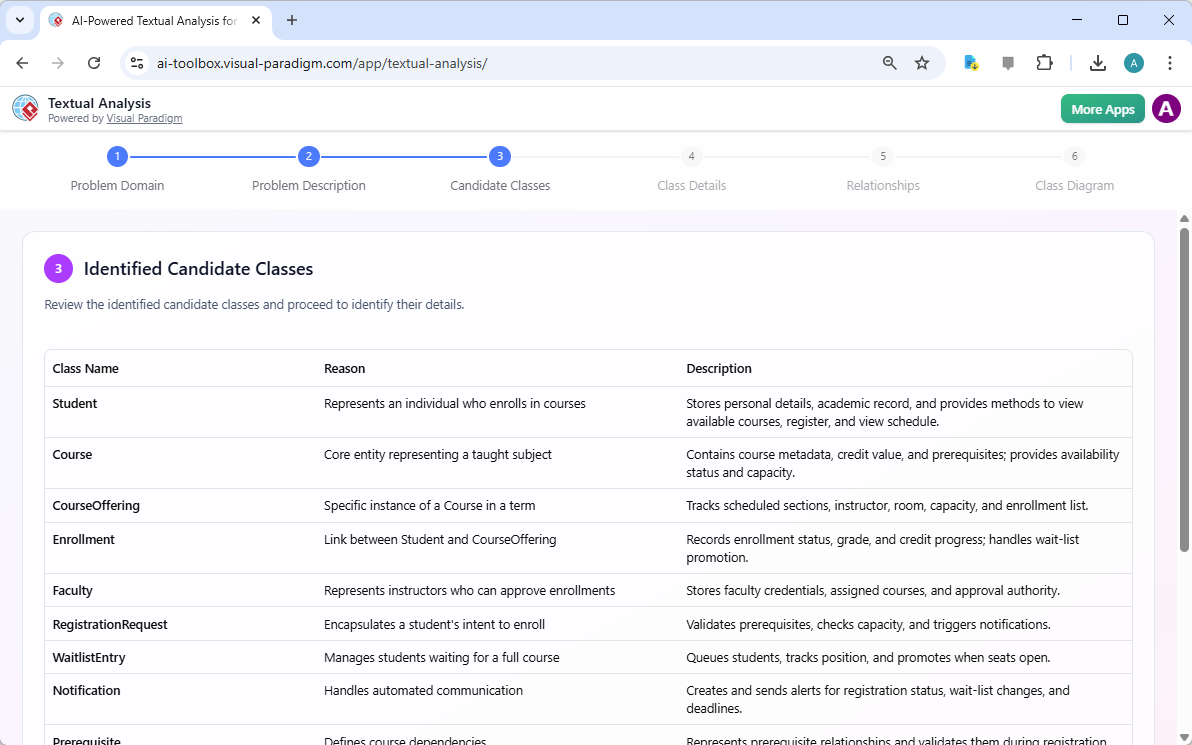
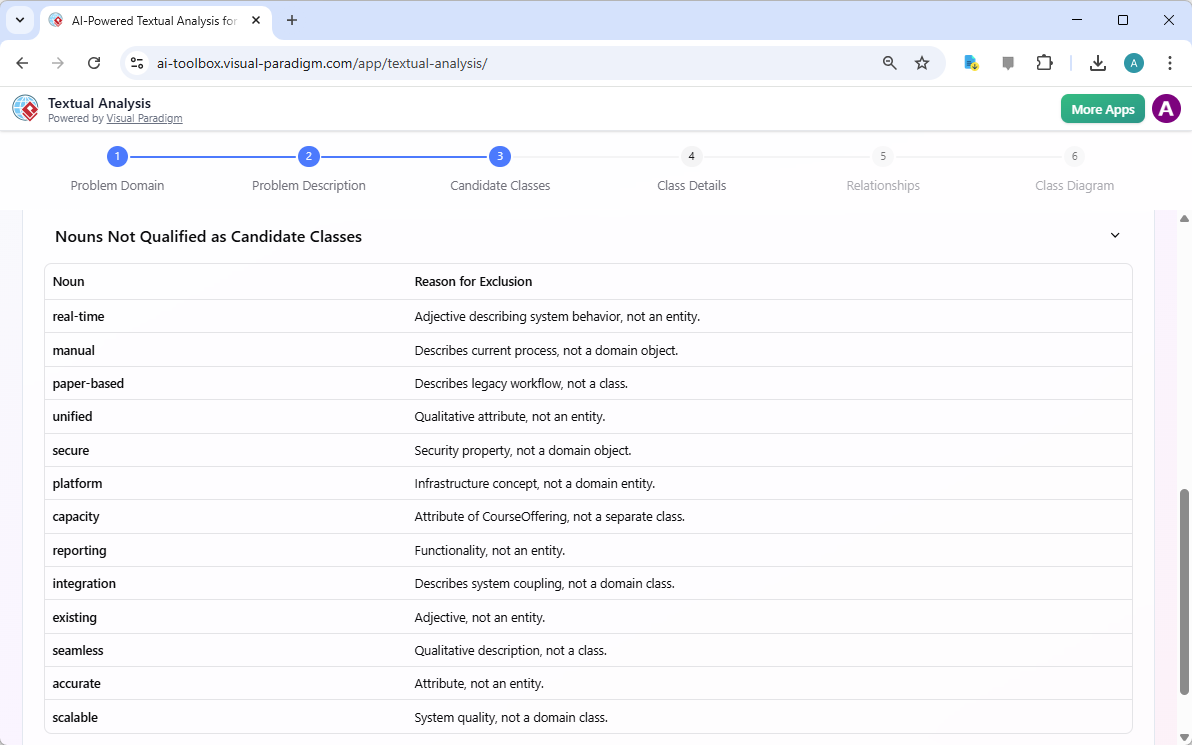
After reviewing the problem description, the tool moves to Step 3, where it identifies potential classes, or objects, within the system. The AI analyzes the text to extract nouns and phrases that represent key entities. For the Student Registration System, it identifies classes like “Student,” “Course,” “CourseOffering,” and “Faculty.” This is a critical phase where the AI distinguishes between core domain entities and other terms that are not suitable for classes. The tool provides a list of identified candidate classes, each with a reason for its inclusion. For instance, “Student” is identified because it represents an individual who enrolls in courses. It also presents a list of nouns that are not qualified as candidate classes, such as “real-time” or “manual,” explaining that these are adjectives or attributes, not domain objects. This intelligent filtering ensures that the model is built on the correct set of entities.
Step 4: Define Class Details
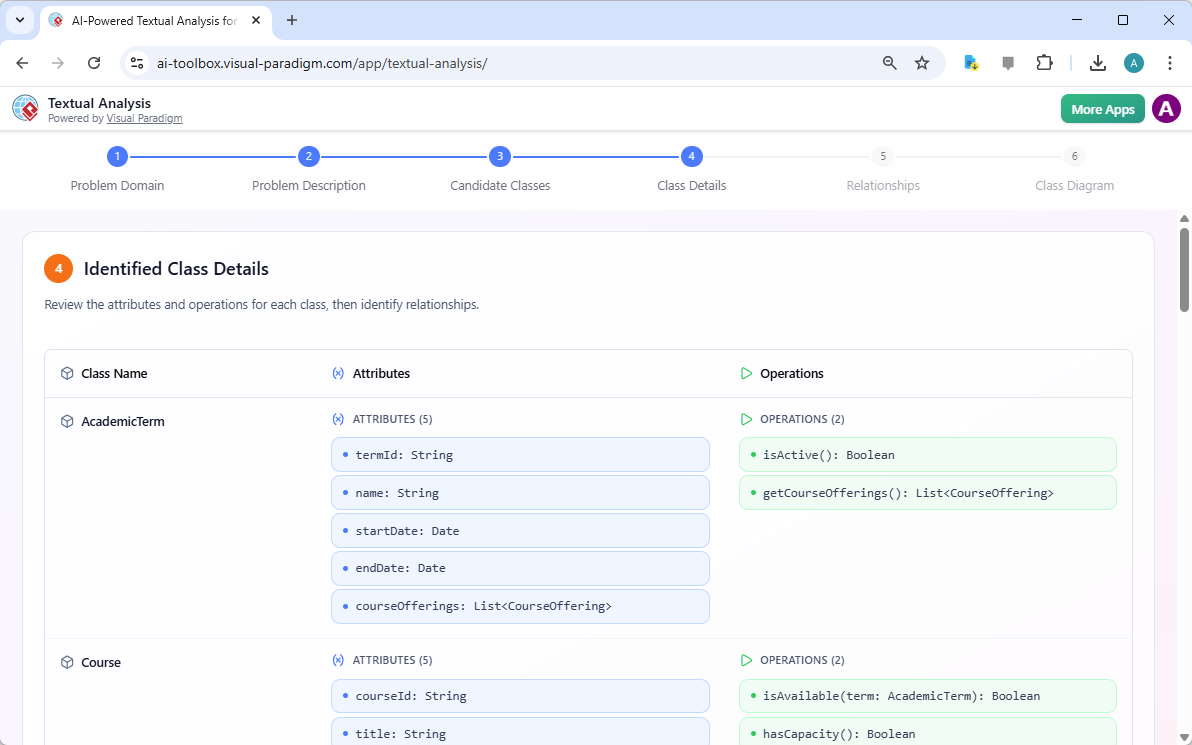
In Step 4, the AI delves deeper into the identified classes by defining their attributes and operations. The user is presented with a detailed view of each class, listing its attributes (data fields) and operations (functions or methods). For example, the “Course” class might have attributes like “courseId,” “title,” and “creditHours,” while the “RegistrationSystem” class would have operations like “lookupCourse” and “generateReport.” This step transforms the high-level entity identification into a more concrete data model. The AI uses the context from the problem description to infer what data is relevant and what actions the system should be able to perform. The user can review and refine these details, ensuring the model accurately reflects the system’s requirements before moving to define how these classes interact.
Step 5: Identify Class Relationships
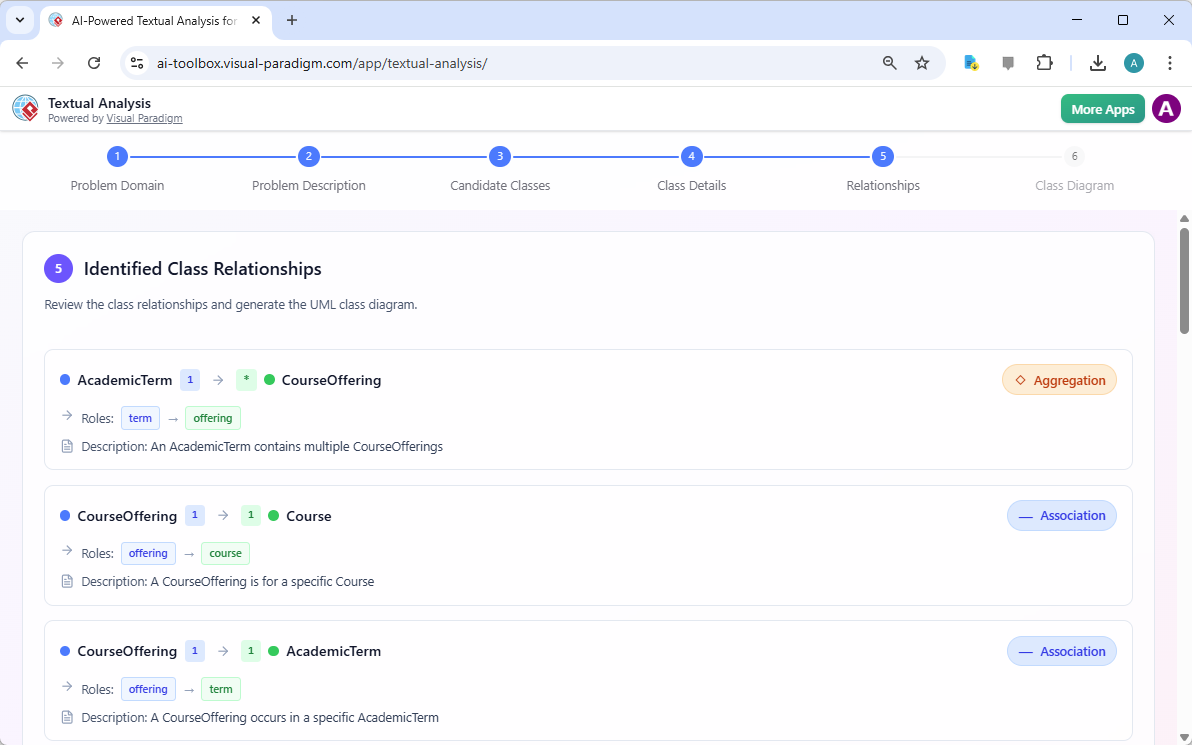
With the classes and their details defined, the tool proceeds to Step 5, where it identifies the relationships between them. The AI analyzes the problem description to determine how the classes are connected. For instance, it recognizes that a “CourseOffering” is associated with a specific “Course” and occurs in a particular “AcademicTerm.” It also identifies that a “Student” enrolls in a “CourseOffering,” and a “Faculty” member teaches a “CourseOffering.” The tool presents these relationships with their type (e.g., Association, Aggregation) and the roles played by each class in the relationship. This step is essential for creating a coherent and accurate model, as it defines the structure and behavior of the system. The user can review these relationships and make adjustments if needed.
Step 6: Generate the Final Class Diagram
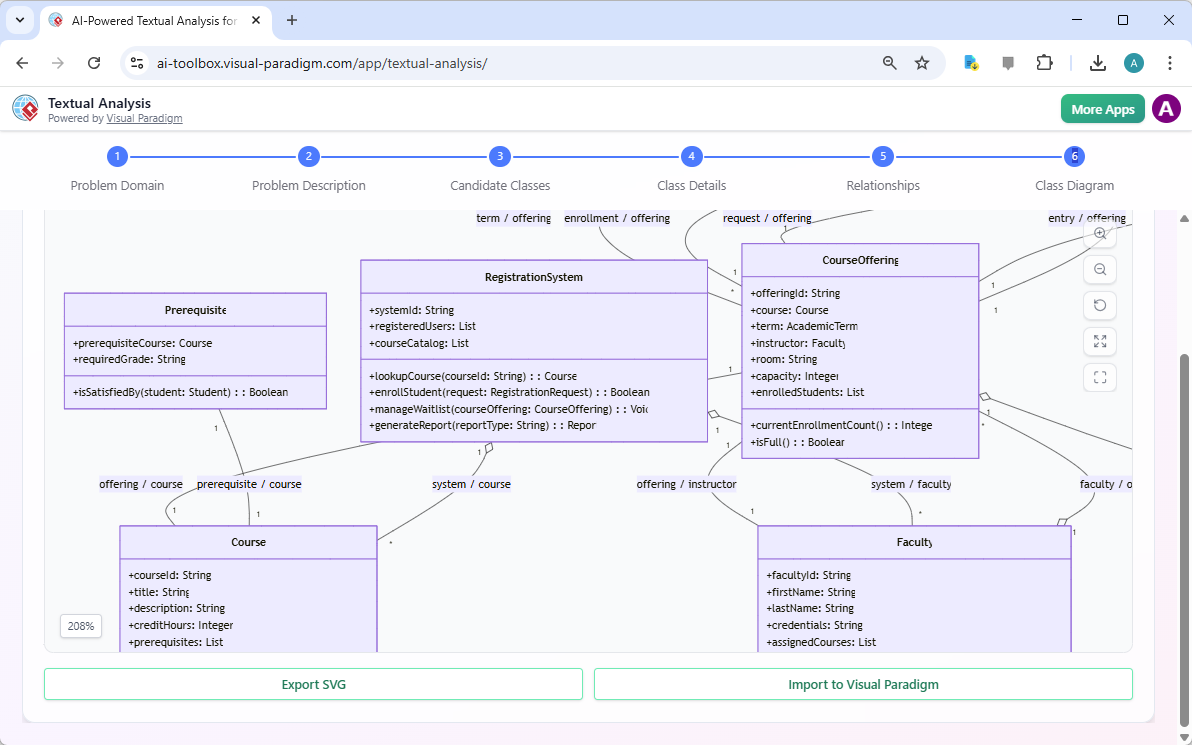
The culmination of the process is Step 6, where the AI generates the final UML class diagram. The tool takes all the previously identified classes, their attributes, operations, and relationships and renders them into a visual diagram. The diagram clearly shows the structure of the system, with each class represented as a box containing its name, attributes, and operations, connected by lines that represent the relationships between them. The final diagram is a powerful visual representation of the software design, ready for use in documentation, discussion with stakeholders, or as a foundation for implementation. The user can export the diagram as an SVG or import it directly into Visual Paradigm for further modeling.
Conclusion
The AI-Powered Textual Analysis Tool in Visual Paradigm offers a transformative approach to software design. By automating the process of converting a natural language description into a formal UML class diagram, it dramatically accelerates the requirements analysis and design phases. The step-by-step workflow, from inputting a problem domain to generating a complete diagram, demonstrates the tool’s ability to intelligently analyze text, extract key entities and relationships, and produce a professional-grade artifact. This capability is invaluable for developers, analysts, and architects, allowing them to focus on higher-level design decisions rather than the tedious work of manual analysis. For those looking to streamline their software development process, this AI-powered tool is a powerful asset.
Ready to experience the future of software design? Try the AI-Powered Textual Analysis Tool in Visual Paradigm today.
Related Links
Textual analysis tools in Visual Paradigm bridge the gap between unstructured information and formal design by transforming written descriptions into structured visual models. These tools utilize AI-driven processing to identify key entities, relationships, and candidate patterns, which significantly accelerates requirements engineering and software design workflows.
-
AI Textual Analysis – Transform Text into Visual Models Automatically: This feature leverages AI to analyze text documents and automatically generate UML, BPMN, and ERD diagrams, facilitating faster documentation and modeling.
-
AI-Powered Textual Analysis: From Problem Description to Class Diagram: A specialized guide focused on converting natural language problem descriptions into accurate, production-ready class diagrams.
-
Textual Analysis in Visual Paradigm: From Text to Diagram: An official documentation resource detailing the transition from written narratives to structured use case and class diagrams.
-
Visual Paradigm Textual Analysis Tool Features: An overview of the tool’s capabilities in deriving meaningful insights from large volumes of unstructured text through natural language processing.
-
Documenting Requirements Using Textual Analysis: This guide explains how to extract and organize requirements from project documents to enhance traceability and clarity across the development lifecycle.
-
Advanced Textual Analysis Techniques in Visual Paradigm: Explore sophisticated methods for text mining, including sentiment analysis and keyword extraction, to gain deeper analytical insights.
-
What is Textual Analysis? – Visual Paradigm Circle: An introductory resource covering the purpose and strategic benefits of implementing textual analysis within standard project workflows.
-
Identifying Domain Classes Using AI Textual Analysis: A tutorial on streamlining domain modeling by using AI to automatically identify and categorize potential classes directly from text.
-
Visual Paradigm AI Toolbox: Textual Analysis for Software Modeling: A web-based application within the AI Toolbox that allows users to identify entities and concepts to build structured software models from unstructured input.
-
Case Study: AI-Powered Textual Analysis for UML Class Diagram Generation: A real-world evaluation demonstrating how AI-driven extraction improves the accuracy and efficiency of generating models from complex requirements.