


Introduction
In the rapidly evolving landscape of software architecture and system design, the ability to quickly translate conceptual ideas into formal modeling diagrams is crucial. Visual Paradigm has revolutionized this process with the introduction of their AI Profile Diagram Generator, a groundbreaking feature launched in March 2026 that bridges the gap between abstract thinking and structured UML modeling. This comprehensive guide explores how this innovative AI-powered tool transforms the way software architects, developers, and system designers create Profile Diagrams, eliminating the traditional barriers of manual diagram creation while maintaining professional standards and compliance.
What is Visual Paradigm’s AI Profile Diagram Generator?
Visual Paradigm’s AI Profile Diagram Generator is an advanced artificial intelligence feature integrated directly into the Visual Paradigm Desktop environment and OpenDocs platform. Released in early 2026, this tool enables users to generate professional-grade UML Profile Diagrams instantly from simple text descriptions or unstructured notes.
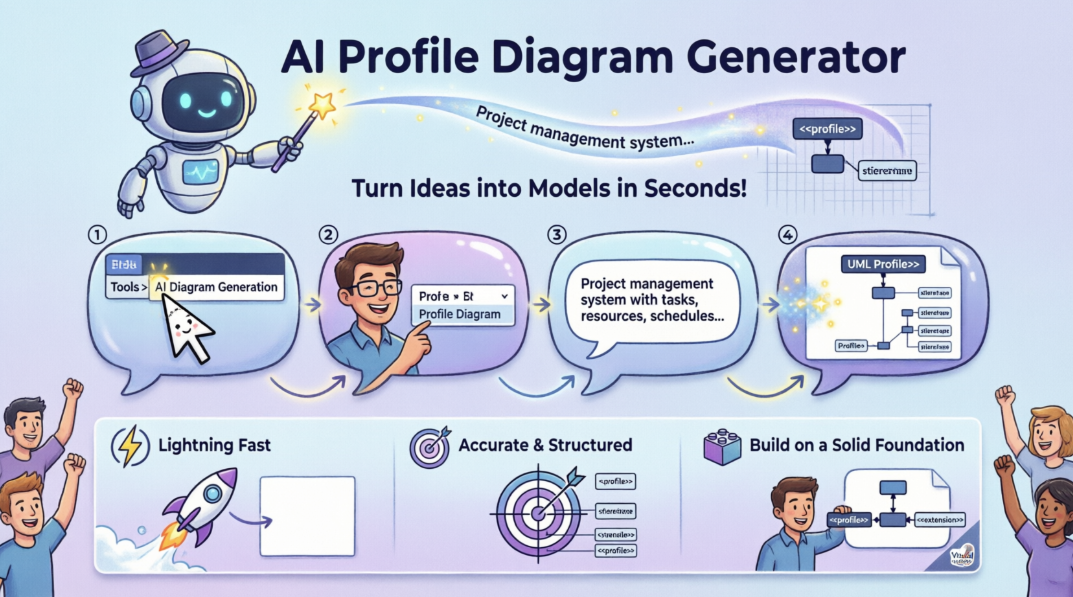
The AI engine understands domain-specific requirements and automatically creates the necessary stereotypes, tagged values, and constraints that comply with standard UML extension mechanisms. This means you can focus on high-level architecture and domain customization rather than spending hours on manual shape placement and connector drawing.
Who Should Use This Tool?
Primary Users:
Software Architects who need to define domain-specific customizations and constraints for complex enterprise systems can leverage this tool to rapidly prototype architectural frameworks.
Systems Engineers working on industry-specific solutions (aerospace, healthcare, finance) can quickly generate tailored UML profiles that extend standard modeling capabilities.
Development Teams adopting framework-specific approaches (.NET, J2EE, Spring) can create customized profiles that enforce organizational standards and best practices.
Business Analysts who need to communicate complex domain concepts through visual models without deep UML expertise can use natural language to generate professional diagrams.
Educators and Students teaching or learning UML extension mechanisms can rapidly create examples and explore different profiling scenarios.
Key Features and Capabilities
1. Automated Generation from Text Prompts
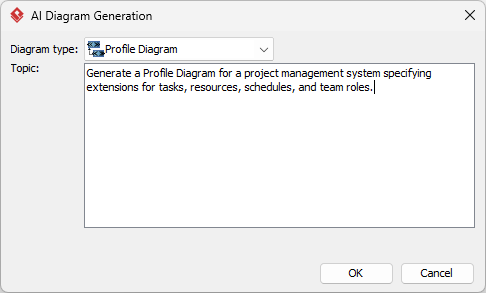
Simply describe your domain or platform requirements in natural language, and the AI instantly generates a complete Profile Diagram. For example, entering “Generate a Profile Diagram for a project management system specifying extensions for tasks, resources, schedules, and team roles” produces a fully structured diagram ready for refinement.
2. Multi-Platform Integration
The AI generation capability is seamlessly integrated across:
- Visual Paradigm Desktop – Full-featured modeling environment
- OpenDocs – AI-powered knowledge management platform
This ensures consistency whether you’re working on individual projects or collaborative knowledge bases.
3. Intelligent Refinement & Customization
Generated diagrams are not static outputs. You maintain full control to:
- Rename elements using AI chatbot commands
- Add new attributes and constraints
- Refine stereotypes and tagged values
- Adjust layout and styling
- Continue modeling with Visual Paradigm’s comprehensive tool suite
4. Standard UML Compliance
The AI ensures all generated Profile Diagrams follow official UML extension mechanisms, refining semantics without contradicting base models. This guarantees professional quality and interoperability with other UML tools.
5. Cross-Domain Support
The generator understands various domains and platforms:
- Industry Domains: Aerospace, healthcare, finance, manufacturing
- Technology Platforms: .NET, J2EE, Java EE, Spring
- Custom Frameworks: Organization-specific modeling extensions
Step-by-Step Tutorial: How to Generate Profile Diagrams
Follow this comprehensive workflow to create your first AI-generated Profile Diagram:
Step 1: Access the AI Diagram Generation Tool
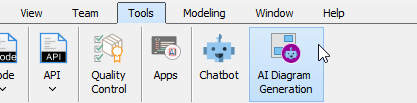
Navigate to the top menu in Visual Paradigm Desktop and select Tools > AI Diagram Generation. This opens the AI Diagram Generation dialog box where you’ll configure your request.
Step 2: Select Profile Diagram Type
From the available diagram type options, choose Profile Diagram. The interface presents various UML and non-UML diagram types, so ensure you select the correct one for your needs.
Step 3: Craft Your Prompt
Enter your specific requirements in the prompt field. Be as detailed as possible for best results. Examples:
Basic Prompt:
“Generate a Profile Diagram for a project management system”
Detailed Prompt:
“Generate a Profile Diagram for a project management system specifying extensions for tasks, resources, schedules, and team roles. Include stereotypes for critical tasks, time-sensitive resources, and role-based access constraints.”
Domain-Specific Prompt:
“Create a Profile Diagram for healthcare systems with extensions for patient records, medical procedures, healthcare providers, and compliance constraints following HIPAA standards.”
Step 4: Generate and Review
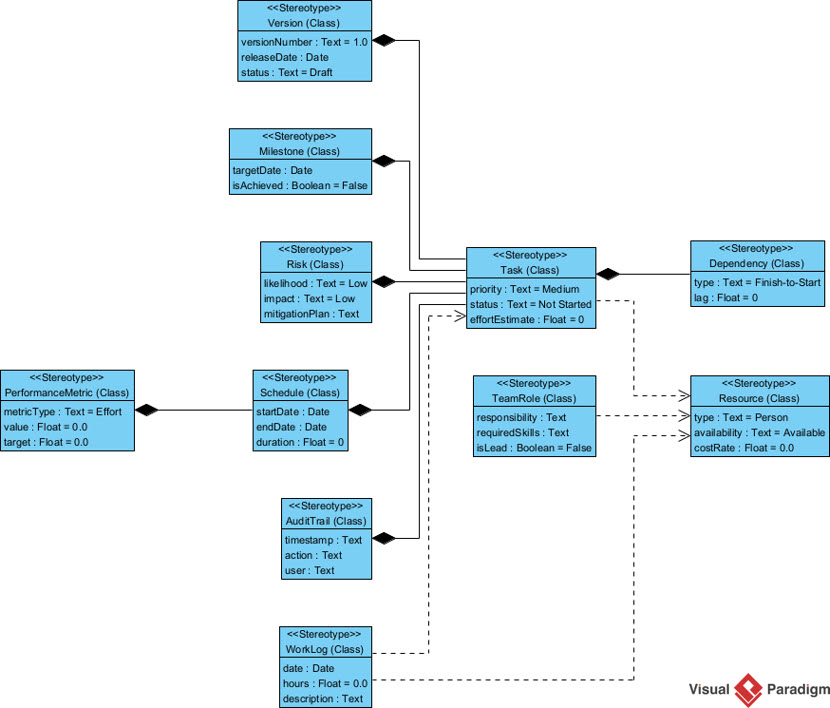
Click OK to process your request. The AI engine analyzes your prompt and generates the diagram within seconds.
Step 5: Refine and Customize
Once the diagram appears on your canvas:
- Review the generated elements
- Use AI chatbot commands to make adjustments
- Manually edit properties as needed
- Add additional stereotypes or constraints
- Refine the visual layout
Step 6: Export and Share
Export your diagram in various formats or integrate it into your documentation, presentations, or knowledge management systems.
Beyond Profile Diagrams: Comprehensive Diagram Support
While Profile Diagrams are a powerful addition, Visual Paradigm’s AI Diagram Generator supports over 13 additional diagram types, making it a comprehensive modeling solution:
UML Diagrams
- Class Diagrams – Model system structure and relationships
- Sequence Diagrams – Visualize object interactions over time
- Use Case Diagrams – Capture functional requirements
- State Machine Diagrams – Model object lifecycles
- Activity Diagrams – Represent workflows and processes
- Component Diagrams – Show system component architecture
Architecture & Strategy Models
- ArchiMate – Enterprise architecture modeling
- C4 Models – Software architecture visualization
- SysML – Systems engineering modeling
- Strategic Canvases – SWOT, PESTLE, Business Model Canvas
Data & Process Models
- Entity Relationship Diagrams (ERD) – Database design
- Data Flow Diagrams (DFD) – Data movement visualization
- Breakdown Structure Diagrams (BSD) – Project decomposition
This extensive support means you can use a single AI-powered tool for all your modeling needs, from initial strategic planning through detailed technical design.
Why Visual Paradigm’s AI Profile Diagram Generator Stands Out
1. Eliminates the “Blank Page” Problem
Traditional modeling often starts with an intimidating empty canvas. The AI generator provides an immediate foundation, allowing you to iterate and refine rather than build from scratch. This dramatically reduces startup time and cognitive load.
2. Speed Without Sacrificing Quality
What traditionally takes hours of manual work—researching stereotypes, drawing elements, establishing relationships—now takes seconds. Yet the output maintains professional standards and UML compliance, ensuring you don’t trade quality for speed.
3. Natural Language Interface
You don’t need to master UML syntax or memorize diagramming conventions. Simply describe what you need in plain language, and the AI understands your intent. This democratizes professional modeling, making it accessible to stakeholders across technical and non-technical roles.
4. Intelligent Context Awareness
The AI doesn’t just draw shapes—it understands domain context. When you mention “healthcare,” it applies appropriate stereotypes and constraints. When you specify “.NET,” it generates platform-specific extensions. This contextual intelligence produces more relevant and usable diagrams.
5. Seamless Integration with Existing Workflows
The tool integrates directly into Visual Paradigm Desktop, meaning you don’t need to learn a new interface or export/import between tools. Your generated diagrams become part of your existing modeling environment immediately.
6. Iterative Refinement Capabilities
Unlike one-off diagram generators, Visual Paradigm’s AI supports ongoing refinement. Use AI chatbot commands to modify, extend, or adjust your diagrams throughout the development lifecycle, maintaining consistency and reducing manual effort.
7. Educational and Collaborative Value
The tool serves as both a productivity enhancer and learning aid. Students can explore UML profiling concepts by experimenting with prompts, while teams can rapidly prototype and communicate architectural decisions.
Real-World Use Cases and Benefits
Enterprise Architecture Standardization
Large organizations can generate consistent Profile Diagrams that enforce architectural standards across multiple projects, ensuring all teams follow the same modeling conventions and extension mechanisms.
Rapid Prototyping
Startup teams and innovation labs can quickly validate architectural concepts by generating Profile Diagrams from brainstorming sessions, accelerating the path from idea to implementable design.
Compliance and Governance
Regulated industries (healthcare, finance, aerospace) can generate profiles that embed compliance constraints directly into the modeling layer, ensuring designs adhere to regulatory requirements from the outset.
Legacy System Modernization
When modernizing legacy systems, teams can generate Profile Diagrams that map old architectures to new frameworks, creating clear migration paths and extension points.
Training and Onboarding
New team members can learn domain-specific modeling conventions by studying AI-generated Profile Diagrams, reducing onboarding time and ensuring knowledge transfer.
Cross-Team Communication
Business analysts can generate initial Profile Diagrams from requirements documents, providing developers with visual specifications that reduce miscommunication and rework.
Conclusion
Visual Paradigm’s AI Profile Diagram Generator represents a significant leap forward in software modeling technology. By combining the power of artificial intelligence with rigorous UML standards, it delivers a tool that is both accessible to beginners and powerful enough for enterprise architects.
The ability to transform simple text descriptions into professional, standards-compliant Profile Diagrams in seconds addresses one of the most time-consuming aspects of system design. Whether you’re defining domain-specific extensions for a healthcare platform, creating framework-specific profiles for enterprise applications, or teaching UML extension mechanisms, this tool provides the foundation you need to work faster and smarter.
With support for Profile Diagrams and 13+ other diagram types, seamless integration across Visual Paradigm Desktop and OpenDocs, and intelligent refinement capabilities, this AI-powered solution is more than just a diagram generator—it’s a comprehensive modeling assistant that grows with your needs.
The future of modeling is here, and it’s conversational, intelligent, and incredibly efficient. By eliminating manual drudgery while maintaining professional quality, Visual Paradigm’s AI Profile Diagram Generator allows you to focus on what truly matters: designing better systems.
Ready to transform your modeling workflow? Download the latest version of Visual Paradigm and experience the power of AI-driven diagram generation today.
- References
- AI Profile Diagram Generation – OpenDocs UML Support: OpenDocs now fully supports UML Profile Diagrams with AI-powered knowledge management capabilities from Visual Paradigm.
- AI Profile Diagram Generator – UML Tool Update: Generate Profile Diagrams instantly with Visual Paradigm’s AI diagram generator that streamlines UML modeling from text prompts.
- Visual Paradigm Desktop Product Updates: Latest product updates and feature releases for Visual Paradigm Desktop modeling environment.
- Enhance Design Thinking – New AI Diagram Generation: New AI diagram generation features in Visual Paradigm to enhance design thinking and modeling workflows.
- Visual Paradigm – Visual Analysis Platform: Visual Paradigm is a platform for visual analysis that generates SWOT, PESTLE, and Business Canvases for strategic planning.
- What is Profile Diagram – UML Guide: Comprehensive guide explaining UML Profile Diagrams, their purpose, and how they extend UML semantics.
- AI Diagram Generation Features: AI-powered visual diagrams that can be used to change styles, refine, and customize diagrams for professional modeling.
- AI Diagram Generation Video Tutorial: Video demonstration of AI diagram generation capabilities in Visual Paradigm.
- Major Upgrade to AI UML Component Diagram Generation: Major upgrade to AI UML Component Diagram generation featuring enhanced AI chatbot capabilities.
- Visual Paradigm Community Edition – Best Free UML Tool: Comprehensive UML support in Visual Paradigm Community Edition covering various diagram types.
- AI Diagram Generator Now Supports 13 Diagram Types: Visual Paradigm’s AI Diagram Generator now supports 13+ diagram types to instantly generate complex models from text prompts.
- AI Diagram Generator – Quick System Prototyping: The Visual Paradigm AI Diagram Generator supports quick prototyping, documentation, or analysis of systems.
- Comprehensive Review – Visual Paradigm’s AI Diagram Generation: Review of Visual Paradigm’s AI diagram generation features supporting wide notations including sequence, state machine, and activity diagrams.
- Visual Paradigm Desktop AI Activity Diagram Generation: AI-powered activity diagram generation capabilities in Visual Paradigm Desktop.
- Comprehensive Guide to Visual Paradigm’s AI-Powered UML Ecosystem 2025-2026: Visual Paradigm became the first vendor to introduce AI-powered features in the latest version of enterprise architecture modeling.
- AI Generated Component Diagram – Video Streaming Platform: Example of AI-generated component diagram for a video streaming platform use case.
- Visual Paradigm Updates: Visual Paradigm product updates and release announcements.
- AI Diagram Generator – New Types DFD ERD: New support for Data Flow Diagrams (DFD) and Entity Relationship Diagrams (ERD) in AI Diagram Generator.
- OpenDocs Entity Relationship Diagram (ERD) AI Generation: AI generation of Entity Relationship Diagrams in OpenDocs knowledge management platform.
