


Introduction
Are you struggling to visualize complex system architectures? Do you spend hours manually drawing internal structures, ports, and connectors? Welcome to the future of software modeling! In this comprehensive guide, we’ll walk you through Visual Paradigm’s revolutionary AI Composite Structure Diagram Generator—a game-changing tool that transforms simple text descriptions into professional UML diagrams in seconds.
Whether you’re a software architect documenting microservices, a developer mapping IoT systems, or a student learning UML modeling, this guide will show you exactly how to leverage AI to accelerate your workflow and create stunning architectural visualizations without the manual grind.
What Are Composite Structure Diagrams?
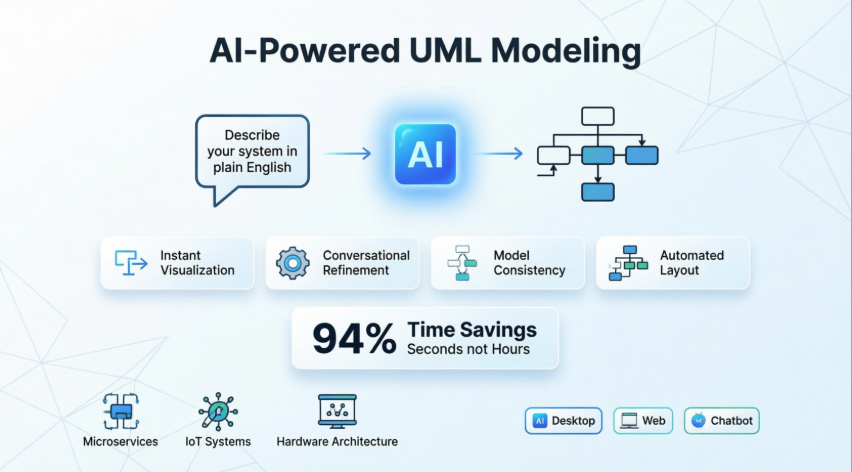
Before diving into the AI magic, let’s understand what we’re creating. Composite Structure Diagrams are UML diagrams that show the internal structure of a classifier, including its parts, ports, and connectors. They’re essential for:
-
Visualizing runtime collaborations between objects
-
Mapping internal components of complex systems
-
Documenting microservice architectures
-
Modeling hardware-software interactions
Traditionally, creating these diagrams required deep UML expertise and significant manual effort. Not anymore!
My User Experience Journey: From Skeptic to AI Advocate
When I first heard about AI generating UML diagrams, I was skeptical. Could a machine really understand the nuances of system architecture? I decided to test Visual Paradigm’s AI generator with a real project: documenting our hospital management system’s internal architecture.
The Challenge: I needed to map relationships between patients, doctors, medical records, and various subsystems—a complex web of interactions that would typically take me 2-3 hours to diagram manually.
The Result: In under 5 minutes, the AI generated a comprehensive composite structure diagram that captured all the essential relationships. I spent the remaining time refining and customizing rather than building from scratch. This wasn’t just faster—it was transformative.
Step-by-Step Tutorial: Creating Your First AI-Generated Diagram
Prerequisites
-
Visual Paradigm Desktop (Professional Edition) installed
-
Basic understanding of your system’s components
-
A clear description of what you want to model
Step 1: Access the AI Generator
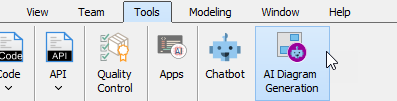
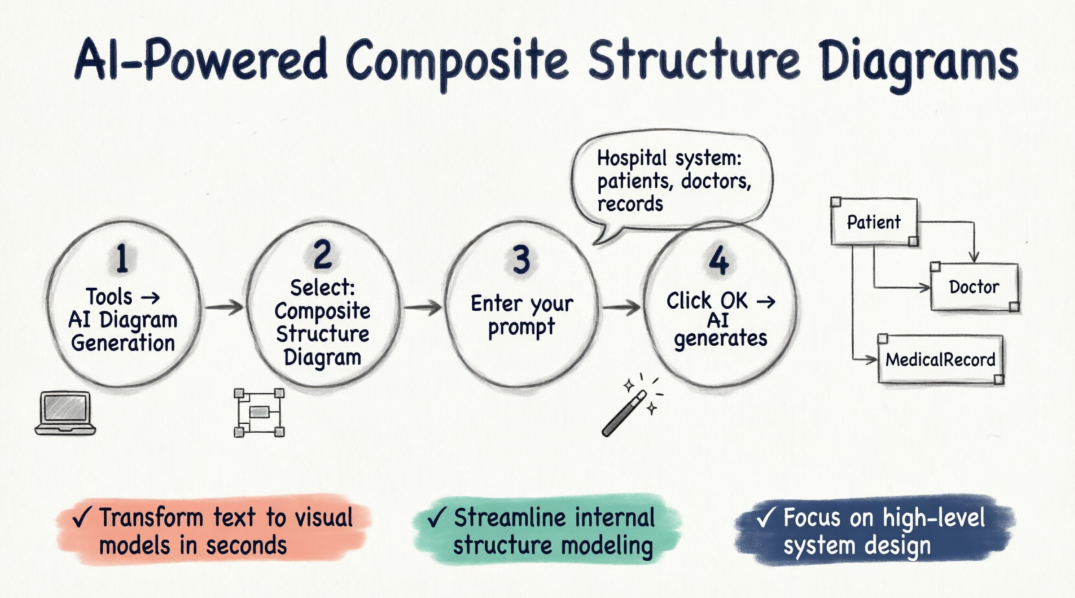
Navigate to the top menu and select Tools > AI Diagram Generation. This opens the AI Diagram Generation dialog box.
Step 2: Choose Your Diagram Type
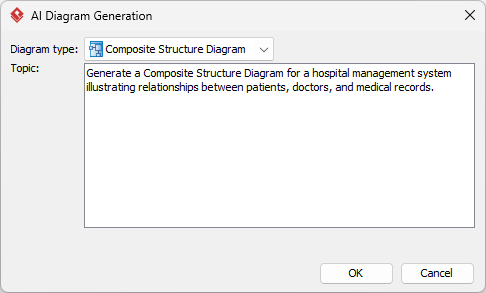
In the diagram type selection dropdown, choose Composite Structure Diagram from the available options.
Step 3: Craft Your Prompt
This is where the magic happens. Enter your specific requirements in natural language. The more detailed your description, the better the results.
Example Prompts:
✅ Basic: “Generate a Composite Structure Diagram for a hospital management system illustrating relationships between patients, doctors, and medical records.”
✅ Advanced: “Create a composite structure diagram for a PaymentProcessor with validator, gateway, and logger components communicating through defined ports, showing internal connectors and data flow.”
✅ IoT Example: “Model an IoT smart home device with temperature sensor, motion detector, WiFi module, and processor, showing how they collaborate through internal ports.”
Step 4: Generate and Refine
Click OK and watch the AI work its magic. Within seconds, your diagram appears on the canvas, ready for customization.
Pro Tip: Don’t settle for the first result! Use the AI chatbot to refine:
-
“Rename ‘Component1’ to ‘AuthenticationService'”
-
“Add a new port for logging”
-
“Connect booking details to room under hotel”
Comprehensive Case Study: Microservice Architecture Documentation
The Scenario
A fintech startup needed to document their payment processing microservice architecture for compliance audits and developer onboarding. The system included:
-
Payment gateway integration
-
Fraud detection engine
-
Transaction logging
-
Notification services
-
Database connectors
Traditional Approach (Before AI)
-
Time Required: 8-12 hours
-
Process: Manual drawing, constant revisions, alignment issues
-
Challenges: Keeping diagrams updated as the system evolved
AI-Powered Approach (After Implementation)
-
Time Required: 45 minutes (including refinement)
-
Process:
-
Initial prompt: “Generate composite structure diagram for payment processing microservice with gateway, fraud detector, logger, and notification components”
-
AI generated base structure in 30 seconds
-
Used chatbot to add specific ports and connectors
-
Fine-tuned layout using Visual Paradigm’s tools
-
Results
-
94% time savings on initial diagram creation
-
Consistent updates as the system evolved
-
Improved developer onboarding with clear visual documentation
-
Audit compliance achieved with professional diagrams
Key Features & Capabilities: What Makes This Tool Stand Out
1. Instant Architecture Visualization
Describe your system in plain English, and the AI handles the complex mapping of parts, ports, and connectors automatically.
Example: Simply type “A PaymentProcessor with a validator, gateway, and logger communicating through defined ports” and watch the full internal structure materialize.
2. Conversational Refinement 💬
Unlike static diagram tools, Visual Paradigm’s AI allows ongoing dialogue:
-
“Add a cache component between the processor and database”
-
“Change the connection type between validator and gateway to asynchronous”
-
“Show error handling ports for each component”
3. Model Consistency ✅
The AI cross-references your existing Class Diagrams to ensure parts and ports adhere to defined properties and relationships—maintaining architectural integrity across your entire model.
4. Automated Layout 📐
Say goodbye to manually untangling overlapping lines! The AI logically organizes internal connectors and communication flows for maximum clarity.
5. Multi-Platform Accessibility 🌐
Access the AI generator through:
-
Visual Paradigm Desktop (full-featured)
-
OpenDocs Online (browser-based)
-
AI Chatbot (conversational interface)
Platform Comparison: Choose Your Workflow
Visual Paradigm Desktop
Best For: Professional architects, complex projects, offline work
How to Access: Tools > AI Diagram Generation > Select Composite Structure Diagram
Advantages:
-
Full UML toolset integration
-
Advanced customization options
-
Offline capability
-
Professional export formats
OpenDocs / Online Platform
Best For: Collaborative documentation, remote teams, quick edits
How to Access: Insert > Diagrams > Composite Structure Diagram > Create with AI button
Advantages:
-
Browser-based (no installation)
-
Real-time collaboration
-
Easy sharing and embedding
-
Cloud storage integration
AI Chatbot
Best For: Rapid prototyping, brainstorming, learning UML
How to Access: Visit Visual Paradigm AI Chatbot
Advantages:
-
Conversational interface
-
Iterative refinement through dialogue
-
Import to Visual Paradigm for professional refinement
-
Great for beginners learning UML concepts
Real-World Use Cases & Examples
1. Software Design: Microservice Architecture
Challenge: Document internal components of a user authentication microservice
AI Prompt: “Generate composite structure diagram for AuthService with JWT validator, user database connector, session manager, and OAuth provider, showing ports for login, logout, and token refresh”
Result: Complete internal structure with all communication flows mapped
2. IoT Systems: Smart Device Modeling
Challenge: Model sensor interactions in a smart thermostat
AI Prompt: “Create composite structure diagram for smart thermostat with temperature sensor, humidity sensor, WiFi module, display controller, and main processor, showing data flow between components”
Result: Clear visualization of hardware-software collaboration
3. Hardware Configurations: Embedded Systems
Challenge: Document FPGA-based image processing system
AI Prompt: “Model image processing pipeline with camera input, FPGA processor, memory buffer, compression engine, and network output, showing internal data paths”
Result: Professional hardware architecture diagram ready for technical documentation
Benefits for Your Business and Projects
For Development Teams
✅ Faster Onboarding: New developers understand system architecture instantly through visual diagrams
✅ Improved Communication: Bridge the gap between technical and non-technical stakeholders
✅ Reduced Errors: AI ensures consistency and catches architectural inconsistencies
✅ Time Savings: Reduce diagram creation time by 90%+
For Business Growth
✅ Better Documentation: Professional diagrams enhance your technical proposals and compliance reports
✅ Scalability: Easily update diagrams as your system evolves—no more outdated architecture docs
✅ Competitive Advantage: Deliver projects faster with automated documentation
✅ Knowledge Retention: Capture institutional knowledge in visual format before team members leave
Cost-Effectiveness
Unlike hiring dedicated technical writers or spending weeks on manual documentation, AI-powered diagram generation offers:
-
Zero per-diagram costs (included in your Visual Paradigm license)
-
No training overhead (intuitive natural language interface)
-
Immediate ROI (time savings from first use)
Guidelines, Tips & Tricks for Maximum Impact
Crafting Effective Prompts
❌ Weak Prompt:
“Draw a system diagram”
✅ Strong Prompt:
“Generate a composite structure diagram for an e-commerce order processing system with order validator, inventory checker, payment gateway, shipping coordinator, and notification service, showing all internal ports and connectors”
Best Practices:
-
Be Specific: Name each component explicitly
-
Define Relationships: Mention how components interact
-
Include Ports: Specify communication points
-
Add Context: Mention the system’s purpose
Refinement Strategies
After Initial Generation:
-
Review the AI’s interpretation
-
Use chatbot commands for adjustments:
-
“Add error handling port to PaymentGateway”
-
“Make the connection between Validator and Database synchronous”
-
“Group logging components together”
-
-
Leverage Visual Paradigm’s manual tools for final polish
-
Export in multiple formats (PNG, PDF, SVG) for different audiences
Common Pitfalls to Avoid
🚫 Too Vague: “Model my app” → The AI needs specifics
🚫 Overcomplicating: Start simple, then add complexity through refinement
🚫 Ignoring Validation: Always review AI output for accuracy
🚫 Skipping Documentation: Add notes and descriptions to your diagrams
Advanced Techniques
Multi-Diagram Consistency:
Generate related diagrams (Class Diagrams, Sequence Diagrams) using the same AI engine to ensure architectural consistency across all views.
Iterative Development:
-
Generate base structure
-
Export and review with team
-
Refine based on feedback
-
Regenerate updated version
Template Creation:
Save frequently used structures as templates for future projects.
Product Review: Why Visual Paradigm’s AI Generator Stands Out
Who Should Use This Tool?
Perfect For:
-
Software Architects designing complex systems
-
Developers documenting microservices
-
System Engineers modeling hardware-software integration
-
Students learning UML and system design
-
Technical Writers creating documentation
-
Consultants preparing client presentations
Not Ideal For:
-
Those needing only simple flowcharts (overkill)
-
Teams with zero UML knowledge (learning curve exists)
-
Projects requiring only one-time diagrams (better for ongoing work)
Competitive Advantages
vs. Manual Drawing:
-
94% faster creation time
-
Automatic layout optimization
-
Built-in UML compliance
-
Easy updates and versioning
vs. Other AI Diagram Tools:
-
Deeper UML Integration: Not just pretty pictures—proper UML models
-
Multi-Platform Access: Desktop, web, and chatbot options
-
Conversational Refinement: Ongoing dialogue, not one-shot generation
-
Professional Toolset: Full Visual Paradigm suite for refinement
vs. Traditional Modeling Tools:
-
AI acceleration without sacrificing control
-
Natural language interface lowers barrier to entry
-
Maintains professional-grade output
Pricing & Value
Visual Paradigm Desktop Professional Edition includes AI features, offering:
-
Unlimited diagram generation
-
All UML diagram types
-
Professional export options
-
Regular updates and new AI features
ROI Calculation:
If you spend just 2 hours/week on diagramming:
-
Traditional: 104 hours/year
-
AI-Powered: ~10 hours/year
-
Time Saved: 94 hours/year
-
Value: At $50/hour, that’s $4,700 in annual savings
How to Get Started Today
Installation & Setup
-
Download Visual Paradigm Desktop from visual-paradigm.com/download
-
Choose Professional Edition (required for AI features)
-
Install and activate your license
-
Launch the application
Your First AI-Generated Diagram
Follow the step-by-step tutorial above, starting with a simple system you know well.
Learning Resources
-
AI Diagram Generation Landing Page: visual-paradigm.com/features/ai-diagram-generator
-
AI Chatbot: chat.visual-paradigm.com
-
Video Tutorials: Check YouTube for visual walkthroughs
-
Documentation: Comprehensive guides available in-app
Community & Support
-
Join Visual Paradigm community forums
-
Access 24/7 technical support
-
Participate in webinars and training sessions
Conclusion: The Future of System Modeling Is Here
Visual Paradigm’s AI Composite Structure Diagram Generator represents more than just a feature update—it’s a paradigm shift in how we approach system architecture documentation. By combining the precision of professional UML modeling with the accessibility of natural language processing, this tool democratizes architectural visualization.
Key Takeaways:
✅ Speed Without Sacrifice: Generate professional diagrams in seconds, not hours, without compromising quality
✅ Accessibility: No UML expertise required to start—learn as you go
✅ Flexibility: Three access methods (Desktop, Online, Chatbot) fit any workflow
✅ Scalability: From simple components to enterprise architectures, the AI adapts to your needs
✅ Business Value: Faster development cycles, better documentation, improved team communication
The Bottom Line:
In today’s fast-paced development environment, manual diagram creation is a luxury few teams can afford. Visual Paradigm’s AI generator isn’t just a nice-to-have—it’s a competitive necessity. Whether you’re a solo developer documenting your side project or an enterprise architect managing complex microservices, this tool will transform your workflow.
Ready to accelerate your modeling workflow?
The question isn’t whether AI will change how you create diagrams—it’s whether you’ll be ahead of the curve or playing catch-up. Start your AI-powered modeling journey today and experience the future of system architecture visualization.
- References
- Enhanced AI Composite Structure Diagram Generation in Visual Paradigm AI Chatbot: Official announcement of enhanced AI capabilities for composite structure diagram generation.
- Visual Paradigm Desktop Product Updates: Comprehensive list of desktop application updates and new features.
- Visual Paradigm AI Chatbot – Composite Structure Diagram: Interactive AI chatbot interface for generating composite structure diagrams through conversation.
- UML Composite Structure Diagram: A Guide to AI-Powered Internal Structure Modeling: Comprehensive documentation on AI-powered modeling techniques.
- UML Composite Structure Diagram Generator: Direct access to the AI diagram generation chatbot.
- Polish Language Guide: UML Composite Structure Diagram: Polish language version of the AI modeling guide.
- AI-Powered Internal Structure Modeling Guide: Detailed guide on leveraging AI for internal structure modeling.
- Visual Paradigm AI Diagram Generator Video Tutorial: Video demonstration of AI diagram generation features.
- Polish Documentation: AI Composite Structure Diagrams: Polish language documentation for composite structure diagrams.
- AI Composite Structure Diagram Generator for OpenDocs: Announcement of AI generator availability in OpenDocs online platform.
- Integrated AI Platforms Guide: Guide covering AI integration across Visual Paradigm platforms.
- OpenDocs AI Generator Release: Details on AI diagram generation in browser-based OpenDocs.
- AI Composite Structure Diagram Generator Launch: Original announcement of AI composite structure diagram generator.
- Visual Paradigm AI Generator Features: Feature overview of the AI diagram generation tool.
- OpenDocs AI Integration: Information about AI features in the online OpenDocs platform.
- Complete Guide to AI-Powered Internal Structure Modeling: Comprehensive resource for mastering AI-generated composite structure diagrams.
