


Enterprise architecture is a complex discipline. It involves modeling business processes, application landscapes, and technology infrastructure to ensure they work together cohesively. However, showing every detail to every person in an organization leads to confusion. This is where the concept of a viewpoint becomes essential. An ArchiMate viewpoint defines the concerns of a specific stakeholder and the principles for constructing a view.
This guide explores how to design and utilize ArchiMate viewpoints effectively. We will break down the theory, the practical application, and the structural requirements needed to align enterprise goals with execution. By understanding these mechanisms, architects can create clear, actionable models that drive decision-making without overwhelming the audience.
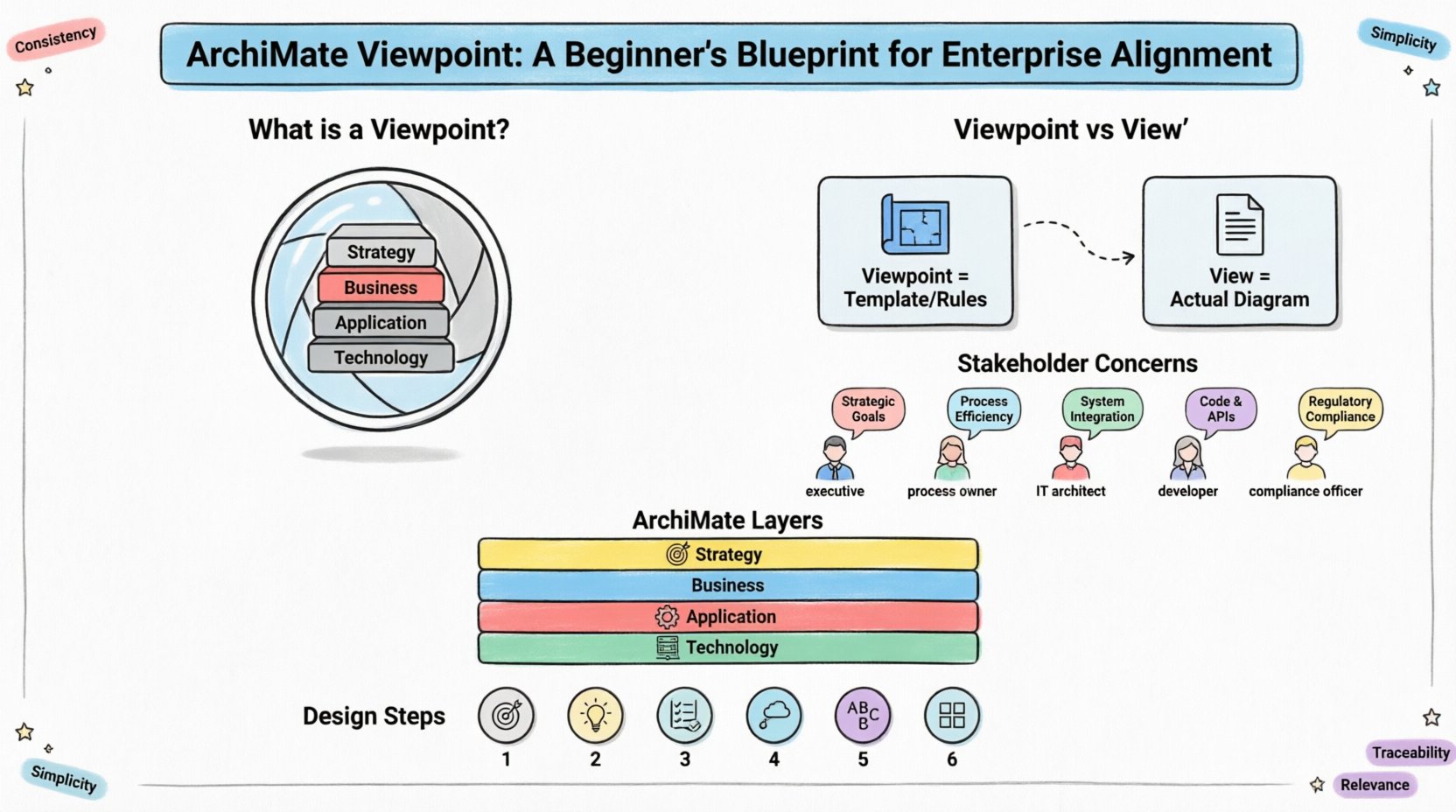
🧩 What is an ArchiMate Viewpoint?
In the context of enterprise architecture, information overload is a significant risk. A single model containing the entire architecture of an organization is too dense to be useful for most stakeholders. A viewpoint addresses this by acting as a filter.
A viewpoint is a description of the concerns of a specific set of stakeholders. It dictates:
- Which elements from the ArchiMate language should be included.
- Which relationships are relevant to the specific concern.
- Which language or notation is used to represent the information.
- The layout and structure of the resulting view.
Think of a viewpoint as a lens. Just as a camera lens focuses on a specific subject while blurring the background, a viewpoint focuses on specific architectural concerns while hiding irrelevant details. It ensures that the right information reaches the right people at the right time.
🔗 The Relationship Between Viewpoint and View
It is crucial to distinguish between a viewpoint and a view. These terms are often used interchangeably, but they serve different functions in the modeling process.
| Concept | Definition | Analogy |
|---|---|---|
| Viewpoint | A specification or template. It defines the rules for creating a view. | A blueprint for a specific room in a house. |
| View | The actual representation or diagram created based on the viewpoint. | The actual architectural drawing of that room. |
When you design a viewpoint, you are establishing a standard. When you apply that viewpoint to your data, you generate a view. This separation allows organizations to maintain consistency. If you change the viewpoint, all views generated from it can be updated automatically to reflect new standards.
👥 Understanding Stakeholder Concerns
The foundation of a good viewpoint lies in understanding the stakeholders. Different roles within an enterprise have different priorities. A C-level executive cares about strategy and investment, while a developer cares about APIs and interfaces. A viewpoint must be tailored to address these specific concerns.
Key stakeholder groups often include:
- Management: Focus on strategy, business value, and risks.
- Business Process Owners: Focus on workflows, handoffs, and efficiency.
- IT Architects: Focus on integration, technology stacks, and data flow.
- Developers: Focus on application logic and service interfaces.
- Compliance Officers: Focus on governance, regulations, and security.
To create an effective viewpoint, ask the following questions:
- What decision does this stakeholder need to make?
- What information do they need to make that decision?
- What level of detail is appropriate for their role?
- How will they interpret the symbols and notations used?
🏛️ ArchiMate Layers and Domains
To construct a viewpoint, one must understand the underlying structure of the ArchiMate language. The language is organized into layers and domains. A viewpoint selects specific combinations of these to define the scope.
Core Layers
The ArchiMate specification organizes architecture into several layers:
- Strategy Layer: Deals with goals, principles, and drivers. It answers “Why?”
- Business Layer: Deals with processes, functions, and organizational units. It answers “What?”
- Application Layer: Deals with software applications and services. It answers “How?” (Functionally)
- Technology Layer: Deals with hardware, networks, and infrastructure. It answers “How?” (Physically)
Domain Extensions
Beyond the core layers, ArchiMate includes specialized domains:
- Motivation: Captures the reasons behind architecture decisions (Stakeholders, Goals, Drivers).
- Implementation & Migration: Focuses on the transition from current state to target state.
- Physical: Represents physical objects and locations.
- Data: Represents data objects and information flow.
A viewpoint might restrict access to only the Business and Strategy layers, or it might focus heavily on the Technology layer. The choice depends entirely on the stakeholder’s needs.
🛠️ Designing a Viewpoint: A Step-by-Step Approach
Creating a viewpoint is a systematic process. It requires careful planning to ensure the resulting views are both accurate and useful. Follow these steps to design a robust viewpoint.
- Identify the Stakeholder Group: Clearly define who will consume this view. Is it for the Board? For the Engineering Team? Be specific.
- Define the Concern: What specific problem are you solving? Is it cost reduction? Risk management? Compliance? The concern drives the content.
- Select ArchiMate Elements: Choose which element types are relevant. Do not include every possible element. If the concern is financial, exclude technology nodes that do not impact cost.
- Define Relationships: Determine which connections matter. For a process view, emphasize flow relationships. For a structural view, emphasize assignment and aggregation relationships.
- Establish Naming Conventions: Ensure consistent naming for elements to avoid ambiguity. This includes prefixes, suffixes, and standard definitions.
- Create Templates: Define the visual layout. Where should the header go? How should layers be stacked? Consistency aids comprehension.
By following this structured approach, you ensure that the viewpoint is not just a random collection of diagrams, but a standardized tool for communication.
📋 Common Viewpoint Examples
While every organization is unique, there are common patterns that recur across industries. Below are examples of standard viewpoints used in enterprise architecture.
1. The Strategic Viewpoint
This viewpoint is designed for executive leadership. It connects high-level goals to business capabilities.
- Focus: Goals, Drivers, Business Capabilities, Principles.
- Excluded Elements: Detailed application interfaces, specific server hardware.
- Goal: To demonstrate how IT investments support business strategy.
2. The Business Process Viewpoint
This viewpoint is used by process owners and operational managers. It maps the flow of work.
- Focus: Business Processes, Functions, Actors, Organization Units.
- Excluded Elements: Specific database schemas, network topology.
- Goal: To identify bottlenecks, redundancies, and efficiency gaps in workflows.
3. The Application Portfolio Viewpoint
This viewpoint is essential for IT management and architects managing software assets.
- Focus: Applications, Services, Data Objects, Interfaces.
- Excluded Elements: Physical hardware, business strategy goals.
- Goal: To manage application lifecycle, licensing, and integration points.
4. The Technology Infrastructure Viewpoint
This viewpoint is for system engineers and infrastructure managers.
- Focus: Devices, Systems Software, Networks, Physical Locations.
- Excluded Elements: Business processes, strategic goals.
- Goal: To plan capacity, manage hardware lifecycle, and ensure network reliability.
🎨 Principles for Effective Viewpoint Design
Designing a viewpoint is an art as much as it is a science. There are principles that guide the creation of high-quality views that facilitate understanding rather than confusion.
1. Consistency
Consistency is key. If one view uses a blue square for a “Process” and another view uses a yellow circle for a “Process,” the stakeholder will become confused. Define a style guide for colors, shapes, and line weights within the viewpoint.
2. Simplicity
Do not try to fit everything into one view. A cluttered diagram is a useless diagram. If a diagram requires a legend with twenty items, it is likely too complex for its intended audience. Use multiple viewpoints to cover different aspects of the architecture.
3. Traceability
Even if a viewpoint hides details, the underlying model should maintain traceability. A business process in the Business Viewpoint should link to the application supporting it in the Application Viewpoint. This ensures that changes in one area can be assessed in others.
4. Contextual Relevance
Always include context. A diagram showing a single application is less useful than a diagram showing that application within the ecosystem of dependencies. However, ensure the context does not obscure the main subject.
🚧 Challenges in Viewpoint Management
Implementing a viewpoint strategy is not without challenges. Organizations often face hurdles when trying to standardize their architecture models.
Challenge 1: Over-Specification
Creating too many viewpoints can lead to fragmentation. If you have fifty viewpoints for fifty different teams, maintaining the underlying model becomes a nightmare. Aim for a consolidated set of standard viewpoints that cover 80% of needs.
Challenge 2: Inconsistent Maintenance
Views can become outdated quickly. If the architecture changes but the views are not updated, stakeholders lose trust in the models. Establish a governance process where views are reviewed periodically.
Challenge 3: Tool Limitations
While the ArchiMate standard is robust, the tools used to model it vary. Some tools make viewpoint management easy, while others require manual effort. Focus on the standard first, then adapt to the tool capabilities.
📊 Integrating Viewpoints into the Enterprise
Viewpoints are not isolated artifacts. They are part of a larger ecosystem of enterprise architecture. Integrating them effectively requires a holistic approach.
Connecting to Governance
Governance bodies often require specific reports. Viewpoints can be configured to generate these reports automatically. For example, a risk management viewpoint can highlight dependencies that pose a single point of failure.
Connecting to Project Management
Projects need to know the target state. Viewpoints help define the target architecture for specific initiatives. A migration viewpoint can show the steps required to move from the current state to the future state.
Connecting to Documentation
Architecture documentation often relies on static PDFs. Dynamic viewpoints allow for interactive exploration of the architecture. This reduces the need for massive document dumps and encourages self-service discovery.
✅ Best Practices for Implementation
To ensure success when implementing ArchiMate viewpoints, consider the following recommendations.
- Start Small: Do not attempt to create viewpoints for the entire organization at once. Start with a pilot group, such as the IT Architecture team.
- Document the Viewpoint: Every viewpoint should have a description explaining its purpose, scope, and intended audience. This document should be accessible to all stakeholders.
- Train Users: Stakeholders need to understand how to read the views. Provide training sessions to explain the notation and the specific concerns addressed.
- Iterate: The first version of a viewpoint will likely need adjustment. Gather feedback after the first few uses and refine the rules.
- Automate Where Possible: Use automation to generate views from the central model. This ensures that the views are always up to date with the underlying data.
🔍 Analyzing Viewpoint Effectiveness
How do you know if a viewpoint is working? Look for signs of engagement and decision-making.
- Decision Velocity: Are meetings shorter because the diagrams clarify the issues?
- Reduced Ambiguity: Are there fewer questions about what a specific component does?
- Adoption: Are stakeholders using the views to plan their own work?
- Accuracy: Do the views match reality when audited?
If a viewpoint fails to generate these outcomes, it is time to revisit the design. Perhaps the scope is too narrow, or the notation is too technical for the audience.
🌟 The Future of Viewpoint Usage
As enterprise architecture evolves, so do the requirements for viewpoints. The rise of agile methodologies requires more dynamic views that can change frequently. The integration of AI and machine learning may soon allow for the automatic generation of viewpoints based on natural language requests.
Regardless of technological shifts, the core principle remains the same. Information must be tailored to the consumer. A viewpoint is the mechanism that ensures this tailoring happens consistently and accurately.
By mastering the design and application of viewpoints, architects can bridge the gap between strategy and execution. They create a shared language that allows the business and IT to collaborate effectively. This alignment is the foundation of a resilient and adaptable enterprise.
📝 Summary of Key Concepts
To recap the essential elements covered in this guide:
- Definition: A viewpoint is a template that defines the concerns of stakeholders.
- Distinction: A viewpoint is the rule; a view is the output.
- Layers: Understand Strategy, Business, Application, and Technology layers.
- Design: Focus on stakeholder needs, element selection, and relationship filtering.
- Consistency: Maintain style guides and naming conventions across all views.
- Maintenance: Regular updates are required to keep views relevant.
Implementing ArchiMate viewpoints is a journey. It requires discipline and a commitment to clarity. However, the payoff is a structured, understandable architecture that supports the organization’s goals. By following the blueprint outlined here, you can build a foundation for enterprise alignment that stands the test of time.
