


Enterprise architecture is a complex discipline that requires precise communication. Without structure, models become confusing and difficult to interpret. Viewpoints provide this essential structure. They define how stakeholders interact with the architecture, ensuring that the right information reaches the right people. This guide explores the anatomy of ArchiMate Viewpoints, breaking down their components and explaining how to construct them effectively.
Understanding the Role of Viewpoints 🧭
At its core, enterprise architecture is about managing complexity. A single model cannot satisfy every stakeholder. Executives need strategic alignment, while developers need technical specifications. Viewpoints address this need by creating specific perspectives on the architecture.
Viewpoints are not just visual representations. They are formal specifications that define:
- Who is the intended audience? 👤
- What concerns are being addressed?
- Why is this view necessary?
- How will the information be presented?
By standardizing these aspects, architects ensure consistency across the organization. This consistency is vital for maintaining a single source of truth. It allows different teams to reference the same models without misinterpretation.
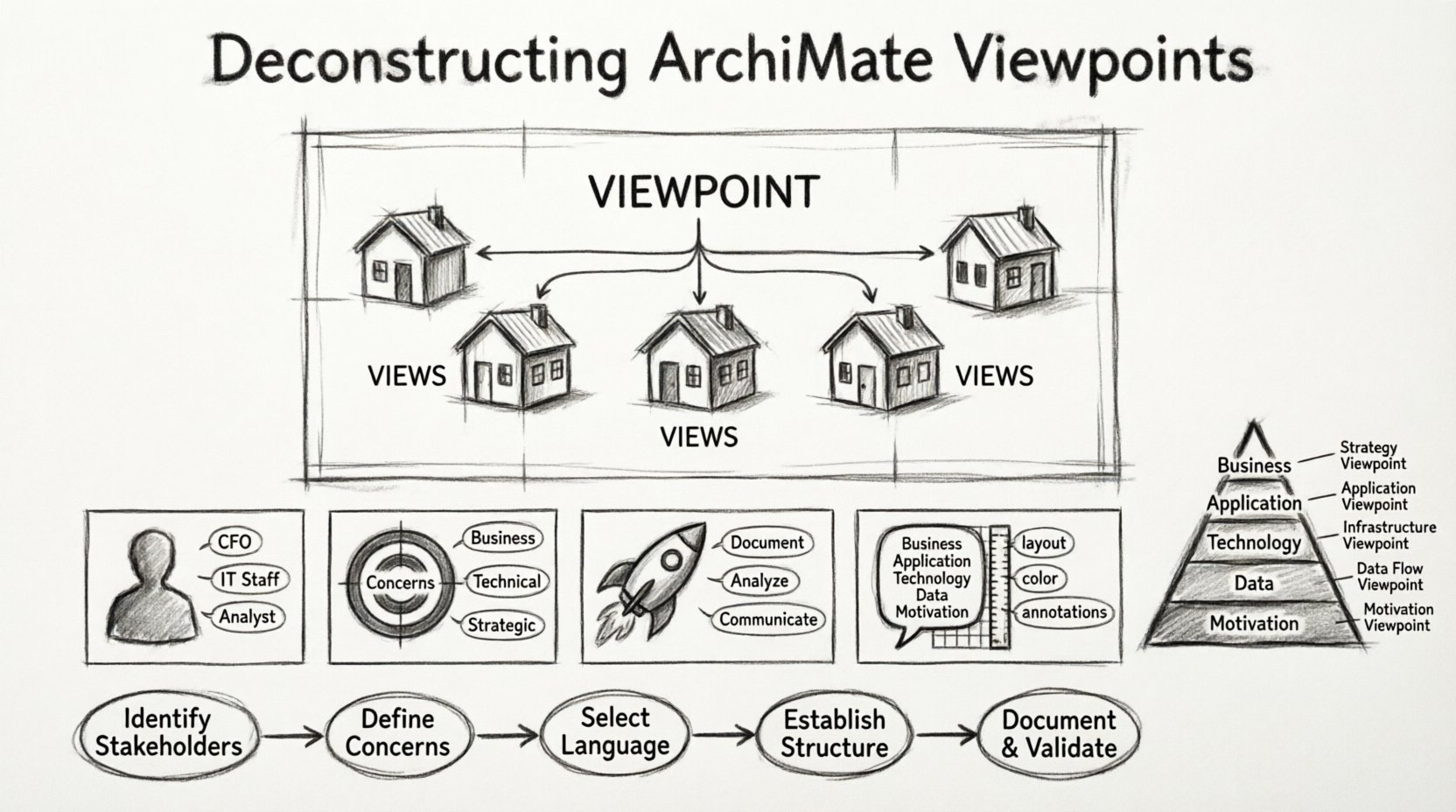
Viewpoint vs. View: A Critical Distinction ⚖️
Confusion often arises between the terms “viewpoint” and “view.” Understanding the difference is fundamental to effective modeling.
- Viewpoint: This is the template or the specification. It defines the rules, conventions, and scope for a specific type of model. It answers the question: “What should a model look like for this audience?”
- View: This is the actual instance. It is the concrete model created using the viewpoint. It answers the question: “What does the model look like right now?”
Think of the viewpoint as a blueprint for a house. The view is the actual house built from that blueprint. You can build multiple views from a single viewpoint, ensuring they all adhere to the same standards.
Anatomy of a Viewpoint: The 5 Core Components 🔧
To build a robust viewpoint, you must define five specific components. These components ensure that the viewpoint is actionable and clear. Let’s break them down.
1. The User 🧑💼
Every viewpoint is designed for a specific user or group of users. Defining the user ensures that the language and complexity are appropriate. For example, a viewpoint for a Chief Financial Officer will differ significantly from one for a System Administrator.
- Identify the role: Is this for management, IT staff, or business analysts?
- Determine the expertise: Do they understand technical jargon, or do they need business terms?
- Clarify the responsibility: What decisions will they make based on this view?
2. The Concern 🎯
A concern is the specific problem or question the viewpoint aims to address. It narrows the focus of the architecture. Without a defined concern, a view becomes cluttered with irrelevant information.
- Business concerns: Process efficiency, compliance, cost reduction.
- Technical concerns: Performance, security, scalability.
- Strategic concerns: Market alignment, innovation, risk management.
3. The Purpose 🚀
The purpose explains why the viewpoint exists. It justifies the effort required to create and maintain the model. A clear purpose prevents scope creep and keeps the model focused.
- Is it for documentation? 📄
- Is it for analysis? 📊
- Is it for communication? 💬
4. The Language 🗣️
In ArchiMate, the language refers to the specific set of elements, relationships, and layers used. A viewpoint dictates which parts of the ArchiMate specification are relevant.
- Layer selection: Business, Application, Technology, Data, or Motivation.
- Element types: Which specific actors, processes, or services are included.
- Relationship types: Which connections (e.g., assignment, realization) are valid.
5. The Model 📐
This component defines the structure of the view itself. It includes layout guidelines, notation standards, and naming conventions. It ensures that all views created from this viewpoint look consistent.
- Layout rules: How should layers be arranged vertically or horizontally?
- Color coding: Which colors represent which types of elements?
- Annotations: What text descriptions are required?
Step-by-Step Construction Guide 📝
Creating a viewpoint is a structured process. Follow these steps to ensure your viewpoints are effective and maintainable.
Step 1: Identify Stakeholders
Start by listing all the groups that need to consume architectural information. Interview them to understand their specific needs. Avoid creating a viewpoint for every single person; group them by shared concerns.
Step 2: Define the Concerns
For each stakeholder group, list the specific questions they need to answer. If a group has too many concerns, consider splitting them into multiple viewpoints. Clarity is key.
Step 3: Select the Language
Choose the relevant layers and elements from the ArchiMate specification. Do not include every possible element. Select only what is necessary to address the defined concerns. This keeps the model clean and readable.
Step 4: Establish the Model Structure
Decide on the visual representation. Will it be a layered diagram? A flowchart? A matrix? Define the rules for how elements are placed relative to each other. Consistency helps stakeholders navigate the model quickly.
Step 5: Document and Validate
Write down the definition of the viewpoint. Include examples of valid models. Review this definition with the stakeholder group to ensure it meets their needs. Validate that the viewpoint actually solves the problems it was designed to address.
Layer-Specific Viewpoints 🏛️
ArchiMate is structured around layers. Each layer has its own set of elements and relationships. Viewpoints often focus on specific layers or combinations of layers.
Business Layer Viewpoints
These focus on business processes, roles, and objects. They are essential for process improvement and organizational design.
- Process Flow: Shows how activities interact.
- Organizational Structure: Shows roles and responsibilities.
- Business Capabilities: Shows what the organization can do.
Application Layer Viewpoints
These focus on software systems and services. They are crucial for IT planning and application portfolio management.
- Service Usage: Shows how applications consume services.
- Data Interaction: Shows how applications access data.
- Deployment: Shows where applications run.
Technology Layer Viewpoints
These focus on hardware, networks, and infrastructure. They are vital for capacity planning and infrastructure security.
- Network Topology: Shows physical connections.
- Resource Allocation: Shows how compute resources are distributed.
- Security Zones: Shows boundaries and controls.
Data Layer Viewpoints
These focus on information objects and data flows. They are important for data governance and master data management.
- Data Model: Shows relationships between data entities.
- Data Flow: Shows how data moves between processes.
- Data Ownership: Shows who is responsible for data quality.
Motivation Layer Viewpoints
These link business strategy to execution. They explain why changes are happening.
- Goal Decomposition: Shows how high-level goals break down.
- Assessment: Shows the status of objectives.
- Principle Enforcement: Shows how rules guide decisions.
Comparing Viewpoint Types 📊
The table below summarizes how different viewpoints vary based on their focus and audience.
| Viewpoint Type | Primary Audience | Key Focus | Typical Output |
|---|---|---|---|
| Strategic | Executive Leadership | Goals, Principles, Drivers | High-level Roadmap |
| Business Process | Process Owners | Activities, Roles, Flow | Process Map |
| Application Architecture | IT Architects | Services, Applications, Interfaces | System Landscape |
| Technology Infrastructure | Infrastructure Team | Hardware, Networks, Devices | Network Diagram |
| Migration & Implementation | Project Managers | Projects, Deliverables, Phases | Transition Plan |
Best Practices for Modeling ✅
To maintain high-quality architecture, follow these guidelines when creating and maintaining viewpoints.
- Keep it Simple: Avoid over-complicating the model. If a stakeholder cannot understand the view in five minutes, it is too complex.
- Use Naming Conventions: Establish a standard for naming elements. This improves searchability and clarity.
- Version Control: Track changes to the viewpoint definition. If the rules change, document the version.
- Reuse Existing Viewpoints: Do not reinvent the wheel. If a viewpoint exists that matches your needs, adapt it rather than creating a new one.
- Focus on Relevance: Remove elements that do not contribute to the defined concern. Every element should have a purpose.
- Iterate: Viewpoints evolve. Gather feedback and update the definition as stakeholder needs change.
Common Pitfalls to Avoid 🚫
Even experienced architects can make mistakes. Being aware of common pitfalls helps you avoid them.
- Too Many Layers: Including every layer in a single view creates clutter. Focus on the relevant layers for the specific concern.
- Inconsistent Notation: Using different symbols for the same element confuses readers. Stick to the standard.
- Lack of Context: A view without context is meaningless. Ensure the purpose and audience are clear.
- Ignoring the Motivation Layer: Focusing only on structure without explaining the “why” makes the architecture rigid. Connect strategy to execution.
- Over-Engineering: Trying to model every possible scenario leads to a model that is never finished. Model what is needed for now.
Final Considerations 🌟
Viewpoints are the bridge between the abstract world of architecture and the concrete needs of stakeholders. They transform complex data into actionable insights. By deconstructing them into their core components, you gain the ability to build models that are clear, consistent, and valuable.
Remember that the goal is communication, not just documentation. A well-constructed viewpoint facilitates decision-making. It aligns teams and reduces ambiguity. As you develop your own viewpoints, keep the user and the concern at the center of your design process.
Enterprise architecture is a journey. Viewpoints are the signposts that guide you along the way. Treat them with care, and they will serve your organization well.