


Enterprise architecture can often feel like navigating a dense forest without a map. You have data, processes, applications, and technologies, but connecting them into a coherent story for your stakeholders is a significant challenge. This is where the concept of ArchiMate Viewpoints becomes essential. A viewpoint acts as the lens through which specific architectural information is presented, tailored to the needs of a particular audience. Without them, models become overwhelming walls of information that no one understands.
This guide walks you through the core principles of defining and utilizing viewpoints. We will move from the foundational definitions to practical construction, ensuring you can communicate complex architecture with precision and clarity. No jargon without explanation, just clear, actionable knowledge.
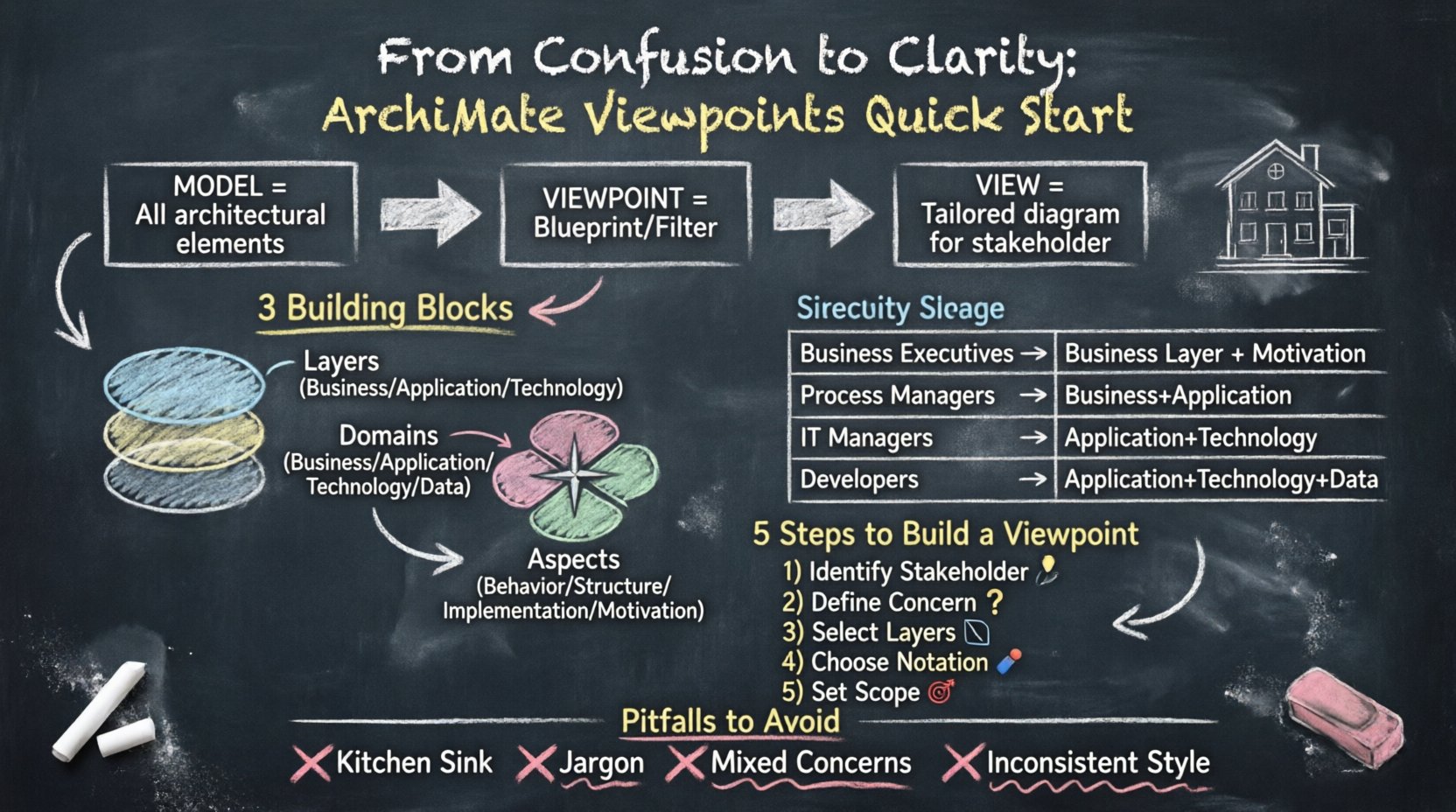
What Exactly Is a Viewpoint? 🤔
In the context of the ArchiMate modeling language, a viewpoint is not the view itself. This is a common distinction that often causes confusion. To understand the mechanics, we must separate three key concepts:
- Model: The complete repository of all architectural elements and relationships within your organization. It contains everything.
- View: A specific representation of the model, tailored for a specific stakeholder. It shows only what is relevant to that person.
- Viewpoint: The definition of how a view is constructed. It specifies which parts of the model are visible, which rules apply, and what notation is used.
Think of the Viewpoint as the blueprint for the View. If you are building a house, the model is the land and the materials. The view is the finished room you walk into. The viewpoint is the architectural plan that dictates which walls to build, what materials to use, and the style of the room.
Why is this distinction vital? Because you cannot create a useful view without a defined viewpoint. If you simply copy-paste elements from the model, you risk showing irrelevant data. A viewpoint imposes constraints. It tells the architecture tool which layers to include, which domains to focus on, and which aspects to highlight.
The Anatomy of an ArchiMate Viewpoint 🔬
Defining a viewpoint requires understanding the core building blocks of the ArchiMate language. Every viewpoint is constructed by selecting specific combinations of layers, domains, and aspects. This selection process ensures the view remains focused.
1. The Layers
The ArchiMate framework is organized into three main layers that represent the logical levels of an organization. A viewpoint typically focuses on one or a combination of these layers:
- Business Layer: Deals with business objects, business processes, business services, and roles. It answers questions about how the organization operates and delivers value.
- Application Layer: Focuses on the software systems, application components, and data objects that support the business processes. It bridges the gap between business needs and IT capabilities.
- Technology Layer: Represents the hardware, networks, and infrastructure that host the applications. It covers servers, devices, and communication paths.
When creating a viewpoint, you decide which layers are visible. A business manager might only need the Business Layer, while a network engineer requires the Technology Layer. A mixed viewpoint might show how a specific application (Application Layer) supports a specific process (Business Layer).
2. The Domains
Domains categorize the architecture based on the scope of the architecture work. There are four primary domains in ArchiMate:
- Business: Focuses on the organization’s structure, governance, and processes.
- Application: Focuses on the software landscape and data integration.
- Technology: Focuses on the infrastructure and deployment.
- Data: Focuses on the information objects, data stores, and data flows that bind the layers together.
A viewpoint can be scoped to a specific domain. For example, a Data Governance Viewpoint would prioritize data elements across all layers, whereas a Process Optimization Viewpoint would prioritize business processes and their supporting applications.
3. The Aspects
Aspects add a specific perspective or dimension to the model. The most common aspects are:
- Behavior: How things function (processes, functions).
- Structure: The static composition (components, objects, nodes).
- Implementation & Migration: How changes are planned and executed over time.
- Motivation: Why the architecture exists (drivers, goals, principles).
Selecting the correct aspect is crucial. If you are analyzing a system failure, a Behavior aspect is necessary. If you are planning a merger, a Motivation aspect is key.
Why Viewpoints Are Critical for Stakeholders 🗣️
Enterprise architecture is not just about drawing diagrams; it is about communication. Different stakeholders have different concerns. A CIO cares about cost and risk. A developer cares about interfaces and dependencies. A process owner cares about efficiency and bottlenecks.
Without viewpoints, you present the same diagram to everyone. This leads to information overload for some and information starvation for others. Viewpoints solve this by curating information.
Here is a breakdown of common stakeholder groups and the typical viewpoint needs for each:
| Stakeholder Group | Primary Concern | Recommended Layers | Key Aspects |
|---|---|---|---|
| Business Executives | Value delivery, ROI, strategic alignment | Business, Motivation | Goals, Drivers, Principles |
| Process Managers | Efficiency, workflow, bottlenecks | Business, Application | Processes, Functions, Services |
| IT Managers | System integration, availability, security | Application, Technology | Interfaces, Deployments, Nodes |
| Developers | Technical constraints, APIs, data flow | Application, Technology, Data | Components, Data Objects, Paths |
By mapping stakeholders to specific viewpoints, you ensure that every meeting has the right visual aids to support the decision-making process.
Constructing a Viewpoint: A Step-by-Step Guide 🛠️
Creating a viewpoint is a logical process. It does not require a specific software tool to conceptualize, though a modeling environment is necessary to implement it. Follow these steps to define a robust viewpoint.
Step 1: Identify the Stakeholder
Who is this view for? You cannot define a viewpoint in a vacuum. Start by asking: Who needs to see this? Is it the CFO? The Lead Engineer? The Compliance Officer? Naming the stakeholder group helps define the context.
Step 2: Define the Concern
What specific question are you trying to answer? Concerns drive the selection of content. Examples include:
- “Where are the security risks in our payment process?”
- “Which applications support the new marketing campaign?”
- “How does this infrastructure change impact server costs?”
A clear concern prevents scope creep. If the concern is cost, you do not need to show detailed process flows. If the concern is risk, you need to show dependencies and failure points.
Step 3: Select the Relevant Layers
Based on the concern, choose the layers. If the concern is about a business process, the Business Layer is mandatory. If the process relies on a specific database, include the Application Layer. Do not include layers that do not contribute to the answer.
Step 4: Choose the Notation and Style
Viewpoints also dictate how elements look. This includes:
- Color Coding: Use red for risks, green for approved, gray for deprecated.
- Layout: Left-to-right flow for processes, hierarchical for structures.
- Labels: Decide how much text is visible. Executives need high-level labels; engineers need technical IDs.
Step 5: Define the Scope
Scope limits the volume of data. Are you looking at the whole enterprise or just the Finance department? Scope ensures the diagram remains readable. A viewpoint should not attempt to show the entire organization in a single view.
Common Viewpoint Patterns and Use Cases 📋
While every organization is unique, certain patterns recur frequently. Understanding these standard patterns can speed up your initial setup.
The Business Process Viewpoint
This is perhaps the most common. It focuses on the Business Layer and the Application Layer. It shows how business processes are supported by applications.
- Goal: Understand the linkage between work and systems.
- Key Elements: Processes, Business Objects, Application Services.
- Benefit: Identifies where automation is possible or where manual workarounds exist.
The Infrastructure Deployment Viewpoint
Focuses on the Technology Layer and Application Layer. It visualizes how software is deployed onto hardware.
- Goal: Assess physical constraints and network topology.
- Key Elements: Nodes, Devices, Communication Paths, Application Components.
- Benefit: Critical for capacity planning and disaster recovery.
The Motivation Viewpoint
This focuses on the Motivation Aspect across all layers. It connects business drivers to architectural assets.
- Goal: Explain the “Why” behind the “What”.
- Key Elements: Drivers, Goals, Assessments, Principles.
- Benefit: Helps justify investment and align architecture with strategy.
The Gap Analysis Viewpoint
Used during Implementation and Migration. It compares the As-Is architecture with the To-Be architecture.
- Goal: Identify missing components and dependencies for a transition.
- Key Elements: Current State, Target State, Migration Tasks.
- Benefit: Reduces risk during transformation projects.
Pitfalls to Avoid When Creating Viewpoints ⚠️
Even with the right framework, mistakes happen. Being aware of common errors helps you refine your approach.
1. The “Kitchen Sink” Syndrome
Do not try to show everything. A common mistake is including every possible layer and aspect in a single view. This results in a cluttered diagram that confuses the audience. Remember: a viewpoint is a filter, not a dump.
2. Ignoring the Stakeholder’s Vocabulary
If you are presenting to business stakeholders, avoid heavy technical jargon. A business process should not be labeled with database table names. Use the language of the audience. This is part of defining the viewpoint.
3. Static vs. Dynamic Confusion
Ensure you know if you are showing structure or behavior. Mixing too many structural elements (like nodes) with behavioral elements (like flows) can make the diagram hard to read. Separate these concerns into different viewpoints if necessary.
4. Lack of Consistency
If you create a “Finance Viewpoint” and a “HR Viewpoint,” they should look similar. Use consistent colors, icon sizes, and layout styles across all viewpoints for the same stakeholder group. This builds trust and familiarity.
Advanced Considerations: Motivation and Principles 💡
While layers and domains are the structural backbone, the Motivation aspect is the strategic backbone. Modern architecture practices emphasize the link between business drivers and technical execution.
When defining a viewpoint, consider adding a Motivation layer. This allows you to trace a business goal down to a specific technology component. For example:
- Driver: Reduce carbon footprint.
- Goal: Optimize server usage.
- Principle: Right-size all infrastructure.
- Asset: Cloud Migration Project.
Incorporating this traceability into your viewpoints makes the architecture defensible. It answers the question: “Why does this system exist?”
Implementing Viewpoints in Your Workflow 🔄
Once you have defined your viewpoints, how do they fit into your daily work? Integration is key.
- Planning: Use the Strategy Viewpoint to align new projects with the long-term roadmap.
- Design: Use the Application Viewpoint when designing new software components.
- Communication: Export specific views for stakeholder meetings. Do not send the whole model file.
- Review: Use the Gap Analysis Viewpoint during quarterly reviews to track progress.
By embedding viewpoints into specific phases of the architecture lifecycle, you ensure they are used, not just created.
Frequently Asked Questions ❓
Can I have multiple viewpoints for the same stakeholder?
Yes. A stakeholder might need a high-level strategic view in the morning and a detailed technical view in the afternoon. Different concerns require different lenses.
Do viewpoints change over time?
Yes. As the organization evolves, the concerns of stakeholders change. A viewpoint that was useful for a legacy system might be obsolete for a cloud-native transformation. Review your viewpoints periodically.
Is there a standard set of viewpoints?
There are standard patterns, but no mandated list. You should tailor the viewpoints to your organization’s specific needs and industry regulations.
How do I decide which aspect to prioritize?
Start with the decision you need to make. If you are deciding on a purchase, focus on the Motivation and Structure. If you are debugging a system, focus on Behavior and Implementation.
Summary of Best Practices 📝
To wrap up, here is a checklist for effective ArchiMate Viewpoint management:
- ✅ Define the audience: Never start without knowing who sees the view.
- ✅ Limit the scope: Use layers and domains to filter data.
- ✅ Standardize notation: Ensure consistency across all diagrams.
- ✅ Focus on concerns: Ensure every element answers a specific question.
- ✅ Include motivation: Connect technical details to business goals.
- ✅ Iterate: Update viewpoints as the architecture and business change.
By mastering the art of viewpoint definition, you transform architecture from a static documentation exercise into a dynamic communication tool. You move from showing everything to showing what matters. This clarity is the foundation of successful enterprise architecture.