


Enterprise architecture is often perceived as a monolithic exercise. In reality, it is a complex web of communications, decisions, and structural definitions. When teams attempt to document systems, strategies, and processes, they frequently encounter a communication barrier. Different individuals within an organization possess distinct priorities, backgrounds, and information requirements. Executives focus on strategy and value. Engineers focus on interfaces and data flows. Auditors focus on compliance and risk. A single model cannot satisfy all these perspectives effectively without becoming cluttered and confusing.
This is where the ArchiMate Viewpoint concept becomes essential. It provides a structured method to filter architectural information so that the right people see the right details at the right time. Understanding how to construct these viewpoints is not just a technical skill; it is a strategic necessity for effective governance and alignment. This guide explores the mechanics of viewpoint design, the analysis of stakeholder concerns, and the practical application of ArchiMate modeling principles without the noise of specific software tools.
🧐 Defining the Viewpoint: More Than Just a Diagram
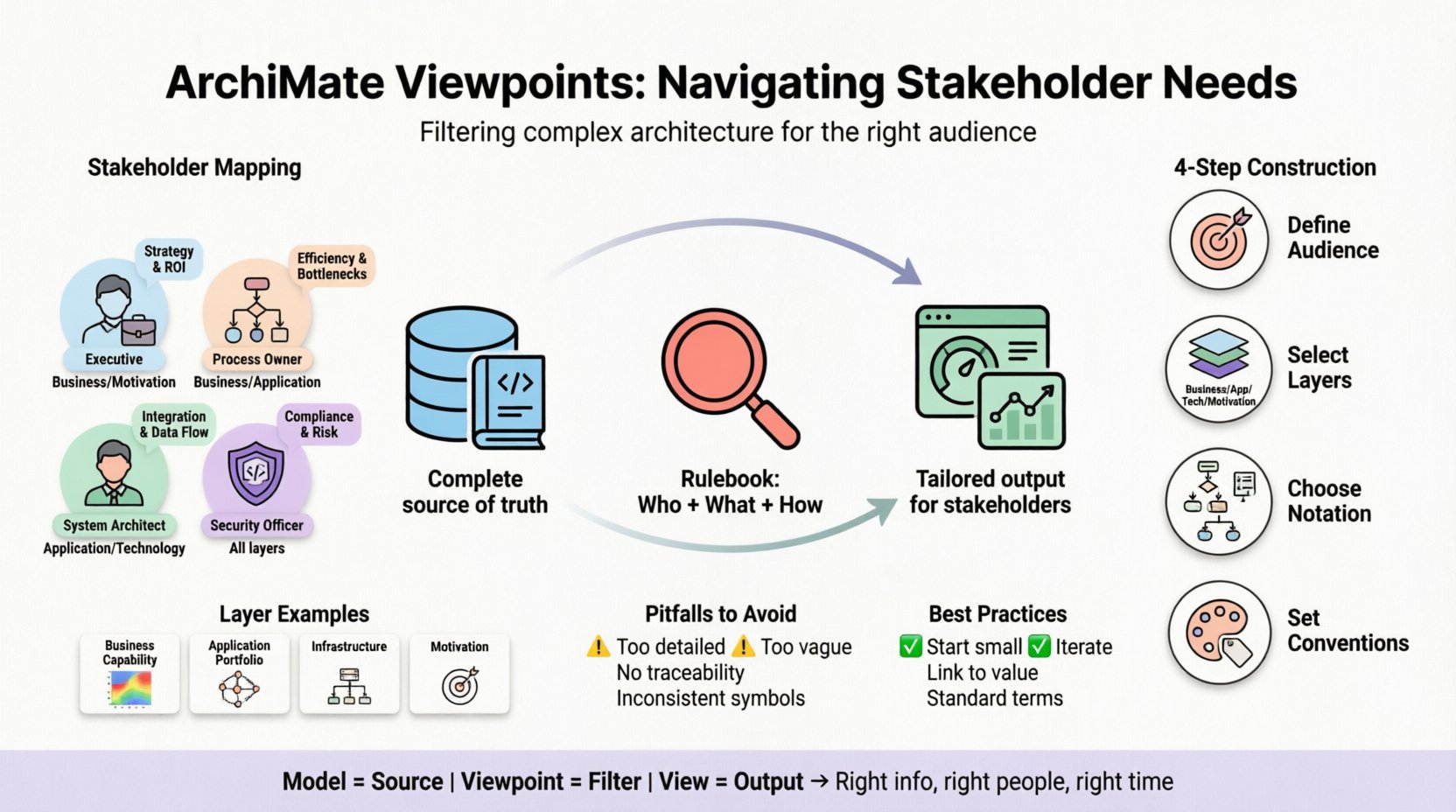
In the context of enterprise architecture, a viewpoint is a specification for a view. It is the rulebook that dictates how a specific set of stakeholders will perceive the architecture. It answers the question: “Who is looking at this, and what do they care about?”
A viewpoint does not contain the actual data. Instead, it defines the scope, the notation, and the conventions used to present the data. Think of it as a lens. The architecture exists as a comprehensive model, but the viewpoint determines what part of that model is visible and how it is rendered.
- Stakeholders: The specific audience for whom the view is intended.
- Concerns: The questions or issues the stakeholders need to address.
- Model Elements: The specific building blocks of the architecture that are relevant to the concerns.
- Notation: The visual language or diagram type used to represent the elements.
- Conventions: The rules for naming, color coding, and layout.
Without a defined viewpoint, a model becomes a “kitchen sink” approach, where every element is thrown into one diagram. This leads to cognitive overload. A well-defined viewpoint ensures clarity and purpose.
👥 Analyzing Stakeholder Needs: The Foundation of Viewpoint Design
Before drawing a single line or selecting a notation, one must understand the audience. Stakeholder analysis is the first step in the viewpoint construction process. If the needs are misidentified, the resulting view will fail to support decision-making.
1. Identifying the Stakeholder Groups
Stakeholders can be categorized by their role and influence. Common groups include:
- Strategic Management: CIOs, CTOs, Business Executives. They need high-level overviews, cost implications, and strategic alignment.
- Tactical Management: Department heads, Project Managers. They need to understand process flows, resource allocation, and project dependencies.
- Operational Staff: System Administrators, Developers, Support Teams. They need technical specifics, interfaces, data structures, and integration points.
- External Partners: Regulators, Auditors, Vendors. They need compliance data, security boundaries, and service level agreements.
2. Mapping Concerns to Roles
Each group has unique concerns. A successful viewpoint aligns the model content with these concerns. For example, a technical developer does not need to see the business strategy, but they do need to see the data flow between applications.
| Stakeholder Group | Primary Concern | Key Questions | Relevant ArchiMate Layer |
|---|---|---|---|
| Executive Leadership | Business Value & Strategy | How does this investment support our goals? What is the ROI? | Business / Motivation |
| Process Owners | Operational Efficiency | Where are the bottlenecks? How do roles interact? | Business / Application |
| System Architects | Integration & Functionality | How do services communicate? What are the data dependencies? | Application / Technology |
| Security Officers | Risk & Compliance | Where are the data breaches possible? Are we compliant? | Technology / Application / Business |
🔗 The Relationship Between Viewpoint, View, and Model
To navigate the nuances effectively, one must distinguish between three core concepts: the Model, the Viewpoint, and the View.
- The Model: The complete repository of all architectural information. It is the source of truth. It contains every relationship, every application, every business process, and every asset.
- The Viewpoint: The filter or the specification. It defines how to extract information from the model for a specific audience.
- The View: The actual output or diagram generated based on the Viewpoint. It is the visual representation seen by the stakeholder.
Imagine the Model is a library containing every book ever written. The Viewpoint is the librarian’s instruction: “Show me all books on quantum physics published after 2020.” The View is the stack of books placed on the table for the reader.
This distinction is vital for maintenance. If the underlying Model changes, the Viewpoint remains constant, and the View updates automatically. If you create a View without a Viewpoint, you lose the traceability. You cannot guarantee that the diagram remains accurate as the architecture evolves.
🛠️ Constructing Effective Viewpoints: A Step-by-Step Approach
Building a viewpoint is a methodical process. It requires defining the scope and the rules before populating the content. The following steps outline the standard methodology for creating robust viewpoints.
Step 1: Define the Scope and Audience
Start by explicitly stating who the audience is. Avoid vague terms like “everyone.” Instead, specify “Senior Project Managers” or “Infrastructure Engineers.” This definition drives the level of abstraction required.
Step 2: Identify the ArchiMate Layers
ArchiMate is structured into layers: Business, Application, Technology, Infrastructure, Data, and Motivation. A viewpoint should rarely use all layers simultaneously unless the concern spans the entire stack.
- Business Layer Viewpoints: Focus on processes, organizational units, roles, and functions.
- Application Layer Viewpoints: Focus on applications, services, and components.
- Technology Layer Viewpoints: Focus on hardware, networks, and deployment.
- Motivation Layer Viewpoints: Focus on goals, principles, and drivers.
Mixing layers requires careful management of the relationships between them. For instance, linking a Business Process directly to a Hardware Device skips the Application layer, which may obscure how the process is actually enabled.
Step 3: Select the Notation
The notation determines the visual representation. ArchiMate supports several diagram types:
- Process Flow Diagram: Shows the sequence of activities.
- Service Flow Diagram: Shows interactions between services.
- Deployment Diagram: Shows software components on hardware nodes.
- Relationship Diagram: Shows associations, dependencies, and access.
Choosing the right notation prevents confusion. A deployment diagram is useless for explaining a business process flow. The notation must match the concern.
Step 4: Establish Conventions
Consistency is key for readability. Define rules for:
- Naming: Standardize how objects are named (e.g., “App – [Function] – [Environment]”).
- Color Coding: Assign colors to specific statuses (e.g., Red for deprecated, Green for active).
- Layout: Decide on a standard orientation (e.g., top-down for processes, left-to-right for flows).
📊 Layer-Specific Viewpoint Examples
To understand the nuances, let us look at specific examples of how viewpoints are tailored to different layers and concerns.
1. The Business Capability Viewpoint
Audience: Strategic Planners Concern: Identifying gaps in business capabilities.
This viewpoint filters the model to show only Business Capabilities and their Relationships. It hides technical details entirely. The goal is to see if the organization has the ability to perform a specific function, such as “Customer Onboarding” or “Risk Management.” It often includes a heatmap to indicate the maturity or performance of each capability.
2. The Application Portfolio Viewpoint
Audience: Application Managers Concern: Managing the software landscape.
This view focuses on Application Services and Application Components. It highlights the dependencies between applications. It answers questions like, “If Application A goes down, which business processes are affected?” It typically uses a matrix or a dependency graph to show coupling.
3. The Deployment and Infrastructure Viewpoint
Audience: DevOps and System Administrators Concern: Physical and logical infrastructure.
This viewpoint details the Deployment Nodes and the System Software residing on them. It is highly technical. It shows network connectivity, server allocation, and data storage locations. It is crucial for capacity planning and security zoning.
4. The Motivation Viewpoint
Audience: Governance Board Concern: Why are we building this?
Often overlooked, this viewpoint links architectural decisions back to Goals, Principles, and Requirements. It ensures that every application or process in the model can be traced back to a business driver. This is essential for justifying investments and retiring legacy systems.
⚠️ Common Pitfalls in Viewpoint Design
Even with a solid methodology, errors can occur. Recognizing these pitfalls helps maintain the integrity of the architecture.
- Over-Specification: Creating a viewpoint that is too detailed for the audience. If a CIO needs to see high-level strategy, showing them API endpoints is noise. It distracts from the decision-making process.
- Under-Specification: A viewpoint that is too vague. If the audience cannot find the specific data they need, the view is useless. This often happens when too many layers are mixed without clear boundaries.
- Lack of Traceability: Creating views without linking them to the underlying Model. If the view is created manually in a drawing tool, it becomes a static image. Changes in the real world will not reflect in the image, leading to data rot.
- Ignoring the Motivation Layer: Focusing only on the “What” and “How” (Business and Technology) while ignoring the “Why” (Motivation). This makes it difficult to explain the value of the architecture to stakeholders.
- Inconsistent Notation: Using different symbols or colors for the same type of object across different views. This confuses the reader and reduces trust in the documentation.
🔄 Validation and Maintenance of Viewpoints
Creating a viewpoint is not a one-time task. Architecture is dynamic, and so must be the views. Validation ensures that the viewpoint continues to serve its purpose.
Regular Audits
Schedule periodic reviews of the viewpoints. Ask the stakeholders: “Does this view help you make decisions?” If the answer is no, the viewpoint needs adjustment. Perhaps the notation is too complex, or the data is outdated.
Change Management Integration
Viewpoints must be part of the change management process. When a new application is introduced or a process is retired, the relevant Viewpoints should be flagged for review. This ensures that the views remain accurate representations of the current state.
Version Control
Just as code requires version control, architectural models and viewpoints should be tracked. This allows teams to understand how the perspective of the architecture has changed over time. It provides a history of decisions and rationale.
🚀 Best Practices for Stakeholder Alignment
To maximize the value of ArchiMate Viewpoints, adhere to these best practices.
- Start Small: Begin with one critical viewpoint for a critical stakeholder group. Validate it before expanding to other groups. This prevents scope creep and resource drain.
- Iterate: Do not expect the first version to be perfect. Gather feedback, adjust the notation, and refine the scope. Viewpoints evolve alongside the organization.
- Focus on Abstraction: Use the correct level of abstraction. High-level views should not show low-level details, and vice versa. Maintain a clear separation of concerns.
- Use Standard Terminology: Ensure that the terms used in the viewpoint match the business language. Avoid internal jargon that stakeholders do not understand.
- Link to Value: Always try to connect the architectural elements to business value. Show how a technology change enables a business goal.
📝 Summary of Key Takeaways
The effectiveness of enterprise architecture relies heavily on communication. ArchiMate Viewpoints provide the mechanism to facilitate this communication by filtering complex models into understandable views.
By understanding the specific needs of stakeholders, selecting the appropriate layers, and defining clear conventions, architects can create documentation that drives decision-making. It is not about creating pretty diagrams; it is about ensuring the right information reaches the right people at the right time.
Remember the core relationship: The Model is the source, the Viewpoint is the filter, and the View is the output. Maintaining this structure ensures that your architecture remains a living asset rather than a static archive. Continuous validation and alignment with stakeholder concerns are the keys to long-term success in enterprise architecture.
As you implement these principles, focus on clarity and purpose. Let the architecture speak to the needs of the business, using the Viewpoint as the translator. This disciplined approach leads to better alignment, reduced risk, and more efficient delivery of value.