


Enterprise architecture modeling often feels like navigating a dense forest without a map. The terminology is dense, the relationships are intricate, and the sheer volume of information can overwhelm even seasoned professionals. However, there is a specific mechanism within the ArchiMate standard designed to cut through this noise. It is the Viewpoint. Understanding how to utilize viewpoint concepts allows architects to tailor their models to specific audiences, ensuring clarity and relevance. This guide provides a structured path to understanding and implementing ArchiMate Viewpoints without relying on complex jargon or proprietary tool restrictions.
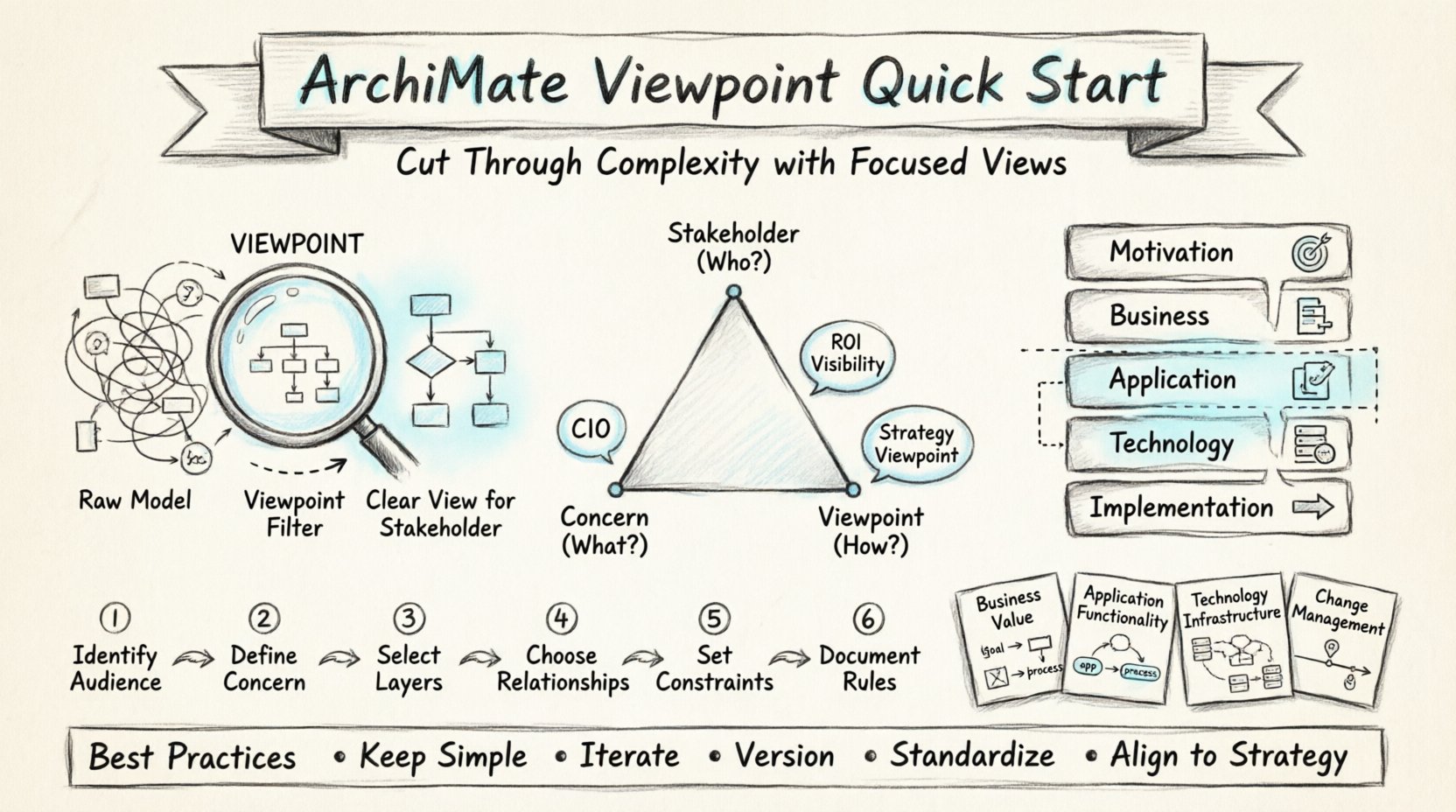
The Complexity Challenge in Enterprise Architecture 🧩
When organizations attempt to document their structure, they often face a critical issue: information overload. A single model attempting to represent the entire business, technology stack, and strategic goals simultaneously becomes unreadable. Different stakeholders require different levels of detail. A C-suite executive needs high-level value streams, while an IT engineer needs specific interface definitions. Trying to serve both with one diagram creates confusion rather than clarity.
To address this, the ArchiMate framework introduces a separation between the model and the view. The model contains the complete set of relationships and concepts. The view is a selection of that model presented in a specific way. But who decides which selection and which way? That decision is governed by the Viewpoint. It acts as the blueprint for how information is filtered and presented.
- Problem: One size does not fit all in architecture documentation.
- Impact: Stakeholders miss critical information buried in noise.
- Solution: Define Viewpoints to manage complexity and focus on concerns.
Defining the ArchiMate Viewpoint 🛑
An ArchiMate Viewpoint is a specification that defines the purpose and scope of a view. It answers the question: “For whom is this view intended, and what specific concerns does it address?”. It is not the diagram itself, but the ruleset that dictates what can appear in the diagram.
Think of a viewpoint as a lens. Just as a microscope lens focuses on cells while a telescope lens focuses on stars, an ArchiMate viewpoint focuses on specific architectural elements. Without a viewpoint, you risk showing irrelevant details to the wrong people. For example, showing detailed database schema to a business process owner provides no value and may cause confusion.
The core definition relies on three pillars:
- Stakeholder: The person or group for whom the view is created.
- Concern: The specific issue or question the stakeholder needs to resolve.
- Notation: The visual language or diagram type used to express the information.
The Trinity: Stakeholder, Concern, and Viewpoint 🤝
Understanding the relationship between these three elements is fundamental to building effective architecture descriptions. You cannot define a viewpoint without knowing who is looking at the data and what they are worried about.
Stakeholders drive the need for the view. They might include developers, managers, auditors, or clients. Each group has a unique perspective. The development team cares about component interfaces. The manager cares about resource allocation and business value.
Concerns are the specific problems that need solving. Examples include: “Is this application compliant with regulations?” or “How will this change impact our delivery speed?”. A viewpoint is created specifically to answer one or more of these concerns.
Viewpoints are the formal mechanisms that ensure the model answers the concern for the stakeholder. They define constraints such as which layers are visible, which relationship types are allowed, and what notation style is used.
| Element | Definition | Example |
|---|---|---|
| Stakeholder | Who receives the information | Chief Information Officer |
| Concern | What information is needed | Technology Investment ROI |
| Viewpoint | The rule set for the view | Technology Strategy Viewpoint |
Core Components of a Viewpoint Specification 📋
When documenting a viewpoint, you must specify several technical details. These details ensure that anyone creating a view based on this viewpoint produces consistent results. This consistency is vital for maintaining a coherent architecture repository over time.
1. Scope and Coverage
You must define the boundaries of the view. Which parts of the enterprise architecture are included? Is it limited to a specific business unit? Is it restricted to a single technology stack? Defining the scope prevents the view from becoming too broad.
2. Allowed Concepts
ArchiMate defines various concepts across different layers. A viewpoint might restrict the diagram to only Business Objects and Business Processes, excluding Application Components entirely. This restriction keeps the diagram focused on the business domain.
3. Allowed Relationships
Not all relationships are appropriate for every view. For instance, a Realization relationship (showing how a service realizes a capability) might be essential for a motivation view, but irrelevant for a simple process flow view. Specifying allowed relationships reduces visual clutter.
4. Stakeholders and Concerns
This section explicitly lists who the view is for and what questions it answers. This documentation ensures that the view is not created in a vacuum but is tied directly to organizational needs.
5. Notation Rules
How should the elements be arranged? Are there specific layout guidelines? Should certain colors be used to denote status? While ArchiMate is standard, the visual representation can vary. Viewpoints standardize this representation.
Navigating the ArchiMate Layers with Viewpoints 🏗️
ArchiMate organizes concepts into layers. A Viewpoint often dictates which layers are visible. Understanding these layers helps you select the correct components for your specific viewpoint.
- Motivation Layer: Deals with goals, drivers, and requirements. Essential for strategic viewpoints that justify investment.
- Business Layer: Focuses on processes, functions, roles, and objects. This is the domain of business architects.
- Application Layer: Covers software applications and data objects. Crucial for software architects and developers.
- Technology Layer: Represents infrastructure, hardware, and networks. Vital for IT operations and infrastructure teams.
- Implementation & Migration Layer: Focuses on projects and transitions between states.
A common mistake beginners make is mixing layers indiscriminately. A Viewpoint helps enforce boundaries. If you are creating a Business Process Viewpoint, you might explicitly exclude the Technology Layer to avoid distracting the business audience with server details.
Creating Your First Viewpoint: A Practical Walkthrough 🛠️
Let us walk through the process of defining a new viewpoint. We will assume a scenario where a company is planning a digital transformation. The management team needs to understand how new applications support business goals.
- Identify the Audience: The primary audience is the Executive Steering Committee. They care about value and risk, not code.
- Define the Concern: The concern is “How does the new application portfolio align with strategic goals?”.
- Select the Layers: We need the Motivation Layer (Goals) and the Application Layer (Applications). The Business Layer is relevant for context, but the Technology Layer is out of scope.
- Choose Relationships: We need Realization (Application realizes Goal) and Assignment (Application supports Business Process). We will omit Access relationships as they are too granular.
- Set Constraints: The view must only show active applications. Inactive applications should be excluded to reduce noise.
- Document the Viewpoint: Record these decisions in a specification document. This becomes the standard for all future views in this category.
By following these steps, you ensure that every diagram produced meets the specific needs of the committee. You avoid the trap of dumping the entire model onto a whiteboard.
Common Viewpoint Patterns to Adopt 🔄
While every organization is unique, there are recurring patterns that appear frequently. Adopting these standard patterns can speed up your initial setup.
1. The Business Value Viewpoint
This view focuses on the Motivation and Business layers. It links Business Capabilities to Business Goals. It is used to demonstrate how business units contribute to overall strategy. It typically excludes technical details entirely.
2. The Application Functionality Viewpoint
This view focuses on the Application layer. It maps Applications to Business Processes. It helps identify where software supports specific operational needs. This is critical for identifying software redundancy.
3. The Technology Infrastructure Viewpoint
This view is for the IT operations team. It maps Applications to Servers and Networks. It focuses on the Technology and Infrastructure layers. It highlights dependencies and potential single points of failure.
4. The Change Management Viewpoint
This view utilizes the Implementation & Migration layer. It shows the sequence of changes required to move from a current state to a target state. It is essential for project planning and resource allocation.
Structuring Information with Tables 📊
Using tables within your viewpoint documentation helps clarify the scope. Below is an example of how a viewpoint specification might define allowed concepts.
| Layer | Concepts Allowed | Relationships Allowed | Exclusions |
|---|---|---|---|
| Motivation | Goal, Driver, Requirement | Realization, Assignment | None |
| Business | Process, Function, Role | Serving, Accessing | Business Objects (Simplified) |
| Application | Application Component, Data Object | Accessing, Realization | Interface (Detailed) |
| Technology | Node, Device, Artifact | Communication, Access | Complete Infrastructure Topology |
This table acts as a checklist for modelers. Before publishing a view, they check against the table to ensure compliance with the viewpoint rules.
Best Practices for Sustainable Modeling 🌱
Creating a viewpoint is the start, not the finish. To maintain value over time, you must follow best practices that ensure longevity and usability.
- Keep Definitions Simple: Avoid overly complex rules that require deep knowledge to interpret. If a rule is hard to understand, it will be ignored.
- Iterate Based on Feedback: Stakeholders will tell you if a view is useful. If they ask for more data, adjust the viewpoint. If they find it too complex, simplify it.
- Version Your Viewpoints: As the organization changes, your viewpoints must evolve. Document changes to the viewpoint specification just as you document changes to the model.
- Standardize Notation: Ensure that icons and colors are consistent across all views. Use the same color for “Critical” risks in every viewpoint.
- Link to Principles: Connect viewpoints to enterprise principles. If a principle states “Cloud First”, your Technology Viewpoint should reflect cloud nodes prominently.
Overcoming Common Obstacles 🛑
Beginners often encounter specific hurdles when implementing viewpoints. Recognizing these early helps in navigating the learning curve.
Obstacle 1: Information Overload
It is tempting to include everything to be safe. This violates the core purpose of a viewpoint. The discipline required to say “no” to irrelevant data is crucial. If it does not answer the stakeholder’s concern, remove it.
Obstacle 2: Ambiguous Concerns
Stakeholders often struggle to articulate their concerns. They might say “I want to see everything about the system.” You must probe deeper. Ask “What decisions will you make based on this view?” If they cannot answer, the concern is not well-defined.
Obstacle 3: Inconsistent Modeling
Different architects might interpret the same viewpoint differently. To prevent this, provide examples. Show a “Gold Standard” view that complies perfectly with the viewpoint specification.
Obstacle 4: Tool Limitations
While the standard is tool-agnostic, some modeling environments handle viewpoints differently. Focus on the conceptual definition rather than the specific button clicks. The logic of the viewpoint remains valid regardless of the software used.
Aligning Viewpoints with Strategic Goals 🎯
Viewpoints are not just about diagrams; they are about governance. They ensure that the architecture supports the business strategy. By defining viewpoints that align with strategic pillars, you force the architecture to reflect the business direction.
For instance, if a strategic goal is “Customer Experience First”, your Business Viewpoint should highlight customer-facing processes prominently. If the goal is “Cost Reduction”, your Technology Viewpoint should focus on resource utilization and consolidation.
This alignment ensures that the architecture is not an academic exercise but a practical tool for decision-making. When a viewpoint is tied to a goal, the resulting model becomes a measure of progress toward that goal.
Summary of Key Takeaways 💡
To summarize the path forward for beginners:
- Start with the Stakeholder: Never create a view without knowing who will read it.
- Focus on Concerns: Design the view to answer a specific question.
- Use Layers to Filter: Use the ArchiMate layers to control the depth of detail.
- Document Rules: Write down the constraints that define your viewpoint.
- Iterate: Treat viewpoints as living documents that evolve with the organization.
Mastering the use of viewpoints transforms enterprise architecture from a chaotic collection of diagrams into a structured library of insights. It reduces the cognitive load on stakeholders and increases the value of the modeling effort. By adhering to these guidelines, you build a foundation for clear, effective, and sustainable architecture descriptions.
Remember, the goal is not complexity for complexity’s sake. The goal is clarity. Viewpoints provide the structure needed to achieve that clarity. As you continue to practice, you will find that defining viewpoints becomes an intuitive part of your workflow, allowing you to focus on the actual architectural challenges rather than the presentation mechanics.