


Enterprise architecture modeling requires precision. It demands a clear path from abstract strategy to concrete implementation. At the heart of this communication lies the ArchiMate Viewpoint. A viewpoint defines how specific information is extracted and presented to a particular audience. It is not merely a visual preference; it is a structural agreement on what matters and why.
Many organizations struggle with cluttered models or stakeholders who cannot find the information they need. This often stems from a lack of disciplined viewpoint design. This guide outlines proven methods for structuring, maintaining, and deploying viewpoints that drive understanding and decision-making.
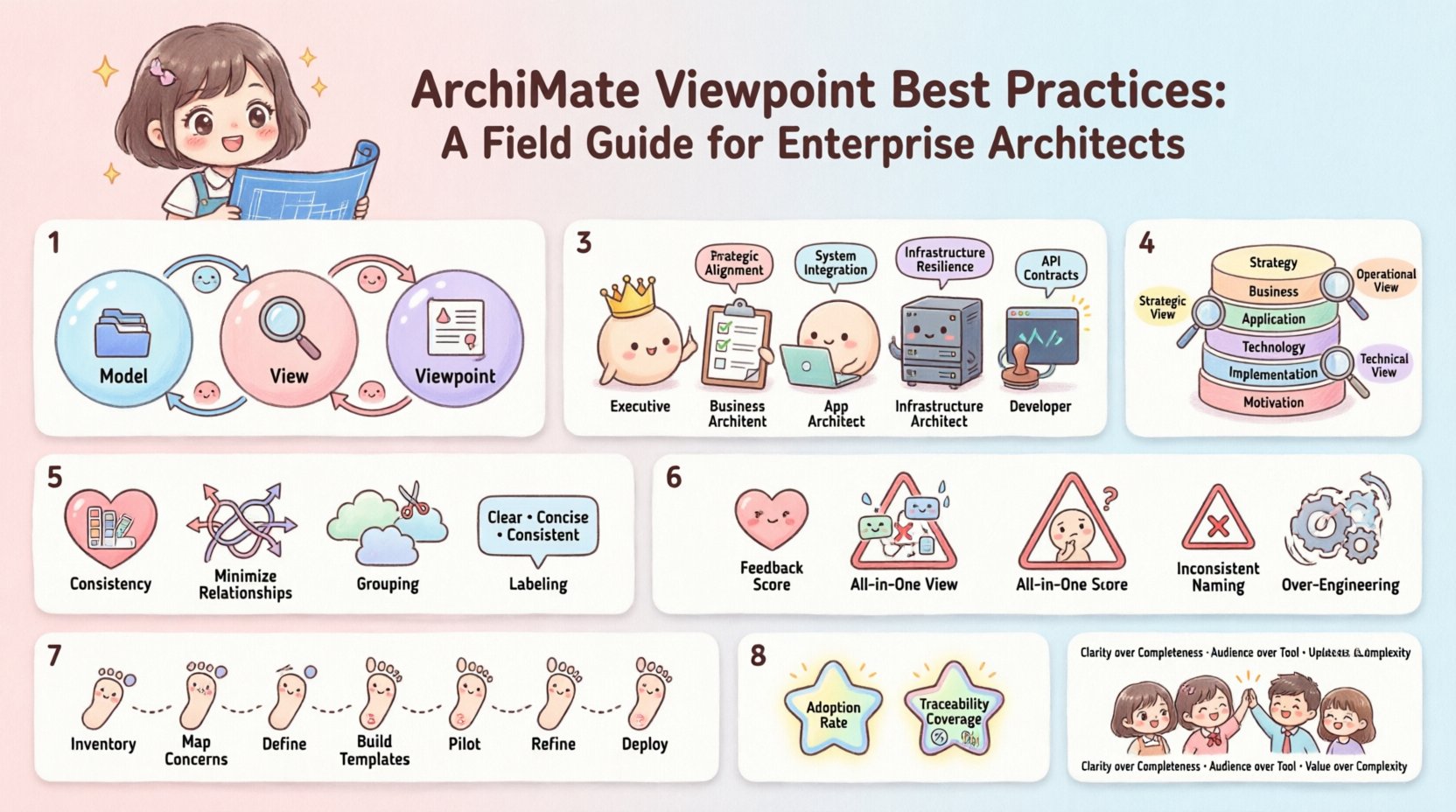
🧩 Understanding the Core Concepts
Before diving into design patterns, it is essential to distinguish between three related terms often used interchangeably but carrying distinct meanings:
- Model: The complete set of information within the repository.
- View: The specific representation of a subset of the model for a specific purpose.
- Viewpoint: The specification that defines the rules for creating a view.
A viewpoint acts as a template. It dictates which layers are visible, which rows apply, and which stereotypes are relevant. Without a defined viewpoint, a view is just a random slice of data. With a robust viewpoint, the view becomes a communication tool.
👥 Aligning with Stakeholder Needs
The primary purpose of a viewpoint is communication. If a stakeholder cannot understand the diagram, the viewpoint has failed. The design process must begin with the audience, not the data.
1. Identify the Audience
- Executive Leadership: Focus on business capabilities, value streams, and high-level strategy. Avoid technical jargon.
- Business Architects: Require details on processes, organization structures, and business rules.
- Application Architects: Need clear mappings between business functions and supporting software components.
- Infrastructure Teams: Focus on technology infrastructure, nodes, and deployment artifacts.
- Developers: Require specific logical data models, API interfaces, and integration patterns.
2. Define the Concerns
Every stakeholder group has specific concerns. A viewpoint should address these directly. For example, a security officer is concerned with trust relationships and data protection, not necessarily with the specific software version numbers. Align the rows of your ArchiMate model to these concerns.
📐 Structural Alignment: Layers and Rows
ArchiMate uses a layered architecture to organize complexity. A well-designed viewpoint leverages these layers effectively.
Standard Layers
- Business Layer: People, roles, activities, and business objects.
- Application Layer: Software components and services.
- Technology Layer: Hardware, networks, and system software.
- Strategy Layer: Goals, principles, and requirements.
- Implementation & Migration: Projects and deliverables.
- Motivation: Drivers, goals, and assessments.
Row Structures
Rows cut across layers to group elements by type. Common rows include:
- Process: Activities and workflows.
- Organization: Roles and organizational units.
- Product: Business objects and products.
- Service: Services provided and consumed.
Best Practice: Limit Visible Layers
While the full model may span all layers, a single view should rarely display more than three layers simultaneously. Showing too much context creates noise. Use a Zoom Strategy:
- Strategic View: Strategy + Business layers.
- Operational View: Business + Application layers.
- Technical View: Application + Technology layers.
📋 Common Viewpoint Categories
To maintain consistency, organizations should define a catalog of standard viewpoints. This ensures that a “Process View” looks the same regardless of which architect creates it.
| Viewpoint Name | Primary Audience | Focus Layers | Key Elements |
|---|---|---|---|
| Capability Map | Strategy Team | Strategy, Business | Capabilities, Value Streams |
| Process Flow | Business Analysts | Business | Activities, Roles, Business Objects |
| Service Interaction | Application Architects | Business, Application | Services, Business Functions, Components |
| Deployment View | Infrastructure Team | Application, Technology | Components, Nodes, Artifacts |
| Access Control | Security Officers | Business, Application, Technology | Trust Relationships, Roles |
🎨 Design Principles for Clarity
Visual design impacts cognitive load. The following principles help reduce confusion.
1. Consistency is Key
Use the same colors, shapes, and line styles for the same element types across all views. If a Business Process is represented as a rounded rectangle in one view, it must remain a rounded rectangle in all other views. This allows stakeholders to scan the model quickly.
2. Minimize Relationships
A common error is including every possible relationship in a view. Use the Rule of Three for connections. If a relationship is critical to the story, include it. If it is implicit or secondary, omit it. Too many arrows make the diagram look like spaghetti.
3. Grouping and Layout
Use groups to cluster related elements. This visually separates distinct domains without needing complex connectors. Ensure there is sufficient whitespace between groups to prevent visual crowding.
4. Labeling Standards
- Short Labels: Avoid long sentences. Use nouns or verb phrases.
- Consistent Ordering: Follow a left-to-right or top-to-bottom flow for processes.
- Unique Identifiers: Include a code (e.g., P-001) in the label if traceability to a requirements system is needed.
🚫 Common Pitfalls to Avoid
Even experienced architects make mistakes when designing views. Awareness of these common traps helps maintain model quality.
1. The “All-in-One” View
Attempting to show the entire enterprise in a single diagram is a failure of abstraction. A single view cannot capture the depth and breadth of a large organization. Decompose the model into logical sections.
2. Ignoring the Motivation Layer
Models often show what exists but not why it exists. Stakeholders need to see the link between a solution and a business driver. Include links to the Motivation layer for critical capabilities or projects.
3. Inconsistent Naming
Using “Client” in one view and “Consumer” in another creates confusion. Establish a glossary and enforce it. Synonyms are the enemy of clarity.
4. Over-Engineering the Model
Modeling every single interface for every system is unnecessary for strategic planning. Focus on the interfaces that drive value or pose risk. Granularity should match the viewpoint’s purpose.
🔗 Traceability and Connectivity
A viewpoint is only as good as its ability to link to other parts of the architecture. Traceability ensures that changes in one area are understood in context.
1. Cross-View Links
Use hyperlinks or cross-references to connect related diagrams. If a business process drives a specific application service, provide a link from the process view to the service view.
2. Version Control
Architectures change. Viewpoints must be versioned. Document when a viewpoint was created, by whom, and what version of the standard it follows. This aids in auditing and governance.
3. Metadata Management
Attach metadata to elements. Fields like Owner, Status, and Last Updated should be visible in reports generated from the viewpoint. This adds operational value to the static diagram.
🛡️ Governance and Maintenance
Once viewpoints are defined, they require governance. A model without maintenance becomes a graveyard of outdated information.
Review Cycles
- Quarterly Review: Check for outdated elements or broken links.
- Annual Audit: Review the viewpoint catalog itself. Are there unused viewpoints? Do new stakeholder groups need new templates?
Quality Gates
Implement checks before a view is published:
- Are all elements within the defined scope?
- Are all labels following the naming convention?
- Are relationships logically valid (e.g., no circular dependencies in process flows)?
- Does the view meet the accessibility standards for the intended audience?
🛠️ Implementation Steps
How do you move from theory to practice? Follow this structured approach.
- Inventory Stakeholders: List all groups who consume architectural information.
- Map Concerns: Document what information each group needs to make decisions.
- Define Viewpoints: Create the specification for each unique need. Define layers, rows, and constraints.
- Build Templates: Create reusable templates within the modeling environment based on the specifications.
- Pilot: Test the viewpoints with a small group of stakeholders. Gather feedback on clarity.
- Refine: Adjust the viewpoints based on feedback. Update the catalog.
- Deploy: Roll out to the wider organization with training materials.
📊 Metrics for Success
How do you know the viewpoints are working? Track the following metrics:
- View Adoption Rate: How often are the standard viewpoints used vs. ad-hoc diagrams?
- Feedback Score: Survey stakeholders on the clarity of the information provided.
- Traceability Coverage: Percentage of critical business drivers linked to architectural elements.
- Update Latency: Time taken to update a view after a change in the underlying model.
🔄 Iterative Improvement
Architecture is not static. The environment changes, technology evolves, and business strategies shift. Viewpoints must evolve with them.
Encourage feedback loops. If a stakeholder says a diagram is confusing, analyze the viewpoint definition. Is it too complex? Is the wrong layer selected? Is the terminology unfamiliar? Treat the viewpoint as a product that requires user experience optimization.
🤝 Collaboration Across Teams
Viewpoints facilitate collaboration between disparate teams. A clear view bridges the gap between IT and Business.
- IT to Business: Use the Service Interaction viewpoint to explain how technology supports business functions.
- Business to IT: Use the Capability Map to show where technology investments should be focused.
- Security to All: Use the Access Control viewpoint to define boundaries and trust zones.
When teams share a common language and visual standard, the friction of translation decreases. Decisions happen faster because the context is clear.
🎯 Final Thoughts on Architecture Communication
The goal of an ArchiMate viewpoint is not to create a pretty picture. It is to enable accurate decision-making. When a viewpoint is well-designed, the stakeholder can look at the diagram and immediately understand the current state, the target state, or the gap between them.
Focus on clarity over completeness. Focus on the audience over the tool. Focus on the value over the complexity. By adhering to these best practices, architects can build a repository of information that serves the organization effectively.
Start small. Define one core viewpoint. Test it. Refine it. Then expand. A disciplined approach to viewpoint design pays dividends in the long run. It transforms the architecture repository from a storage system into a strategic asset.