


Enterprise architecture is often perceived as a domain of immense complexity. Models grow dense, stakeholders become fragmented, and the true purpose of the documentation fades into the background. This is where the concept of the ArchiMate Viewpoint becomes critical. It serves as the mechanism to filter noise, focusing attention on what matters to specific audiences. Without a structured approach to viewpoints, models remain monolithic artifacts that few understand. With them, they become targeted instruments of communication.
This guide explores how to apply ArchiMate viewpoints effectively. We will move beyond theoretical definitions to practical application. The goal is to transform confusion into structured understanding. By the end of this reading, you will understand how to define, construct, and utilize viewpoints to align business strategy with technical execution.
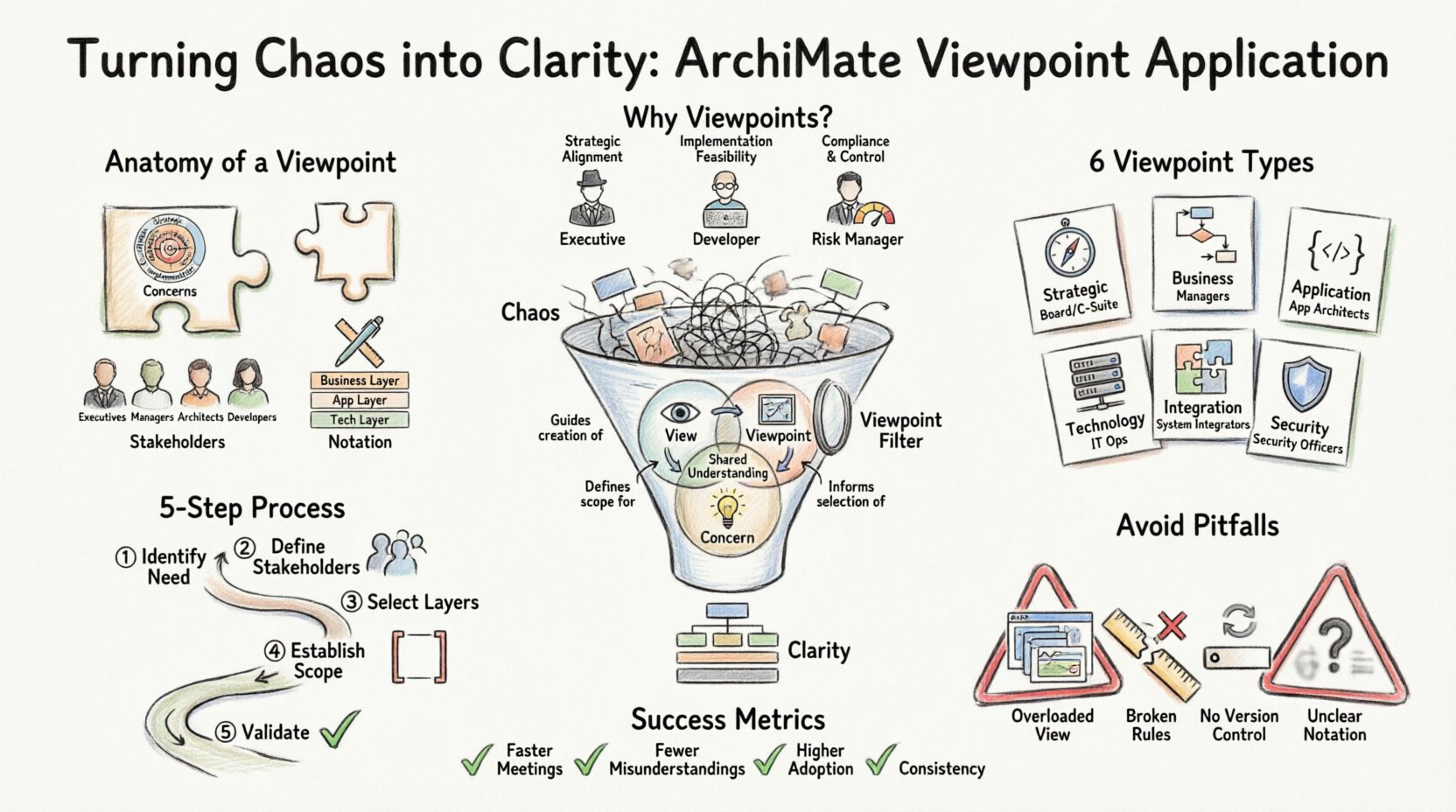
Why Viewpoints Are Necessary 🛑
Complexity is the enemy of clarity. In a large-scale environment, a single model cannot serve every need. A developer needs different information than a C-suite executive. A risk manager requires a different perspective than an application architect. If you present a high-level strategic model to a technical team, they may find it too abstract. If you show a detailed technical specification to a board member, they may lose interest.
The ArchiMate standard addresses this through the Viewpoint. A viewpoint defines the context for a view. It specifies:
- Who the audience is (Stakeholders).
- What the purpose is (Concern).
- Which modeling language concepts are relevant (Notation).
- What the scope is (Scope).
By defining these constraints upfront, you prevent information overload. You ensure that the right people see the right information at the right time. This is the foundation of Architecture Modeling discipline.
The Anatomy of a Viewpoint 🧩
To apply viewpoints correctly, one must understand their internal structure. A viewpoint is not just a label; it is a rule set. It governs what can appear in a view and what must be omitted.
1. Concerns 🎯
A concern represents the issue or problem that the architecture is intended to address. It answers the question: “What are we worried about?” Concerns can be:
- Strategic: Alignment with business goals.
- Business: Process efficiency, organizational structure.
- Application: Software functionality, integration points.
- Technology: Infrastructure, hardware, network.
- Implementation: Migration, project planning.
When defining a viewpoint, you must explicitly state the primary concern. This keeps the model focused. For example, a “Security Viewpoint” focuses on security concerns, filtering out irrelevant application logic details.
2. Stakeholders 👥
Identifying the audience is crucial. Different roles require different levels of detail. A viewpoint should be tailored to:
- Executives: High-level drivers, outcomes, and value streams.
- Managers: Processes, organizational units, and resource allocation.
- Architects: Interfaces, data flows, and system dependencies.
- Developers: Components, interfaces, and deployment targets.
Mapping stakeholders to viewpoints ensures that communication is effective. It prevents the “one size fits all” approach that leads to disengagement.
3. Notation and Language 📐
ArchiMate provides a rich set of elements. A viewpoint dictates which elements from the Business Layer, Application Layer, or Technology Layer are permissible. This constraint reduces cognitive load. It tells the modeler exactly what tools to use for the specific view.
The Relationship: View, Viewpoint, and Concern 🔗
These three concepts are often confused. Understanding their distinction is vital for proper application.
- View: The actual representation or diagram. It is the visual output.
- Viewpoint: The template or rule set used to create the view. It is the definition.
- Concern: The specific issue or interest the view addresses. It is the intent.
A single viewpoint can generate multiple views if the scope changes. A single view can address multiple concerns if they are related. However, for clarity, it is best practice to maintain a clear line of sight between the viewpoint definition and the resulting diagram.
Types of Viewpoints in Enterprise Architecture 📋
While custom viewpoints can be created, standard practice suggests starting with established types. These categories help organize the architecture repository.
| Viewpoint Category | Primary Focus | Typical Audience |
|---|---|---|
| Strategic Viewpoint | Business Drivers & Goals | Board, C-Suite |
| Business Viewpoint | Processes & Organization | Business Managers |
| Application Viewpoint | Software & Services | Application Architects |
| Technology Viewpoint | Infrastructure & Hardware | IT Operations |
| Integration Viewpoint | Data & Interface Flows | System Integrators |
| Security Viewpoint | Access & Protection | Security Officers |
Using this table as a reference helps in selecting the correct viewpoint during the modeling process. It ensures consistency across the enterprise architecture repository.
Practical Steps to Apply Viewpoints 🛠️
Defining a viewpoint is a process. It requires analysis, definition, and validation. Follow this structured approach to ensure high-quality results.
Step 1: Identify the Need 📝
Before creating a new viewpoint, determine if one already exists. Check the existing architecture repository. If a “Security Viewpoint” exists, modify it rather than creating a duplicate. If the need is unique, justify the new viewpoint based on the specific concern it addresses.
Step 2: Define the Stakeholders 👤
List the specific roles that will consume this view. Be precise. Instead of “Management,” use “Regional Operations Managers.” Instead of “IT,” use “Cloud Infrastructure Team.” Precision here prevents ambiguity later.
Step 3: Select the Architecture Layers 🧱
Decide which layers of the ArchiMate framework are relevant. Will this view show only Business processes? Does it need to link to the underlying Application services? Limiting the layers helps maintain focus. A Business Viewpoint might exclude Technology elements entirely to reduce noise.
Step 4: Establish the Scope 🗺️
Define the boundaries. Is this view for the entire enterprise? Or just one department? Scope limits the size of the model. A scoped view is easier to maintain and understand than a global view that attempts to show everything.
Step 5: Validate with Stakeholders ✅
Once the viewpoint definition is complete, review it with the identified stakeholders. Ask them: “Does this address your concerns?” “Is the level of detail appropriate?” “Is the notation clear?” Their feedback is the ultimate test of the viewpoint’s effectiveness.
Common Pitfalls in Viewpoint Application ⚠️
Even experienced practitioners can stumble when applying viewpoints. Awareness of these common errors can save time and prevent rework.
1. Overloading the Viewpoint 🤯
Attempting to satisfy too many concerns in a single viewpoint leads to clutter. If a view tries to show financial data, security risks, and technical dependencies simultaneously, it becomes useless to everyone. Split the concerns into separate viewpoints.
2. Ignoring the Notation Rules 📏
ArchiMate has specific rules about how elements can relate. A viewpoint should enforce these rules. For example, a Business Viewpoint might prohibit showing “Technology Service” elements directly connected to “Business Actor” elements without an intermediary. Ignoring these rules breaks the semantic integrity of the model.
3. Lack of Version Control 🔄
Viewpoints evolve. As stakeholder needs change, the viewpoint definition must change. Failing to version control your viewpoints means stakeholders might be looking at outdated templates. Always maintain a history of viewpoint changes.
4. Assuming Universal Understanding 🤷
Do not assume that all stakeholders understand ArchiMate symbols. A viewpoint should include a legend or a glossary. If the notation is obscure, the view fails its purpose, regardless of how accurate the data is.
Aligning Viewpoints with Stakeholder Needs 🤝
The ultimate goal of a viewpoint is alignment. It bridges the gap between the technical reality and the business expectation. To achieve this, the creation process must be collaborative.
- Workshops: Conduct workshops to map concerns to viewpoints. Let stakeholders define what they need to see.
- Iterative Design: Do not aim for perfection in the first draft. Create a prototype, test it, and refine it.
- Documentation: Document the rationale behind each viewpoint. Why was this layer chosen? Why was that element excluded? This documentation helps new architects understand the context.
When stakeholders feel their specific concerns are addressed, they engage more deeply with the architecture. They stop asking “What is this diagram?” and start asking “How does this help us?”
Maintaining and Evolving Viewpoints 🔄
An architecture is a living system. The environment changes, business goals shift, and technology evolves. Viewpoints must evolve with them. A static set of viewpoints becomes obsolete quickly.
Regular Reviews 📅
Schedule periodic reviews of the viewpoint library. Ask if the existing viewpoints still serve the current organizational structure. If a department is dissolved, does its associated viewpoint still have value?
Feedback Loops 🗣️
Establish a mechanism for feedback. Allow users of the architecture models to suggest changes to the viewpoints. This creates a culture of continuous improvement.
Training 🎓
As viewpoints change, training is required. Ensure that all architects understand the updated definitions. Consistency across the team is key to maintaining a coherent architecture.
Measuring the Success of Viewpoints 📊
How do you know if your viewpoint application is working? Look for these indicators:
- Reduced Meeting Times: Discussions are faster because the relevant information is already visualized.
- Fewer Misunderstandings: Fewer questions about “what does this mean” or “why is this here”.
- Higher Adoption: Stakeholders actively reference the models in their planning and decision-making.
- Consistency: Different architects produce models that look and feel consistent when using the same viewpoint.
Conclusion 🏁
Applying ArchiMate viewpoints is not a theoretical exercise; it is a practical necessity for managing complexity. It transforms a chaotic collection of models into a coherent library of communication tools. By defining concerns, identifying stakeholders, and restricting notation, you create clarity.
The path from chaos to clarity requires discipline. It requires the courage to say “no” to information that does not belong in a specific view. It requires the humility to ask stakeholders what they need. And it requires the patience to refine the definitions over time.
When done correctly, the architecture becomes a strategic asset. It guides investment, informs risk management, and ensures that technology serves the business. The viewpoint is the lens through which this value is focused. Use it wisely.