


Struggling to run effective Agile retrospectives? Discover the AI-Powered Agile Retrospective Planner from Visual Paradigm, a powerful tool designed to transform your team’s reflection process. This online software provides a structured, 5-step workflow that ensures every retrospective is well-prepared, deeply insightful, and leads to tangible action. From setting the stage to creating a final report, the planner guides you through each phase with clear instructions and intelligent suggestions. With features like AI-generated plans and a comprehensive final report, this tool helps Scrum Masters and Agile coaches save time, foster deeper team insights, and turn discussion into real improvement. Let’s explore how this innovative tool can revolutionize your team’s continuous improvement cycle.
Quick Summary: Key Features of the Agile Retrospective Planner
-
AI-Powered Planning: Generate a complete, detailed retrospective plan in minutes by describing your sprint context.
-
5-Step Guided Wizard: Follow a proven structure: Set the Stage, Gather Data, Generate Insights, Decide What to Do, and Final Report.
-
Multi-Tab Organization: Keep your session plan neatly organized with dedicated tabs for findings, concepts, tasks, and documents.
-
Drag-and-Drop Flexibility: Easily sequence your agenda items using intuitive drag-and-drop functionality.
-
Local File Storage: Save your plans as secure .json files on your computer for future reuse and complete data privacy.
-
Consolidated Final Report: Generate a professional, comprehensive document that serves as a facilitator’s guide and meeting record.
Step 1: Prepare for Retrospective – Setting the Foundation
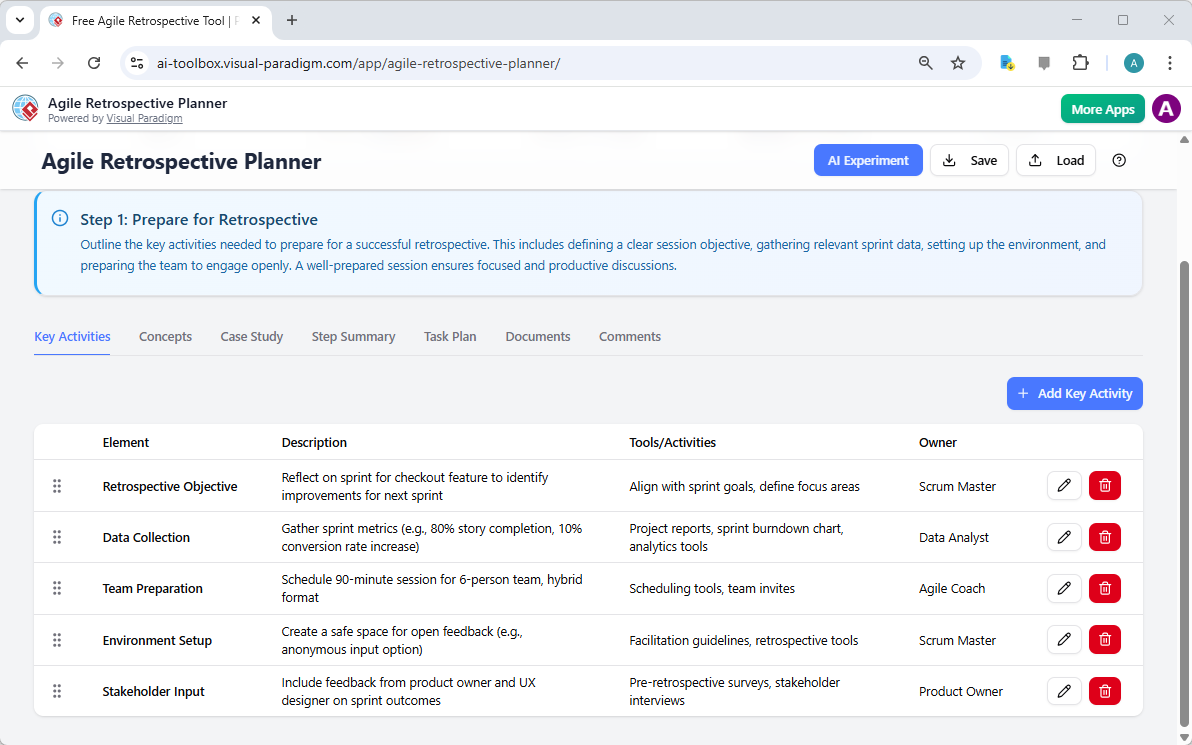
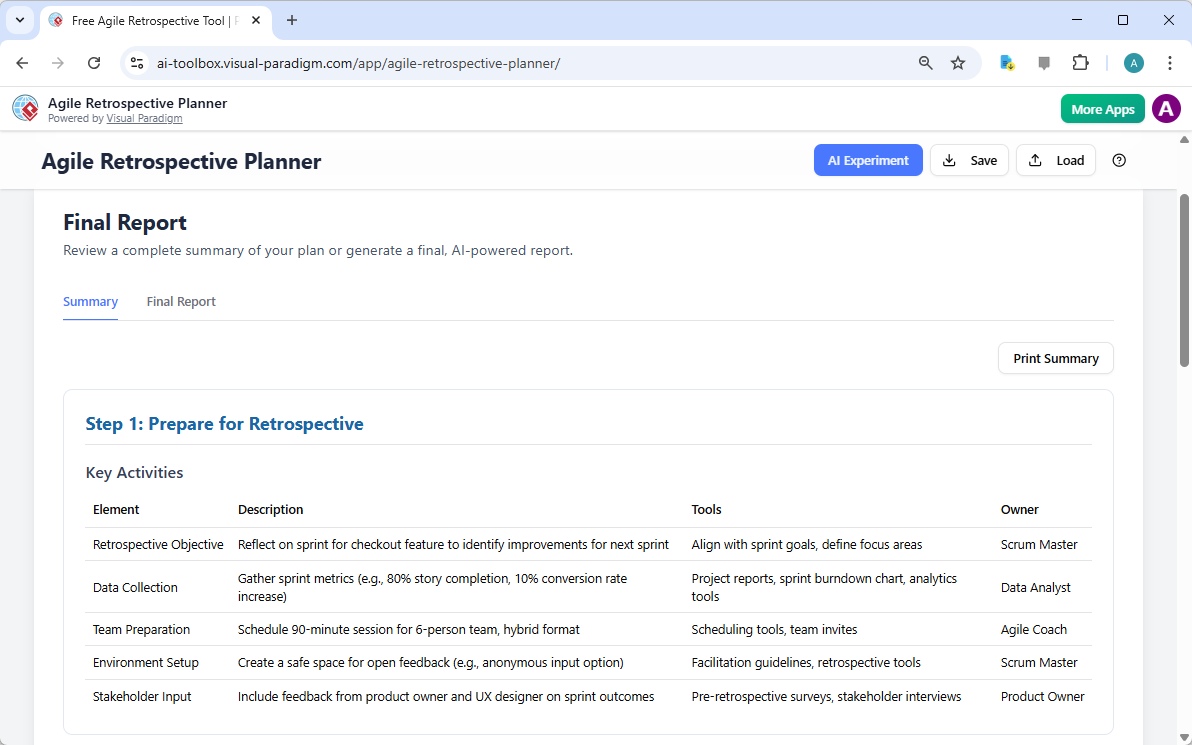
Every successful retrospective begins with a solid foundation. Step 1, “Prepare for Retrospective,” is the critical first phase where you define the session’s objective and lay out the groundwork for a productive discussion. Visual Reference 1 shows the interface for this initial stage. The planner provides a structured table with five key elements: Retrospective Objective, Data Collection, Team Preparation, Environment Setup, and Stakeholder Input. Each element has a clear description and a designated owner, ensuring that all necessary preparations are assigned and tracked. For instance, the Retrospective Objective might be to reflect on a new feature launch, while Data Collection could involve gathering metrics like story completion rates. This systematic approach ensures that no critical preparation step is overlooked, setting the stage for a focused and open team discussion.
Step 2: Conduct the Retrospective – Structuring the Flow
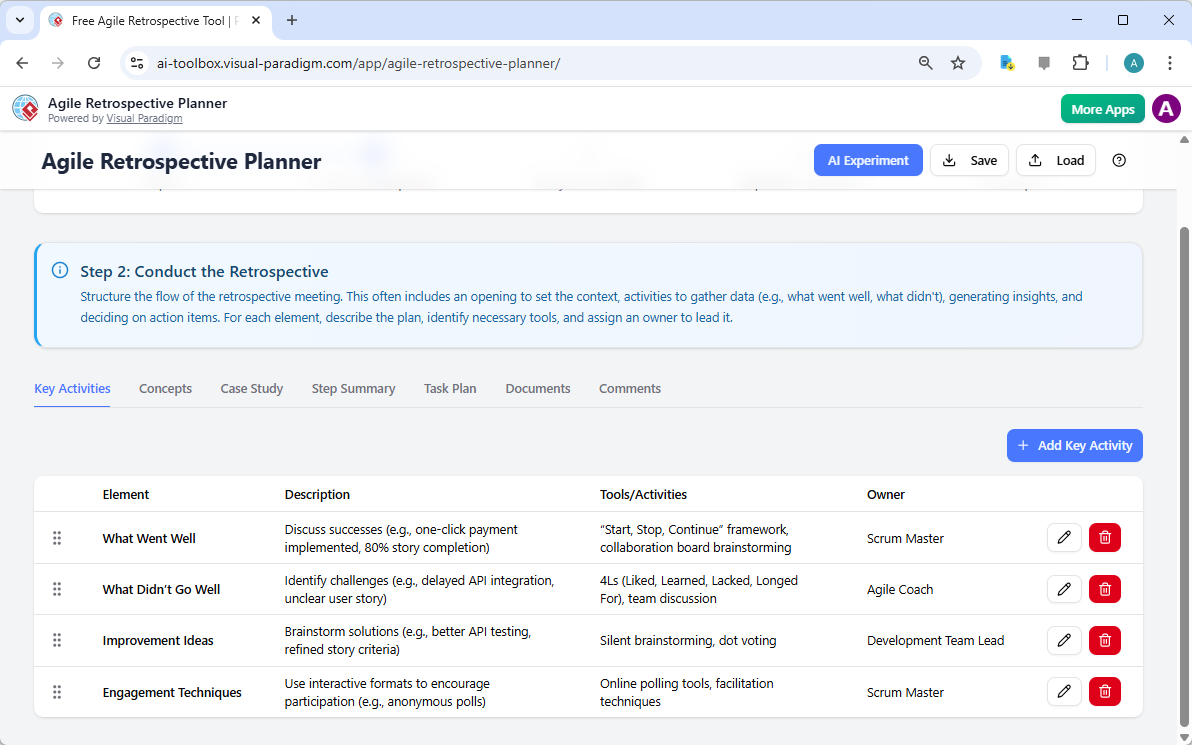
With the stage set, Step 2 focuses on the core activities of the retrospective meeting itself. Visual Reference 2 illustrates the “Conduct the Retrospective” phase, which structures the flow of the session. This step is designed to guide you through the process of gathering data, generating insights, and deciding on action items. The planner suggests key activities such as discussing “What Went Well” and “What Didn’t Go Well,” using frameworks like “Start, Stop, Continue” or 4Ls. It also recommends specific tools and activities for each element, such as brainstorming solutions or using online polling for engagement. By outlining these activities in advance, the planner helps you create a clear agenda that keeps the team focused on the goal of identifying improvements. This structured approach ensures that the retrospective is not just a casual discussion but a purposeful, data-driven analysis of the team’s performance.
Step 3: Analyze & Prioritize – Turning Insights into Action
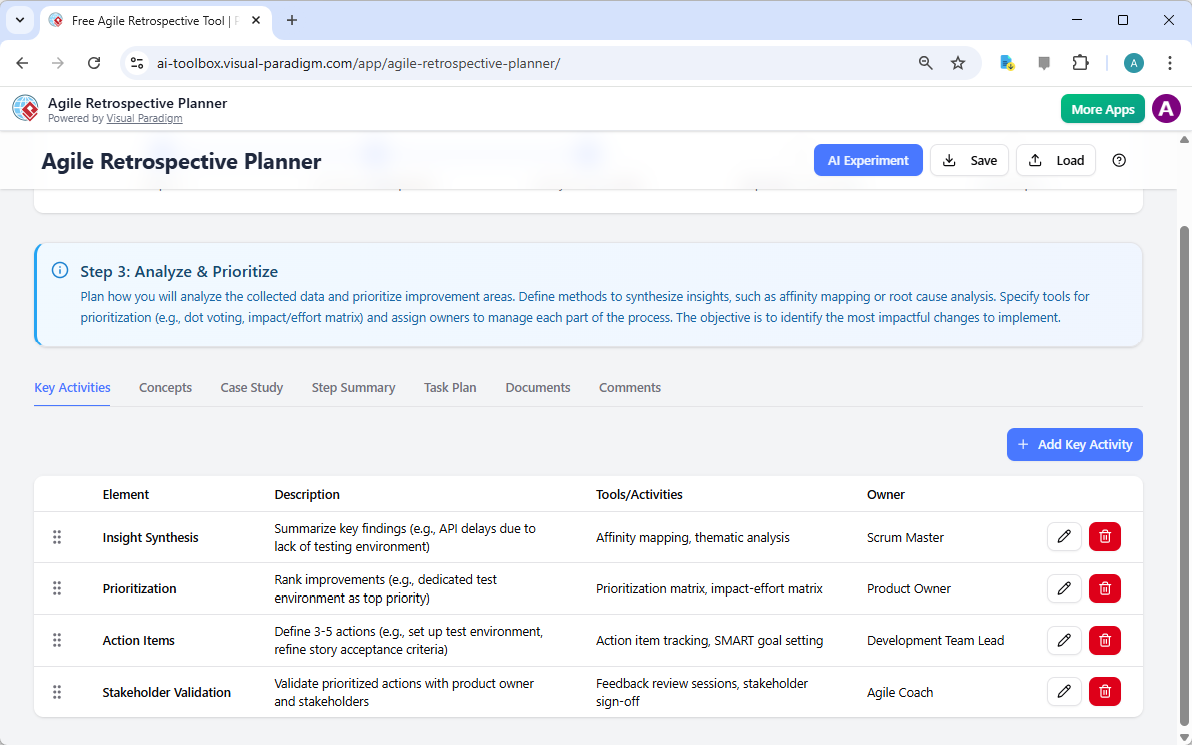
After gathering data, the next crucial step is to analyze it and prioritize the most impactful improvements. Step 3, “Analyze & Prioritize,” is where the team synthesizes their findings into actionable insights. Visual Reference 3 shows the interface for this phase, which includes elements like Insight Synthesis, Prioritization, Action Items, and Stakeholder Validation. The planner suggests methods for analyzing data, such as affinity mapping or root cause analysis, and provides tools for prioritization like the impact-effort matrix. This step is vital because it ensures that the team doesn’t just identify problems but focuses on the ones that will have the biggest positive impact. By defining specific action items and assigning owners, the planner bridges the gap between discussion and implementation, ensuring that the retrospective’s outcomes are not just discussed but also executed.
Step 4: Implement & Monitor – Ensuring Follow-Through
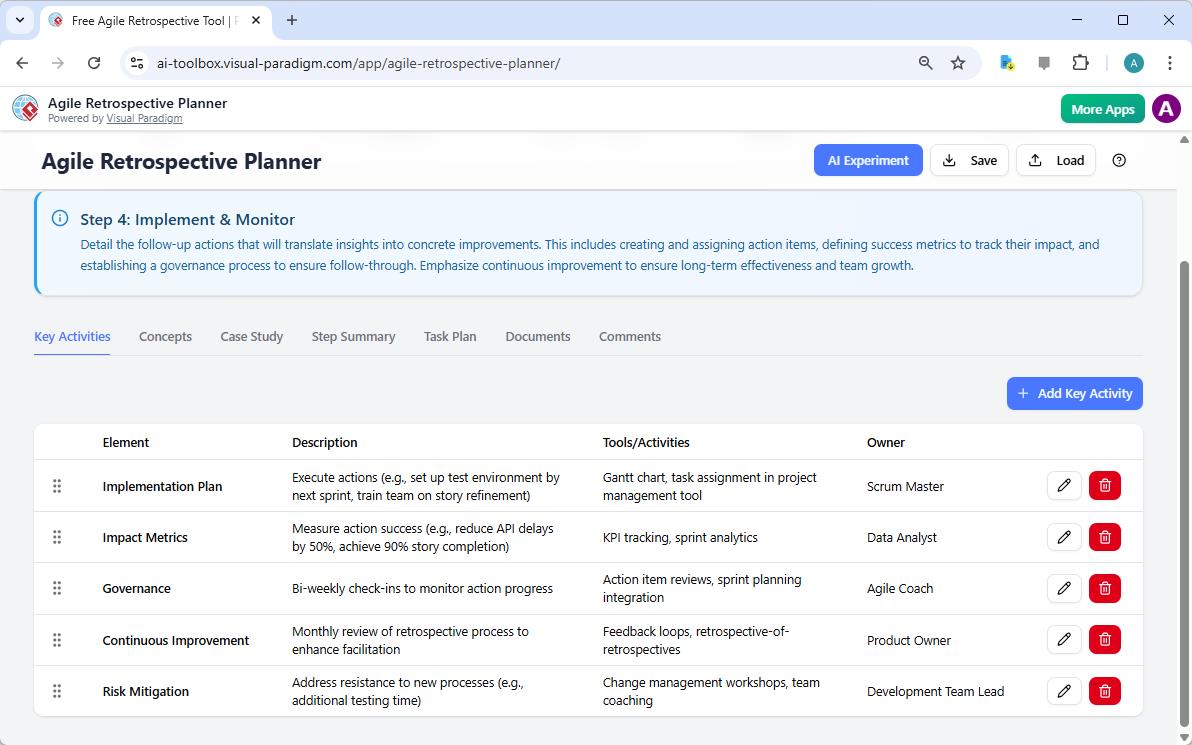
For a retrospective to be truly effective, its outcomes must be implemented and monitored. Step 4, “Implement & Monitor,” focuses on the follow-up actions that will turn insights into concrete improvements. Visual Reference 4 displays the interface for this phase, which includes an Implementation Plan, Impact Metrics, Governance, Continuous Improvement, and Risk Mitigation. The planner helps you define how to execute the action items, measure their success (e.g., reducing API delays by 50%), and establish a governance process to ensure follow-through. This step is essential for creating a culture of continuous improvement, where the team regularly reviews its own processes and adapts to change. By planning for implementation and monitoring from the outset, the planner helps ensure that the retrospective’s value is sustained over the long term.
Step 5: Final Report – Creating a Comprehensive Record
The final step of the process is to consolidate all the planning into a single, comprehensive document. Step 5, “Final Report,” is where the planner brings everything together. Visual Reference 5 shows the final report, which includes a summary of the entire plan, from the initial objective to the final implementation strategy. This report serves as a professional facilitator’s guide, a meeting agenda for attendees, and a permanent record of the retrospective’s plan. It can be printed as a PDF or shared digitally, ensuring that everyone is on the same page. This final document is invaluable for maintaining transparency, tracking progress, and providing a historical record of the team’s journey. By creating a clear and organized final report, the planner ensures that the hard work of the retrospective is not lost but becomes a cornerstone of the team’s continuous improvement process.
Conclusion: Elevate Your Retrospectives with a Proven Tool
The Agile Retrospective Planner from Visual Paradigm is more than just a tool; it’s a strategic partner for any team committed to continuous improvement. By providing a structured, AI-powered workflow, it simplifies the often complex process of running a retrospective. From the initial preparation to the final report, the planner ensures that every step is deliberate, focused, and results-driven. It saves valuable time, encourages deeper insights, and turns team discussions into actionable outcomes. Whether you are a seasoned Scrum Master or new to Agile, this tool empowers you to lead more effective and impactful retrospectives. Ready to transform your team’s reflection process? Try the AI-Powered Agile Retrospective Planner today and experience the power of structured, intelligent planning.
Related Links
Agile development is an iterative mindset that enables teams to innovate, respond to change, and reduce risk throughout the project management lifecycle. This methodology emphasizes continuous feedback and frequent software releases to ensure that value is delivered consistently to stakeholders. Visual Paradigm supports these workflows through specialized tools for sprint management, user story mapping, and AI-powered backlog planning to enhance team collaboration and project clarity.
-
Agile Methodology Tutorial: Principles and Practices Explained: A comprehensive guide covering the fundamental principles and various frameworks of the Agile methodology.
-
What is Agile Project Management?: An overview describing Agile as a mindset that helps teams manage innovation and navigate project risks.
-
Adopting UML in Agile Projects: A Complete Tutorial: This tutorial explains how to integrate UML modeling into Agile workflows to improve communication and planning.
-
Sprint Guide in the Agile Handbook: A detailed resource on the structure and purpose of sprints within the iterative software development process.
-
What Is a User Story? A Complete Guide to Agile Requirements: This guide details how to effectively capture user needs and requirements through the use of user stories.
-
Agile User Story Mapping Tool: An overview of the tool used to visualize product backlogs and prioritize features for upcoming sprints.
-
Sprint Planning in Agile: Step-by-Step Guide: A practical guide focusing on backlog grooming, task breakdown, and team alignment during the planning phase.
-
Agilien AI-Powered Jira Backlog Planner: Details on how AI intelligently automates the structuring of user stories and epics within Jira for more efficient sprints.
-
A Comprehensive Guide to User Story Mapping: This resource explains how to use story maps to align development teams and prioritize product features effectively.
-
Visual Paradigm Jira Integration: Seamless Agile Workflow: An article detailing how to synchronize diagrams and visual models directly within Jira to enhance project visibility.