Enterprise architecture is often described as the blueprint for an organization’s transformation. Yet, for many practitioners, the foundational standards like ArchiMate can feel like a maze of acronyms and abstract concepts. One of the most frequent stumbling blocks is the confusion between layers and viewpoints. Understanding how these concepts interact is critical for creating clear, actionable models. This guide breaks down the architecture layers, explains the role of viewpoints, and provides a structured approach to keep your modeling efforts precise.
Why the Confusion Happens 🤔
When building an enterprise architecture model, it is easy to mix concepts. You might find yourself placing a business process inside a technology layer, or describing a business role as an application function. This happens because the business reality is interconnected. However, the modeling standard requires separation to ensure clarity.
Without a clear distinction, stakeholders get lost. IT teams see business terms they do not understand, and business leaders see technical details they cannot use. The core issue is usually a lack of separation between what the organization does and how it is supported. By strictly adhering to the layer definitions, you create a map that is navigable for everyone involved.
Understanding the Core Layers 🧱
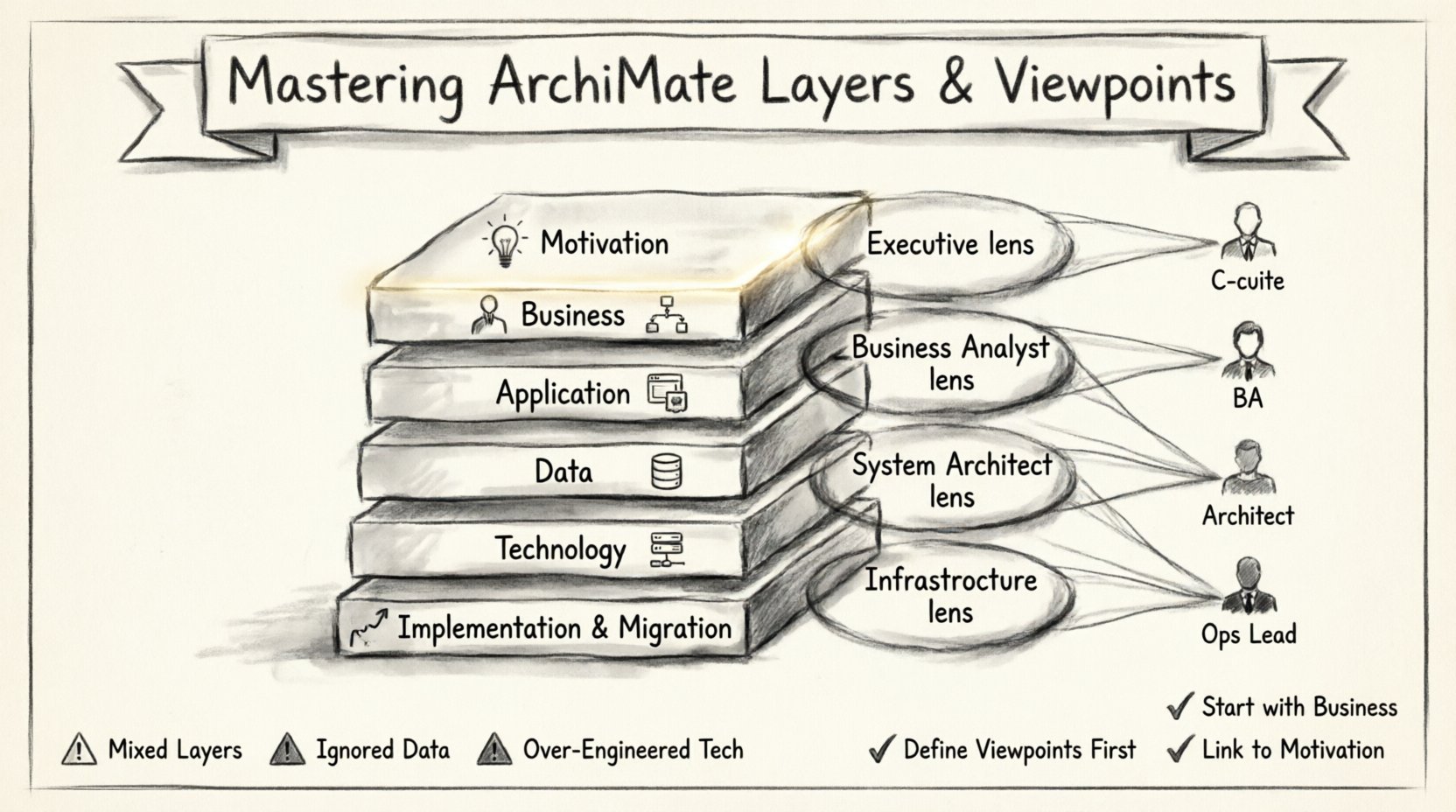
The ArchiMate standard divides the enterprise into specific layers. Each layer represents a distinct aspect of the architecture. Keeping these boundaries clear prevents the “everything is connected to everything” syndrome that makes models unreadable. Here is a detailed breakdown of the standard layers.
- Business Layer: This layer describes how the organization operates. It focuses on value creation and the delivery of services to customers or other business units.
- Application Layer: This layer represents the software systems that support the business processes. It defines the application functions and services exposed to the business.
- Data Layer: Often considered part of the business or application layer depending on the standard version, this focuses on the information objects created and used.
- Technology Layer: This describes the physical and logical infrastructure required to run the applications. It includes hardware, networks, and operating systems.
- Implementation & Migration Layer: This handles the projects and initiatives that move the enterprise from its current state to a target state.
- Motivation Layer: This adds the reasoning behind the architecture. It includes drivers, principles, goals, and assessments.
The Business Layer in Detail
The business layer is the starting point for most architecture initiatives. It answers the question: “What value do we deliver?” Elements here include:
- Business Processes: Sequences of activities that create value.
- Business Roles: People or units responsible for specific activities.
- Business Services: Discrete units of functionality delivered to a stakeholder.
- Business Objects: Entities of business significance, such as a Customer or Order.
- Collaborations: Groups of roles working together to achieve a business goal.
The Application Layer in Detail
Once the business needs are defined, the application layer describes the software that supports them. This is often where the most technical detail begins.
- Application Functions: The capabilities provided by a software system (e.g., “Calculate Tax”).
- Application Services: The interface through which the function is accessed (e.g., “Submit Tax Return”).
- Application Components: The actual modular parts of the software.
- Interface Usage: How applications communicate with each other.
The Technology Layer in Detail
This layer provides the foundation for the applications to run. It is often invisible to the business but critical for stability.
- Network: The communication infrastructure.
- Hardware: Servers, devices, and physical equipment.
- System Software: Operating systems and databases.
- Device: End-user devices like laptops or phones.
What Are Viewpoints? 🧐
If layers are the chapters in a book, viewpoints are the specific lenses you use to read them. A viewpoint defines the perspective from which a stakeholder views the architecture. It determines which layers are relevant and which elements are necessary for a specific audience.
Imagine you are a CEO. You care about the Business Layer and the Motivation Layer. You do not need to see the specific network cables in the Technology Layer. A viewpoint tailored for the CEO would filter out the technical noise. Conversely, a System Administrator needs a different viewpoint that highlights the Technology and Application layers.
The Role of Viewpoints in Clarity
Using viewpoints correctly ensures that the right information reaches the right person. It prevents information overload. Without viewpoints, a single model might become too complex to be useful. Viewpoints allow you to slice the model horizontally or vertically to suit specific needs.
- Filtering: Showing only relevant layers for a specific concern.
- Abstraction: Hiding technical details that are irrelevant to the current discussion.
- Focus: Highlighting specific elements like security, performance, or cost.
Mapping Layers to Viewpoints 🗺️
Understanding how to map layers to viewpoints is the key to avoiding confusion. You must decide which layers are visible in a specific view. This mapping depends on the stakeholder’s responsibility and the question they are trying to answer.
| Stakeholder Group | Primary Focus | Relevant Layers | Key Elements |
|---|---|---|---|
| Executive Leadership | Strategy & Value | Motivation, Business | Goals, Business Processes, Services |
| Business Analysts | Process & Operations | Business, Application | Processes, Roles, Application Services |
| System Architects | Integration & Design | Application, Technology | Components, Interfaces, Devices |
| Infrastructure Teams | Deployment & Ops | Technology, Implementation | Hardware, Network, Migration Projects |
Common Pitfalls When Modeling Layers ⚠️
Even experienced architects make mistakes. Identifying these common pitfalls helps you avoid them in your own work.
1. Mixing Layers in a Single Element
A frequent error is defining a single element that spans multiple layers without proper relationships. For example, creating a “Server” that is also a “Business Process.” These are distinct concepts. A business process is an activity; a server is physical hardware. They are connected, but they are not the same thing.
2. Ignoring the Data Layer
Data is often treated as an afterthought. However, information objects are central to business value. If you do not explicitly model how data flows between business processes and application functions, you miss critical dependencies. Ensure data objects are linked to both the business process that creates them and the application function that stores them.
3. Over-Engineering the Technology Layer
It is tempting to model every server and every network cable. This creates noise. Unless the specific hardware impacts the business value or risk profile, keep the technology layer at a logical level. Focus on the type of infrastructure rather than the specific serial number of a device.
4. Forgetting Motivation
Architecture without motivation is just a drawing. Why are we changing the process? What drives this technology investment? The Motivation layer connects the “What” to the “Why.” Always link processes and applications to goals and principles.
Best Practices for Clear Modeling 🛠️
To maintain clarity and avoid getting lost in the details, follow these practical guidelines.
- Start with the Business: Always define the business layer first. Do not start with technology. The technology serves the business, not the other way around.
- Define Viewpoints Before Modeling: Know who will read the model before you start drawing. This tells you which layers to include.
- Use Consistent Naming: Ensure terms are used consistently across layers. If you call it a “Customer Order” in the business layer, do not call it “Order 1” in the application layer.
- Limit View Complexity: A single diagram should not contain more than 20 to 30 elements. If it does, split it into multiple viewpoints.
- Validate with Stakeholders: Regularly show your models to the people who will use them. Ask if they understand the relationships between layers.
Deep Dive: The Application-Technology Relationship 🔄
The boundary between the Application and Technology layers is often where confusion arises. This relationship is defined by the “realization” or “deployment” relationship. An application function is realized by an application component. An application service is deployed on a device or network.
When modeling this, ask: “Does this element depend on the physical infrastructure?” If yes, it belongs in the Technology layer. If it depends on the logical capability, it belongs in the Application layer. For instance, a database software is an application component. The server hosting the database is a technology device. Keeping this distinction clear ensures you can upgrade the server without changing the application logic.
Handling Implementation & Migration 🚀
The Implementation & Migration layer is often overlooked until a project is already underway. This layer is crucial for planning. It connects the current state to the target state. It includes:
- Projects: Groups of work packages.
- Work Packages: Specific sets of activities.
- Deliverables: The output of the work packages.
By modeling this layer, you can see exactly which business capabilities will be affected by a specific project. This helps in impact analysis. If a project removes a technology device, which business processes will stop? The mapping in this layer makes that traceability possible.
Strategic Alignment with Motivation 🎯
Why do we build architectures? To align with strategy. The Motivation layer is the bridge. It includes:
- Drivers: Internal or external forces pushing for change.
- Goals: Specific outcomes to achieve.
- Principles: Rules that guide decision-making.
- Assessments: Evaluations of the current state against the goals.
When you confuse layers, you often lose the thread of motivation. For example, if you model a technology change without linking it to a business goal, the change appears arbitrary. Always trace the line from the Motivation layer down to the Business or Technology layers.
Practical Example: A Digital Transformation 📱
Consider a scenario where a company wants to move from a paper-based system to a digital one.
- Business Layer: The “Submit Application” process changes from physical forms to a web portal.
- Application Layer: A new web application replaces the old filing cabinet system.
- Data Layer: Customer data moves from paper files to a database.
- Technology Layer: Servers and internet infrastructure are upgraded to support the web portal.
- Motivation Layer: The driver is “Reduce processing time” and the goal is “Faster customer onboarding”.
If you mix these, you might say “The Web Portal is the Business Process.” This is incorrect. The Business Process is the activity of submitting the application. The Web Portal is the application service that enables it. Keeping these separate allows you to change the technology (e.g., move to mobile) without changing the core business process (submitting the application).
Refining Your Viewpoints Over Time 🔄
Viewpoints are not static. As the organization evolves, the needs of the stakeholders change. You might start with a high-level business view. Later, you might need a detailed security view that spans all layers. Regularly review your viewpoint definitions. Are they still serving the stakeholders? Are they too complex? Are they missing critical layers?
Adopting an iterative approach to viewpoint design ensures your architecture remains relevant. Document the purpose of each viewpoint. This helps new team members understand why a specific layer is visible in one diagram but hidden in another.
Summary of Key Takeaways ✅
- Separation is Key: Keep Business, Application, and Technology layers distinct.
- Viewpoints Define Focus: Use viewpoints to filter layers for specific audiences.
- Motivation Connects the Dots: Always link architecture elements to business goals.
- Traceability Matters: Ensure you can trace a business need down to the technical implementation.
- Keep it Simple: Avoid cluttering diagrams with unnecessary technical details.
Mastering the separation of layers and the definition of viewpoints transforms architecture from a confusing diagram into a strategic asset. By following these principles, you create models that are not only technically accurate but also practically useful for driving enterprise change. The goal is clarity, not complexity. When your stakeholders can look at a model and immediately understand the value and the cost, you have succeeded.