Enterprise Architecture models often grow to become complex artifacts that contain vast amounts of data. While this depth provides a complete picture of the organization, it frequently creates confusion for specific audiences. A CFO does not need to see every service dependency in the application layer, just as a developer does not need a high-level business strategy map. This discrepancy between available data and required information is known as model noise. 📉
To address this challenge, the ArchiMate standard provides a mechanism called the Viewpoint. A viewpoint acts as a specialized lens, allowing architects to present only the relevant subset of the model to the correct stakeholder. This guide explores how to leverage ArchiMate Viewpoints to filter complexity, improve communication, and ensure that architecture information remains actionable.
Understanding the Noise Problem in Enterprise Architecture 🧩
When an enterprise architecture model reaches a certain scale, it becomes unwieldy. Every relationship, dependency, and constraint is stored in the repository. If you present this entire repository to a business stakeholder, you risk overwhelming them. This is the core problem of information overload.
Model noise manifests in several ways:
- Irrelevance: Showing technical details to business leaders.
- Complexity: Too many lines connecting elements on a diagram.
- Confusion: Lack of context for specific architectural decisions.
- Time Wasted: Stakeholders spend time searching for information they do not need.
The goal is not to hide information, but to organize it so that the right information appears in the right context. ArchiMate Viewpoints provide the rules for this organization.
Defining the ArchiMate Viewpoint 🧭
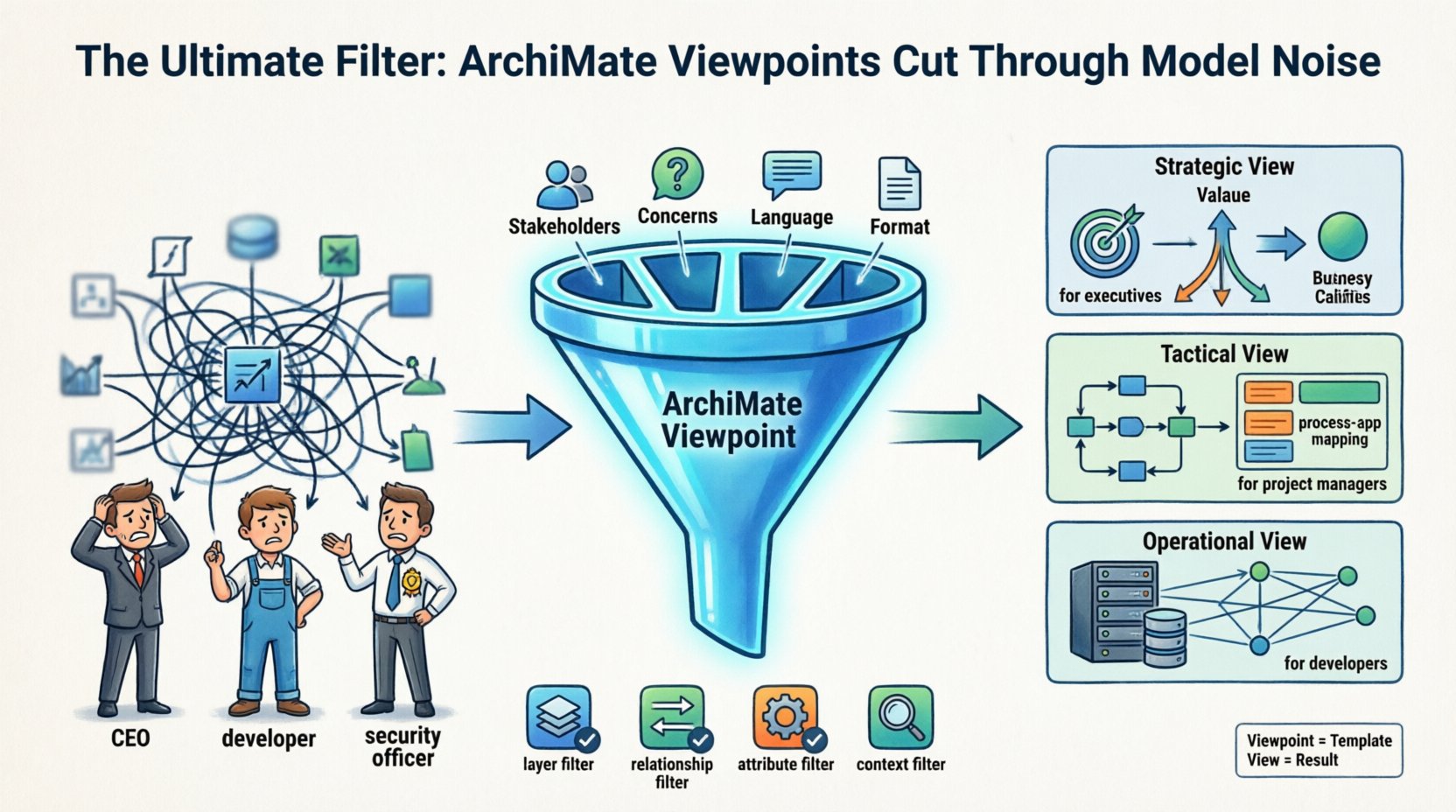
In the context of the ArchiMate standard, a Viewpoint is not a drawing itself. It is a specification that defines how to construct a View. It dictates the following:
- Stakeholders: Who is this for?
- Concerns: What questions does this stakeholder need answered?
- Language: Which layers and concepts from the ArchiMate language are allowed?
- Format: How should the information be displayed?
Think of a Viewpoint as a recipe. The View is the meal. The Viewpoint tells you which ingredients (layers) to use, how to season them (stakeholders), and the style of plating (format).
By defining a Viewpoint, you ensure consistency. Every time you create a view for the IT Director, you use the same Viewpoint. This creates a predictable experience for the stakeholder, reducing cognitive load.
Viewpoint vs. View: The Critical Distinction 🔍
Confusion often arises between the terms View and Viewpoint. Understanding the difference is essential for proper implementation.
- Viewpoint: The abstract definition or template. It exists before the view is created. It contains the rules and constraints.
- View: The concrete realization of the Viewpoint. It is the actual diagram or report generated from the model data.
You can have one Viewpoint generate multiple Views. For example, a “Security Audit Viewpoint” might generate a View for the current state and another View for the target state, both adhering to the same rules.
Structuring Your Viewpoint Strategy 🗺️
Creating a Viewpoint requires strategic thinking. You must identify the core concerns of your organization and map them to the ArchiMate language. A robust strategy involves categorizing Viewpoints by the type of decision they support.
1. Strategic Viewpoints
These focus on high-level alignment. They typically use the Business Layer and Motivation Layer. The goal is to show how IT supports business goals.
- Focus: Value streams, capabilities, goals, and principles.
- Audience: C-Suite, Board Members, Strategy Teams.
- Filter: Exclude technical details like servers, databases, or specific software.
2. Tactical Viewpoints
These focus on project delivery and capability management. They often bridge the Business Layer and Application Layer.
- Focus: Process-Application mapping, service dependencies.
- Audience: Project Managers, IT Directors, Product Owners.
- Filter: Exclude infrastructure details but include application interfaces.
3. Operational Viewpoints
These focus on the technical implementation and runtime environment. They utilize the Application Layer, Technology Layer, and Data Layer.
- Focus: Infrastructure topology, security controls, data flow.
- Audience: System Administrators, Developers, Security Officers.
- Filter: Exclude high-level business strategy unless it impacts security compliance.
Aligning Viewpoints with Stakeholder Needs 👥
One of the most effective ways to reduce noise is to map specific Viewpoints to specific stakeholder groups. Below is a breakdown of common stakeholder profiles and the Viewpoint specifications that serve them best.
| Stakeholder Group | Primary Concern | Recommended Layers | Key Concepts |
|---|---|---|---|
| Business Executives | ROI and Strategic Alignment | Business, Motivation | Business Process, Goal, Principle |
| IT Management | Cost and Resource Allocation | Business, Application, Technology | Service, Function, Node |
| Architects | Consistency and Integration | All Layers | Interface, Relationship, Dependency |
| Developers | API Contracts and Data Flow | Application, Data, Technology | Component, Interface, Data Object |
| Security Officers | Risk and Compliance | Motivation, Technology | Threat, Asset, Security |
When you define a Viewpoint, you explicitly state which of these groups it serves. This prevents the accidental exposure of sensitive or irrelevant data.
Designing Effective Filtering Rules 🎚️
A Viewpoint is essentially a set of filters. To make these filters effective, you must define them with precision. Ambiguity leads to noise.
1. Layer Filtering
The simplest filter is the ArchiMate layer. You can restrict a Viewpoint to the Business Layer only. This automatically hides all Application and Technology elements. However, sometimes you need a cross-layer view. In this case, you must define specific relationships that are allowed.
2. Relationship Filtering
Not all relationships are useful for every stakeholder. A “serves” relationship is vital for an IT Manager. A “association” relationship might be too vague for a Security Officer. Your Viewpoint should specify which relationship types are visible.
3. Attribute Filtering
Sometimes the element itself is visible, but the attributes should be hidden. For example, a “Server” element might be visible to a Capacity Planner, but its IP address attribute should be hidden in a general topology view. While not always a native ArchiMate feature, this logic is applied during the View generation process.
4. Context Filtering
Focus on specific domains. A Viewpoint for the “Finance Domain” might only show Business Processes related to billing and reporting. This reduces the visual clutter of unrelated processes.
Common Implementation Challenges ⚠️
Even with a solid plan, challenges arise when implementing Viewpoints. Being aware of these pitfalls helps maintain model quality.
- Over-Specialization: Creating too many Viewpoints for minor differences. This makes the architecture hard to maintain. Aim for 5 to 10 core Viewpoints.
- Inconsistency: Using different naming conventions across Viewpoints. Ensure a “Business Process” is always called “Business Process”.
- Orphaned Elements: Elements that are not included in any Viewpoint. These are effectively invisible to stakeholders and may be removed to clean the model.
- Static Views: Creating views that are not updated. A Viewpoint that references outdated data creates noise in the form of misinformation.
Maintaining Viewpoint Integrity Over Time 🔄
Architectures evolve. Stakeholder needs change. A Viewpoint that was relevant five years ago may no longer serve its purpose today. Regular reviews are necessary.
1. Quarterly Reviews
Schedule regular sessions to review the active Viewpoints. Ask the stakeholders: “Does this view still answer your questions?” If the answer is no, update the Viewpoint specification.
2. Version Control
Treat Viewpoints as code. Keep track of changes to the Viewpoint definitions. If you change a filtering rule, document why. This ensures that historical views remain valid while new views reflect current standards.
3. Feedback Loops
Establish a channel for stakeholders to request changes. If the Operations team says the “Network Topology View” is missing a critical link, update the Viewpoint to include it. This keeps the architecture relevant.
Integrating Viewpoints into Governance 🏛️
Viewpoints are not just a technical exercise; they are a governance tool. They define how architecture information is approved and distributed.
- Approval Workflows: Different Viewpoints may require different approval levels. A Strategic Viewpoint needs C-Suite approval. An Operational Viewpoint might only need IT Manager approval.
- Access Control: Use Viewpoints to enforce security. Sensitive data should only appear in Viewpoints accessible to authorized personnel.
- Reporting: Standardize reports based on Viewpoints. This ensures that when a report is generated, it always follows the same structure and content rules.
Case Study: Applying Viewpoints in a Real Scenario 🏢
Consider a financial institution migrating to a cloud infrastructure. The model contains thousands of elements.
Scenario A: The Board Meeting
The CEO needs to know the strategic impact. You use the Strategic Business Viewpoint. It shows the “Digital Transformation” goal and the high-level business capabilities being modified. No servers or code are shown. The noise is zero.
Scenario B: The Migration Team
The engineers need to know what to move. You use the Infrastructure Migration Viewpoint. It shows the current nodes, the target cloud nodes, and the data dependencies. Business goals are excluded. The noise is zero.
Scenario C: The Risk Audit
The auditors need to know about compliance. You use the Compliance Viewpoint. It highlights security controls, data residency locations, and encryption status. It filters out performance metrics.
By separating these concerns, each group gets exactly what they need without distraction.
Best Practices for Long-Term Success ✅
To ensure your Viewpoint strategy remains effective, follow these recommendations:
- Start Simple: Do not try to define every possible view at the beginning. Start with the top 3 stakeholder groups.
- Document the Logic: Write down the rules for each Viewpoint. Do not rely on memory.
- Use Standard Concepts: Stick to the standard ArchiMate concepts. Avoid custom extensions unless absolutely necessary.
- Automate Generation: Where possible, automate the creation of Views from the Viewpoint definitions to ensure consistency.
- Train Stakeholders: Teach stakeholders how to read the views. A well-designed view is useless if the audience does not understand the symbols.
The Impact of Effective Filtering 🚀
When you successfully implement ArchiMate Viewpoints, the impact is tangible. Decision-making speeds up because information is accessible. Misunderstandings decrease because the context is clear. The architecture model becomes a living document that supports the business, rather than a static database that sits in a repository.
Reduction in noise leads to an increase in signal. The signal is the actionable intelligence that drives enterprise transformation. By applying the right filters, you ensure that the intelligence reaches the right people at the right time.
Summary of Key Takeaways 📝
- Noise is inevitable: Large models contain too much information for any single person.
- Viewpoints are templates: They define the rules for creating specific views.
- Stakeholder mapping is key: Match Viewpoints to specific roles and concerns.
- Consistency matters: Use the same Viewpoint for similar requests.
- Maintain actively: Review and update Viewpoints as the organization changes.
By treating Viewpoints as a core component of your Enterprise Architecture practice, you transform complexity into clarity. This approach allows your architecture team to focus on value creation rather than data management.