In the landscape of contemporary software architecture, visual documentation serves as the backbone of communication between engineering teams, operations staff, and stakeholders. A deployment diagram specifically illustrates the physical hardware and software components of a system, detailing how nodes connect and how artifacts are distributed. However, maintaining these diagrams manually has become a significant bottleneck. As infrastructure scales and evolves rapidly, the traditional approach of drawing nodes and connections by hand often leads to stale documentation that no longer reflects reality.
This guide explores the methodologies and strategies for automating deployment diagram generation. By integrating diagram creation into modern workflows, organizations can ensure that their architectural documentation remains accurate, accessible, and synchronized with the underlying infrastructure. The goal is to reduce overhead and increase reliability without introducing unnecessary complexity.
📐 Understanding Deployment Diagrams
Before implementing automation, it is essential to define the scope and structure of a deployment diagram. These visual representations are critical for understanding the topology of a system. They go beyond simple flowcharts to depict the actual deployment environment.
- Nodes: These represent the physical or virtual hardware units where software components execute. Examples include servers, routers, and storage devices.
- Artifacts: These are the software packages, executables, or libraries that are deployed onto the nodes.
- Connectors: Lines indicating communication paths between nodes or between nodes and artifacts. These often specify protocols or network types.
- Interfaces: Defined points of interaction where components communicate with external systems or other nodes.
When these elements are documented manually, the cognitive load on the architect increases significantly. Every infrastructure change requires a corresponding update to the visual representation. Automation addresses this by treating the diagram as a derived artifact rather than a primary document.
⚠️ The Challenges of Manual Maintenance
Relying on manual updates for deployment diagrams introduces several systemic risks. In fast-paced development environments, the time between a code change and a production deployment is often short. If documentation is not updated in parallel, it becomes obsolete quickly.
The following issues are common in manual workflows:
- Documentation Drift: The diagram diverges from the actual infrastructure state. Engineers lose trust in the documentation and stop referencing it.
- Time Consumption: Architects spend a significant portion of their week redrawing diagrams rather than designing new solutions.
- Inconsistency: Different team members may create diagrams with varying levels of detail or different naming conventions.
- Human Error: Manual entry is prone to typos, missing nodes, or incorrect connection mapping.
Automation mitigates these risks by establishing a single source of truth. The diagram becomes an output of the infrastructure definition, ensuring that the visual representation is always a reflection of the deployed state.
🤖 Core Principles of Automation
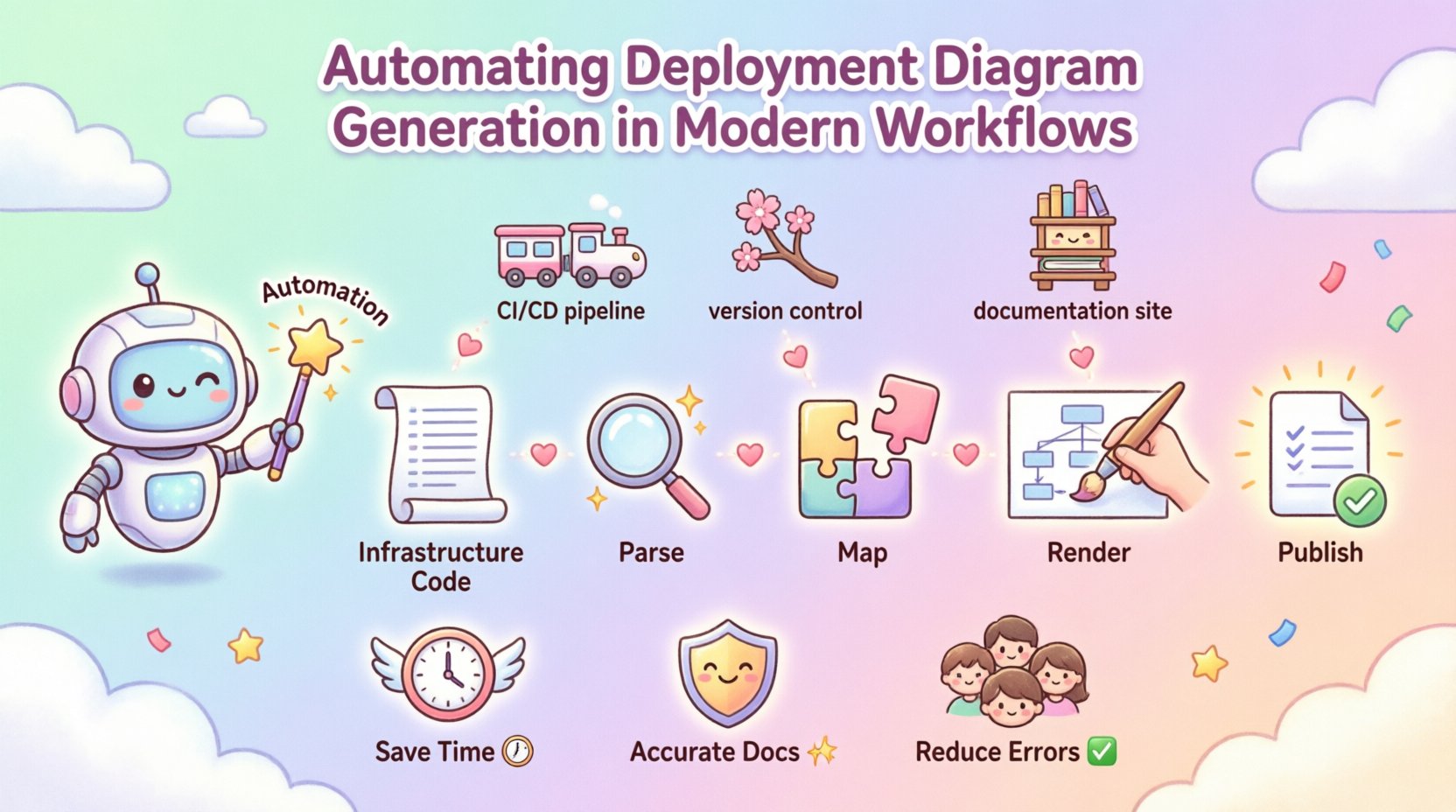
Automating deployment diagram generation requires a structured approach to data extraction and rendering. The process generally involves three distinct phases: parsing, mapping, and visualization.
1. Parsing Infrastructure Definitions
The first step is extracting data from the infrastructure configuration. In modern environments, infrastructure is often defined using code. This includes configuration files for orchestration platforms, cloud resource definitions, and server setup scripts.
- Static Analysis: Tools scan configuration files to identify declared resources without executing them.
- Runtime Inspection: Agents query the live environment to capture the actual state of running nodes and services.
- API Integration: Direct connections to cloud management APIs provide real-time data about resource allocation.
By parsing these sources, the system identifies what nodes exist, what software is installed on them, and how they are networked.
2. Mapping Relationships
Identifying resources is only half the task. The system must understand how these resources relate to one another. This involves analyzing network configurations, service dependencies, and deployment pipelines.
- Network Topology: Determining which nodes can communicate based on subnet configurations and security groups.
- Service Binding: Linking an application artifact to the specific node where it runs.
- Dependencies: Mapping upstream and downstream connections between services.
3. Rendering the Visuals
Once the data is parsed and relationships are mapped, the system generates the visual output. This is typically done using a diagramming syntax or a dedicated rendering engine.
- Standardized Syntax: Using a text-based language to define the diagram allows for version control and easy editing.
- Layout Algorithms: Automated placement of nodes to ensure the diagram is readable and not cluttered.
- Export Formats: Generating images, PDFs, or interactive web views for different use cases.
🔗 Integration Strategies
Automation should not exist in a silo. It must be integrated into the existing development and operations pipelines to be effective. This ensures that diagrams are generated automatically whenever changes occur.
Continuous Integration and Deployment
Incorporating diagram generation into the build pipeline is the most effective strategy. When a change is merged, the pipeline triggers the diagram generation step.
- Pipeline Triggers: Automated runs on every commit or pull request.
- Validation: The pipeline checks if the generated diagram matches the expected structure.
- Artifact Storage: The resulting diagram is stored alongside the build artifacts for easy access.
Version Control Systems
Storing diagram definitions in a version control system allows for history tracking and collaboration. Teams can review changes to the architecture just as they would review code changes.
- Code Review: Diagram updates are subject to the same review process as application code.
- Branching: Feature branches can include proposed architectural changes.
- History: Rollbacks are possible if a diagram update introduces errors.
Documentation Sites
The generated diagrams should be published to a central documentation hub. This makes them accessible to all team members without requiring specialized tools.
- Static Site Generation: Diagrams are embedded directly into documentation pages.
- Live Updates: The site refreshes automatically when new diagrams are generated.
- Searchability: Diagrams can be tagged and indexed for quick retrieval.
📊 Data Sources and Configuration
The accuracy of an automated diagram depends entirely on the quality of the data sources. Relying on a single source is often insufficient. A robust system aggregates data from multiple points.
The table below outlines common data sources and their specific contributions to the diagram generation process.
| Data Source | Information Provided | Automation Role |
|---|---|---|
| Infrastructure Code | Node definitions, resource types | Primary source for static topology |
| Orchestration Platform | Pod placement, service discovery | Dynamic mapping of running instances |
| Network Config | Subnets, gateways, firewall rules | Defining connection paths and security zones |
| Artifact Repository | Versioned software packages | Linking specific builds to deployment nodes |
| Monitoring Systems | Active connections, traffic flow | Validating runtime connectivity |
🛡️ Governance and Quality Control
Automation reduces manual effort, but it does not eliminate the need for oversight. Governance ensures that the generated diagrams meet organizational standards and security requirements.
Standardization
Teams should agree on a standard for how diagrams are structured. This includes node shapes, color coding for security levels, and naming conventions for connections.
- Template Usage: Enforcing a template ensures consistency across different projects.
- Style Guides: Defining how artifacts are labeled and grouped.
- Hierarchy: Establishing levels of detail (e.g., high-level overview vs. detailed technical view).
Access Control
Not all diagrams are suitable for all audiences. Sensitive infrastructure details may need to be restricted.
- Role-Based Access: Limiting view access based on user roles.
- Data Masking: Hiding specific internal IP addresses or configuration keys in the visual output.
- Environment Separation: Ensuring production diagrams are not visible to development-only staff.
Review Cycles
Even automated systems require human review. Periodic audits ensure that the automation logic itself has not drifted.
- Quarterly Reviews: Checking diagram accuracy against actual infrastructure.
- Incident Analysis: Using diagrams to trace root causes during outages.
- Onboarding: Using diagrams to train new engineers on system architecture.
📉 Implementation Roadmap
Moving from manual to automated diagram generation is a process that should be phased. A sudden switch can disrupt workflows. The following roadmap outlines a logical progression.
- Assessment Phase: Audit current documentation. Identify which diagrams are most frequently used and where the most pain points exist.
- Pilot Program: Select a single project or service to test the automation pipeline. Define success metrics for this pilot.
- Tool Selection: Choose the automation framework that fits the existing stack. Focus on integration capabilities rather than just diagram rendering.
- Pipeline Integration: Embed the generation step into the CI/CD process. Ensure it runs on every build.
- Publication: Connect the output to the documentation site. Ensure the links are updated automatically.
- Scaling: Roll out the process to additional projects. Refine the templates and logic based on feedback.
📈 Measuring Success
To justify the investment in automation, teams must track the impact on their workflows. Several metrics can indicate whether the implementation is successful.
- Accuracy Rate: The percentage of generated diagrams that match the live infrastructure without manual correction.
- Time Saved: The reduction in hours spent by architects on updating diagrams.
- Update Latency: The time between an infrastructure change and the diagram reflecting that change.
- Adoption Rate: How often engineers reference the automated diagrams during troubleshooting or planning.
- Drift Frequency: How often manual overrides are required due to detection errors.
High accuracy and low latency are the primary indicators of a well-functioning system. If the diagrams are generated instantly but are frequently wrong, the automation is not yet ready.
⚙️ Common Pitfalls to Avoid
Even with a solid plan, implementation can encounter obstacles. Being aware of common pitfalls helps teams navigate the transition smoothly.
- Over-Automation: Trying to automate every single detail can lead to overly complex diagrams that are hard to read. Focus on the high-level topology first.
- Ignoring Context: Automated diagrams often lack business context. They show *what* is deployed but not *why*. Manual annotations may still be needed for context.
- Hardcoded Paths: Avoid hardcoding file paths or specific URLs in the automation logic. This makes the system fragile and hard to move.
- Lack of Error Handling: If the data source is unavailable, the pipeline should fail gracefully. It should not generate a broken diagram silently.
- Ignoring Legacy Systems: Older infrastructure may not have APIs. These systems often require manual intervention or custom scripts to be included in the diagram.
🔄 Future Trends
The field of infrastructure visualization is evolving. As systems become more dynamic, the methods for documenting them must adapt.
- Real-Time Visualization: Moving from static snapshots to live, interactive maps that update as traffic flows.
- AI-Assisted Design: Using machine learning to suggest optimal node placements or identify potential bottlenecks.
- 3D Modeling: Exploring three-dimensional representations of data centers and cloud regions for better spatial understanding.
- Standardized Interchange: Development of industry-wide standards for exchanging architecture data between different tools.
🛠️ Technical Considerations
When building the automation pipeline, specific technical choices will impact performance and maintainability.
Performance
Diagram generation should not become a bottleneck in the deployment pipeline. Large infrastructure definitions can take significant time to parse.
- Caching: Cache parsed data to avoid re-processing unchanged resources.
- Parallelization: Run parsing tasks for different nodes in parallel where possible.
- Incremental Updates: Only regenerate the parts of the diagram that have changed.
Security
The automation process often requires access to sensitive infrastructure data.
- Secret Management: Store API keys and credentials in a secure vault, not in the code.
- Network Isolation: Ensure the diagram generation service runs in a secure network segment.
- Audit Logging: Log all access to infrastructure data for compliance and debugging.
🎯 Final Thoughts
Automating deployment diagram generation is not just about saving time; it is about improving the reliability of the system documentation. By treating architecture as code, teams can ensure that their visual representations are always accurate. This leads to better decision-making, faster onboarding, and more resilient systems. The journey from manual to automated documentation requires planning and discipline, but the long-term benefits are substantial.
Start small, focus on accuracy, and integrate the process into your existing workflows. Over time, the diagram becomes a trusted asset that supports the entire engineering lifecycle.