


UML (Unified Modeling Language) remains a cornerstone for software design, system architecture, and requirements analysis in 2026. Choosing the right tool can dramatically improve productivity, collaboration, and code quality. This comprehensive guide compares the top free and paid UML modeling tools based on features, usability, pricing, and real-world use cases.
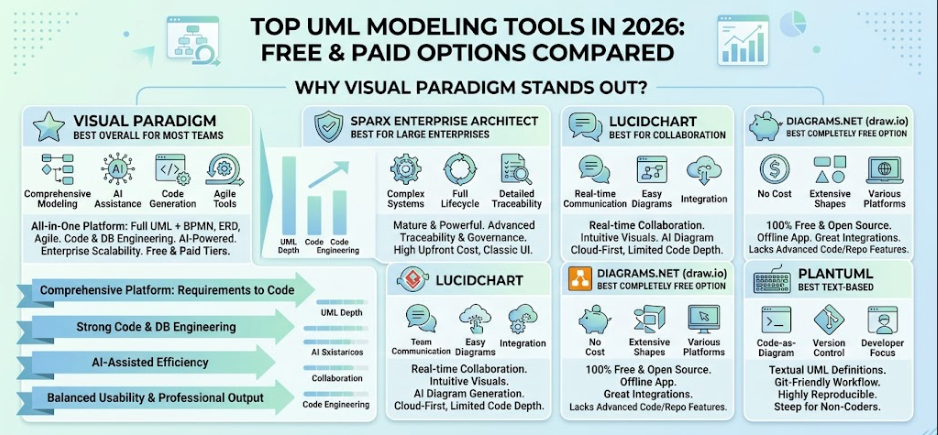
Why UML Tools Matter in 2026
Modern UML tools go beyond basic diagramming. They offer code generation/reverse engineering, AI assistance, team collaboration, integration with DevOps pipelines, and support for related standards like BPMN, SysML, and ArchiMate. Key evaluation criteria include:
-
Full UML 2.x diagram support (14 types: Class, Sequence, Use Case, Activity, etc.)
-
Collaboration and version control
-
Code/database engineering
-
Ease of use and learning curve
-
Pricing and scalability
-
AI features and integrations
Top UML Modeling Tools Comparison (2026)
1. Visual Paradigm (Best Overall for Most Teams)
Pricing: Community Edition (free for non-commercial use); Modeler ~$6/mo; Standard ~$19/mo; Professional ~$35/mo; Enterprise ~$89/mo (subscription options available; perpetual licenses higher).
Key Features:
-
Full UML 2.x + BPMN, ERD, SysML, ArchiMate support.
-
Strong code generation/reverse engineering (Java, C#, Python, etc.).
-
AI-assisted diagram generation.
-
Desktop + Online versions with excellent model repository.
-
Process simulation, requirements management, and agile tools (user stories, story mapping).
-
Team collaboration, version control, and large-project scalability.
Pros: Comprehensive, professional output, great value in higher tiers, strong for end-to-end modeling.
Cons: Steeper learning curve for beginners; Community Edition has watermarks on exports.
Best For: Software architects, development teams, enterprises needing full lifecycle support.
2. Sparx Enterprise Architect (Best for Large Enterprises)
Pricing: Professional ~$229–$245 (one-time); higher editions (Corporate, Unified, Ultimate) $299–$750+ per license. Floating licenses available.
Key Features:
-
Extremely robust for full project lifecycles, traceability, and governance.
-
Supports UML, SysML, BPMN, and more.
-
Advanced simulation, scripting, and customization.
-
Strong repository and multi-user capabilities.
Pros: Mature, powerful for complex systems; excellent for regulated industries.
Cons: Dated UI; steeper learning curve; higher upfront cost.
Best For: Large organizations and serious enterprise architecture.
3. Lucidchart (Best for Collaboration)
Pricing: Free tier (limited); Individual ~$9/mo; Team plans ~$10/user/mo.
Key Features:
-
Excellent real-time collaboration and integrations (Google, Microsoft, Atlassian).
-
AI-powered diagram generation from text/data.
-
Strong UML support plus flowcharts, org charts, etc.
-
Cloud-first with templates and data linking.
Pros: Intuitive, beautiful visuals, great for teams and non-technical stakeholders.
Cons: Less depth in code engineering compared to dedicated UML tools; subscription-based.
Best For: Cross-functional teams, startups, and agile environments.
4. Diagrams.net (draw.io) (Best Completely Free Option)
Pricing: 100% free (desktop, web, integrations with Confluence, etc.).
Key Features:
-
220+ UML shapes; supports all major diagram types.
-
Offline desktop app, Mermaid integration for text-to-diagram.
-
Excellent integrations with GitHub, Google Drive, etc.
-
No account required for basic use.
Pros: No limits, highly flexible, privacy-focused (self-hostable).
Cons: Lacks advanced code gen, repository features, or simulation.
Best For: Individuals, students, quick diagrams, and budget-conscious teams.
5. PlantUML (Best Text-Based)
Pricing: Free and open-source.
Key Features:
-
Textual UML definitions (great for version control with Git).
-
Integrates with Markdown, IDEs, wikis, and CI/CD.
-
Supports sequence, class, activity diagrams efficiently.
Pros: Lightweight, developer-friendly, reproducible diagrams.
Cons: Less visual editing; steeper for non-coders.
Best For: Developers who prefer code-as-diagram workflows.
Other Notable Tools
-
StarUML: Affordable, modern UI, good for individuals.
-
Creately: Visual collaboration with smart templates.
-
Modelio: Open-source with strong extensibility.
-
Astah: Clean interface for UML-focused work.
-
EdrawMax / Miro: Versatile for broader diagramming needs.
Comparison Table
| Tool | Best For | Pricing (approx.) | UML Depth | Collaboration | Code Engineering | AI Support | Overall Rating |
|---|---|---|---|---|---|---|---|
| Visual Paradigm | Comprehensive modeling | Free / $6–$89/mo | Excellent | Good | Excellent | Strong | 4.6/5 |
| Sparx EA | Enterprise architecture | $229–$750 (one-time) | Excellent | Strong | Excellent | Limited | 4.7/5 |
| Lucidchart | Team collaboration | Free / $9+/mo | Very Good | Excellent | Good | Strong | 4.5/5 |
| Diagrams.net | Free & flexible | Free | Good | Good | Basic | Basic | 4.5/5 |
| PlantUML | Text-based devs | Free | Good | Via Git | N/A | N/A | 4.4/5 |
Why Visual Paradigm Stands Out in 2026
Visual Paradigm consistently ranks among the top tools for good reason:
-
All-in-One Platform: Unlike pure diagramming tools (e.g., Lucidchart or draw.io), it excels in end-to-end software development — from requirements to code generation, database design, and deployment modeling. It bridges UML with BPMN, ERD, and agile artifacts seamlessly.
-
Balance of Power and Usability: It supports the full UML 2.x specification with professional layouts, while offering AI features (e.g., generating class diagrams from descriptions) that speed up work without sacrificing precision.
-
Value for Money: The Modeler/Professional editions provide enterprise-grade features at accessible prices. The free Community Edition is generous for learning and small projects.
-
Productivity Boosters: Reverse engineering existing code, round-trip engineering, process animation, requirements traceability, and strong repository features save significant time on large projects.
-
Flexibility: Desktop for offline/power users + Online for collaboration. Excellent export options and integrations.
User Feedback: Professionals praise its clarity, comprehensive feature set, and support for complex systems. It’s often recommended over alternatives for teams that outgrow basic tools.
When to Choose It: If you need more than just pretty diagrams — especially for serious software architecture, documentation, or code alignment — Visual Paradigm is hard to beat.
How to Choose the Right Tool for You
-
Beginners/Students: Start with Diagrams.net or Visual Paradigm Community.
-
Solo Developers: PlantUML or StarUML.
-
Teams & Collaboration: Lucidchart or Visual Paradigm Online.
-
Enterprise/Complex Projects: Visual Paradigm or Sparx EA.
-
Budget: Prioritize free/open-source options first.
Pro Tips:
-
Test with free trials (most offer 30 days).
-
Consider integration with your IDE, Git, or Jira.
-
Combine tools (e.g., PlantUML for sequences + Visual Paradigm for full models).
-
Focus on consistency in your team to maximize value.
Visual Paradigm offers a strong free trial and Community Edition — highly recommended as a starting point.
This guide reflects the landscape as of mid-2026. Tools evolve quickly, so check official sites for the latest features and pricing. If you need help with a specific diagram type, tool setup, or comparison for your use case, let me know!
Related posts:
 From Text to Class Diagram: How AI Builds a Student Registration System
📘 Comprehensive Guide to Understanding and Creating UML Sequence Diagrams: The “Place Order Scenario”
The Complete Guide to Visual Paradigm’s OpenDocs Pipeline
From Text to Class Diagram: How AI Builds a Student Registration System
📘 Comprehensive Guide to Understanding and Creating UML Sequence Diagrams: The “Place Order Scenario”
The Complete Guide to Visual Paradigm’s OpenDocs Pipeline
 Complete Guide: Send Diagrams from Visual Paradigm AI Chatbot Directly to OpenDocs

