In the intricate world of Business Process Model and Notation (BPMN), the flow of control is designed to be linear and predictable. However, real-world operations are rarely that simple. Systems fail, data validation breaks, and external dependencies go offline. This is where error events become critical. They provide a standardized mechanism within the BPMN specification to manage exceptions without breaking the integrity of the overall process model.
Effective exception handling is not about predicting every failure. It is about defining a clear path when things do go wrong. This guide explores the mechanics, configurations, and strategic application of error events to ensure your workflows remain resilient. We will examine how to distinguish between different types of error triggers, configure error codes correctly, and maintain a clean process design.
Understanding the Core Concept of Error Events ⚙️
An error event is a specific type of event that is triggered by a failure condition within the process or the environment. Unlike message events which rely on external communication, or signal events which broadcast to the entire engine, error events are tightly coupled with the execution flow of a specific task or activity.
When a process instance encounters a problem, the engine needs to know where to divert the execution. Error events act as the signposts for this diversion. They allow the model to separate the happy path (normal execution) from the unhappy path (exception handling).
Key characteristics include:
- Specificity: They are usually attached to tasks that are known to be failure-prone.
- Propagation: They can bubble up the hierarchy if not caught locally.
- Standardization: They follow the BPMN 2.0 specification for interoperability.
Types of Error Events in BPMN 📋
There are two primary ways to implement error handling in a workflow diagram. Choosing the right one depends on the granularity of the failure you wish to capture.
1. Boundary Error Events 🎯
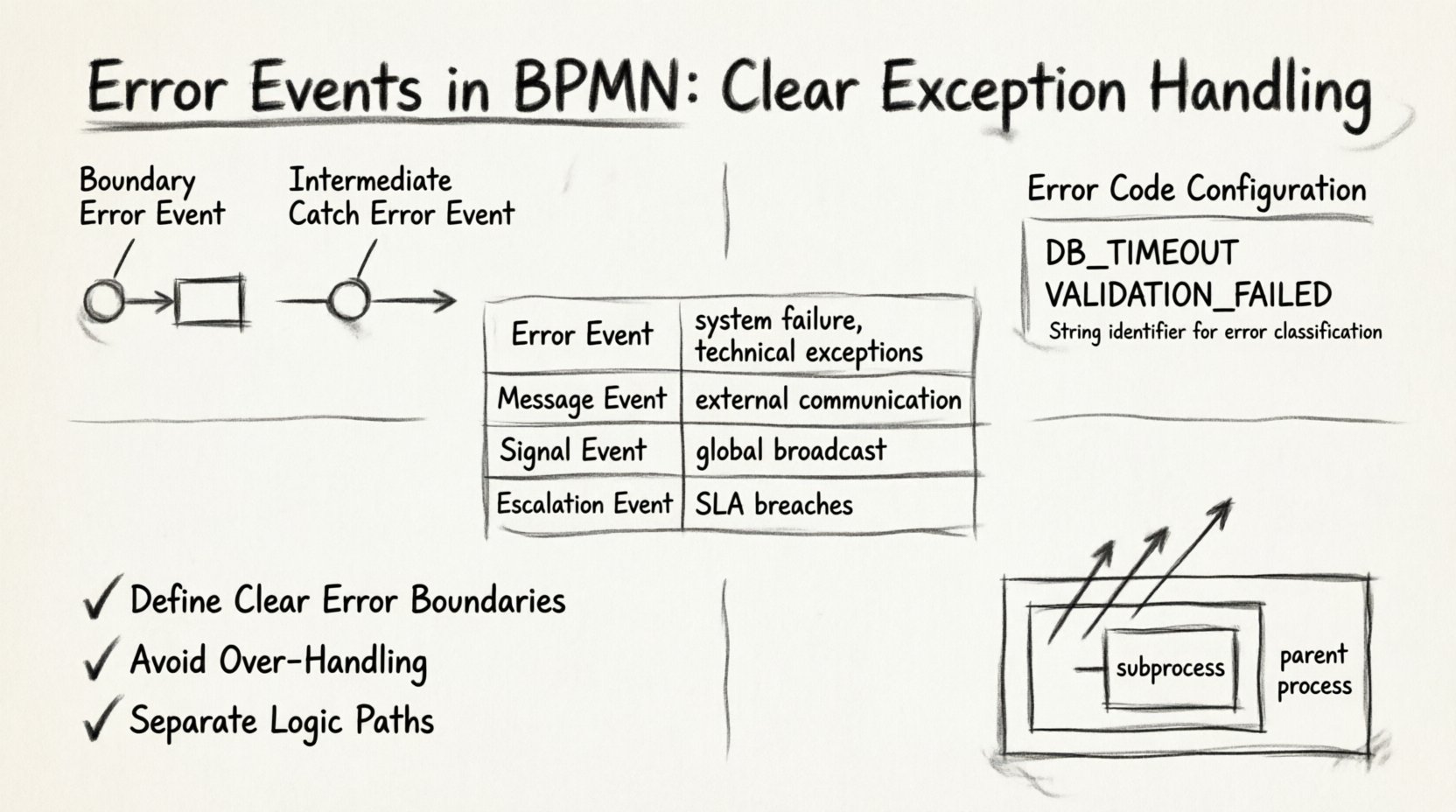
A boundary error event is attached directly to the boundary of a task, subprocess, or call activity. It represents a local exception handler. If the task executes and throws an error, the flow immediately diverts to the path connected to the boundary event.
This is the most common pattern for handling specific failures. It allows you to isolate the error within the scope of the activity. For example, if a database write operation fails, a boundary event can catch that specific failure without stopping the entire process instance.
Benefits of boundary events:
- Encapsulation: The exception handling logic is visually located next to the task it protects.
- Non-Blocking: The main task continues until the error occurs.
- Clarity: The diagram clearly shows which tasks have fallback mechanisms.
2. Intermediate Catch Error Events 🔄
An intermediate catch error event sits on the sequence flow, rather than attached to a task boundary. This type is less common but useful for handling errors that occur between tasks or within a subprocess that needs to be caught in the parent scope.
This approach is often used when you want to catch errors that propagate out of a subprocess but haven’t reached the main process boundary yet. It allows for centralized error management for a specific block of logic.
Configuration and Attributes ⚙️
To make error events functional, they require specific configuration within the modeling tool and the execution engine. These configurations define what constitutes an error and how the system reacts.
Error Code Definition
Every error event should have a unique Error Code. This is a string identifier that distinguishes one type of error from another. Without a defined code, the engine cannot differentiate between a database timeout and a validation failure.
- String Identifier: Use a consistent naming convention, such as
DB_TIMEOUTorVALIDATION_FAILED. - Granularity: Avoid generic codes like
ERROR_1. Use descriptive identifiers that aid in debugging. - Mapping: Ensure the external system or script throws the exact code defined in the event.
Message Association
Some implementations allow an error event to be associated with a specific message definition. This links the error to a human-readable message that can be displayed in a user interface or logged.
- User Feedback: Enables the system to tell the user exactly what went wrong.
- Logging: Facilitates automated logging systems to categorize incidents by error type.
Comparing Error Handling Strategies 📊
Understanding where error events fit in the broader context of BPMN is essential. Below is a comparison of event types to clarify when to use an error event versus other options.
| Event Type | Trigger Source | Typical Use Case | Scope |
|---|---|---|---|
| Error Event | System/Task Failure | Technical exceptions, validation failures | Local or Process |
| Message Event | External Communication | Waiting for a reply, receiving data | Process Instance |
| Signal Event | Global Broadcast | Canceling multiple instances, system-wide alerts | Global |
| Escalation Event | Process Rules | SLA breaches, manual intervention requirements | Process Hierarchy |
Designing for Resilience: Best Practices 🛡️
Building a process model that handles errors gracefully requires a strategic approach. It is not enough to simply place an event on the diagram; the logic surrounding it must be sound.
1. Define Clear Error Boundaries
Do not catch errors that should terminate the process. Some failures are unrecoverable. If a process cannot proceed without specific data, catching the error and retrying indefinitely leads to a zombie process. Instead, allow the error to bubble up to a higher level or terminate the instance cleanly.
- Identify Critical Tasks: Determine which tasks are essential for the process to function.
- Terminate on Fatal Errors: Use error events to signal that the process cannot continue.
- Retry on Transient Errors: Use boundary events for network timeouts or temporary unavailability.
2. Avoid Over-Handling
Every task does not need an error handler. Adding boundary events to every single task clutters the diagram and makes the flow difficult to read. Only attach error events to tasks that are known to fail or have significant consequences if they do.
3. Separate Logic Paths
Ensure that the path taken after an error is distinct from the normal path. If the error path eventually rejoins the main flow, use an exclusive gateway to merge them cleanly. Do not mix error handling logic with business logic.
Data Mapping and Propagation 📡
When an error occurs, data is often lost unless explicitly mapped. One of the most overlooked aspects of error events is the handling of variables.
Error Data Persistence
When an exception is caught, the system typically stores information about the failure. This might include the error code, the timestamp, and the state of the variables at the moment of failure.
- Variable Capture: Configure the engine to save the state of process variables upon error.
- Context Preservation: Ensure that the error handler has access to the data that caused the failure.
Bubbling Up Errors
If a subprocess throws an error and the subprocess does not have a boundary event to catch it, the error bubbles up to the parent process. This is a crucial feature for hierarchical process design.
- Parent Handling: The parent process can decide how to react to a child failure.
- Global Recovery: Allows for a centralized recovery strategy for a suite of related tasks.
Human Task Error Handling 👤
Process models often involve human participants. When a human task fails, the error event behaves slightly differently than a system task.
- Task Abandonment: If a user abandons a task, this can trigger an error event.
- Timeouts: If a task is not completed within a set time, an escalation or error can be triggered.
- Reassignment: Error events can route the task to a different user or queue if the original assignee fails.
When designing for human tasks, the error path often involves a notification mechanism. This could be an email alert or a dashboard notification to a supervisor.
Testing and Validation 🔍
Once the model is built, it must be tested to ensure the error paths function as intended. Static analysis is not enough.
Simulation Scenarios
Run process simulations that intentionally trigger errors. Verify that:
- The boundary event activates correctly.
- The process follows the exception flow.
- Data is preserved or logged appropriately.
- The process does not enter an infinite loop of retries.
Code Coverage
Ensure that the error handling logic covers the expected range of failure scenarios. This includes:
- Network connectivity issues.
- Invalid data inputs.
- External API unavailability.
Common Pitfalls to Avoid ⚠️
Even experienced modelers make mistakes when implementing error events. Awareness of common issues helps in maintaining a robust model.
- Missing Error Codes: Failing to define the error code in the engine configuration leads to silent failures.
- Unreachable Paths: Creating error paths that can never be reached due to logic constraints.
- Ignoring Logs: Catching an error and doing nothing with it. The error should always trigger a log entry or notification.
- Complex Merges: Merging too many error paths into a single gateway without distinguishing the cause of the error.
Conclusion on Exception Design 🎓
Designing error events requires a balance between technical precision and operational pragmatism. By understanding the specific types of events, configuring them correctly, and following established best practices, you can build processes that are robust against failure.
The goal is not to eliminate errors, which is impossible, but to manage them efficiently. A well-structured BPMN model with clear exception handling reduces downtime, improves visibility into failures, and ensures that business operations can recover quickly. Focus on the specific needs of your tasks, define clear codes, and test the failure paths rigorously. This approach leads to reliable workflows that stand up to real-world complexity.