In the complex world of software architecture, code is only one part of the solution. The blueprint that precedes the construction is often more critical for long-term maintainability and team alignment. A Unified Modeling Language (UML) portfolio demonstrates that you can translate abstract requirements into structured, visual systems. This guide explores how to curate a professional collection of modeling work that signals competence to hiring managers and technical leads.
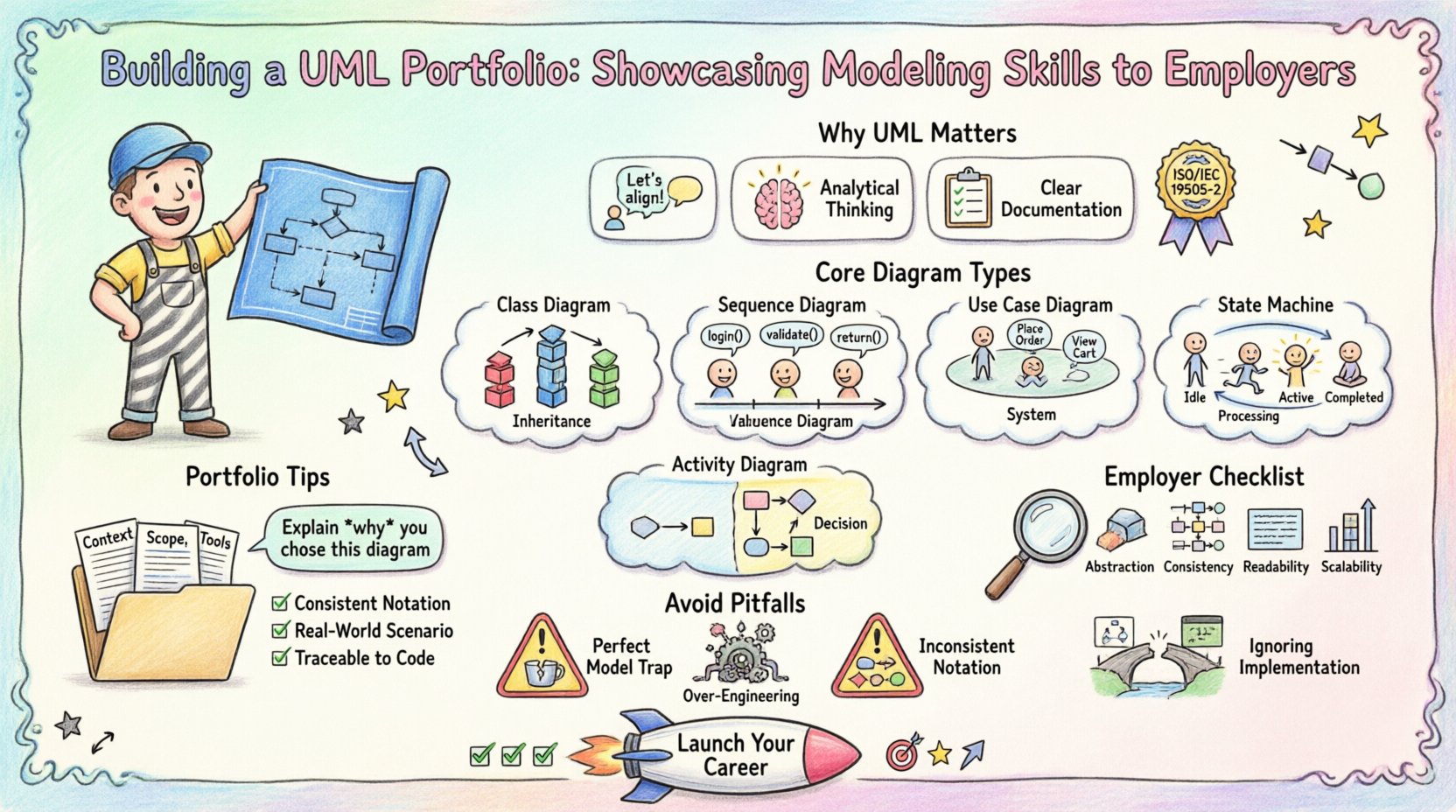
Why UML Matters in a Job Market 🤔
Many developers focus solely on implementation. They write functions, manage databases, and deploy applications. However, senior roles and architectural positions require the ability to think before coding. Employers look for candidates who understand system boundaries, data flows, and interaction patterns.
A portfolio of UML models serves several purposes:
- Demonstrates Communication Skills: It shows you can explain complex logic to non-technical stakeholders.
- Proves Analytical Thinking: It reveals how you break down problems into manageable components.
- Highlights Documentation Habits: It indicates you value long-term project health over quick fixes.
- Shows Standardization: It proves you adhere to industry standards for system design.
Understanding the Core Diagram Types 🧩
To build a robust portfolio, you must showcase a variety of diagram types. Each serves a distinct purpose in the software development lifecycle. Relying on just one type creates a narrow impression of your capabilities.
1. Class Diagrams: The Static Structure 🏛️
Class diagrams describe the static structure of a system. They display classes, attributes, operations, and relationships. In a portfolio, these diagrams should not be simple lists of variables. They must show inheritance, composition, and aggregation.
- Focus on Relationships: Clearly distinguish between a strong relationship (composition) and a weak one (association).
- Visibility Modifiers: Indicate public, private, and protected members to show encapsulation awareness.
- Design Patterns: Highlight where patterns like Singleton or Factory are implemented within the structure.
2. Sequence Diagrams: The Dynamic Flow 🔄
Sequence diagrams illustrate how objects interact over time. They are essential for showing API calls, user actions, and internal method invocations. These diagrams are often the first thing technical leads inspect when evaluating system logic.
- Lifelines: Ensure every participant has a clear lifeline.
- Messages: Differentiate between synchronous and asynchronous messages.
- Activation Bars: Show exactly when an object is active and processing data.
3. Use Case Diagrams: The Functional Scope 🎯
Use case diagrams map out the interactions between actors and the system. They define the “what” without getting into the “how”. This is valuable for showing you understand requirements gathering and stakeholder analysis.
- Actor Definitions: Clearly define who is interacting with the system.
- Inclusion and Extension: Use these relationships to show reusable functionality or optional behaviors.
- Boundary: Draw a clear line around the system boundary to define scope.
4. Activity Diagrams: The Workflow ⚙️
Activity diagrams are similar to flowcharts but more powerful. They model the logic of an algorithm or a business process. They are excellent for showing decision points, parallel processes, and concurrency.
- Swimlanes: Use swimlanes to assign responsibility to specific actors or system components.
- Decision Nodes: Clearly mark where paths diverge based on conditions.
- Concurrency: Show parallel execution threads to demonstrate understanding of performance.
5. State Machine Diagrams: The Lifecycle 🔄
State machine diagrams describe the behavior of a single object throughout its existence. They are crucial for objects with complex life cycles, such as an Order in an e-commerce system or a Thread in a scheduler.
- States: Define distinct conditions of the object.
- Transitions: Show what triggers the change from one state to another.
- Events: Clarify the input that causes the transition.
Structuring Your Portfolio Projects 📂
Collecting diagrams is not enough. You must organize them into coherent case studies. A recruiter or hiring manager needs to understand the context immediately. Do not simply dump images into a folder.
Project Context is Key
Every diagram needs a background story. Without context, a class diagram is just a drawing. A portfolio entry should include:
- Problem Statement: What issue was the system solving?
- Constraints: Were there performance limits, budget caps, or legacy dependencies?
- Team Role: What specific responsibility did you hold in the modeling process?
Documentation Standards
Consistency is a mark of professionalism. Ensure your diagrams follow a consistent naming convention and notation style. If you use a specific notation standard (like UML 2.x), mention it. This helps reviewers who are familiar with specific variations.
- Legend: Include a legend if you use custom symbols.
- Versioning: Indicate which version of the model is presented.
- Tools: Mention the category of tool used (e.g., “general modeling environment”) without naming specific commercial software.
What Employers Look For in Modeling 🧐
Hiring teams evaluate portfolios differently than academic professors. They care about practical application, scalability, and maintainability. They want to see that you can model systems that actually work in production.
Here is a checklist of attributes that signal high competence:
- Abstraction: Can you hide complexity behind interfaces? Do you show too many details?
- Consistency: Do the names in the Class Diagram match the names in the Sequence Diagram?
- Completeness: Are there obvious gaps in the logic flow?
- Readability: Is the layout clean? Do lines cross unnecessarily?
- Scalability: Does the design account for future growth or changes?
Table: Diagram Selection Guide
Use the following table to decide which diagrams best represent your skills for specific job roles.
| Diagram Type | Best For | Complexity Level |
|---|---|---|
| Class Diagram | Data structures, backend logic, database schema | Medium |
| Sequence Diagram | API design, microservice interaction, event handling | High |
| Use Case Diagram | Requirement gathering, user stories, feature scope | Low |
| Activity Diagram | Business processes, workflows, algorithms | Medium |
| State Machine | Event-driven systems, finite state machines, UI states | High |
Common Mistakes to Avoid ⚠️
Even experienced modelers can make errors that undermine their credibility. Avoid these pitfalls to ensure your portfolio remains strong.
1. The “Perfect Model” Trap
Real-world systems evolve. A portfolio that shows a perfect, final-state model without iterations looks theoretical. Include notes on how the design changed based on feedback or new requirements. This shows adaptability.
2. Over-Engineering
Do not model every single method in a simple CRUD application. That is noise. Focus on the critical paths and complex logic. Simplify where possible to highlight what matters.
3. Inconsistent Notation
Do not mix UML standards with proprietary notations without explanation. Stick to the standard symbols for arrows, diamonds, and notes. Confusion suggests a lack of foundational knowledge.
4. Ignoring the Code
While the focus is on modeling, the link to implementation is vital. If possible, provide a link to a repository or a snippet of code that reflects the diagram. This proves you can bridge the gap between design and code.
Presenting Your Work Effectively 🎨
How you present the diagrams is as important as the diagrams themselves. A cluttered presentation can hide excellent work. A clean presentation elevates average work.
Visual Hierarchy
Organize your portfolio page or document logically. Start with high-level architecture, then drill down into specific components. Use headings to guide the reader. Do not force them to guess where to look next.
- Executive Summary: Start with a one-page overview of the system.
- High-Level Diagrams: Show the big picture first (Component or Deployment).
- Deep Dives: Follow with detailed Class or Sequence diagrams.
Annotations and Commentary
Diagrams often speak a language of symbols. Text explains the intent. Add brief annotations to explain non-obvious design decisions. Why did you choose an interface here? Why is this class mutable?
- Design Rationale: Explain the “Why” behind the structure.
- Trade-offs: Mention what you sacrificed for this design (e.g., “Sacrificed query speed for data integrity”).
- Future Work: Note potential improvements for the next iteration.
Preparing for the Interview Discussion 🗣️
Having a portfolio is step one. Discussing it is step two. Be prepared to walk a hiring manager through your models. They may ask you to draw on a whiteboard or explain a specific relationship.
Practice Your Narrative
Rehearse explaining your diagrams out loud. If you stumble over the terminology, it indicates a lack of fluency. You should be able to describe a Sequence Diagram in plain English without looking at the image.
- Start with the Actor: “The user clicks a button…”
- Follow the Flow: “…which triggers the service layer…”
- End with the Result: “…which updates the database and returns a success message.”
Anticipate Technical Questions
Be ready for questions about scalability and security. Even if the diagram doesn’t show encryption, know how it fits into the architecture.
- Security: Where does authentication happen?
- Performance: Are there bottlenecks in the data flow?
- Maintainability: How easy is it to add a new feature?
Continuous Improvement and Feedback 🔄
A portfolio is not a static document. It should grow as your skills grow. Treat it as a living artifact. Seek feedback from peers, mentors, or online communities. Constructive criticism helps refine your notation and logic.
- Peer Review: Have a colleague look at your diagrams. Can they understand them without your explanation?
- Code Review: Compare your diagrams against your actual code. Do they match?
- Industry Trends: Stay updated on UML updates and industry modeling standards.
Conclusion on Portfolio Strategy 🚀
Building a UML portfolio is a strategic investment in your career. It shifts your identity from a coder to a designer and architect. It proves you value structure, clarity, and long-term system health. By selecting the right projects, documenting them thoroughly, and presenting them clearly, you create a tangible asset that speaks for your technical depth.
Remember that the goal is not to display every diagram you have ever drawn. It is to display the best work that demonstrates your ability to solve real problems. Focus on quality over quantity. A single, well-documented case study with clear Class, Sequence, and Activity diagrams is often more impressive than a folder of fifty incomplete sketches.
As you refine your portfolio, keep the end-user in mind. Whether that user is a recruiter, a hiring manager, or a future team member, ensure the documentation serves them. Clear diagrams reduce ambiguity, save time, and build trust. This is the true value of modeling in a professional environment.
Start organizing your work today. Review your past projects for modeling opportunities. Draft new diagrams for current challenges. Treat every design decision as a potential portfolio entry. With time and attention to detail, you will have a collection that stands out in a competitive job market.
Final Checklist for Your Portfolio 📝
- Project Context: Is the problem statement clear?
- Diagram Variety: Do you have at least three different types of diagrams?
- Consistency: Are naming conventions consistent across all diagrams?
- Visual Quality: Are the images high resolution and uncluttered?
- Code Link: Is there a link to the implementation (if available)?
- Annotations: Are design decisions explained?
- Formatting: Is the document easy to read and navigate?