Enterprise architecture is inherently complex. It involves layers of business processes, application services, technology infrastructure, and data objects. When these elements interact within a single model, the resulting diagram can become overwhelming. Stakeholders often struggle to see the signal amidst the noise. This is where the concept of the ArchiMate Viewpoint becomes essential.
A viewpoint is not just a drawing style; it is a formal specification for the construction of a view. It defines the purpose, the audience, and the specific aspects of the architecture that are relevant to a particular context. Without a disciplined approach to selecting and defining these viewpoints, architectural documentation loses its value. This guide explores the mechanics of choosing the right viewpoint to ensure clarity and alignment.
🧩 Understanding the ArchiMate Modeling Landscape
Before selecting a viewpoint, one must understand the underlying language. ArchiMate provides a standardized notation for describing, analyzing, and visualizing enterprise architectures. It is structured around a meta-model that defines relationships between concepts.
The architecture is not a flat list of items. It is organized into layers and domains. These structures allow architects to slice the complexity horizontally and vertically. However, a single diagram rarely serves every purpose. The goal is to isolate specific concerns to make the information digestible for the intended reader.
Layers: Strategic, Business, Application, Technology, and Physical layers provide horizontal segmentation.
Domains: Business, Application, Technology, and Data domains provide vertical segmentation.
Aspects: Motivation, Implementation and Migration, and External aspects add depth to the model.
When you look at the entire model, you are looking at the Architecture. When you look at a specific slice defined by a viewpoint, you are looking at a View. The viewpoint dictates how that slice is cut.
🔍 View vs. Viewpoint: Defining the Difference
Confusion between a View and a Viewpoint is common. Distinguishing them is the first step in effective modeling.
Concept | Definition | Analogy |
|---|---|---|
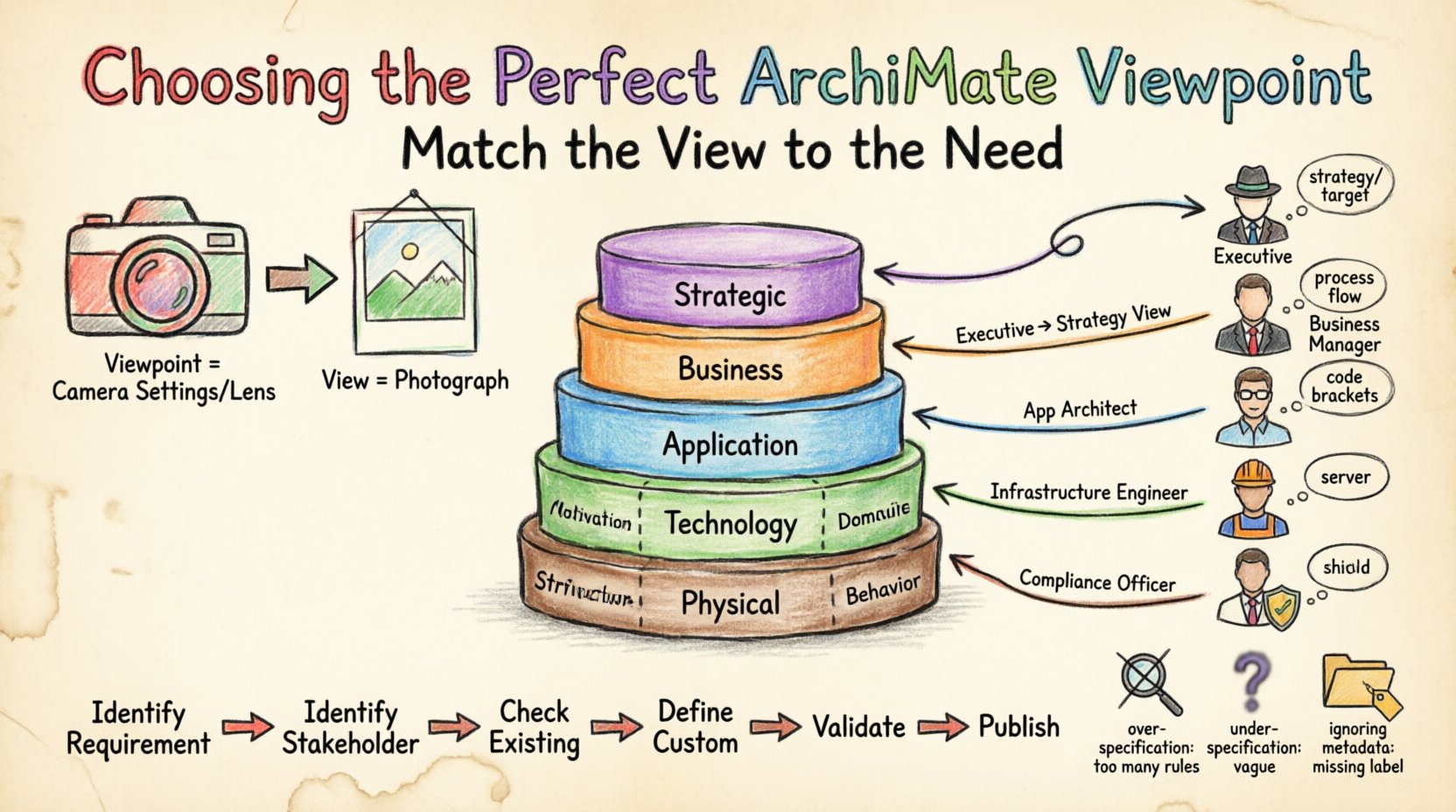
View | A representation of a system from the perspective of a related stakeholder. It is the actual artifact or diagram. | The photograph of a building. |
Viewpoint | A specification of the conventions, rules, and templates for constructing a view. It defines what is shown and how. | The camera settings and lens used to take the photograph. |
If you create a diagram without a defined viewpoint, you risk including irrelevant details or omitting critical information. A viewpoint acts as a contract between the architect and the stakeholder. It answers the question: “What information do you need to see to make your decision?”
🎯 Identifying Stakeholder Concerns
The primary driver for choosing a viewpoint is the stakeholder. Different roles require different levels of abstraction and different data points. A generic model rarely satisfies everyone. You must map specific concerns to specific viewpoints.
Consider the following roles and their typical needs:
Executive Management: Concerned with strategy, value realization, and high-level capability mapping. They need to see the link between business goals and IT capabilities.
Business Managers: Interested in processes, organizational structures, and how work flows. They need process views that highlight bottlenecks or redundancies.
Application Architects: Focus on software services, interfaces, and data structures. They need to see dependencies between systems to manage technical debt.
Infrastructure Engineers: Concerned with servers, networks, and physical locations. They need technology views that map services to hardware.
Compliance Officers: Require views that highlight security controls, data privacy, and regulatory adherence.
To choose the right viewpoint, ask these questions:
Who is the primary audience?
What decision are they trying to make?
What level of detail is required to support that decision?
What terminology is familiar to this audience?
📊 Selecting the Right Viewpoint for Your Goal
Once stakeholders are identified, the selection process moves to the technical definition of the view. The goal of the view drives the selection of the viewpoint. Common goals include gap analysis, migration planning, impact analysis, or capability mapping.
1. Gap Analysis Viewpoints
These viewpoints compare the current state (As-Is) with the future state (To-Be). They highlight missing capabilities or technologies. The viewpoint must support the visualization of differences between two distinct models or layers.
2. Migration Viewpoints
When planning a transition, the viewpoint must show the timeline and the dependencies. It needs to illustrate which elements are retired, which are added, and the sequence of implementation.
3. Impact Analysis Viewpoints
When a change occurs, such as a new regulation or a software upgrade, this viewpoint shows the ripple effect. It focuses on relationships like dependencies and assignments to trace the impact.
4. Capability Mapping Viewpoints
These are high-level strategic views. They map business capabilities to the applications and technology that support them. This helps in identifying investment priorities.
🛠️ Core ArchiMate Layers and Their Implications
ArchiMate defines specific layers. Choosing a viewpoint often involves selecting which layers to include. Including too many layers can create cognitive overload. Including too few can obscure context.
Business Layer
Focuses on the business structure, processes, roles, and interactions. Viewpoints here are essential for aligning business strategy with execution. They answer “Who does what and how?”
Application Layer
Focuses on the software applications that support the business. Viewpoints here show application portfolios, interfaces, and services. They answer “What software runs the business?”
Technology Layer
Focuses on the hardware and infrastructure. Viewpoints here show servers, networks, and devices. They answer “Where does the software run?”
Physical Layer
Focuses on the physical location of technology. This is often a subset of the Technology layer but is critical for disaster recovery and geographic distribution planning.
When defining a viewpoint, specify which layers are active. A Business Viewpoint should exclude Application and Technology details unless they are directly referenced for context. A Technology Viewpoint should exclude Business details unless they are relevant to the infrastructure requirements.
📋 Common Viewpoint Categories Explained
While custom viewpoints are common, standard categories exist within the ArchiMate community. Understanding these helps in adopting best practices.
Category | Primary Focus | Typical Audience |
|---|---|---|
Business Process Viewpoint | Activities, processes, and flow. | Process Owners, Business Analysts |
Application Interaction Viewpoint | Interfaces and communication between apps. | Application Architects |
Technology Deployment Viewpoint | Mapping software to hardware. | Infrastructure Architects |
Value Stream Viewpoint | Value creation steps from customer to provider. | Strategic Planners |
Implementation & Migration Viewpoint | Phasing and transitions. | Project Managers |
When adopting a standard category, ensure the definition matches your organizational needs. A generic “Business Process Viewpoint” might not be enough if your organization requires a specific focus on regulatory compliance within those processes.
⚠️ Pitfalls in Viewpoint Definition
Creating viewpoints is a discipline. There are common mistakes that reduce the effectiveness of the architecture.
Over-specification: Defining a viewpoint that is too rigid. It should allow for necessary variation without breaking the standard.
Under-specification: Defining a viewpoint too broadly. This leads to inconsistent diagrams that confuse readers.
Ignoring Metadata: A viewpoint must include metadata such as the purpose, the audience, and the relevant layers. Without this, the view lacks context.
Ignoring Language Constraints: ArchiMate has specific rules for relationships. A viewpoint must enforce these rules to maintain model integrity.
Static Definitions: Viewpoints should evolve. As the organization changes, the needs of the stakeholders change. A viewpoint that worked five years ago may need adjustment today.
Another common error is creating a “one size fits all” model. An executive summary diagram should not look the same as a technical design diagram. The viewpoint definition must explicitly state the level of abstraction.
🔁 Maintaining Viewpoint Consistency Over Time
Once a viewpoint is selected and defined, it must be maintained. This involves governance and versioning.
1. Naming Conventions
Use clear, consistent naming for viewpoints. Include the domain and the layer in the name. For example, “Business Layer – Process Flow Viewpoint” is clearer than “Process View”.
2. Template Management
If you use a modeling tool, define templates based on the viewpoint. This ensures that every architect starts with the same icons, colors, and layout rules.
3. Review Cycles
Schedule periodic reviews of the viewpoint library. Are there duplicates? Are some viewpoints never used? Are new stakeholder groups emerging that require new perspectives?
4. Documentation
Keep documentation for each viewpoint. Explain why it exists, what it shows, and how to interpret it. This reduces the training burden for new team members.
🧭 Practical Steps for Selection
To operationalize this knowledge, follow this workflow when a new modeling requirement arises.
Identify the Requirement: What is the specific question that needs answering?
Identify the Stakeholder: Who needs the answer?
Check Existing Viewpoints: Does a standard viewpoint already exist that fits this need?
Define Custom Viewpoint: If no standard fits, define a new one. Specify the layers, concepts, and relationships to include.
Validate: Show the draft view to a representative stakeholder. Does it answer their question?
Publish: Add the viewpoint to the central repository or library.
This process ensures that every diagram serves a purpose. It prevents the accumulation of unused models that clutter the architecture repository.
🔗 Relationships and Constraints
ArchiMate relies heavily on relationships. A viewpoint must define which relationships are visible. Showing every relationship in a model creates a spiderweb that is impossible to read.
Common relationships to include or exclude:
Access: Often critical for understanding data flows but can clutter a high-level view.
Assignment: Crucial for showing who is responsible for what, but irrelevant for infrastructure views.
Serving: Essential for Application to Business relationships.
Realization: Important for understanding how design elements achieve goals.
The viewpoint definition should explicitly list the allowed relationship types. This constraint simplifies the visualization and enforces the architectural intent.
🎨 Visual Style and Presentation
While the logic of the viewpoint is paramount, the visual style matters. The viewpoint should define the visual encoding.
Color Coding: Define which colors represent specific domains or statuses.
Iconography: Standardize the shapes for different concept types.
Layout: Define preferred positioning, such as top-down for processes or left-to-right for flows.
Consistency in visual style reduces the cognitive load on the reader. They do not need to relearn the legend for every new diagram. The viewpoint acts as the style guide for the visualization.
📈 Measuring Viewpoint Effectiveness
How do you know if a viewpoint is working? You can measure effectiveness through feedback and usage metrics.
Feedback Loops: Ask stakeholders if the view helped them make a decision.
Usage Frequency: Track which viewpoints are used most often. Low usage might indicate the viewpoint is too complex or not relevant.
Query Response Time: If the view is used for reporting, does it generate the data quickly? Performance is a factor in selection.
Effective viewpoints are those that reduce the time to understanding. They turn complex data into clear information.
🚀 Looking Forward
The landscape of enterprise architecture continues to evolve. New technologies and methodologies emerge. Viewpoints must remain flexible to accommodate these changes. The core principle remains constant: match the view to the need.
By rigorously applying the selection criteria outlined above, you ensure that your architectural models remain valuable assets. They become communication tools rather than just documentation exercises. This discipline supports better decision-making across the organization.