🚀 Introduction: The Future of Intelligent Documentation
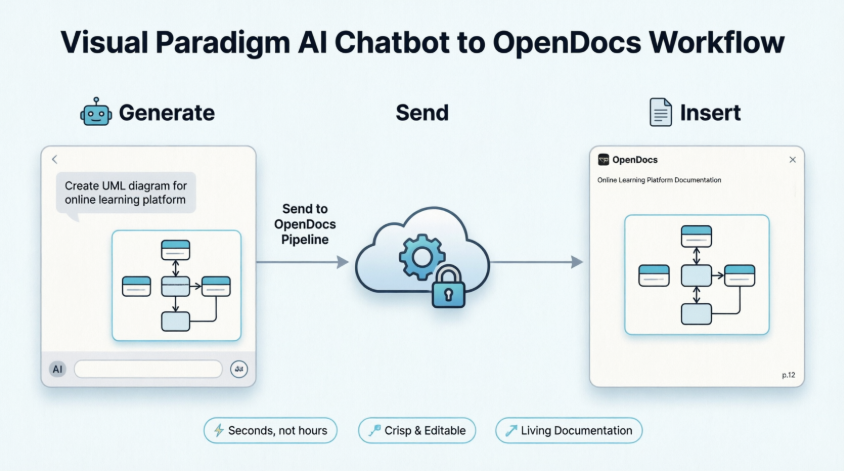
Go from a simple chat prompt to professional system documentation in seconds. Visual Paradigm’s new AI Chatbot integration with OpenDocs removes the friction from visual knowledge management, enabling software engineers, business analysts, and project leads to visualize complex ideas and document them instantly.
By connecting the Visual Paradigm AI Chatbot directly to OpenDocs, you can now:
-
Generate professional diagrams through natural conversation
-
Instantly send visuals to your documentation workspace using “Send to OpenDocs Pipeline”
-
Maintain living, editable diagrams within your knowledge base
Note: This feature requires a Visual Paradigm Online (Combo Edition) or Visual Paradigm Professional Edition license.
Start generating with the AI Chatbot | Explore your OpenDocs workspace
📚 What is Visual Paradigm OpenDocs?
OpenDocs is a specialized knowledge and document management platform built for modern, visual-heavy documentation. Unlike conventional text editors, OpenDocs is engineered to handle live diagrams, allowing you to:
-
Embed, view, and update visual models directly within document pages
-
Keep technical specifications and knowledge bases clear and professional
-
Maintain diagram editability without leaving your documentation environment
🔗 The Power of the Pipeline
The Pipeline serves as the connective tissue of the Visual Paradigm ecosystem—a secure, centralized repository for all your creative assets (called artifacts).
When you generate a diagram in the AI Chatbot and send it to the Pipeline:
-
That artifact becomes instantly available as an input for OpenDocs
-
No more downloading files, taking screenshots, or managing messy manual uploads
-
Your diagrams remain crisp, high-resolution, and fully editable
🛠️ How It Works: Step-by-Step Guide
Follow these steps to experience a seamless, web-based workflow between diagram generation and documentation:
Step 1: Generate Your Diagram
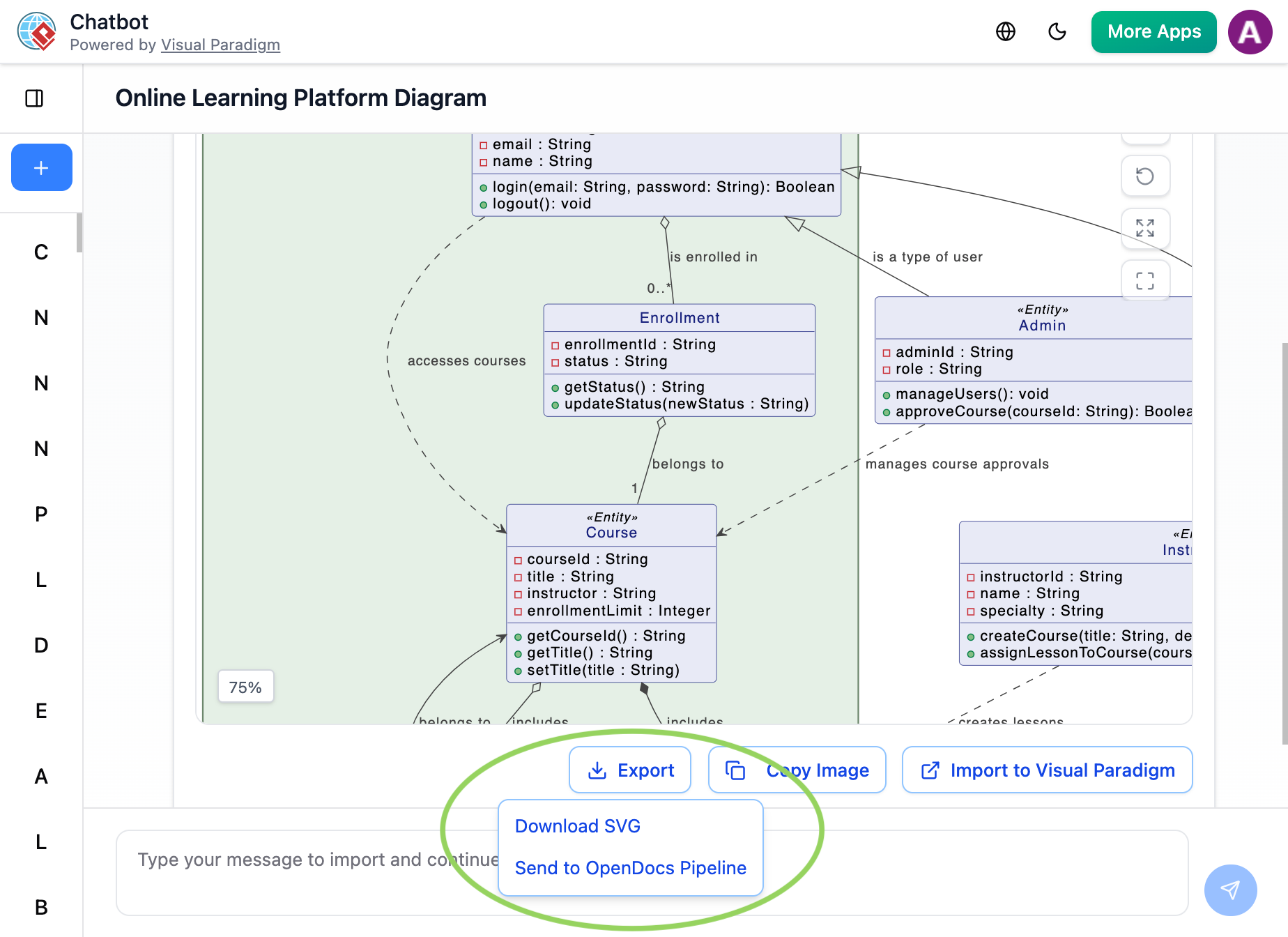
Create or refine your diagram (UML, flowchart, architecture, BPMN, etc.) in the AI Chatbot using natural language prompts. Once the AI produces the visual you need:
-
Click Export in the chatbot interface
-
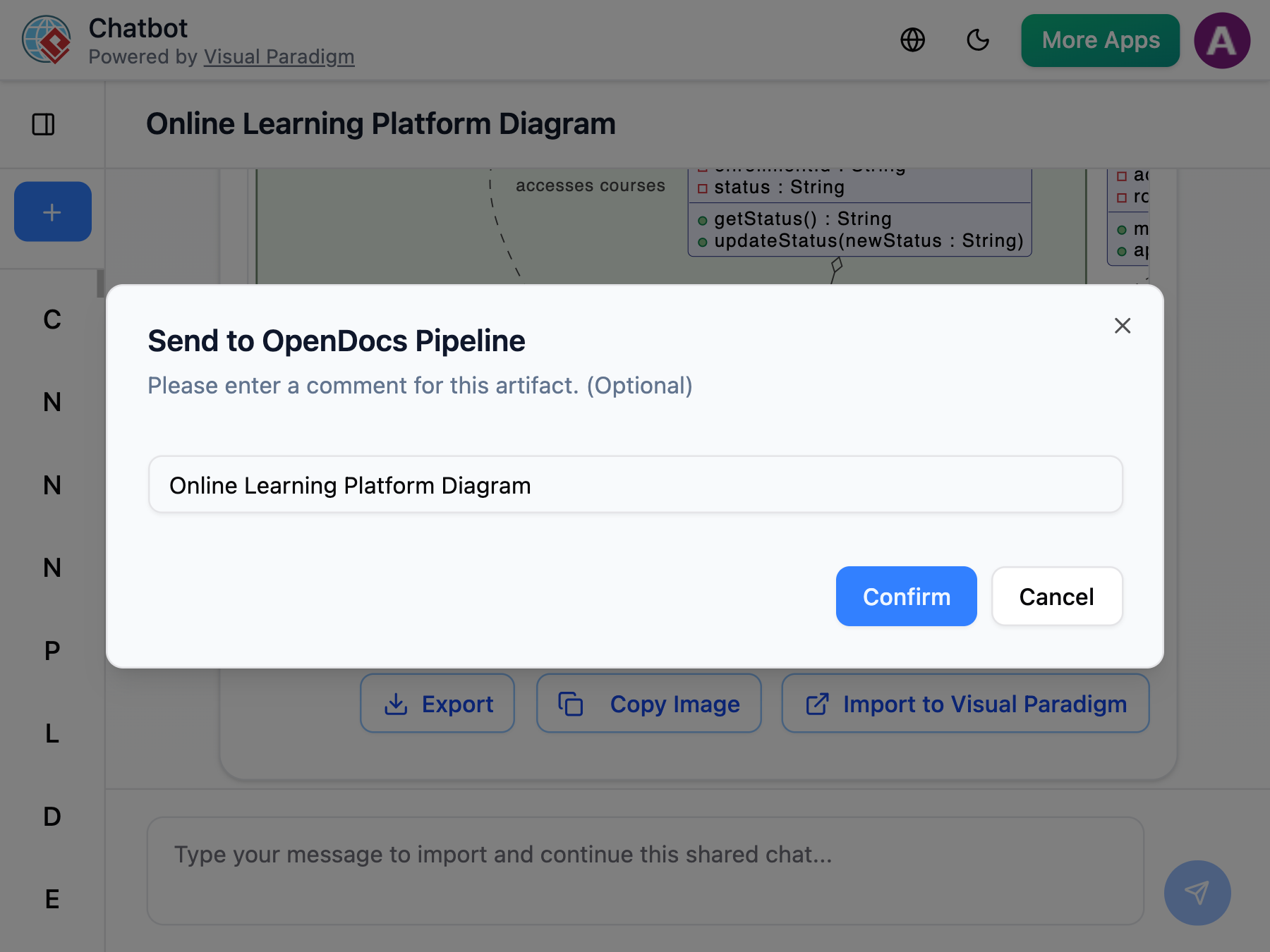
Select Send to OpenDocs Pipeline
-
(Optional) Enter a descriptive name for your artifact
Step 2: Insert into OpenDocs
Navigate to your desired document page in OpenDocs and enter edit mode:
-
Click Insert on the toolbar
-
Select Pipeline from the sidebar menu
-
Your AI-generated diagram will appear in the asset list, ready to insert
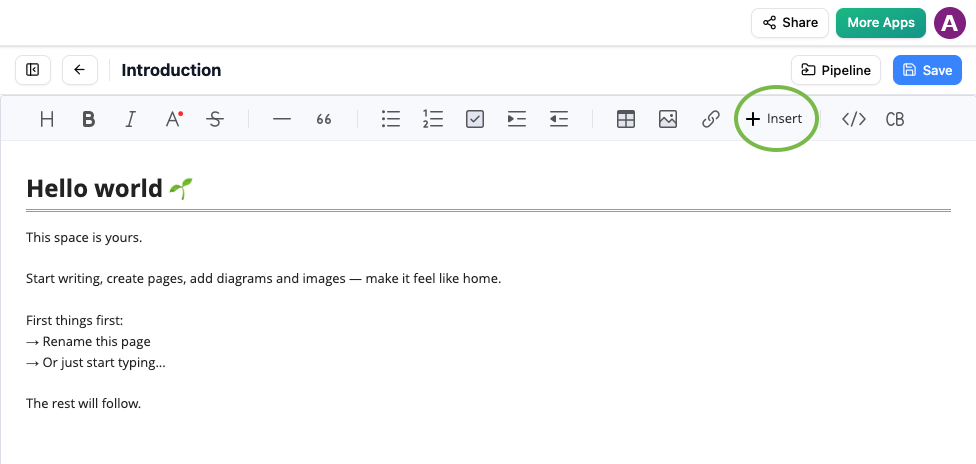
Insert button in OpenDocs editor with Pipeline option for adding AI-generated diagrams
Step 3: Finalize Your Document
-
Select your generated diagram from the Pipeline asset list
-
The diagram inserts instantly at your cursor position
-
Enjoy a crisp, professional visual perfectly integrated into your knowledge base
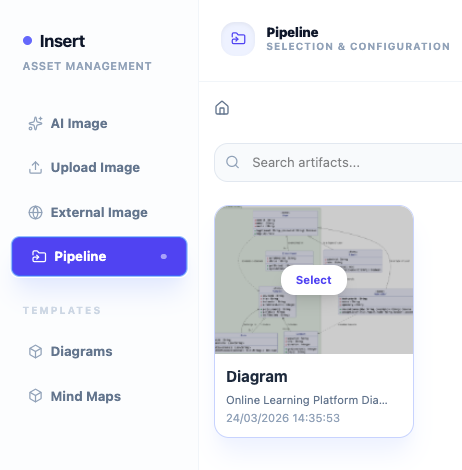
OpenDocs Pipeline tab showing recently sent diagram from Visual Paradigm AI Chatbot ready to be inserted
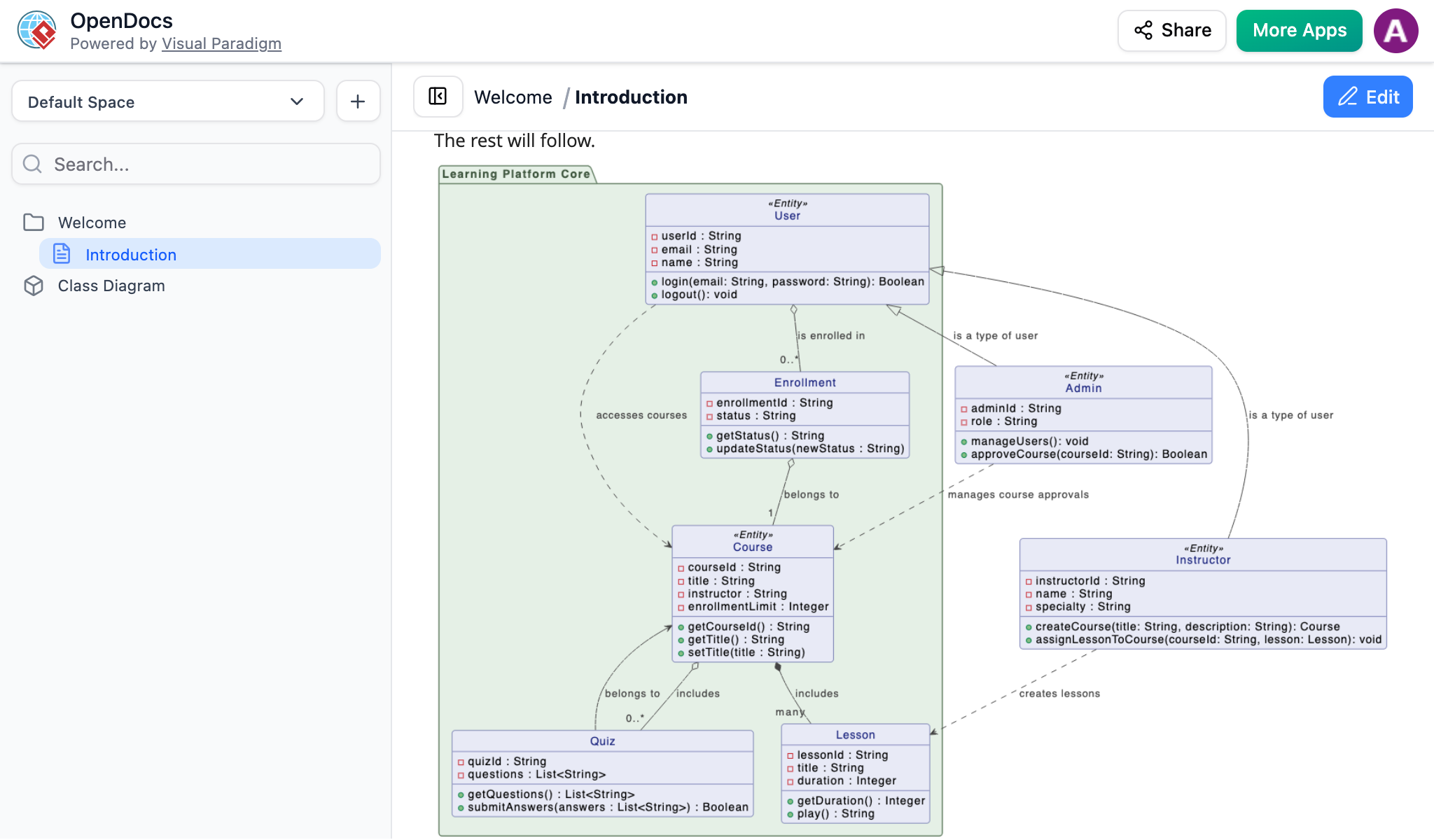
AI-generated UML diagram from Visual Paradigm Chatbot successfully inserted into an OpenDocs page using the Pipeline feature
✨ Why You’ll Love This AI Workflow
| Benefit | Description |
|---|---|
| ⚡ Unmatched Efficiency | Go from abstract idea to perfectly placed diagram in seconds |
| 🎨 Crisp Visuals | Maintain high-resolution clarity without blurry screenshots |
| 🌐 Web-Based Simplicity | No installation required—everything works directly in your browser |
| 🔄 Living Documentation | Use the Pipeline to manage and update AI-generated artifacts effortlessly |
| 🎯 Single Source of Truth | Diagrams remain linked and editable; update documents with one click |
| 🚀 Rapid Prototyping | Move from initial idea to documented architecture in minutes |
🔁 Keeping Diagrams Updated: Synchronization Tips
Because your diagrams are stored as living artifacts in the Pipeline, you can maintain them over time:
-
Re-edit the source model in the AI Chatbot or Visual Paradigm Desktop/Online
-
Re-export to Pipeline using the same artifact name or update the existing one
-
Refresh in OpenDocs – your document will reflect the latest version automatically
💡 Pro Tip: Use descriptive, consistent naming conventions for your Pipeline artifacts to make them easy to locate and update across projects.
📋 Quick Reference Checklist
✅ Generate diagram via AI Chatbot using natural language
✅ Click Export → Send to OpenDocs Pipeline
✅ (Optional) Name your artifact for easy identification
✅ Open target document in OpenDocs and enter Edit mode
✅ Click Insert → Pipeline → Select your diagram
✅ Diagram inserts at cursor position, ready for final formatting
✅ Save and share your professional documentation
🔗 Related Resources
🚀 Get Started Today
Try the AI Chatbot
Explore OpenDocs
📚 References
- AI Diagram to OpenDocs Pipeline Release Announcement: Official release notes detailing the new integration between Visual Paradigm AI Chatbot and OpenDocs Pipeline for seamless diagram export.
- Sync AI Diagram to OpenDocs Pipeline Guide: Step-by-step tutorial for synchronizing AI-generated diagrams with OpenDocs, including update workflows and best practices.
- Visual Paradigm AI Chatbot Feature Page: Overview of the AI Chatbot capabilities, supported diagram types, and natural language prompting features for rapid visual creation.
- Mastering the Pipeline in Visual Paradigm OpenDocs: Comprehensive third-party guide covering Pipeline asset management, organization strategies, and advanced knowledge management workflows.
- Visual Paradigm Online to OpenDocs Export Guide: Documentation for exporting diagrams created in Visual Paradigm Online directly to OpenDocs, complementing the AI Chatbot workflow.
- Visual Paradigm OpenDocs: Complete Guide to AI-Powered Knowledge Management: In-depth exploration of OpenDocs capabilities, AI integration patterns, and enterprise documentation strategies.