


Introduction
Visual Paradigm has revolutionized the way Data Flow Diagrams (DFDs) are created with the integration of its AI-Powered DFD Generator within its flagship AI Chatbot. This innovative tool allows users to generate clean, accurate, and presentation-ready Data Flow Diagrams in mere seconds by simply describing their system in plain English. Unlike traditional methods that require templates or manual dragging of shapes, the AI efficiently constructs DFDs based on user input, making it one of the most intelligent visual modeling tools available today.
Availability
-
Free to Start
-
Requires Visual Paradigm Desktop Professional Edition or VP Online Combo
-
Access instantly: Visual Paradigm AI Chatbot
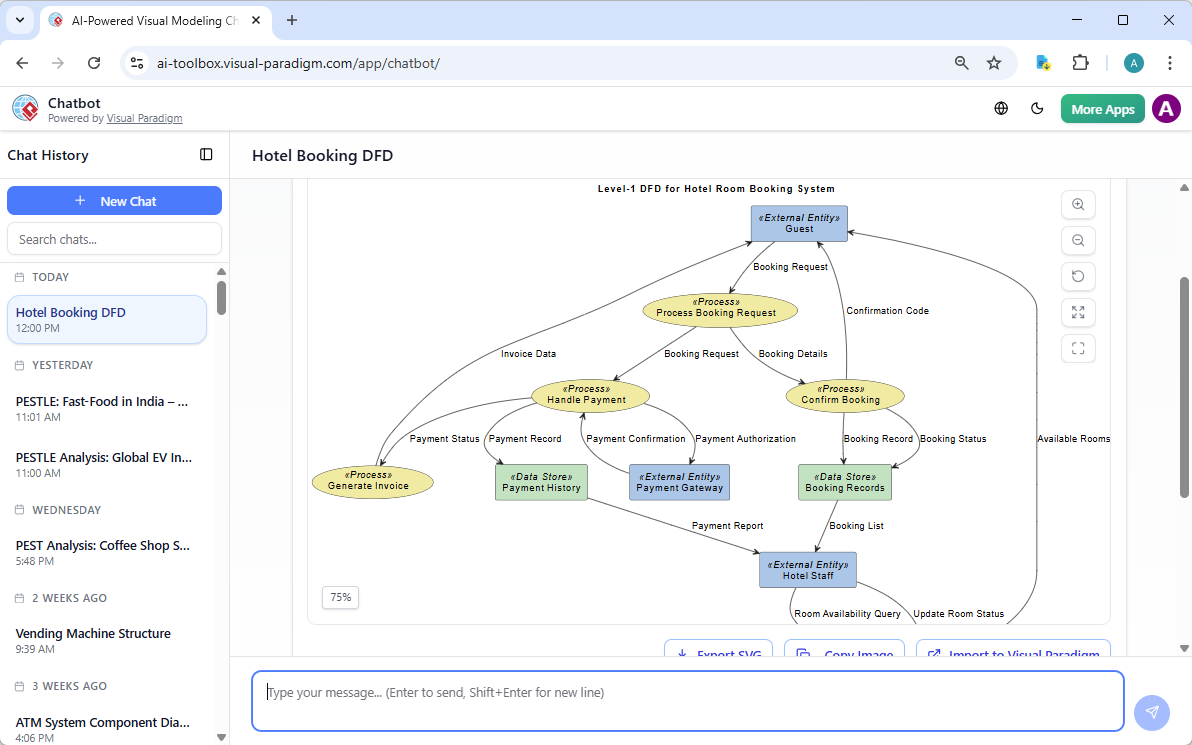
Key Concepts of Data Flow Diagrams (DFD)
A DFD focuses exclusively on how data flows through a system, identifying who interacts with the data and where it is stored, distinguishing it from traditional flowcharts.
Core Components (Symbols)
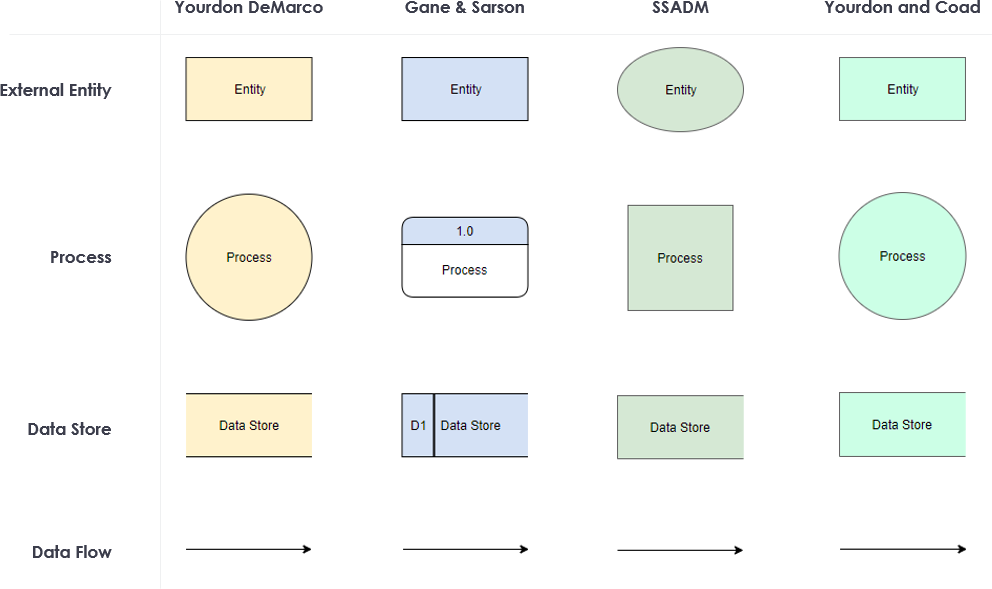
The AI generator creates standard-compliant diagrams utilizing either Gane & Sarson or Yourdon & Coad notation, which includes:
-
External Entities: Represented as rectangles or 3D boxes, these are the sources and destinations of data (e.g., Patient, Customer, Bank).
-
Processes: Depicted as rounded rectangles or circles with numbered labels, these signify transformations of data with a verb+noun format (e.g., “1.0 Check Appointment Availability”).
-
Data Stores: Shown as open rectangles or two parallel lines, indicating persistent storage (e.g., Patient Database, D1: Account DB).
-
Data Flows: Illustrated with arrows and labels, these indicate named packets of data moving between components.
DFD Levels
-
Level 0 (Context Diagram): Represents the entire system as one process bubble with external entities only.
-
Level 1: Decomposes the system into major processes, data stores, and flows, which is the most commonly generated level by the AI.
-
Lower Levels (2+): Provide further decomposition of processes.
Fundamental Rules & Guidelines
-
Every data flow must begin and end at a process (no direct entity-to-entity or store-to-store links).
-
Balance levels — inputs and outputs must be conserved when transitioning from Level 0 to Level 1.
-
Avoid “black holes” (instances where data enters but never leaves) and “miracles” (data that appears from nowhere).
-
Maintain readability with a maximum of 5-9 processes per level.
-
Use consistent, meaningful labels on every flow.
These rules are automatically adhered to by the AI, but it’s always good practice to verify the output.
Step-by-Step: How to Generate a DFD with AI
-
Go to the Visual Paradigm AI Chatbot.
-
Type a natural-language prompt (see examples below).
-
The AI constructs a complete Level-1 DFD in under 10 seconds.
-
Review the diagram in the chat interface.
-
Continue the conversation to refine the diagram:
-
“Add a process for insurance verification”
-
“Use Gane-Sarson notation”
-
“Make the Patient Database a data store”
-
-
Query the diagram like a knowledge base:
-
“What data enters the billing process?”
-
“Explain the flow from Patient to Appointment Scheduling.”
-
-
Export, open it in Visual Paradigm Desktop, or generate documentation automatically.
Desktop Alternative (Professional Edition):
Navigate to Tools → AI Diagram Generation → Data Flow Diagram → describe your system → choose the level and notation.
Prompt Engineering Best Practices & Guidelines
The quality of the generated DFD is heavily influenced by the specificity of your prompt.
Effective Prompt Formula
“Generate a Level 1 DFD for [System Name] using Gane-Sarson notation.
External entities: [list].
Main processes: [list with verb-noun names].
Data stores: [list].
Include flows for [key data items].”
Good Example
“Generate a Level 1 DFD for Hospital Management System.
External entities: Patients, Doctors, Pharmacists, Billing Department, Insurance Providers.
Processes: manage patient records, schedule appointments, prescribe medications, process billing, verify insurance.
Data stores: Patient Database, Appointment Schedule, Medication Inventory.”
Bad Example
“Create a DFD for a hospital.” (too vague)
Refinement Prompts
-
“Add a data flow labeled ‘Payment Details’ from Customer to Payment Gateway.”
-
“Decompose the ‘Process Booking’ process into a Level 2 diagram.”
-
“Rename process 3.0 to ‘Validate Insurance Coverage’.”
Real-World Examples Generated by the AI
The AI has proven capability in generating production-quality Level-1 DFDs. Here are three exemplary cases:
1. Hospital Management System
-
Entities: Patients, Doctors, Pharmacists, Billing, Insurance.
-
Processes: Record management, appointment scheduling, medication prescribing, billing, insurance verification.
-
Data Stores: Patient Database, Appointment Schedule, Medication Inventory, Billing Records.
2. Airline Reservation System
-
Entities: Passenger, Airport Authority, Payment Gateway, Flight Operator.
-
Processes: Manage schedules, process bookings, handle payments, generate tickets.
-
Data Stores: Flight DB, Passenger DB, Booking Records.
3. Online Banking System
-
Entities: Customer, Bank Administrator, Third-Party Payment Service.
-
Processes: Authentication, account management, transaction processing, report generation.
-
Data Stores: Customer DB, Account Information, Transaction Log.
These examples illustrate clean process decomposition, appropriate system boundaries, and well-labeled flows, perfectly reflecting the AI’s capabilities from a single descriptive sentence.
Advanced Tips & Best Practices
-
Validate AI output against the established DFD rules.
-
Iterate quickly since the conversational interface allows for rapid refinements.
-
Integrate with other models by opening the generated DFD in Visual Paradigm Desktop to link it to ERDs, use-case diagrams, or generate code/reports.
-
Create leveled sets — begin with Level 1 and then ask the AI (or manually) to decompose into Level 2 sub-processes.
-
Export options include PNG, SVG, PDF, or direct embedding into project documentation.
-
Team collaboration is facilitated by sharing the chatbot link or exporting to a shared VP project.
Benefits & Use Cases
-
Speed: Transform ideas into professional diagrams in seconds instead of hours.
-
Accuracy: AI adheres to DFD notation and rules by default.
-
Accessibility: Ideal for non-diagramming stakeholders.
Common use cases include:
-
Requirements analysis
-
System design
-
Business process re-engineering
-
Compliance documentation (healthcare, fintech, aviation, logistics)
Limitations & Pro Tips
-
The AI is an effective co-pilot but always review for domain-specific accuracy.
-
Very complex enterprise systems may require manual adjustments post initial generation.
-
Full export and advanced decomposition features necessitate the Desktop Professional or VP Online Combo edition.
Conclusion
Visual Paradigm’s AI-Powered DFD Generator, in conjunction with the conversational AI Chatbot, has fundamentally transformed the process of creating data flow diagrams. What traditionally required hours of meticulous work can now be achieved in seconds, complemented by built-in refinement and querying capabilities that far surpass conventional tools.
Begin your journey today—visit the chatbot, type “Generate a DFD for [your system],” and experience the future of professional modeling. Whether you are a business analyst, system architect, or software engineer, this tool will significantly enhance your workflow and improve the quality of your system documentation.