🎯 Overview
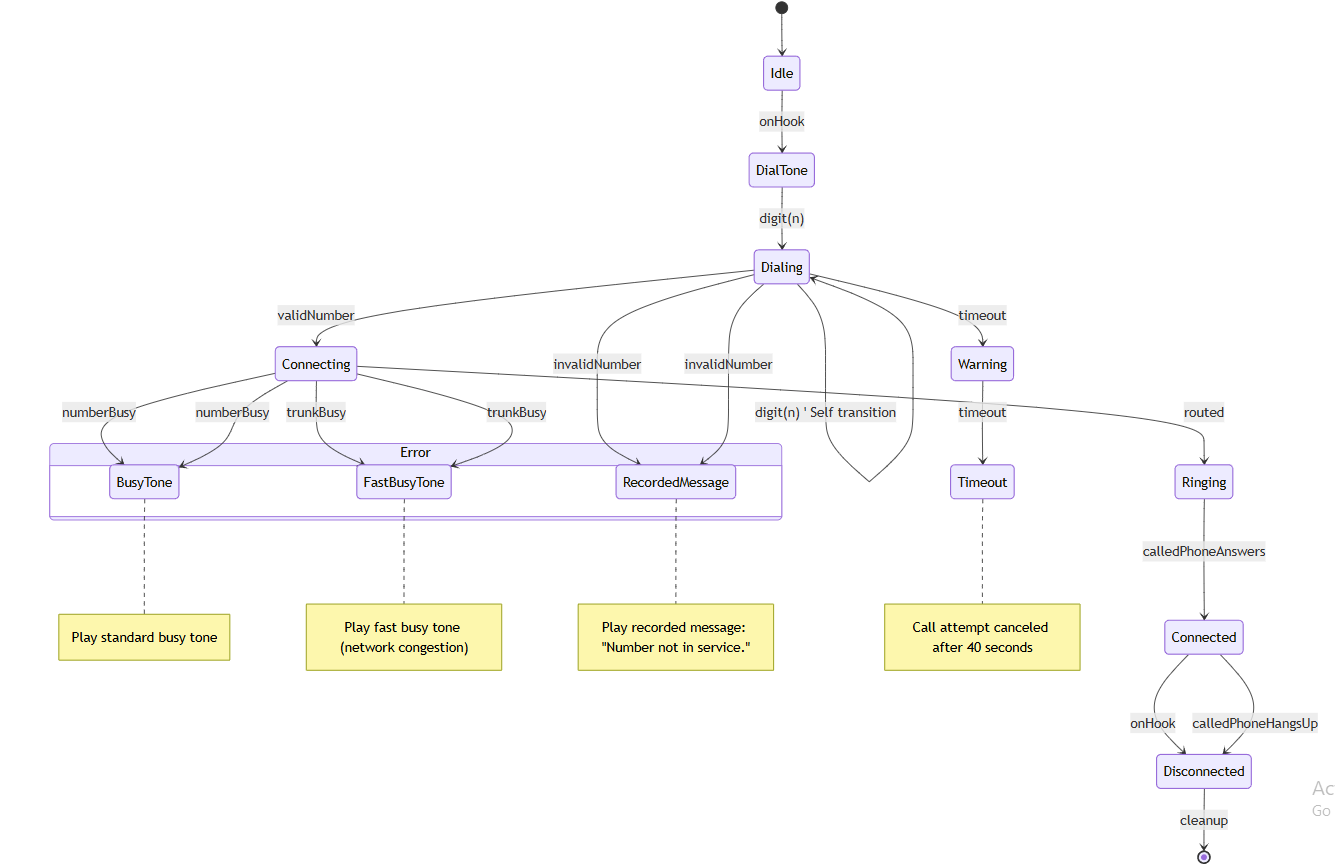
This guide walks you through the design and modeling of a Telephony Call Control System using UML State Machine Diagrams. It focuses on the outbound call lifecycle, illustrating how a phone line transitions between states in response to user actions and network events.
The diagram captures both happy paths (successful call setup) and unhappy paths (errors, timeouts, busy lines), emphasizing robustness, exception handling, and clear state transitions—key principles in real-time communication systems.
🧩 Core Concepts in UML State Machines
Before diving into the diagram, understand these foundational UML concepts:
| Concept | Description |
|---|---|
| State | A condition during which an object satisfies certain conditions or performs actions. |
| Transition | A change from one state to another, triggered by an event. |
| Event | An occurrence that causes a transition (e.g., onHook, validNumber). |
| Self Transition | A transition that starts and ends in the same state (e.g., digit(n) while in Dialing). |
| Pseudo State | Special control points like Initial or Final that aren’t actual states. |
| Composite State | A state containing substates (e.g., Error state with BusyTone, FastBusyTone, RecordedMessage). |
| Guard Condition | A Boolean expression that must be true for a transition to occur. |
✅ Pro Tip: Use
event [guard] / actionsyntax in UML to document triggers, conditions, and side effects.
🔄 Outbound Call Lifecycle: Step-by-Step Breakdown
1. Initiation & Dialing Phase
🔹 Initial Pseudo State → Idle
-
The system starts in the Initial Pseudo State.
-
No activity yet; the phone is on the hook.
🔹 Idle → DialTone (onHook)
-
Event:
onHook(user lifts the handset) -
Transition:
onHook → DialTone -
Action: Generate dial tone; prepare for digit input.
📌 This is the first visible state change in the call lifecycle.
🔹 DialTone → Dialing (digit(n))
-
Event:
digit(n)(user enters a digit) -
Transition:
digit(n) → Dialing -
State: Enter
Dialingmode.
🔹 Self Transition: Dialing → Dialing (digit(n))
-
Event:
digit(n)(multiple digits entered) -
Guard: None (always allowed)
-
Action: Append digit to the number being dialed.
-
Purpose: Allow continuous digit entry without leaving the
Dialingstate.
💡 Self transitions are essential for handling input sequences like phone numbers.
2. Connection Logic & Exception Handling
🔹 Dialing → Connecting (validNumber)
-
Event:
validNumber(complete number validated) -
Transition:
validNumber → Connecting -
Action: Initiate call setup with the network.
🔹 Dialing → RecordedMessage (invalidNumber)
-
Event:
invalidNumber(e.g., wrong length, invalid prefix) -
Transition:
invalidNumber → RecordedMessage -
Action: Play pre-recorded message: “The number you dialed is not in service.”
🔹 Connecting → BusyTone (numberBusy)
-
Event:
numberBusy -
Transition:
numberBusy → BusyTone -
Action: Play busy tone; inform user the line is occupied.
🔹 Connecting → FastBusyTone (trunkBusy)
-
Event:
trunkBusy -
Transition:
trunkBusy → FastBusyTone -
Action: Play fast busy tone; indicate network congestion.
⚠️ Note: These are error states that interrupt the normal flow. They must be handled gracefully.
3. Timeout & Warning Mechanism
🔹 Dialing → Warning (timeout)
-
Event:
timeoutafter 30 seconds of inactivity -
Transition:
timeout → Warning -
Action: Play warning beep; notify user to continue or hang up.
🔹 Warning → Timeout (timeout)
-
Event:
timeoutagain after 10 seconds -
Transition:
timeout → Timeout -
Action: Cancel call attempt; return to
Idle.
⏱️ Timeout logic prevents indefinite waiting and improves user experience.
4. Active Call & Disconnection
🔹 Connecting → Ringing (routed)
-
Event:
routed(network successfully routes the call) -
Transition:
routed → Ringing -
Action: Send ringing signal to the called party.
🔹 Ringing → Connected (calledPhoneAnswers)
-
Event:
calledPhoneAnswers -
Transition:
calledPhoneAnswers → Connected -
Action: Establish audio connection; start call recording (if enabled).
🔹 Connected → Disconnected (onHook OR calledPhoneHangsUp)
-
Two Paths to Disconnection:
-
User hangs up:
onHook → Disconnected -
Other party hangs up:
calledPhoneHangsUp → Disconnected
-
🔄 Both transitions lead to
Disconnectedbefore reachingFinal State.
🔹 Disconnected → Final State
-
Event: None (implicit or via cleanup action)
-
Transition:
Disconnected → Final -
Action: Clean up resources, log call duration, update statistics.
✅ Final State signifies the end of the call lifecycle.
🎨 Visual Design Principles for Clarity
To make complex state machines readable and maintainable:
| Principle | Implementation |
|---|---|
| Central Happy Path | Keep the main flow (Idle → DialTone → Dialing → Connecting → Ringing → Connected) as a clean vertical or horizontal line. |
| Branch Outward for Exceptions | Place error states (BusyTone, FastBusyTone, RecordedMessage) as side branches. |
| Group Related States | Use composite states for error conditions (see below). |
| Use Pseudo States Wisely | Initial and Final should be clearly marked. |
| Avoid Crossing Transitions | Keep arrows from overlapping; use orthogonal regions if needed. |
🔧 Advanced Modeling Techniques
✅ Composite State: “Error” Grouping
Instead of listing BusyTone, FastBusyTone, and RecordedMessage as separate states, group them under a composite state called Error:
[Error]
├── BusyTone
├── FastBusyTone
└── RecordedMessage
-
Entry Action: Play error tone or message.
-
Exit Action: Return to
DialToneorIdleafter user response.
✅ Benefit: Reduces visual clutter and improves scalability.
✅ Guard Conditions (Optional Enhancements)
Add guards to refine transitions:
digit(n) [number.length < 15] → Dialing
validNumber [number.isInternational] → Connecting
🛠️ Guards prevent invalid transitions and support conditional logic.
📌 Key Takeaways: Best Practices for Complex State Machines
| Practice | Why It Matters |
|---|---|
| Model Unhappy Paths | Real systems fail. Designing for invalidNumber, timeout, trunkBusy ensures reliability. |
| Use Action Expressions | Include / logCallAttempt() or / playTone() to show side effects. |
| Keep Events Verbose & Action-Oriented | Use onHook, routed, calledPhoneAnswers instead of e1, e2. |
| Name States Clearly | Avoid State1, State2. Use Dialing, Ringing, Connected. |
| Document Assumptions | E.g., “Timeout after 30s of inactivity” should be noted in comments. |
💻 Code Generation: PlantUML & Mermaid
Here are ready-to-use code blocks to generate this diagram in your preferred format.
✅ PlantUML Code
@startuml
[*] –> Idle
Idle –> DialTone : onHook
DialTone –> Dialing : digit(n)
Dialing –> Dialing : digit(n) ‘ Self transition
Dialing –> Connecting : validNumber
Dialing –> RecordedMessage : invalidNumber
Dialing –> Warning : timeout
Warning –> Timeout : timeout
Connecting –> Ringing : routed
Connecting –> BusyTone : numberBusy
Connecting –> FastBusyTone : trunkBusy
Ringing –> Connected : calledPhoneAnswers
Connected –> Disconnected : onHook
Connected –> Disconnected : calledPhoneHangsUp
Disconnected –> [*] : cleanup
state “Error” as ErrorState {
state “BusyTone” as BusyTone
state “FastBusyTone” as FastBusyTone
state “RecordedMessage” as RecordedMessage
}
‘ Internal actions
Idle : entry / Wait for off-hook
DialTone : entry / Play dial tone
Dialing : entry / Collect digits
Connecting : entry / Route call
Ringing : entry / Ring remote phone
Connected : entry / Establish call session
Disconnected : entry / Terminate session
@enduml
📥 How to Use: Paste into PlantUML Live or your IDE plugin.
✅ Mermaid Code
stateDiagram-v2
    [*] --> Idle
    Idle --> DialTone : onHook

    DialTone --> Dialing : digit(n)
    Dialing --> Dialing : digit(n)  ' Self transition
    Dialing --> Connecting : validNumber
    Dialing --> RecordedMessage : invalidNumber
    Dialing --> Warning : timeout

    Warning --> Timeout : timeout

    Connecting --> Ringing : routed
    Connecting --> BusyTone : numberBusy
    Connecting --> FastBusyTone : trunkBusy

    Ringing --> Connected : calledPhoneAnswers
    Connected --> Disconnected : onHook
    Connected --> Disconnected : calledPhoneHangsUp

    Disconnected --> [*] : cleanup

    state Error {
        BusyTone
        FastBusyTone
        RecordedMessage
    }

    Connecting --> BusyTone : numberBusy
    Connecting --> FastBusyTone : trunkBusy
    Dialing --> RecordedMessage : invalidNumber

    note right of BusyTone
        Play standard busy tone
    end note

    note right of FastBusyTone
        Play fast busy tone (network congestion)
    end note

    note right of RecordedMessage
        Play recorded message: "Number not in service."
    end note

    note right of Timeout
        Call attempt canceled after 40 seconds
    end note
📥 How to Use: Paste into Mermaid Live Editor or supported Markdown tools (VS Code, Obsidian, etc.).
📚 Summary & Final Thoughts
This Telephony Call Control System state machine is a real-world example of how UML can model complex, event-driven systems with high reliability.
✅ What Makes This Diagram Effective:
-
Clear happy path with logical flow.
-
Comprehensive error handling.
-
Use of self transitions, composite states, and guards.
-
Visual clarity through grouping and annotation.
🛠️ When to Use This Pattern:
-
Telephony systems
-
IoT device control
-
User session management
-
Workflow engines
-
Embedded systems with finite state logic
📝 Want to Extend This?
Consider adding:
-
Call Recording state (with
startRecording,stopRecordingevents) -
Call Forwarding logic (conditional routing)
-
Call Waiting support (parallel states)
-
Call Transfer as a substate of
Connected -
State History (shallow/deep history) for re-entry after interruption
📌 Final Recommendation
Always model both success and failure paths.
A state machine that only handles “happy paths” is incomplete and prone to bugs in production.
Use this guide as a template for modeling any real-time system where state transitions, events, and error resilience matter.
✅ Ready to generate, visualize, or extend?
👉 Copy the PlantUML or Mermaid code above and integrate it into your documentation, architecture diagrams, or system design documents.
Let me know if you’d like a PDF version, interactive diagram, or integration into a larger system model (e.g., with components or sequence diagrams)!
📘 “The best systems are not just correct—they anticipate failure.”
— Designing with UML State Machines