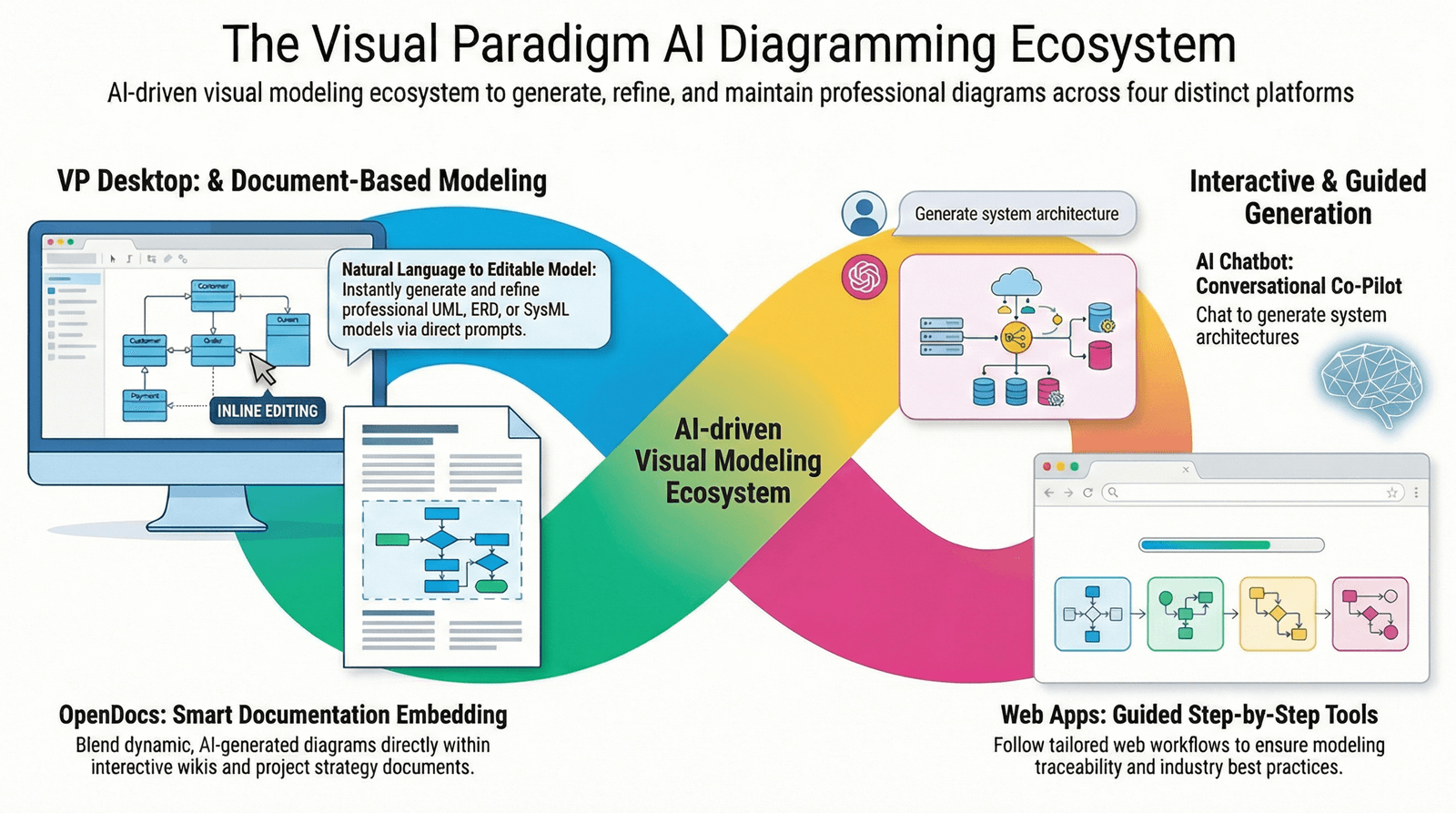
In the rapidly evolving landscape of software architecture and system design, traditional diagramming methods—relying heavily on manual drag-and-drop tools—are being outpaced by intelligent, AI-driven alternatives. The integration of artificial intelligence into modeling environments has revolutionized how teams design, document, and collaborate on complex software systems. This guide provides a complete, structured overview of AI-powered C4 and UML modeling, focusing on Visual Paradigm’s AI Ecosystem as a leading example of this transformative shift.
1. Introduction: The Evolution from Traditional to AI-Driven Modeling
For decades, software architects and developers have relied on visual modeling tools to create system diagrams such as C4 models (Context, Container, Component, Deployment) and UML diagrams (Use Case, Class, Sequence, etc.). These diagrams serve as critical communication artifacts between stakeholders, developers, and business teams.
However, traditional modeling workflows are often time-consuming, error-prone, and prone to inconsistency due to manual effort. Diagrams frequently become outdated—a form of “hidden technical debt”—as systems evolve but documentation lags behind.
Enter AI-powered modeling. By leveraging natural language processing (NLP), machine learning, and intelligent automation, modern platforms like Visual Paradigm are redefining what it means to model software systems.
✅ Key Advantage: AI transforms modeling from a mechanical, box-and-line exercise into a conversational, iterative, and intelligent process.
2. AI vs. Traditional Modeling: A Comparative Analysis
| Feature | Traditional Modeling | AI-Powered Modeling (e.g., Visual Paradigm) |
|---|---|---|
| Input Method | Manual drag-and-drop of shapes and connectors | Natural language prompts (e.g., “Create a container diagram with React frontend and Node.js backend”) |
| Speed | Hours to draft a basic diagram | Seconds to generate a fully structured diagram |
| Accuracy | Prone to syntax errors and non-standard notation | Enforces strict C4 and UML standards automatically |
| Iteration | Tedious updates; re-drawing required | Instant updates via chat commands (e.g., “Split the API into two microservices”) |
| Consistency | Varies by team member; inconsistent notation common | Uniform notation across all diagrams |
| Documentation | Manual writing; easily forgotten | Auto-generated documentation linked to diagrams |
| Collaboration | Limited to file sharing or version control | Real-time cloud collaboration with change tracking |
Why AI is Superior:
-
Eliminates technical debt from outdated diagrams.
-
Improves team alignment through shared understanding via standardized, AI-validated models.
-
Accelerates onboarding for new developers and stakeholders.
-
Supports agile development cycles with rapid model updates.
📌 Note: While AI significantly enhances productivity, it is not infallible. Always review and validate AI-generated outputs before finalizing or sharing diagrams.
3. Visual Paradigm’s AI Ecosystem: A Next-Generation Modeling Platform
Visual Paradigm has emerged as a pioneer in AI-driven software modeling. Its AI Ecosystem functions as a co-pilot for architects and developers, seamlessly integrating natural language input with precise, standardized diagram generation.
Core Features of the AI Ecosystem
✅ AI-Powered C4 Diagram Generator
-
Instantly generates C4 model diagrams at all four levels:
-
System Context: High-level view of the system within its environment.
-
Container: Major components (e.g., web app, database, third-party services).
-
Component: Internal structure of containers (e.g., authentication module, payment service).
-
Deployment: Physical or cloud deployment topology.
-
-
Accepts natural language input and applies C4 model conventions automatically.
-
Supports PlantUML syntax export for portability and integration with documentation tools.
🧠 Example Prompt:
“Generate a C4 Container Diagram for an e-commerce platform with a React frontend, Node.js backend, PostgreSQL database, and AWS cloud deployment.”
→ Instant diagram with correct structure, labels, and relationships.
✅ Conversational AI Assistant
-
Engage in a natural language dialogue to modify, refine, or extend diagrams.
-
Perform actions like:
-
“Add a Redis cache layer to the backend.”
-
“Rename the ‘User Service’ to ‘Identity Management Service’.”
-
“Show the data flow from frontend to API.”
-
-
Enables iterative design, where models evolve alongside system development.
✅ Smart Modeling Tools
-
Automatic Layouting: Intelligent arrangement of elements for clarity and readability.
-
Quality Checks: Real-time validation for:
-
Missing or incorrect relationships
-
Invalid UML syntax
-
Inconsistent naming conventions
-
-
Documentation Generation: Automatically creates detailed descriptions, use case summaries, and system overviews from diagrams.
✅ Integration & Collaboration
-
PlantUML Compatibility: Export diagrams as PlantUML code for use in Markdown, Confluence, GitHub, and other documentation systems.
-
Cloud-Based Environment: All models stored securely in the cloud with:
-
Version history
-
Real-time collaboration
-
Role-based access control
-
Shared workspaces for distributed teams
-
🔗 Pro Tip: Use the AI Diagram Generator in conjunction with PlantUML to maintain consistency across documentation pipelines.
4. Practical Use Cases: How Teams Are Using AI Modeling
🛠️ Use Case 1: Rapid System Onboarding
New team members can quickly understand a system by generating a C4 Context Diagram via a simple prompt. The AI creates a visual map of the system’s boundaries and key external actors, reducing ramp-up time.
🔄 Use Case 2: Agile Architecture Refinement
During sprint planning, architects can update diagrams in real time using chat commands. For example:
“Split the monolithic backend into two microservices: Order Management and Inventory.”
→ Diagram updates instantly with proper decomposition and communication flows.
📄 Use Case 3: Automated Technical Documentation
AI generates detailed documentation from diagrams, including:
-
Component responsibilities
-
Data flow descriptions
-
External dependencies
-
Deployment considerations
This documentation can be exported to PDF, Markdown, or integrated into Confluence or Notion.
🤝 Use Case 4: Cross-Team Alignment
Non-technical stakeholders (product managers, business analysts) can participate in the modeling process by describing system behavior in plain language. The AI translates these into accurate, standardized diagrams—bridging the communication gap.
5. Best Practices for Effective AI Modeling
To maximize the benefits of AI-powered modeling while minimizing risks:
| Practice | Why It Matters |
|---|---|
| Use precise, descriptive prompts | Avoid ambiguity; e.g., “Create a UML Use Case Diagram for user login with password reset and two-factor authentication” is better than “Make a login diagram.” |
| Validate AI output | Always review generated diagrams for correctness, completeness, and alignment with actual system behavior. |
| Maintain version control | Use cloud-based versioning to track changes and revert if needed. |
| Combine AI with human expertise | AI is a tool, not a replacement. Architects should guide the process and ensure architectural integrity. |
| Leverage PlantUML for portability | Export models to code to ensure long-term maintainability and integration with CI/CD pipelines. |
6. Future Outlook: The Rise of AI-First Architecture
The trend toward AI-driven modeling is not a passing fad—it’s a fundamental shift in software engineering practices. As AI models become more sophisticated, we can expect:
-
Predictive modeling: AI suggests architectural improvements based on patterns and past projects.
-
Self-documenting systems: Diagrams update automatically as code changes (via CI/CD hooks).
-
Cross-diagram consistency: AI ensures that changes in one diagram (e.g., C4 Container) are reflected in related UML or deployment diagrams.
-
Generative design: AI proposes alternative architectures based on requirements (e.g., scalability, security, cost).
🌐 Visual Paradigm’s roadmap includes deeper integration with AI code assistants (like GitHub Copilot), automated compliance checks, and real-time architecture risk analysis.
7. Conclusion: Embrace the AI Co-Pilot for Modern Software Architecture
The transition from traditional drag-and-drop modeling to AI-powered, conversational design represents a quantum leap in software architecture productivity and accuracy. Platforms like Visual Paradigm are leading this transformation by offering:
-
Instant, text-to-diagram generation
-
Conversational editing and refinement
-
Automatic adherence to C4 and UML standards
-
Seamless collaboration and documentation
While AI is not perfect and requires human oversight, its ability to accelerate design, reduce errors, and ensure consistency makes it an indispensable tool for modern development teams.
✅ Final Recommendation: Replace manual diagramming with AI-assisted modeling. Use tools like Visual Paradigm to turn architecture into a dynamic, collaborative, and future-proof process.
Reference List (Markdown Format)
C4 Model vs. UML Comparison for Architects – Diagrams AI: A detailed comparison between C4 and UML modeling approaches, emphasizing their roles in software architecture and how AI enhances both.
C4 PlantUML Studio – Visual Paradigm: An in-depth exploration of Visual Paradigm’s C4 PlantUML Studio, highlighting its integration of AI, PlantUML support, and real-time collaboration features.
AI-Driven C4 Container Diagrams – Visual Paradigm Docs: A comprehensive guide on creating, refining, and maintaining C4 Container Diagrams using AI, with practical examples and best practices.
Mastering AI-Driven Use Case Diagrams – Archimetric: A step-by-step tutorial on leveraging AI to generate and enhance use case diagrams, including natural language input and automated documentation.
The Ultimate Guide to C4 PlantUML Studio – Visual Paradigm Blog: A visionary overview of how C4 PlantUML Studio, powered by AI, is transforming software architecture design with speed, accuracy, and consistency.
AI Diagram Generator – Visual Paradigm Releases: Official release notes detailing the launch of Visual Paradigm’s AI Diagram Generator, including support for full C4 model generation and conversational editing.
Comprehensive Review of Visual Paradigm’s AI Diagram Generation – Fliplify: A user-centric review evaluating the performance, usability, and impact of Visual Paradigm’s AI features across real-world projects.
C4 System Context Diagram – Visual Paradigm Docs: A definitive guide to creating and using C4 System Context Diagrams with AI assistance, emphasizing strategic visibility and stakeholder communication.
Comprehensive Guide to Visual Paradigm’s AI-Powered UML & Modeling Ecosystem (2025–2026) – Cybermedian: A forward-looking analysis of Visual Paradigm’s AI ecosystem, forecasting future capabilities and enterprise adoption trends.
📌 Disclaimer: This guide is based on publicly available information from the referenced sources. While efforts have been made to ensure accuracy and completeness, users are advised to consult the official Visual Paradigm documentation and perform due diligence before relying on AI-generated content in production environments.
Ready to transform your modeling workflow?
👉 Explore Visual Paradigm’s AI Ecosystem Today