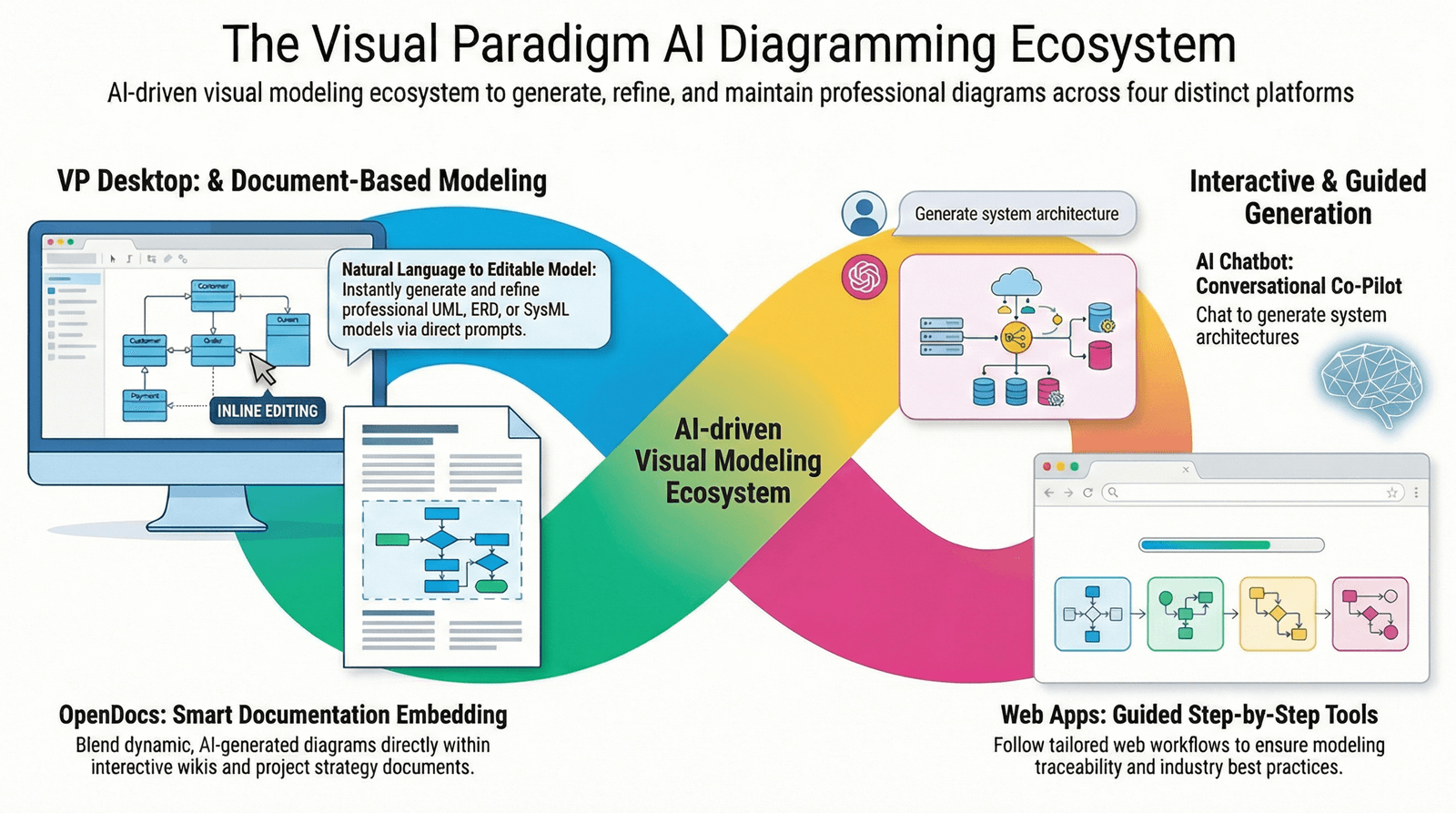
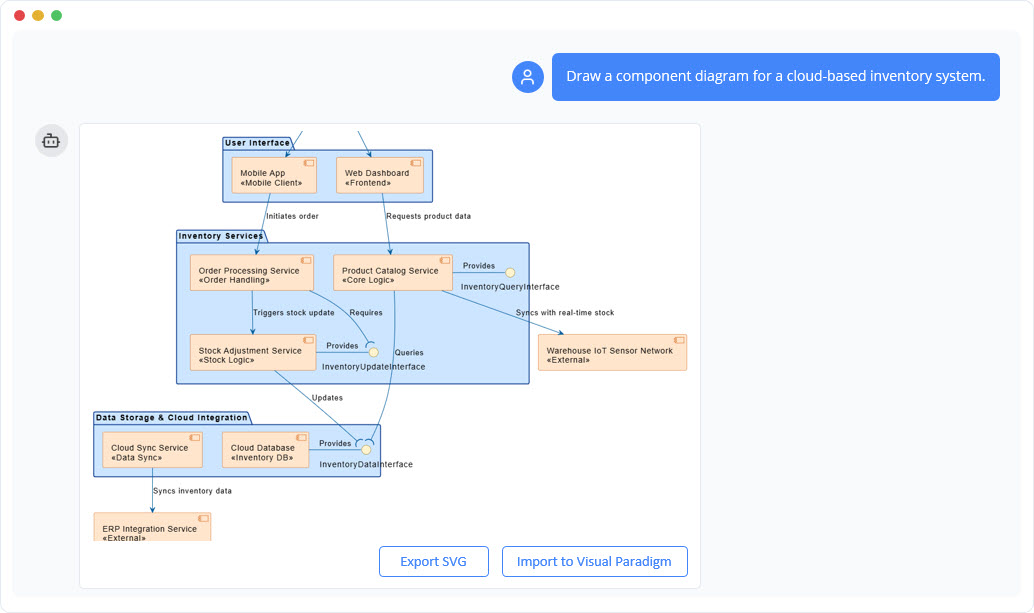
In the rapidly evolving landscape of AI-powered software development and enterprise knowledge management, selecting the right tool for your specific task is critical. The Visual Paradigm (VP) AI ecosystem offers three specialized AI-driven tools—General LLMs (e.g., ChatGPT, Claude, Gemini), the Visual Paradigm AI Chatbot, and OpenDocs—each designed to excel in distinct domains. This guide provides a complete, up-to-date, and actionable framework for choosing the optimal tool based on your project phase, technical requirements, and collaboration goals, aligned with industry standards as of 2026.
Overview: When to Use What?
| Tool | Primary Purpose | Best For |
|---|---|---|
| General LLM (ChatGPT, Claude, Gemini) | Brainstorming & General Text Generation | Open-ended ideation, drafting emails, generating code snippets, quick research |
| VP AI Chatbot (AI-Modeling Assistant) | Rapid, Accurate Visual Diagram Generation | Creating UML, C4, ERD, SysML diagrams from natural language; editing diagrams via chat |
| OpenDocs (AI-Powered Knowledge Hub) | Structured Documentation & Collaboration | Building centralized wikis, technical specs, HR policies, and collaborative knowledge bases with embedded visuals |
✅ Pro Tip: The most effective workflows combine all three tools in sequence: Brainstorm → Visualize → Document & Share.
1. General LLMs: The Creative Spark (e.g., ChatGPT, Claude, Gemini)
Primary Purpose
General-purpose Large Language Models (LLMs) are ideal for broad, open-ended tasks that don’t require domain-specific accuracy or structured output.
Best Use Cases
-
Project Ideation & Brainstorming: Generate initial concepts, outline features, or explore different architectural approaches.
-
Content Drafting: Write emails, blog posts, summaries, or meeting notes quickly.
-
Code Snippet Generation: Produce sample code for testing or prototyping (e.g., Python, JavaScript).
-
Exploratory Research: Quickly gather high-level information on a topic before diving deeper.
Key Limitations
-
No specialized modeling knowledge: LLMs lack training in formal modeling standards like UML 2.5, TOGAF, or ArchiMate.
-
Diagram inaccuracies: Prompts for diagrams often result in syntactically incorrect or semantically ambiguous visual outputs (e.g., misaligned UML associations, incorrect C4 component relationships).
-
No editability: Outputs are typically static text or images, not fully editable diagrams.
Example Workflow
A product manager uses Claude to brainstorm features for a new mobile app:
“Suggest 5 key user stories for a fitness tracking app with social sharing.”
The output serves as a foundation for further refinement in more specialized tools.
🔍 Note: Always validate any diagram or technical specification generated by a general LLM before using it in production or formal documentation.
2. Visual Paradigm AI Chatbot: The Specialized Modeling Engine
Primary Purpose
The Visual Paradigm AI Chatbot is a purpose-built AI assistant trained on millions of real-world visual modeling examples and industry standards (including OMG UML 2.5, TOGAF, ArchiMate, and C4).
Best Use Cases
-
Rapid Diagram Creation: Generate accurate UML diagrams (Use Case, Sequence, Class, Activity), C4 Context/Container/Component diagrams, ERDs, and SysML from natural language.
-
Iterative Diagram Editing: Modify diagrams through conversational commands (e.g., “Add a database component to the system,” or “Change the association to aggregation”).
-
Compliance with Standards: Ensure diagrams follow formal modeling conventions, improving clarity and professionalism.
-
Integration with VP IDE: Diagrams are fully editable, version-controlled, and exportable to other formats (PDF, PNG, SVG, etc.).
Key Advantages
-
✅ Industry-Standard Accuracy: Outputs conform to OMG and enterprise architecture frameworks.
-
✅ Full Editability: Unlike static AI-generated images, diagrams are live, interactive, and can be refined.
-
✅ Context-Aware: Understands software architecture terminology and modeling semantics.
-
✅ Real-Time Collaboration: Works seamlessly within the Visual Paradigm platform.
Example Workflow
A software architect inputs:
“Generate a C4 Container Diagram for a cloud-based e-commerce platform with user authentication, product catalog, order processing, and payment gateway.”
The AI produces a correct, standardized C4 diagram that can be immediately edited and shared with the team.
📌 Best Practice: Use the VP AI Chatbot after initial brainstorming with a general LLM to convert ideas into precise, standardized visuals.
3. OpenDocs: The AI-Powered Knowledge Management Platform
Primary Purpose
OpenDocs is a next-generation knowledge hub that unifies AI-powered documentation, visual modeling, and team collaboration in one platform. It’s designed for building and maintaining a Single Source of Truth (SSoT) for technical and business documentation.
Best Use Cases
-
Creating Centralized Project Wikis: Build comprehensive documentation repositories for software projects, product specs, or operational processes.
-
Writing Technical Specifications: Draft detailed requirements, API documentation, or system design documents with embedded diagrams.
-
HR & Operational Policies: Develop and maintain company-wide policies, onboarding guides, and compliance documents.
-
Collaborative Knowledge Sharing: Enable teams to edit, comment, and version-control documents in real time.
Key Features
-
✅ Markdown-Driven Editing: Clean, syntax-highlighted writing with support for tables, code blocks, and rich formatting.
-
✅ Embedded Visuals: Insert UML, C4, mind maps, and other diagrams directly into documents.
-
✅ Folder & Hierarchy Structure: Organize content logically with nested folders and navigation.
-
✅ AI-Powered Content Generation: Use AI to draft sections, summarize long texts, or suggest improvements.
-
✅ Version Control & Permissions: Track changes and manage access levels for team members.
Example Workflow
A project manager uses OpenDocs to create a central project repository:
Adds a project charter with AI-generated summaries.
Embeds a C4 Component Diagram (created earlier via the VP AI Chatbot).
Adds a timeline table and risk assessment matrix.
Shares the document with stakeholders and enables real-time feedback.
💡 Ideal For: Teams transitioning from fragmented documentation (e.g., Google Docs, Confluence, Notion) to a unified, visual, and AI-enhanced knowledge base.
Ideal End-to-End Workflow (2026 Standard)
Follow this proven sequence to maximize efficiency, accuracy, and collaboration:
-
Brainstorm with a General LLM
→ Use ChatGPT or Claude to explore ideas, draft user stories, or outline system features. -
Generate Accurate Diagrams with the VP AI Chatbot
→ Convert the brainstormed concepts into standardized, editable UML or C4 diagrams. -
Document & Collaborate in OpenDocs
→ Compile the final design into a structured, shareable document with embedded diagrams, AI-generated content, and team collaboration features.
✅ Example:
A fintech startup develops a new payment processing system:
Step 1: Use Claude to brainstorm core components.
Step 2: Use VP AI Chatbot to generate a C4 Context Diagram and Sequence Diagram.
Step 3: Use OpenDocs to build a full technical specification with diagrams, API descriptions, and deployment plans—shared with dev, QA, and product teams.
Critical Reminder: AI Can Make Mistakes
While AI tools are powerful, they are not infallible. Always:
-
Verify diagram accuracy (especially syntax and semantics).
-
Cross-check AI-generated content against known standards or expert review.
-
Use human judgment to validate outputs before deployment.
🛑 Never assume AI output is correct without review.
Even the most advanced AI models can hallucinate, misinterpret context, or generate non-compliant artifacts.
- Reference List (2026 Industry Standards)
- Visual Paradigm – OpenDocs Overview: Comprehensive guide to OpenDocs, highlighting its role as an AI-powered knowledge platform for structured documentation and visual collaboration.
- Visual Paradigm – OpenDocs Release Update (2026): Official release notes detailing new AI features, document editing enhancements, and integration capabilities in OpenDocs.
- Cybermedian – Why Visual Paradigm 18.0 Is More Than Just a Free LLM: In-depth analysis of the shift from general-purpose to purpose-built AI in professional software modeling.
- Visual Paradigm – Introducing the AI Chatbot: Launch article detailing the AI Chatbot’s training on UML, C4, and enterprise architecture standards.
- Visual Paradigm – What Makes the VP AI Chatbot Different?: Technical comparison highlighting the superiority of purpose-built AI over generic diagram generators.
- Archimetric – Review: Generic AI vs. Visual Paradigm’s C4 Tools: Independent review comparing AI diagram tools, concluding that VP’s AI Chatbot produces more accurate and usable C4 diagrams.
- Visual Paradigm – Comprehensive Guide to OpenDocs (Feb–Mar 2026): Detailed user guide covering OpenDocs’ AI features, visual integration, and team collaboration workflows.
- Cybermedian – OpenDocs Revolutionizes Knowledge Management: Insightful article on how OpenDocs transforms traditional documentation into dynamic, visual, and AI-enhanced knowledge systems.
- Visual Paradigm – VP AI Chatbot Introduction Guide: Step-by-step tutorial for using the AI Chatbot to generate and edit diagrams.
Final Thoughts
As of 2026, the future of software development and enterprise knowledge management lies not in choosing one AI tool, but in strategically combining specialized AI tools within an integrated ecosystem. By aligning the right tool to the right task—general LLMs for ideation, VP AI Chatbot for precision modeling, and OpenDocs for structured collaboration—teams can achieve faster delivery, higher quality, and greater alignment across departments.
🔧 Your AI Stack, Your Advantage
Use the right tool at the right time—and always validate, verify, and iterate.