“A picture is worth a thousand lines of code.”
— Modern software development mantra
Unified Modeling Language (UML) is the gold standard for visualizing, specifying, constructing, and documenting software-intensive systems. With 13–14 standardized diagram types, UML enables teams to model both the static structure and dynamic behavior of complex systems—ensuring clarity, consistency, and collaboration across development lifecycles.

But creating accurate, maintainable UML diagrams manually is time-consuming and error-prone. That’s where Visual Paradigm’s All-in-One, AI-Powered Platform transforms the process—from idea to implementation—into a seamless, intelligent workflow.
Understanding UML: The Two Pillars of System Modeling
UML diagrams are divided into two core categories, each serving a distinct purpose in system design.
🔹 Structural UML Diagrams (Static View)
What must exist in the system?del
These diagrams define the components, relationships, and organization of a system at rest.
| Diagram | Purpose |
|---|---|
| Class Diagram | Models classes, attributes, methods, and relationships (inheritance, association, aggregation). |
| Object Diagram | Shows specific instances of classes and their relationships at a point in time. |
| Component Diagram | Illustrates how software components are organized and depend on one another. |
| Deployment Diagram | Maps software artifacts to physical hardware (e.g., servers, devices). |
| Composite Structure Diagram | Displays internal structure and collaboration within a class. |
| Package Diagram | Groups related elements into logical packages (e.g., modules, layers). |
| Profile Diagram | Customizes UML for domain-specific modeling (e.g., healthcare, finance). |
✅ Use Case: Designing a microservices architecture, defining database schema, or organizing a modular monolith.
🔹 Behavioral UML Diagrams (Dynamic View)
How does the system behave over time?
These diagrams capture interactions, workflows, and state changes—the “live” behavior of the system.
| Diagram | Purpose |
|---|---|
| Use Case Diagram | Visualizes functionality from the user’s perspective (actors interacting with system). |
| Activity Diagram | Maps business processes, workflows, or algorithmic logic (like flowcharts). |
| State Machine Diagram | Tracks the lifecycle of an object across states and transitions. |
| Sequence Diagram | Shows the time-ordered sequence of messages between objects. |
| Communication Diagram | Focuses on object structure and message flow (similar to Sequence, but more structural). |
| Interaction Overview Diagram | Combines Activity and Sequence diagrams—high-level view of complex interactions. |
| Timing Diagram | Highlights time constraints and timing of events (e.g., real-time systems). |
✅ Use Case: Modeling user onboarding flows, payment processing, or IoT device state management.
Why Manual UML Modeling Falls Short
Despite its power, traditional UML modeling faces several challenges:
-
Time-intensive: Creating and maintaining diagrams by hand slows down development.
-
Inconsistency: Different team members may interpret symbols differently.
-
Lack of traceability: Linking diagrams to code, requirements, or test cases is often manual.
-
Stale documentation: Diagrams become outdated as code evolves.
-
Steep learning curve: Newcomers struggle with UML syntax and best practices.
This is where Visual Paradigm’s AI-Powered, All-in-One Platform changes everything.
How Visual Paradigm Transforms UML with AI & Integration
Visual Paradigm isn’t just a UML tool—it’s an intelligent, end-to-end software design ecosystem that unifies modeling, code generation, documentation, collaboration, and AI assistance.
Let’s explore how each feature enhances the UML process.
✅ 1. AI-Powered Diagram Generation from Natural Language
Problem: Starting a class diagram from scratch takes time and precision.
Solution: Use the AI Visual Modeling Chatbot to generate diagrams instantly.
💬 Prompt:
“Create a class diagram for an e-commerce system with User, Product, Cart, Order, and Payment classes. Include relationships and key attributes.”
✅ The AI:
-
Interprets your request
-
Generates a complete, valid Class Diagram in seconds
-
Uses correct UML syntax (e.g.,
+for public,-for private) -
Suggests associations, aggregations, and inheritance based on context
🔗 Pro Tip: Use “Suggest by AI” when unsure about relationships or multiplicity.
✅ 2. Smart Diagram Synchronization with Code (Round-Trip Engineering)
Problem: Diagrams become outdated when code changes.
Problem: Manual updates lead to inconsistencies.
Solution: Visual Paradigm supports round-trip engineering with 20+ languages (Java, C#, Python, TypeScript, etc.).
-
Generate code from UML: Right-click a class → “Generate Code” → instant implementation.
-
Reverse engineer code into UML: Import existing code → auto-generate Class, Component, or Deployment diagrams.
-
Synchronize changes: Edit the diagram → update code in real time (and vice versa).
🔄 Example: Modify a
Userclass in the diagram → instantly update the corresponding Java class file.
✅ 3. Multi-Diagram Consistency & Traceability
Problem: Use Case → Activity → Sequence diagrams often contradict each other.
Solution: Visual Paradigm enables cross-diagram traceability and automated consistency checks.
-
Link a Use Case to its corresponding Activity Diagram and Sequence Diagram.
-
Use Traceability Matrix to verify all requirements are covered.
-
Visualize dependencies across diagrams with color-coded links.
📌 Benefit: Ensure every user action is modeled correctly across all behavioral diagrams.
✅ 4. AI-Enhanced Behavioral Diagrams: From Flow to Sequence
Problem: Creating complex workflows or message sequences is tedious.
Solution: Use AI-assisted diagram creation to accelerate behavioral modeling.
💬 Prompt:
“Generate a Sequence Diagram for a user logging in, verifying their password, and accessing their dashboard.”
✅ The AI:
-
Identifies key objects:
User,Authentication Service,Database,Dashboard UI -
Orders interactions chronologically
-
Adds messages, activation bars, and return values
-
Suggests optional steps (e.g., 2FA, session timeout)
🛠️ Bonus: Click “Refine with AI” to add error handling, retry logic, or security checks.
✅ 5. Intelligent Component & Deployment Diagrams
Problem: Mapping software to infrastructure is error-prone and often done late in the cycle.
Solution: Visual Paradigm integrates cloud architecture modeling with UML.
-
Create a Component Diagram → map components to cloud services (e.g., AWS Lambda, Azure Blob Storage).
-
Generate a Deployment Diagram automatically from component and cloud choices.
-
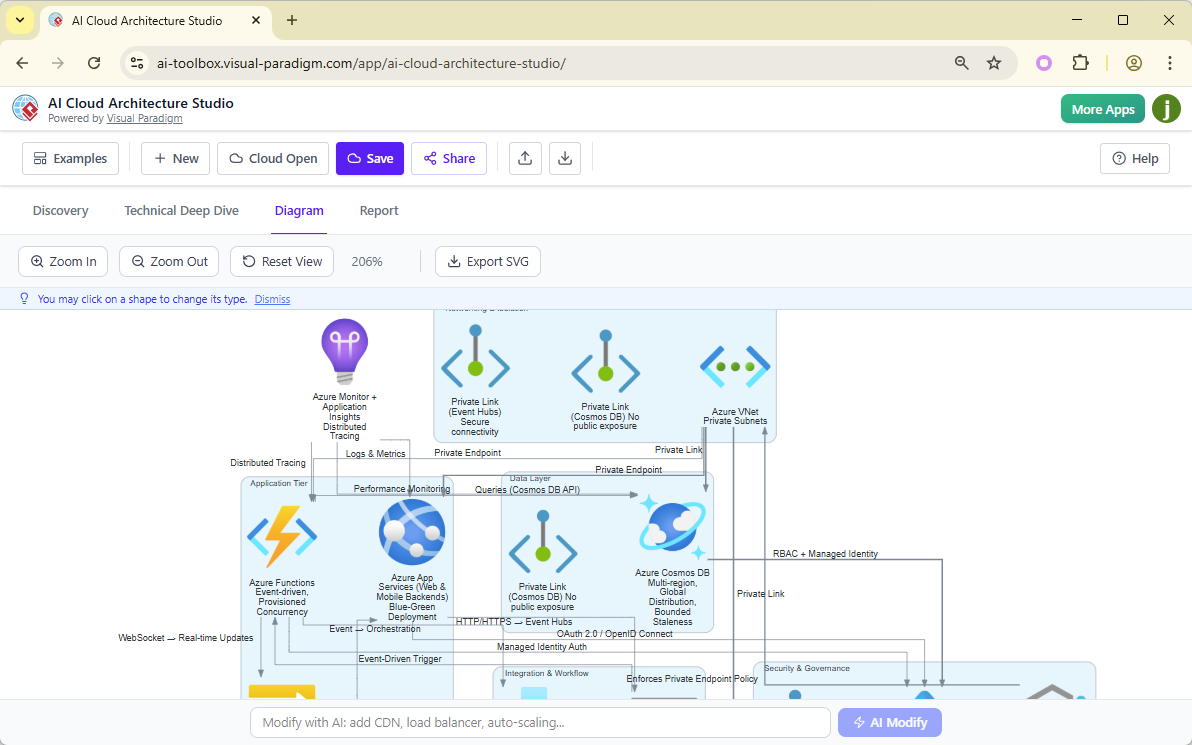
Use AI Cloud Architecture Studio (as described in previous guide) to turn a natural language description into a full cloud diagram—then import it into your UML model.
🔗 Integration: Your UML Component Diagram can now show AWS EC2 instances, Kubernetes pods, or Azure Functions—with real icons and deployment context.
✅ 6. Real-Time Collaboration & Version Control
Problem: Teams work in silos, leading to outdated or conflicting diagrams.
Solution: Visual Paradigm supports cloud-based collaboration with:
-
Real-time editing (like Google Docs)
-
Secure sharing via links
-
Comment threads on diagrams
-
Git integration (push/pull model changes)
-
Version history and rollback
👥 Ideal for: Remote teams, DevOps, and cross-functional product groups.
✅ 7. Automated Documentation & Reporting (AI-Powered)
Problem: UML diagrams are often poorly documented.
Solution: Generate professional, AI-analyzed reports in Markdown or PDF.
-
AI-Generated Reports cover:
-
System overview
-
Security considerations (e.g., data flow risks)
-
Scalability analysis
-
Compliance gaps
-
Cost implications (if linked to cloud diagrams)
-
📄 Output: A living document that can be embedded into wikis (OpenDocs), Confluence, or GitHub Pages.
✅ 8. Integration with the Full Visual Paradigm Ecosystem
Visual Paradigm isn’t limited to UML—it’s a unified platform for all software lifecycle stages.
| Feature | How It Enhances UML |
|---|---|
| VP Desktop | Full modeling suite for UML, SysML, BPMN, ERD. Import diagrams for deep analysis. |
| OpenDocs | Embed UML diagrams into interactive knowledge bases. Zoom, click, link to source. |
| AI Visual Modeling Chatbot | Brainstorm use cases, generate activity flows, or refine sequence diagrams. |
| Requirements Management | Link UML diagrams to user stories, epics, and test cases. |
| Test Case Generation | Automatically create test scenarios from Activity and Sequence diagrams. |
🔄 Workflow Example:
Use Case → Activity Diagram → Sequence Diagram → Class Diagram → Code → Test Cases → Deployment Diagram → Cloud Architecture
All within a single, AI-driven platform.
Real-World Use Case: Building a Food Delivery App
Let’s see how Visual Paradigm streamlines the full UML lifecycle for a real project.
🌟 Step 1: Discovery & Use Case Modeling
“I need a food delivery app with order placement, driver tracking, and real-time notifications.”
-
Use AI Chatbot → generate Use Case Diagram with actors:
Customer,Restaurant,Driver,Admin. -
AI suggests key use cases:
Place Order,Track Driver,Update Order Status.
🌟 Step 2: Behavioral Modeling
-
Create Activity Diagram for “Place Order” workflow.
-
Generate Sequence Diagram for “Customer Places Order” → includes
Order Service,Payment Gateway,Notification Service.
🌟 Step 3: Structural Design
-
Build Class Diagram with
Order,Payment,DriverLocation,Notificationclasses. -
Use AI Suggestion to add
@Validatedannotations and@OneToManyrelationships.
🌟 Step 4: Component & Deployment
-
Create Component Diagram for microservices:
Order Service,Payment Service,Notification Service. -
Link components to cloud services via AI Cloud Architecture Studio → generate Deployment Diagram on AWS.
🌟 Step 5: Documentation & Collaboration
-
Export AI-Report in PDF: covers security, scalability, and cost.
-
Share via secure link with stakeholders.
-
Integrate into OpenDocs for team onboarding.
Conclusion: UML Reimagined for the AI Era
UML is not obsolete—it’s more relevant than ever. But its power is unlocked only when paired with the right tools.
Visual Paradigm’s All-in-One, AI-Powered Platform turns UML from a static documentation exercise into a living, intelligent design engine that:
-
Accelerates modeling with AI
-
Ensures consistency across diagrams
-
Links design to code, cloud, and testing
-
Enables collaboration at scale
-
Reduces time-to-market by up to 60%
🎯 Final Thought:
The future of software design isn’t just about writing code—it’s about modeling systems with clarity, intelligence, and foresight. With Visual Paradigm, you’re not just drawing diagrams—you’re building the blueprint for success.
Want to Get Started?
We can help you:
-
Create a custom UML template for your domain (e.g., healthcare, fintech, IoT)
-
Generate a team onboarding guide with AI-assisted UML examples
-
Deliver a presentation deck for leadership (ROI, time savings, risk reduction)
👉 Let us know your needs—we’ll deliver a tailored resource within 24 hours.
Visual Paradigm – Where Intelligence Meets Design.
🌐 www.visual-paradigm.com
📧 [email protected]