


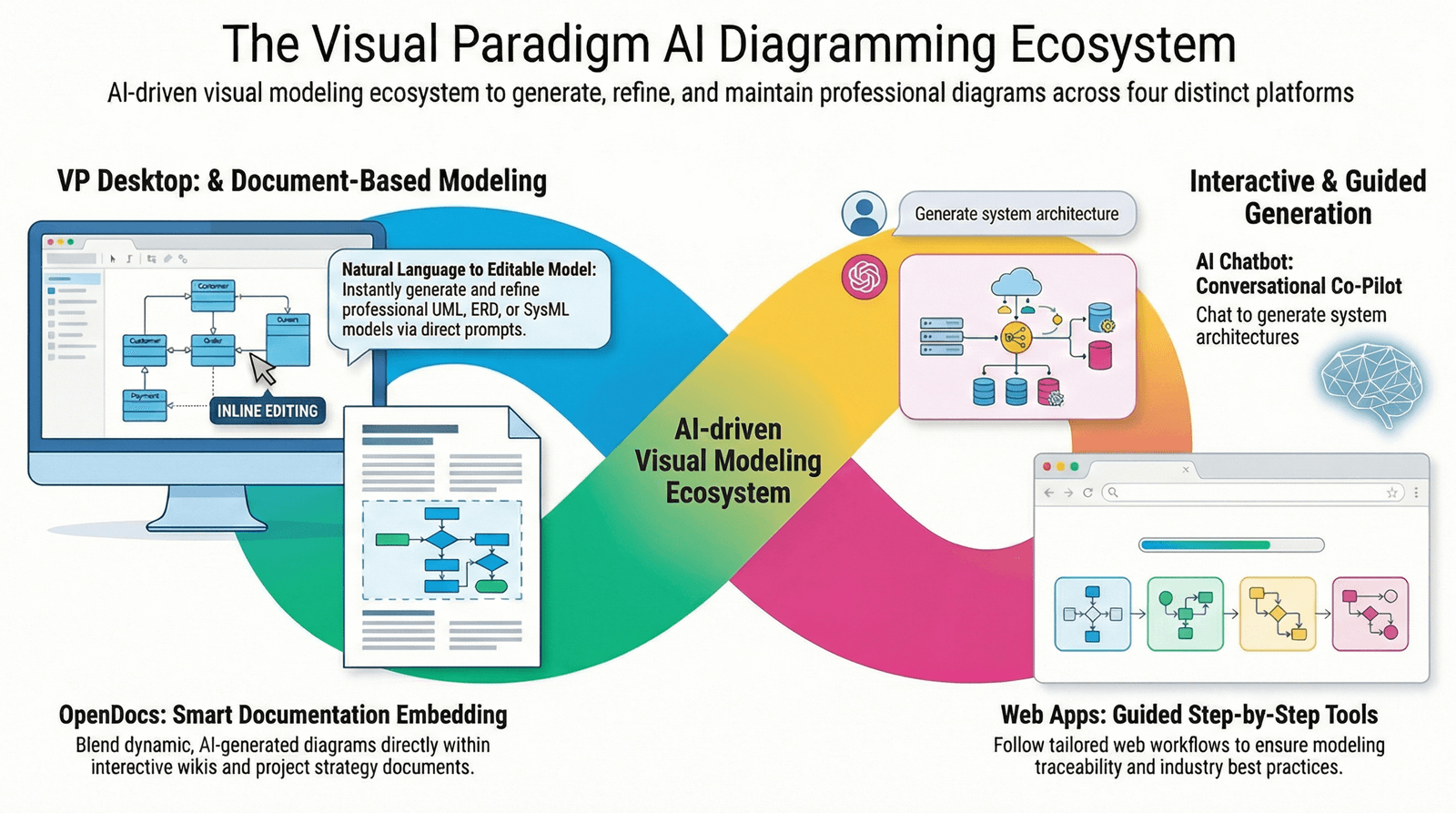
This guide provides a complete, structured overview of how to leverage the C4 Model and UML for effective software architecture and detailed technical design—using Visual Paradigm as your primary tool, enhanced by its AI-powered ecosystem, particularly OpenDocs. Whether you’re an architect, developer, team lead, or technical writer, this guide will help you streamline documentation, improve team communication, and accelerate design workflows.
1. Choosing the Right Modeling Approach: C4 vs. UML
C4 Model: High-Level Architecture & Stakeholder Communication
The C4 Model (Context, Container, Component, Code) is a powerful, human-centric approach to visualizing software architecture at multiple levels of abstraction.
| Level | Purpose | Audience |
|---|---|---|
| Context | Shows the system in its environment—users, external systems, and interactions. | Business stakeholders, product managers |
| Container | Breaks down the system into major components (e.g., web apps, databases, APIs). | Architects, DevOps, technical leads |
| Component | Details internal structure of a container—modules, services, libraries. | Developers, QA teams |
| Code | Focuses on actual source code (classes, functions, files). | Developers, code reviewers |
✅ Best For:
-
Onboarding new team members
-
Presenting system architecture to non-technical stakeholders
-
Mapping microservices and system boundaries
-
Planning and documenting domain-driven design (DDD) initiatives
📌 Why C4? It’s intuitive, scalable, and promotes clarity across teams. Unlike rigid standards, C4 encourages “zooming” from high-level context down to code—making it ideal for evolving systems.
UML: Detailed, Behavior-Focused Technical Design
UML (Unified Modeling Language) is a formal, standardized language for modeling software systems at a granular level.
Common UML Diagrams & Their Uses:
| Diagram Type | Purpose |
|---|---|
| Class Diagram | Models static structure: classes, attributes, methods, relationships |
| Sequence Diagram | Visualizes dynamic behavior: object interactions over time |
| Activity Diagram | Captures workflows, business processes, or control flow |
| Component Diagram | Shows modular structure of software (complements C4) |
| Deployment Diagram | Illustrates physical infrastructure and runtime components |
✅ Best For:
-
Designing complex object-oriented systems
-
Detailing how components interact during runtime
-
Documenting business logic and state transitions
-
Supporting code generation and reverse engineering
📌 Why UML? It provides precision and consistency. While C4 explains what the system is, UML explains how it works internally.
✅ Verdict: Use Both — C4 for Architecture, UML for Design
“Use C4 to communicate architecture to stakeholders. Use UML to design the internals of components.”
-
C4 → High-level clarity, stakeholder alignment, system boundaries
-
UML → Technical depth, behavioral modeling, code traceability
Together, they form a synergistic architecture documentation stack—ideal for modern software teams building scalable, maintainable systems.
🔗 C4 vs. UML: Which One?
🔗 Integrating C4 and UML Diagrams: A Synergistic Approach
2. Visual Paradigm: The All-in-One Tool for C4 & UML
Visual Paradigm is a leading visual modeling platform that supports both C4 and UML with full fidelity and AI-powered acceleration.
✅ Key Features of Visual Paradigm
| Feature | Description |
|---|---|
| Native C4 Support | Full support for all six C4 diagram types: Context, Container, Component, Code, Deployment, and Dynamic (e.g., Sequence). |
| AI-Powered Diagram Generation | Describe your system in plain English → AI generates accurate C4 or UML diagrams instantly. |
| Intelligent Modeling | AI acts as a “co-pilot” — suggests improvements, detects inconsistencies, and enforces standards. |
| Interactive Zooming | Seamlessly navigate between C4 levels (e.g., from Context to Component) without redrawing. |
| Code Engineering | Reverse engineer code into diagrams; generate code from UML models (Java, C#, Python, etc.). |
| Cloud Collaboration | Real-time editing, versioning, and sharing via secure web links. |
📌 Visual Paradigm is not just a diagramming tool—it’s a full software architecture lifecycle platform.
🔗 Visual Paradigm C4 Diagram Tool
🔗 Full C4 Model Support in Visual Paradigm
🔗 AI Diagram Generator: Complete C4 Model
3. OpenDocs: The AI-Powered Visual Knowledge Engine
OpenDocs is Visual Paradigm’s next-generation knowledge management platform that uniquely integrates AI-driven documentation with professional-grade visual modeling.
🌟 What Makes OpenDocs Different?
Unlike generic tools like Notion or Google Docs, OpenDocs eliminates the friction between writing and designing by combining:
-
A rich text editor
-
A full-featured visual modeling engine
-
AI co-pilot capabilities
✅ No app switching. No copy-paste chaos. One unified workspace.
🔧 Core Capabilities of OpenDocs
1. AI-Powered Visual Generation
-
Describe a system in natural language → AI generates:
-
C4 Diagrams (Context, Container, Component, Code)
-
UML Diagrams (Class, Sequence, Component, Activity)
-
ERD (Entity Relationship Diagrams)
-
Flowcharts & BPMN Diagrams
-
-
Example:
“Create a C4 Context diagram for an e-commerce platform used by customers, merchants, and payment gateways.”
→ AI instantly generates a structured diagram.
🔗 AI Component Diagram Generator – OpenDocs Update
🔗 AI ERD Generation in OpenDocs
2. Intelligent Transformation
-
AI doesn’t just generate diagrams—it understands intent.
-
It suggests better structures, identifies missing elements, and aligns with industry standards (UML, C4, BPMN, SysML).
3. Hierarchical Documentation with Tree Structure
-
Organize documentation using a folder-based tree system, similar to a file explorer.
-
Ideal for managing large projects, technical specs, API documentation, and architecture decision records (ADRs).
🔗 OpenDocs: Revolutionizing Knowledge Management with AI and Visual Thinking
4. AI-Powered Mind Mapping
-
Use native Mind Map support to brainstorm ideas.
-
AI auto-suggests branches based on your central theme.
-
Convert rough ideas into structured visual roadmaps for architecture, product planning, or project scoping.
5. Frictionless Collaboration
-
Share read-only web links with stakeholders—no login required.
-
Ideal for sharing architecture docs with clients, executives, or cross-functional teams.
6. Standards-Compliant Output
-
Unlike generic AI tools that produce informal sketches, OpenDocs generates enterprise-grade, standards-compliant diagrams.
-
Fully compliant with UML 2.5, C4 notation, BPMN 2.0, and SysML.
4. Why OpenDocs Stands Out in the Market
| Feature | OpenDocs | Generic AI Tools (e.g., ChatGPT, Notion AI) |
|---|---|---|
| AI understands technical modeling standards | ✅ Yes | ❌ No (produces informal visuals) |
| Integrated diagramming + text editing | ✅ Yes | ❌ No (requires export/paste) |
| Standards-compliant output | ✅ UML, C4, BPMN, SysML | ❌ Often non-standard or unclear |
| Hierarchical documentation system | ✅ Yes (tree structure) | ❌ Flat or wiki-style |
| Code ↔ Diagram synchronization | ✅ Yes (via Visual Paradigm) | ❌ No |
| Collaboration via shareable links | ✅ Yes | ❌ Limited or requires login |
🌐 OpenDocs is a premium extension for the Visual Paradigm ecosystem, designed for software architects, technical leads, and knowledge workers who demand precision, scalability, and professionalism.
🔗 What Makes Visual Paradigm’s AI Chatbot Different?
🔗 Top 5 UML Tools: Why Visual Paradigm Stands Out
5. How to Get Started with OpenDocs & Visual Paradigm
✅ Step-by-Step Workflow
-
Define Your Goal
-
Are you documenting software architecture?
-
Mapping business processes?
-
Building a personal knowledge base?
-
-
Choose a Template
-
OpenDocs offers pre-built templates:
-
C4 Architecture Documentation
-
Microservices System Design
-
UML Class & Sequence Diagrams
-
Business Process Mapping (BPMN)
-
Technical Specification Templates
-
-
-
Use AI to Generate Diagrams
-
Type a description in plain English.
-
Let OpenDocs’ AI generate the diagram automatically.
-
Refine with natural language (e.g., “Add authentication service”).
-
-
Enhance with Visuals & Text
-
Write detailed explanations alongside diagrams.
-
Use mind maps for brainstorming.
-
Link diagrams to code or documentation.
-
-
Share & Collaborate
-
Generate a read-only web link.
-
Share with stakeholders, clients, or teams.
-
No login required—ideal for external review.
-
6. Best Practices & Pro Tips
-
Start with C4: Use Context and Container diagrams to align stakeholders before diving into UML.
-
Use UML to validate behavior: After designing a component in C4, use Sequence and Class diagrams to verify interactions.
-
Keep OpenDocs organized: Use the folder tree to group by system, module, or release.
-
Leverage AI for ideation, not final decisions: Always review AI-generated diagrams for accuracy and completeness.
-
Reverse engineer code: Use Visual Paradigm to import code and auto-generate UML diagrams.
⚠️ AI Can Make Mistakes
Always validate outputs—especially in production-critical systems. AI is a co-pilot, not a replacement for expertise.
7. Summary: The Ultimate Architecture & Design Workflow
| Phase | Tool | Technique |
|---|---|---|
| High-Level Vision | C4 (Context) | Stakeholder alignment |
| System Boundaries | C4 (Container) | Microservices mapping |
| Component Design | C4 (Component) + UML (Class/Component) | Internal structure |
| Behavioral Modeling | UML (Sequence, Activity) | Runtime logic |
| Documentation & Knowledge | OpenDocs | Unified text + visuals |
| Code Integration | Visual Paradigm | Reverse/forward engineering |
🏁 Result: A living, evolving, standards-compliant architecture documentation system—ready for review, handoff, and long-term maintenance.
Reference List (Markdown Format)
- C4 Model vs. UML Comparison for Architects: A detailed comparison of C4 and UML, highlighting their roles in software architecture and team communication.
- The Ultimate Guide to C4 PlantUML Studio Revolutionizing Software Architecture Design: A comprehensive walkthrough of C4 modeling using Visual Paradigm’s tools.
- AI Diagram Generator: Complete C4 Model Support: Official release notes on AI-powered C4 diagram generation in Visual Paradigm.
- Visual Paradigm – C4 Diagram Tool: Official product page for C4 modeling in Visual Paradigm.
- Integrating C4 and UML Diagrams: A Synergistic Approach to Software Architecture: Explains how C4 and UML complement each other in enterprise architecture.
- OpenDocs by Visual Paradigm: Revolutionizing Knowledge Management with AI and Visual Thinking: In-depth article on OpenDocs’ AI-powered visual knowledge engine.
- AI-Powered Component Diagram Generation in OpenDocs: Release details on AI-generated UML Component diagrams.
- AI-Driven ERD Generation in OpenDocs: How OpenDocs uses AI to generate professional Entity Relationship Diagrams.
- Visual Paradigm – Full C4 Model Support: Technical details on native C4 diagram support.
- What Makes Visual Paradigm’s AI Chatbot Different?: Explains the unique advantages of Visual Paradigm’s AI over generic tools.
- Top 5 UML Tools: Why Visual Paradigm Stands Out: A comparative review highlighting Visual Paradigm’s strengths in UML modeling.
- Share OpenDocs Links Without Account: Guide on how to share architecture documentation with stakeholders via secure, read-only web links.
✅ Final Thoughts
“Great architecture isn’t just code—it’s communication, clarity, and consistency.”
With Visual Paradigm and OpenDocs, you now have a powerful, AI-augmented toolkit to:
-
Design systems with precision
-
Document them with professionalism
-
Communicate with clarity across teams
-
Scale your knowledge base with confidence
Whether you’re building microservices, leading a technical team, or managing enterprise architecture—this is the future of software design.
📌 Ready to start?
👉 Visit OpenDocs by Visual Paradigm and begin generating your first AI-powered architecture diagram in seconds.
✅ Pro Tip: Use the C4 + UML + OpenDocs stack to create a living architecture documentation system that evolves with your software—no more outdated or inconsistent diagrams.