Enterprise architecture is a discipline built on complexity. It involves mapping relationships between business strategies, operational processes, information systems, and technology infrastructure. Without structure, this landscape becomes an unmanageable web of data. This is where the concept of a viewpoint becomes essential. A viewpoint acts as a lens, focusing attention on specific concerns for a specific audience. It filters out noise and highlights signal.
Designing ArchiMate viewpoints from scratch requires a deliberate approach. It is not merely about selecting shapes and lines; it is about communication strategy. You are defining how information is presented to ensure that stakeholders can make informed decisions. This guide provides a comprehensive walkthrough on constructing these views effectively, adhering to the framework’s standards while maintaining practical utility.
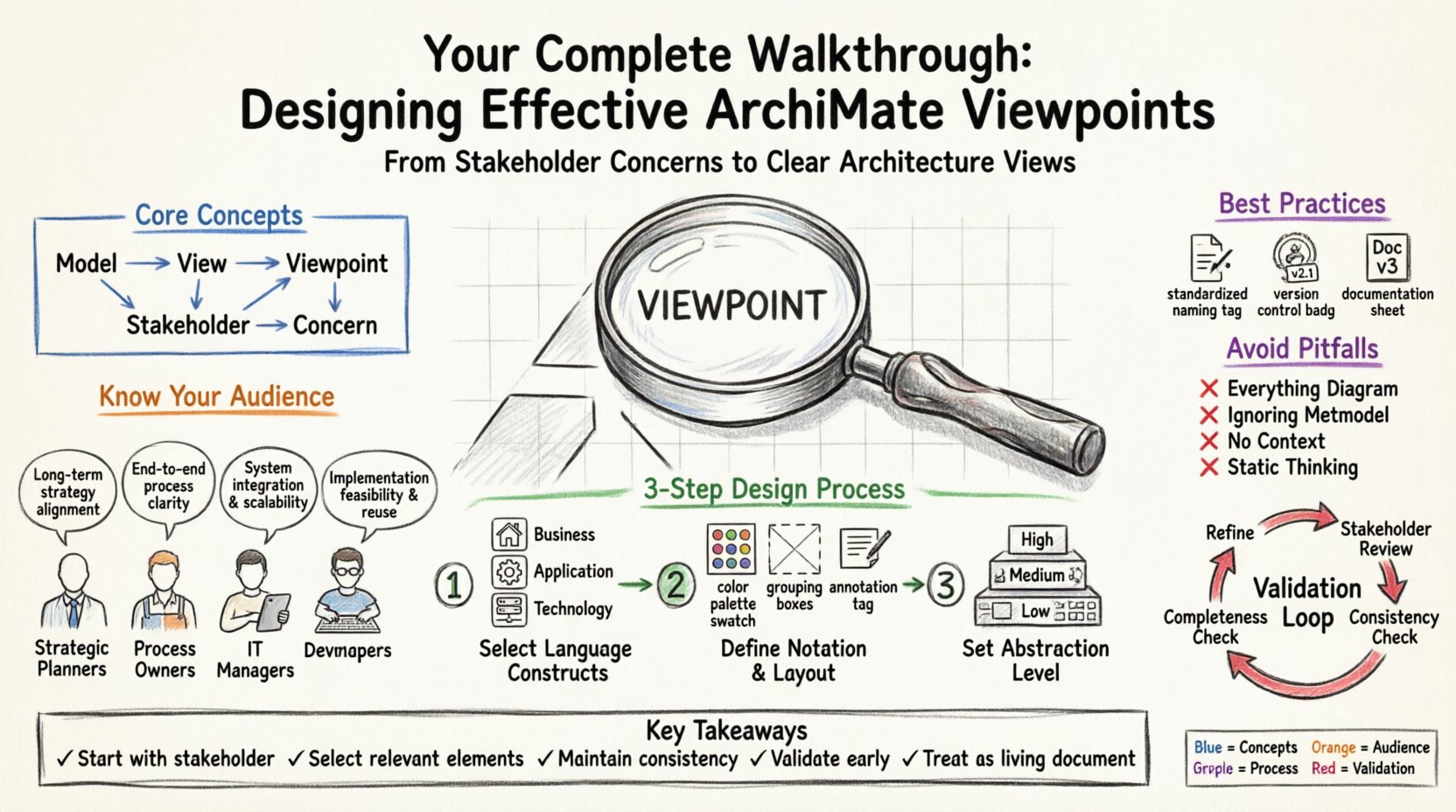
🧩 Understanding the Core Concepts
Before beginning the design process, it is necessary to establish a firm grasp of the underlying terminology. The framework relies on a metamodel, which defines the rules of the language. However, the metamodel alone is often too dense for direct consumption. Viewpoints bridge the gap between the abstract model and the human reader.
- Model: A collection of architecture descriptions that represent a specific domain.
- View: A representation of a set of related architecture descriptions.
- Viewpoint: The convention used to represent a view. It defines the language, notation, and level of detail.
- Stakeholder: An individual or group with a concern regarding the architecture.
- Concern: A matter of interest to a stakeholder.
When you design a viewpoint, you are essentially creating a contract between the architect and the stakeholder. You promise to show them what they need to see, and nothing more. If the viewpoint includes irrelevant details, it dilutes the message. If it omits critical information, it fails to serve the stakeholder.
🎯 Pre-Design Analysis: Know Your Audience
The first step in designing an effective viewpoint is not opening the modeling canvas. It is understanding who will read the output. Different roles require different information. A Chief Technology Officer needs a different perspective than a Business Process Owner.
1. Identify the Stakeholders
Begin by listing the individuals or groups who will consume the architecture description. Consider their roles, their responsibilities, and their current knowledge base.
- Strategic Planners: Focus on long-term goals, business capabilities, and value streams.
- Process Owners: Interested in workflow efficiency, process interactions, and organizational structure.
- IT Managers: Concerned with application interactions, technology infrastructure, and deployment.
- Developers: Require detailed data models, interface definitions, and logical flows.
2. Define the Concerns
Once stakeholders are identified, define their specific concerns. What questions do they need answered?
- How does a change in business strategy impact the technology stack?
- Where are the bottlenecks in the current application landscape?
- What are the data flows between legacy systems and new services?
Each concern maps to a specific set of ArchiMate elements. By defining the concern first, you prevent the common pitfall of including every available element in the diagram.
🛠️ The Design Process: Step-by-Step
Designing a viewpoint is a systematic process. It involves selecting the right constructs, defining the notation, and ensuring consistency across the documentation.
Step 1: Select the Language Constructs
The framework provides a rich set of modeling elements. You must choose only those relevant to the concern. Do not default to using everything available.
- Business Layer: Use Business Actors, Roles, Activities, and Business Services to describe organizational functions.
- Application Layer: Use Applications and Application Services to map software functionality.
- Technology Layer: Use Devices, Nodes, and Infrastructure to depict physical or logical computing resources.
- Relations: Select the specific relationships (Association, Flow, Realization, Aggregation) that tell the story you intend.
Step 2: Define the Notation and Layout
The visual representation matters. The layout should guide the eye from the most important elements to the supporting details. Consider the following:
- Color Coding: Use consistent colors to represent different layers or statuses. For example, green for stable, red for deprecated.
- Grouping: Use containers to group related elements. This reduces visual clutter.
- Annotations: Add text boxes to explain complex relationships or constraints that symbols cannot convey.
Step 3: Set the Abstraction Level
Abstraction is the art of hiding detail. A high-level viewpoint shows the big picture. A low-level viewpoint shows implementation specifics.
- High Level: Focus on Business Capabilities and Value Streams. Ignore specific software instances.
- Medium Level: Include Application Services and Business Processes. Show how processes trigger applications.
- Low Level: Detail specific Application Components, Data Objects, and Infrastructure Nodes.
📊 Common Viewpoint Categories
While custom viewpoints are often necessary, the framework defines standard categories to ensure consistency across the organization. Understanding these categories helps in selecting the right starting point.
| Layer | Primary Focus | Typical Audience |
|---|---|---|
| Business | Organization, Processes, Goals | Management, Business Analysts |
| Application | Software Services, Functions | IT Managers, Architects |
| Technology | Hardware, Networks, Systems | Infrastructure Teams |
| Strategy | Goals, Principles, Requirements | Strategic Planners |
| Implementation | Projects, Migrations | Project Managers |
When designing a new viewpoint, check if an existing category covers the requirement. If not, create a custom one, but ensure it is documented clearly.
📝 Best Practices for Consistency
To maintain the integrity of the architecture description, adhere to strict guidelines during the design phase. Inconsistency leads to confusion and mistrust in the documentation.
- Standardize Naming: Use a naming convention for all elements. Avoid acronyms that are not defined in a glossary.
- Limit Cross-Layer Connections: While the framework allows connections between layers, overuse them. Keep the focus on the primary layer unless a dependency is critical.
- Version Control: Maintain a history of changes. Viewpoints evolve as the architecture evolves. Track when a viewpoint was created and by whom.
- Documentation: Every viewpoint should have a metadata block. Include the purpose, the audience, the date, and the version.
⚠️ Common Pitfalls to Avoid
Even experienced architects can fall into traps when creating views. Being aware of these common issues can save significant time during the review process.
1. The Everything Diagram
Trying to fit the entire architecture into a single view is a mistake. This overwhelms the reader. Break the architecture down into multiple viewpoints, each addressing a specific concern.
2. Ignoring the Metamodel
The framework has strict rules about which elements can connect. For example, a Business Actor cannot directly realize an Application Component. Always verify that the relationships used are valid according to the metamodel.
3. Lack of Context
A diagram without context is just a picture. Ensure that the viewpoint explains the relationships. Use arrows to show direction of flow. Use labels to clarify the nature of the link.
4. Static Thinking
Architecture is dynamic. A viewpoint designed today may not be valid in six months. Plan for maintenance. Design the viewpoint in a way that allows elements to be added or removed without breaking the layout.
🔍 Validation and Review
Once the viewpoint is designed, it must undergo validation. This is not just a technical check; it is a usability check.
- Stakeholder Review: Show the draft to the intended audience. Ask them if it answers their questions. If they say no, refine the viewpoint.
- Consistency Check: Ensure the viewpoint aligns with other viewpoints in the repository. Do not show conflicting information.
- Completeness Check: Verify that all required elements for the concern are present. Missing a critical dependency can lead to architectural flaws.
🔄 Maintenance and Evolution
A viewpoint is a living document. As the organization changes, the viewpoint must change with it.
- Regular Audits: Schedule periodic reviews of the viewpoints. Remove outdated elements.
- Feedback Loop: Create a mechanism for stakeholders to request changes. If a stakeholder says a diagram is unclear, treat that as a requirement for improvement.
- Archiving: When a viewpoint is superseded, archive the old version. Keep it accessible for historical reference, but mark it as obsolete.
🎨 Visual Design Principles
While the framework is logical, the presentation is visual. Good visual design aids comprehension.
- White Space: Do not cram elements together. Use whitespace to separate distinct logical groups.
- Alignment: Align elements horizontally or vertically where possible. This creates a sense of order.
- Hierarchy: Place the most important elements at the top or center of the view. Less critical details should be peripheral.
- Flow Direction: Use a consistent flow direction, typically left-to-right or top-to-bottom, to indicate progression.
📚 Integrating with Other Frameworks
Often, the architecture description must align with other management frameworks. This requires careful mapping.
- ITIL: Map Application Services to ITIL Service Catalog items.
- TOGAF: Ensure the viewpoint satisfies the Architecture Content Framework requirements.
- ISO Standards: Adhere to relevant ISO standards for enterprise architecture documentation.
🛡️ Security and Access Control
Not all architecture information is public. Some viewpoints contain sensitive data regarding infrastructure or security protocols.
- Classification: Classify viewpoints based on sensitivity (Public, Internal, Confidential).
- Access Control: Restrict access to sensitive viewpoints to authorized personnel only.
- Redaction: If a viewpoint must be shared widely, redact sensitive details before distribution.
🚀 Summary of Key Actions
Designing effective ArchiMate viewpoints is a foundational skill for enterprise architects. It requires a balance of technical precision and communication strategy. By following the steps outlined above, you ensure that your architecture descriptions are not just diagrams, but actionable tools.
Remember the following key takeaways:
- Start with the stakeholder, not the tool.
- Select only the elements that serve the concern.
- Maintain strict consistency in notation and naming.
- Validate with the audience before finalizing.
- Treat the viewpoint as a living document.
By adhering to these principles, you create a robust architecture description that supports decision-making and drives organizational success.