
Flowchart Mastery: Seven Principles for Clean Activity Diagrams with VPasCode
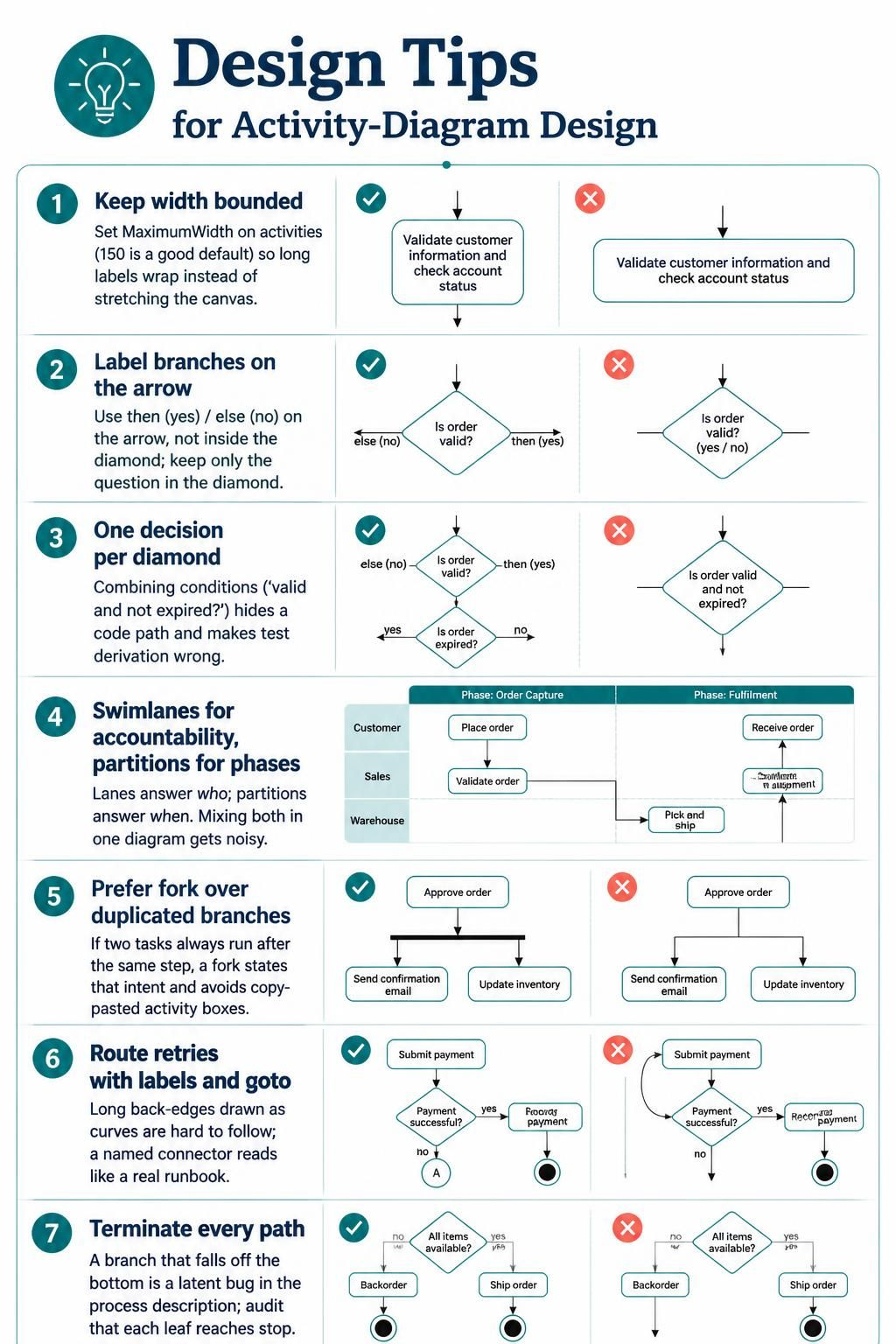
Activity diagrams are the backbone of business process modeling. They translate complex workflows into visual stories that stakeholders and developers can understand. However, a diagram that is too wide, too cluttered, or logically ambiguous defeats its purpose. Based on best practices for high-quality modeling, this guide breaks down seven critical design principles to ensure your activity diagrams are professional, readable, and logically sound.
1. The Golden Rule of Layout: Keep Width Bounded
One of the most common mistakes in modeling is allowing activity boxes to expand horizontally, creating a “wall of text” that forces the viewer to scroll endlessly. To maintain a clean, scannable layout, you must strictly bound the width of your elements.
When using tools like VPasCode or Visual Paradigm, apply a MaximumWidth constraint (150 pixels is a robust default). This forces long labels to wrap into multiple lines rather than stretching the canvas. This technique ensures that the logical flow remains vertical and easy to follow, keeping the “who” and “when” of the process distinct from the “what.”
2. Labeling Logic: Branches vs. Diamonds
Clarity in decision points is paramount. The golden rule is to keep the diamond shape for the question and the arrows for the answers.
- Correct Approach: Place the condition inside the diamond (e.g., “Is order valid?”). Label the outgoing arrows with “then (yes)” or “else (no).” This aligns with how readers scan documents—left to right, top to bottom.
- Incorrect Approach: Writing “yes” and “no” inside the diamond itself. This clutters the logic gate and disrupts the flow of the arrows.
3. Logic Integrity: One Decision Per Diamond
It is tempting to combine conditions to save space, such as writing “Is order valid AND not expired?” inside a single diamond. This is a modeling anti-pattern. Combining conditions hides specific code paths and makes test derivation difficult because you cannot trace exactly which condition failed.
The Solution: Break compound logic into sequential decisions. If an order must be valid AND not expired, use two distinct diamonds. This creates a clear audit trail and simplifies the mapping of the diagram to actual code or business rules.
4. Organizational Structure: Swimlanes vs. Partitions
Visual Paradigm offers two distinct ways to organize activity diagrams: Swimlanes and Partitions. It is crucial to use them for their intended purposes to avoid visual noise.
- Swimlanes (Lanes): These answer the question “Who?”. Use swimlanes to assign accountability to specific roles (e.g., Customer, Sales, Warehouse).
- Partitions (Phase): These answer the question “When?”. Use partitions to group activities by lifecycle stages (e.g., Order Capture, Fulfillment).
Pro Tip: Mixing lanes and partitions in a single diagram often results in a confusing matrix. Choose one structure to define the context of your process.
5. Flow Efficiency: Forks Over Duplicated Branches
When a process splits into parallel tasks, avoid drawing separate lines from the same node if the intent is to start multiple activities simultaneously. Instead, use a Fork (a thick horizontal bar) to indicate parallel execution.
This visual cue states the intent clearly: “These tasks happen together.” It also prevents the “copy-paste” syndrome where activity boxes are duplicated, ensuring that any future updates to a task are reflected in only one place.
6. Handling Errors: Route Retries with Labels
Long back-edges (loops used for retries) drawn as curved lines are notoriously hard to follow visually. They create “spaghetti code” aesthetics on the diagram.
The Best Practice: Use labeled connectors and the goto pattern. Instead of drawing a long curve back to a previous step, draw a line to a named connector (e.g., “A”) and label it. This mimics a real-world runbook or technical documentation, making the error handling path explicit and readable.
7. Completeness: Terminate Every Path
A process description is incomplete if it leaves the reader hanging. Every branch in your diagram must eventually lead to a termination state (a solid black circle).
If a path falls off the bottom of the diagram without reaching a stop node, it represents a latent bug in your process logic. Ensure that “Backorders,” “Cancellations,” and “Success” paths all converge on a definitive end point.
@startuml
' Example of bounded width and proper branching
skinparam activity {
    MaximumWidth 150
}

start
:Validate Customer Info;
if (Order Valid?) then (yes)
  :Check Inventory;
  fork
    :Send Email;
  and
    :Update Stock;
  endfork
  stop
else (no)
  goto End
endif

label End
stop
@enduml