
Mastering Diagram-as-Code: AI-Powered Mind Maps with VPasCode
In the modern era of software engineering and technical communication, the ability to rapidly prototype, document, and visualize complex ideas is paramount. Visual Paradigm’s VPasCode tool offers a unique bridge between traditional coding syntax and visual diagramming. By utilizing Markdown as a source language, developers can generate Markmap diagrams instantly. This tutorial explores the underlying architecture of this “Diagram-as-Code” workflow, analyzing how a simple JavaScript example is transformed into a structured visual mind map.
The Architecture of VPasCode
VPasCode operates on a fundamental principle: text is the source of truth. Unlike traditional diagramming tools where nodes are dragged and dropped onto a canvas, VPasCode relies on a hierarchical text structure. The system parses a Markdown document, interpreting headers as root nodes and list items as child nodes. This approach reduces the overhead of manual layout management, allowing the engineer to focus on content logic rather than visual geometry.
The rendering engine, Markmap, is specifically designed to take this hierarchical structure and translate it into a collapsible, interactive mind map. This is particularly useful for technical documentation, such as outlining the components of a programming function or breaking down system requirements.
Deconstructing the Example Structure
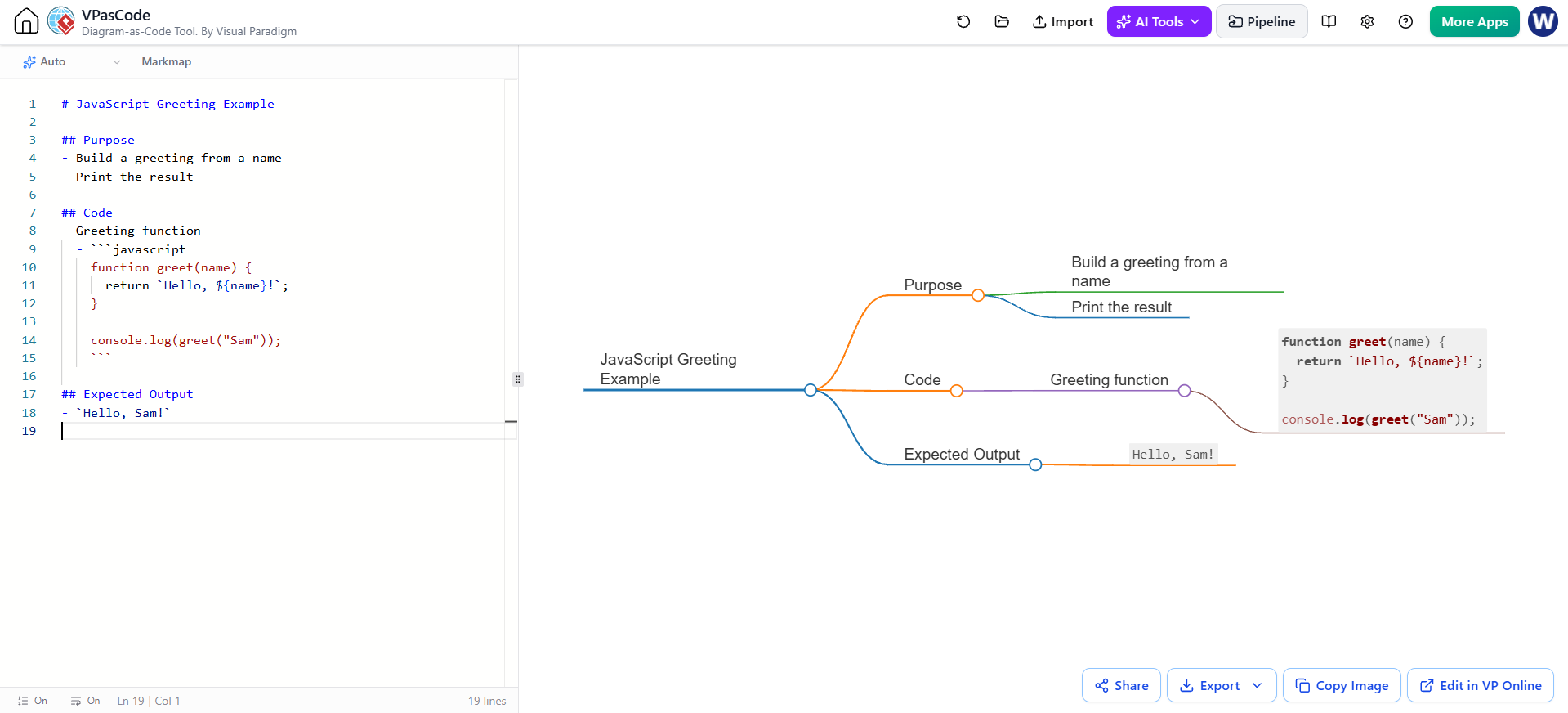
Let us analyze the specific components of the “JavaScript Greeting Example” provided in the tool’s interface. The diagram is divided into three distinct conceptual branches: Purpose, Code, and Expected Output. This structure mimics the standard documentation pattern used in software development: defining the problem, providing the solution, and verifying the result.
1. The Purpose Branch
The root node of the diagram, JavaScript Greeting Example, acts as the context for the entire system. The first major branch, Purpose, is defined by a level-two header (## Purpose). Within this branch, the tool identifies list items to represent the specific goals of the code snippet. The resulting visual structure clearly delineates the two primary objectives:
- Build a greeting from a name: The input processing stage.
- Print the result: The output generation stage.
2. The Code Branch
The Code branch is the most complex part of the diagram, requiring specific syntax to handle code blocks correctly. In VPasCode, the content of a code block is treated as a single node string. This preserves the integrity of the JavaScript syntax within the visual representation.
The system renders the function definition and the execution call as a cohesive unit. This prevents the diagram from becoming cluttered with individual lines of code, instead presenting the function as a logical entity. The visual representation of the code is:
function greet(name) {
  return `Hello, ${name}!`;
}

console.log(greet("Sam"));
3. The Expected Output Branch
Finally, the Expected Output branch serves as the verification mechanism. By defining the expected string literal Hello, Sam!
Workflow Integration
Integrating VPasCode into a development workflow is seamless. The left pane of the interface acts as a text editor, where changes are made in real-time. As the user edits the Markdown, the right pane—the Markmap canvas—updates dynamically. This immediate feedback loop allows for rapid iteration on technical diagrams without the friction of clicking and dragging nodes.
For example, if a developer needs to add a new feature to the greeting function, such as handling a “Goodbye” case, they simply add a new bullet point under the Purpose header. The diagram automatically re-calculates the layout to accommodate the new node.
Conclusion
The “JavaScript Greeting Example” demonstrates the power of Diagram-as-Code. By leveraging the simplicity of Markdown and the visualization capabilities of Markmap, VPasCode enables engineers to create high-quality architectural diagrams and documentation with minimal effort. This approach ensures that documentation remains synchronized with code, fostering a more efficient and transparent development process.