
Mastering Multi-Engine DSLs in Visual Paradigm AI with VPasCode
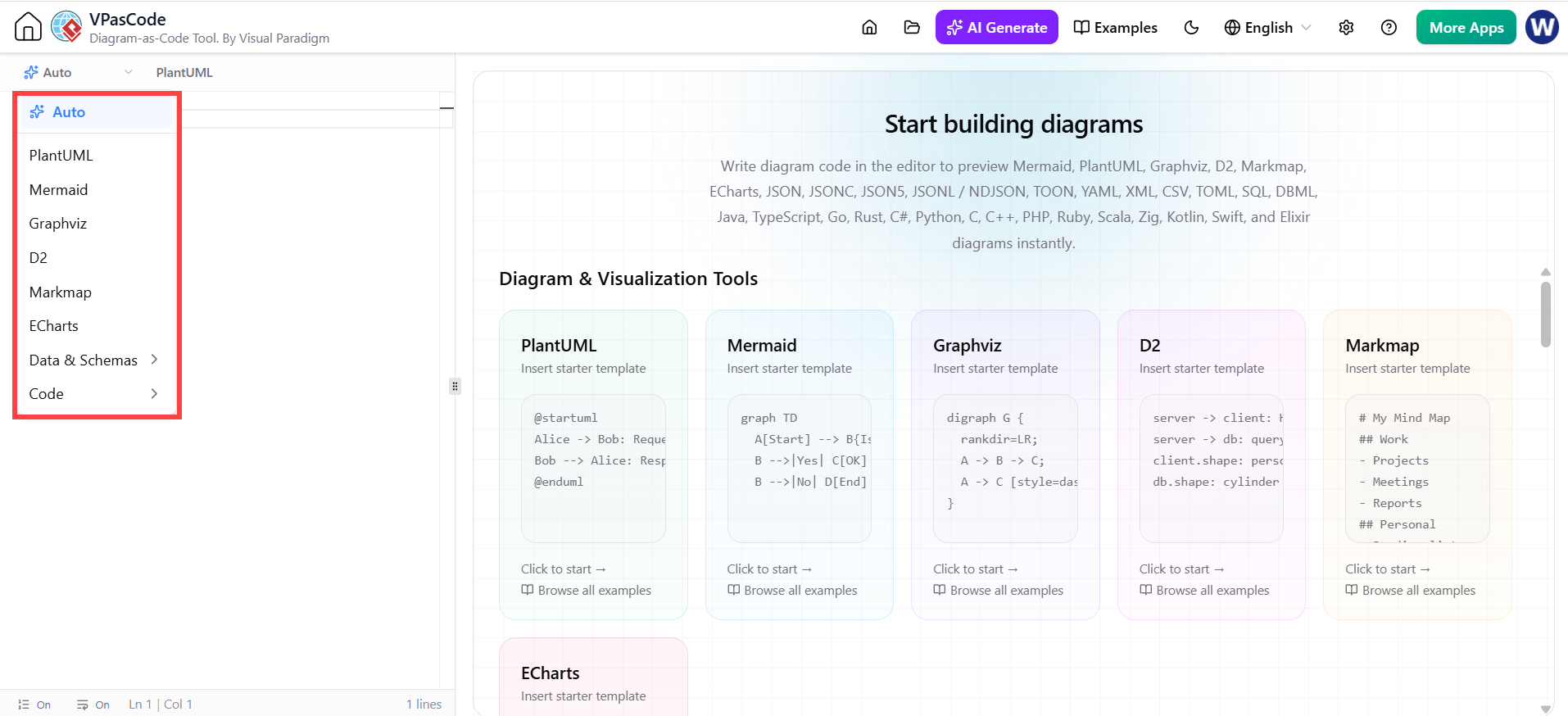
Welcome to this technical deep dive into the VPasCode tool within the Visual Paradigm AI ecosystem. The screenshot provided highlights a pivotal shift in how software architects and developers interact with modeling tools: the transition from rigid, single-purpose diagramming to a dynamic, Multi-Engine DSL (Domain Specific Language) architecture.
In traditional diagramming tools, you are often forced to choose a specific engine (e.g., “I must use PlantUML” or “I must use Mermaid”). VPasCode changes the paradigm by supporting multiple engines simultaneously, with AI capabilities designed to detect, translate, and correct your code intelligently.
1. The Core Architecture: Multi-Engine DSL Support
The most striking feature visible in the interface is the “Auto” engine selection (highlighted in the red box). This system is built on a “Polyglot” architecture. Instead of forcing the user to write code in a single dialect, the platform dynamically supports a wide array of modeling languages including:
- PlantUML: Ideal for software architecture and UML diagrams.
- Mermaid.js: Excellent for workflow charts and sequence diagrams.
- Graphviz: Used for complex graph theory and node-link diagrams.
- Markmap: Specialized for converting Markdown mind maps into interactive visuals.
- ECharts: A powerful engine for complex data visualization and charts.
How the AI Engine Works
The system utilizes an AI Automatic Detection engine. When you begin typing, the AI analyzes the context and syntax of your input to select the best-suited syntax. If you write a sequence of arrows, it might default to Mermaid; if you start with “Actor,” it might prioritize PlantUML.
2. Context-Aware Refactoring
One of the biggest challenges in “Diagram-as-Code” is that manual edits often break the code structure. VPasCode introduces a Context-Aware Refactoring feature.
When you use AI to modify a diagram, it is designed to be non-destructive. It respects existing manual comments and layout attributes. This allows for an Iterative Refinement workflow where you can:
- Ask AI to “Move the database to the cloud.”
- Keep your custom manual styling (colors, fonts) intact.
- Refine the model without losing previous work.
3. Semantic Retention Translation
For international teams, language barriers in modeling can be significant. The platform includes a Semantic Retention Translation filter.
This tool performs a sophisticated conversion of labels and metadata for global teams while strictly maintaining the underlying DSL syntax framework. This ensures that a “Start” node in English translates correctly to “Délamarrage” in French without breaking the rendering logic of the diagram engine.
4. The AI Diagnostic Engine
Perhaps the most critical technical component is the AI Diagnostic Engine. Unlike simple spellcheckers, this is a logic validator.
- Logic Parsing: It analyzes the structure of the DSL to find logical inconsistencies, not just typos.
- One-Click Correction: If the parser detects damaged logic, it offers inline fixes, automatically repairing the code to match valid syntax rules.
Example: Syntax Correction Workflow
Imagine you are writing a PlantUML sequence diagram but forget a closing tag. The Diagnostic Engine detects this immediately.
@startuml
Alice -> Bob: Hello
Bob -> Alice: Hi
' Missing @enduml here

' AI Diagnostic Engine would flag this and suggest:
' "Detected incomplete sequence. Applying fix..."
@enduml
Conclusion
By integrating these advanced DSL capabilities, VPasCode transforms the diagramming process from a static drawing task into a dynamic, code-driven engineering workflow. The ability to switch between engines and rely on AI for validation makes it a robust tool for modern software architecture.