
Mastering the Source of Truth: A Guide to Visual Paradigm Desktop & AI Workflow
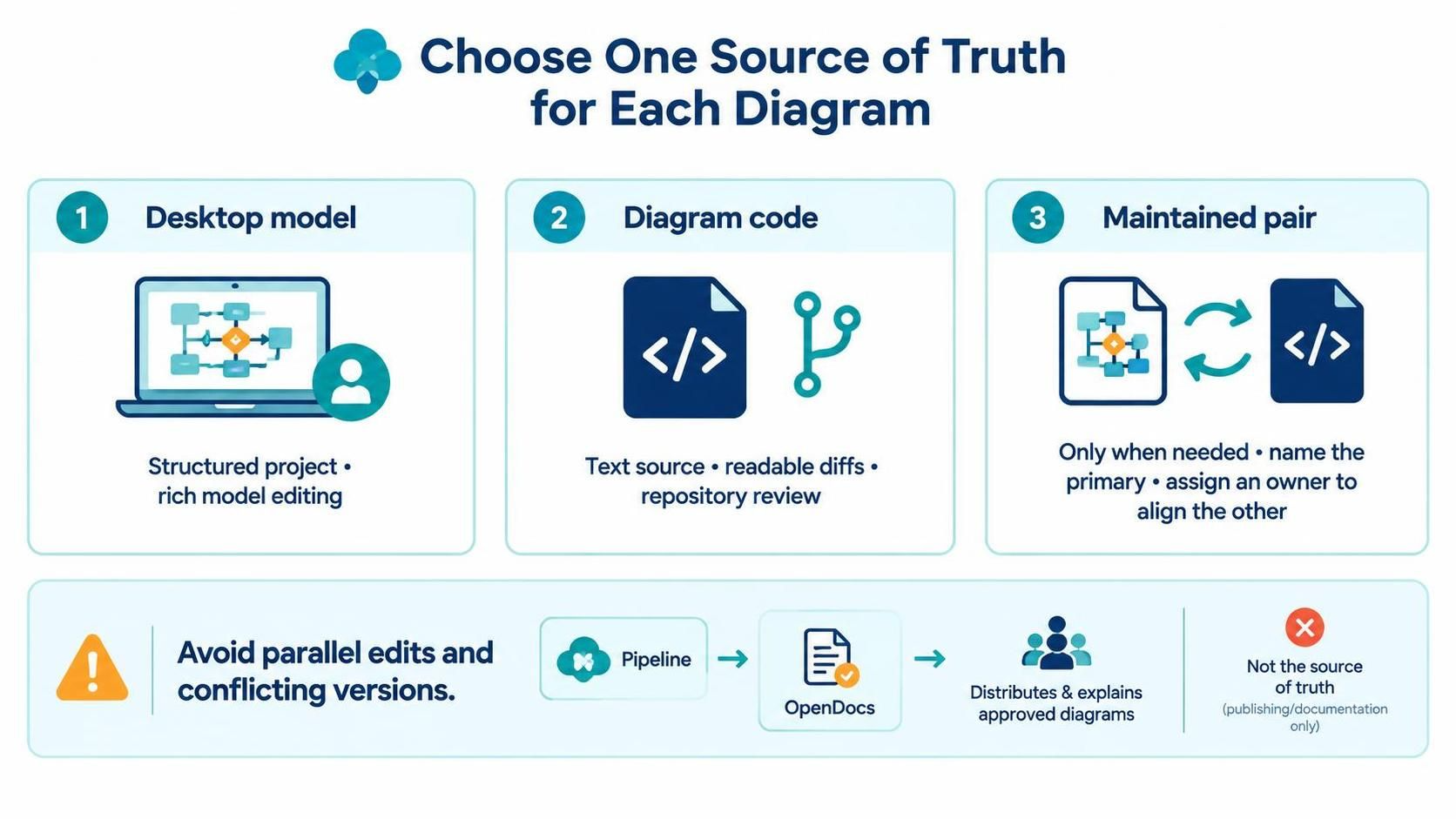
In the realm of system architecture and model-driven engineering, the concept of a “Single Source of Truth” is paramount. When leveraging a powerful ecosystem like Visual Paradigm Desktop combined with an AI Ecosystem, teams gain access to a complete workflow that bridges the gap between visual thinking and structured code. However, this power brings a critical governance challenge: deciding which representation of a diagram is the authoritative one.
This tutorial explores the three strategic approaches to defining your source of truth, ensuring your team avoids the chaos of conflicting versions while maximizing the benefits of both rich visual editing and version-controlled text.
1. The Desktop Model: Rich Visual Editing
The most common approach for structured projects is to designate the Desktop Model as the source of truth. In this paradigm, the diagram is a living object within the Visual Paradigm workspace. This is the ideal choice when the workflow relies on:
- Structured Projects: You are working within a complex, multi-diagram repository managed entirely within the IDE.
- Rich Model Editing: Your team prioritizes drag-and-drop interactions, automatic layout engines, and deep semantic modeling over text manipulation.
By treating the Desktop Model as the primary asset, you ensure that all visual relationships, properties, and styling are preserved through the application’s native data structures. This reduces the cognitive load on modelers who prefer visual manipulation.
2. Diagram Code: The Text-First Approach
For teams that operate in a software development environment where text files are central, Diagram Code (such as VPasCode) serves as the authoritative source. This approach treats diagrams as code artifacts that are stored in a repository.
This method is essential when your workflow demands:
- Readable Diffs: You need to review changes to a diagram using standard Git tools, seeing exactly which nodes or edges were added or removed.
- Repository-Based Review: Diagram changes are subject to the same pull request workflows as application code.
- Portability: The diagram exists as a portable text file that can be viewed without specialized modeling software.
When using Diagram Code as the source, the visual model is generated from the text definition. This ensures that the “truth” of the architecture is captured in a version-controlled, human-readable format.
3. The Deliberately Maintained Pair
While selecting a single source is generally the best practice, there are scenarios where a Deliberately Maintained Pair is necessary. This approach involves keeping both the Desktop Model and the Diagram Code in sync. However, this is not a default state; it requires strict governance.
If you choose this path, you must explicitly define:
- Which is Primary? One source must be the master, and the other is merely a reflection.
- Who is Responsible? A specific team member or role must be assigned to the task of ensuring the secondary representation is aligned whenever the primary is updated.
This strategy is only recommended when there is a clear, documented reason to maintain two representations, as it introduces the risk of drift if not managed rigorously.
The Danger of Parallel Edits
The core purpose of making this governance decision is to prevent parallel edits. If a team member edits the diagram visually in the Desktop while another edits the code file in a text editor, you will inevitably create conflicting versions. These conflicts can lead to data loss or a broken model that no longer accurately represents the system.
Furthermore, it is crucial to understand the role of the Pipeline and OpenDocs. While these tools are vital for distributing diagrams and explaining approved architecture to stakeholders, they are consumers of the truth, not the source of it.
Workflow Summary:
- Authoritative Source (Desktop or Code) is updated.
- Pipeline processes the change.
- OpenDocs publishes and explains the approved diagram.
- Note: Publishing does not replace the need for a designated source of truth.