
Mastering Visual Paradigm’s Hybrid Ecosystem: The VP AI-Driven Modeling Pipeline
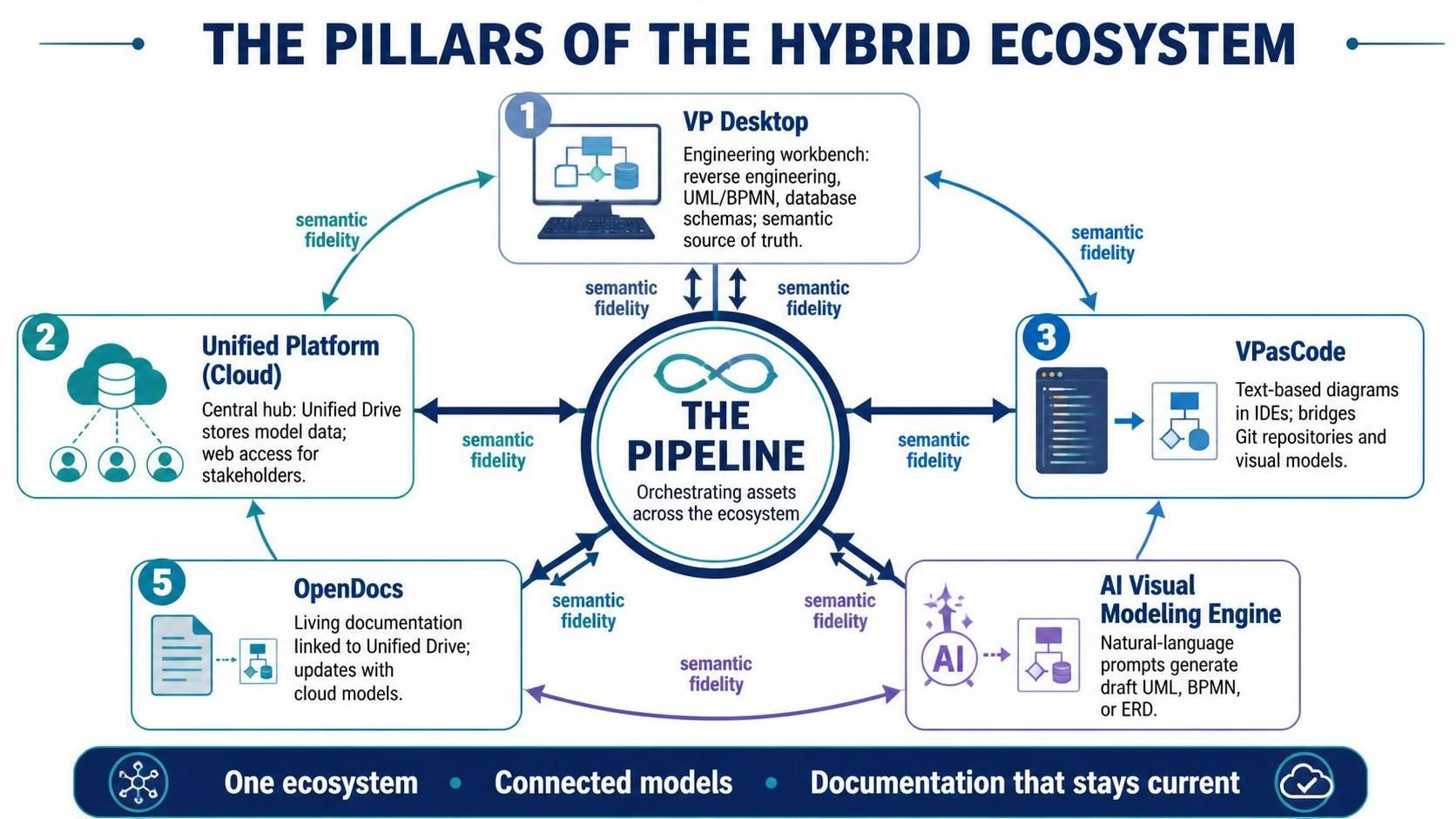
In the modern landscape of software architecture and system design, a disconnect often exists between the heavy-lifting engineering tools, the collaborative cloud platforms, and the documentation required by stakeholders. Visual Paradigm addresses this fragmentation through a sophisticated architecture known as the Hybrid Ecosystem. This tutorial breaks down the five core pillars of this system, explaining how they function individually and, more importantly, how they are orchestrated by “The Pipeline” to maintain semantic fidelity across your entire development lifecycle.
1. The Engineering Workbench: VP Desktop
At the heart of the ecosystem lies the VP Desktop. This is not merely a drawing tool; it is a comprehensive engineering workbench designed for high-fidelity technical modeling. When architects and engineers need to perform complex tasks, they turn to this environment.
- Reverse Engineering: It can ingest existing codebases to generate visual representations, allowing teams to understand legacy systems.
- Modeling Depth: It supports detailed
UML(Unified Modeling Language),BPMN(Business Process Model and Notation), and database schema design. - Source of Truth: Crucially, VP Desktop serves as the semantic source of truth. It holds the deep, granular data that defines the system’s architecture.
2. The Central Hub: The Unified Platform (Cloud)
While the desktop is for heavy lifting, the Unified Platform acts as the central nervous system of the organization. It moves beyond simple file hosting to manage a Unified Drive.
Unlike traditional systems where models are saved as static files (like .xml or .vp files) that get versioned and lost, the Unified Drive stores model data as a database entity. This architecture ensures that:
- Web Access: Stakeholders who do not require the full power of the desktop client can access and review models directly via a browser.
- Centralized Storage: All model data lives in one secure location, accessible by both the desktop and the cloud.
3. The Developer Bridge: VPasCode
For developers who prefer working in their Integrated Development Environments (IDEs) like VS Code or IntelliJ, the visual modeler can sometimes feel like a barrier. VPasCode removes this barrier entirely.
VPasCode is a developer-first tool that allows you to define diagrams using text-based scripts. Similar to how PlantUML or Mermaid works, you write code in your IDE, and the system renders the diagram. It effectively bridges the gap between standard Git repositories and visual models, enabling version control workflows that developers are already comfortable with.
// Example of VPasCode syntax for a sequence diagram
actor User
participant "System" as Sys

User -> Sys: Login Request
Sys -> Sys: Validate Credentials
Sys --> User: Access Granted
4. The Accelerator: AI Visual Modeling Engine
The initial scoping phase of a project often involves a lot of brainstorming and high-level concepting. The AI Visual Modeling Engine integrates generative AI directly into this workflow.
Instead of starting with a blank canvas, you can provide natural language prompts. The engine translates these prompts into draft structures for UML, BPMN, or ERD (Entity-Relationship Diagrams). This allows architects to rapidly prototype ideas and validate requirements before committing to detailed design.
"Create a BPMN diagram for a loan approval process including a decision gate for credit checks."
5. The Living Documentation: OpenDocs
One of the most painful aspects of software engineering is maintaining documentation. By the time a diagram is exported to PDF or Word, it is often outdated. OpenDocs solves this by acting as a living documentation platform.
It pulls data directly from the Unified Drive. This means that when a model updates in the cloud—whether via the Desktop, VPasCode, or AI—the documentation page updates automatically. There is no manual re-exporting required; the documentation stays in sync with the code and the model.
The Glue: The Pipeline
Connecting these five distinct components is The Pipeline. This orchestration layer is the critical infrastructure that moves assets between AI, Desktop, Cloud, and Documentation.
The diagram emphasizes semantic fidelity at every connection point. This means that when data moves from the Desktop to the Cloud, or from an AI prompt to a VPasCode script, the underlying meaning and relationships of the data are preserved. It is not just a file transfer; it is a data synchronization that ensures the “One Ecosystem” remains consistent.
Conclusion: A Connected Future
The Hybrid Ecosystem represents a shift from isolated tools to a connected workflow. By combining the power of the Desktop, the accessibility of the Cloud, the efficiency of VPasCode, the speed of AI, and the reliability of OpenDocs, organizations can ensure that their documentation stays current and their models are always accurate.