In the world of business process modeling, clarity is paramount. When professionals adopt the Business Process Model and Notation (BPMN) standard, they are engaging with a universal language designed to describe workflows. However, even experienced modelers often stumble over the visual syntax of connectivity. Two specific elements frequently cause confusion: the sequence flow and the message flow. Understanding the distinction is not merely about drawing the right line; it is about defining the nature of interaction, control, and communication within a system. 🧩
This guide provides a technical breakdown of these two critical connectors. We will examine their graphical representation, their semantic meaning within an execution engine, and the specific scenarios where each is required. By mastering this distinction, you ensure that your process diagrams are not only visually appealing but also logically sound and executable. 📊
Understanding the Sequence Flow 🔗
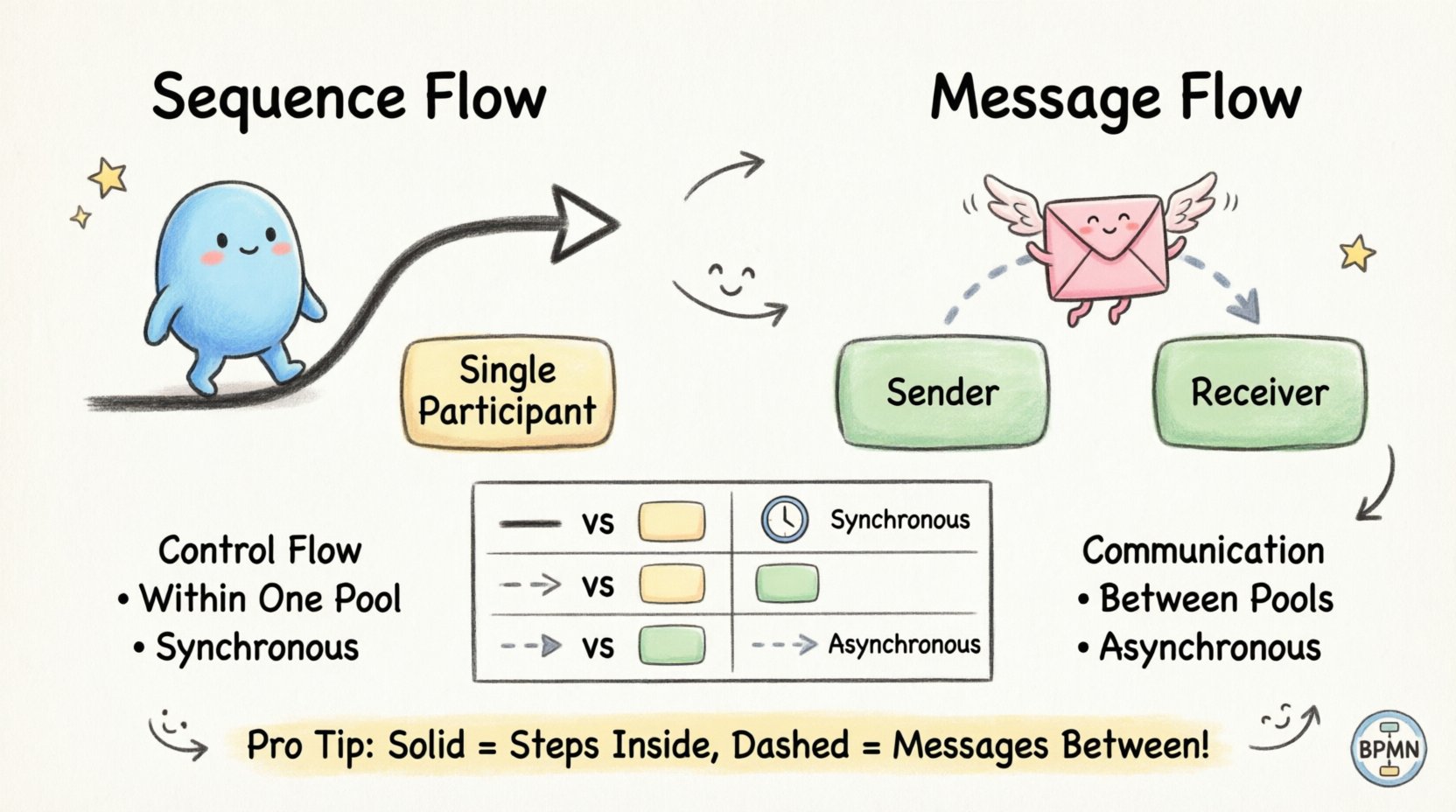
The sequence flow represents the order of activities. It dictates the path a process takes from one step to the next. This flow is the backbone of the control logic. It determines what happens next, based on conditions or the completion of the previous task. In technical terms, it carries a token that represents the state of the process execution. ⚡
Key Characteristics
- Location: Sequence flows exist entirely within a single participant, often referred to as a Pool.
- Visual Syntax: Represented by a solid line with an open arrowhead at the end.
- Direction: Indicates the order of execution. It moves from a source (like a start event or task) to a target (like a task or gateway).
- Logic: It governs the internal logic. It answers the question: “What is the next step?”
When modeling a sequence flow, you are describing a dependency. Task B cannot begin until Task A has completed. This is the definition of a synchronous process. If the process model represents a single organizational unit, the sequence flow is the primary connector. It binds the swimlanes together internally. 🏢
Visual Details
In the standard notation, the line is typically black or dark grey. The arrowhead is open, signifying the passage of control. You will often see label text placed near the line to indicate conditions, especially when connecting to gateways. For example, a line leaving a decision point might be labeled “Approved” or “Rejected.” These labels are crucial for understanding the branching logic. 🏷️
It is important to note that sequence flows do not represent the movement of physical objects or information between separate entities. They represent the movement of control within a single entity. If you draw a sequence flow crossing the boundary of a Pool, the diagram becomes invalid according to the BPMN specification. 🚫
Understanding the Message Flow 📨
The message flow represents communication between participants. It indicates that one entity is sending information to another, or that a signal is being exchanged. Unlike the sequence flow, which controls the steps, the message flow controls the interaction. It answers the question: “Who is talking to whom?” 🗣️
Key Characteristics
- Location: Message flows exist between Pools. They connect separate participants, which could be different organizations, systems, or departments.
- Visual Syntax: Represented by a dashed line with a classic arrowhead at the end.
- Direction: Indicates the sender and the receiver. The arrow points from the sender to the receiver.
- Logic: It governs asynchronous communication. It signifies that the sender does not wait for an immediate response to continue its own internal logic.
When you draw a message flow, you are acknowledging boundaries. You are stating that the process is distributed. This is common in scenarios involving external vendors, customer interactions, or inter-departmental handoffs. For instance, a “Submit Application” task in one pool might trigger a “Review Application” task in another pool via a message flow. 📤
Visual Details
The dashed line is the primary identifier. It visually separates the flow of control (sequence) from the flow of information (message). The arrowhead is typically solid and filled, distinguishing it from the open arrowhead of the sequence flow. This subtle difference is critical for parsers and human readers alike. 👀
Message flows often connect specific events. You will frequently see them connecting a Message Start Event to a Message Intermediate Event. This implies that the process is waiting for a specific piece of data to arrive before it can proceed. This creates a pause in the internal logic until the external signal is received. ⏳
Side-by-Side Comparison 📋
To ensure clarity, we can compare the two flows directly. This table highlights the technical differences that define their usage.
| Feature | Sequence Flow | Message Flow |
|---|---|---|
| Line Type | Solid Line | Dashed Line |
| Arrowhead | Open (Hollow) | Closed (Filled) |
| Scope | Within a Single Pool | Between Pools |
| Meaning | Control Flow / Order | Communication / Interaction |
| Token Type | Process Token | Message Object |
| Timing | Synchronous (Immediate) | Asynchronous (Deferred) |
Common Modeling Errors ⚠️
Even with a strong understanding of the rules, errors occur. Here are the most frequent pitfalls when differentiating these flows.
1. Crossing Pool Boundaries with Sequence Flows
A sequence flow crossing from one Pool to another is a syntax error. A Pool represents a distinct participant with its own execution context. You cannot control the internal steps of another participant directly. If you need to trigger a step in another Pool, you must use a Message Flow to send a signal, and that other Pool must have a corresponding Message Start Event to receive it. 🛑
2. Confusing Lane Boundaries with Pool Boundaries
Swimlanes (Lanes) exist inside a Pool. A Lane represents a sub-unit, such as a specific role or department. You can use a sequence flow to cross from one Lane to another within the same Pool. This is internal handoff. Do not use a message flow for internal handoffs unless the lanes represent distinct technical systems that communicate via messages rather than shared state. 🏊
3. Missing Message Intermediate Events
When a message flow enters a Pool, it must terminate at an event. You cannot draw a message flow directly into a Task or a Gateway. It must land on a Message Event. This event acts as the receiver. If you connect a message flow to a task directly, the execution engine will not know how to trigger that task upon receipt of the message. ⚡
4. Omitting Message Objects
In complex scenarios, it is helpful to annotate the message flow with a message object. This clarifies what data is being exchanged. While not strictly required by all parsers, it is best practice for human readability. It ensures that the receiver knows what to expect. 📦
Execution and Logic Implications ⚙️
The choice between these flows has profound implications for how a process is executed by software engines.
Token Consumption
Sequence flows consume tokens. When a token reaches a gateway, it splits or merges. The logic is deterministic. If the condition is met, the token follows that path. This is immediate. Message flows, however, rely on the availability of a message. The process might sit idle, waiting for a message to arrive. This introduces latency. The execution engine must manage a queue of messages. ⏳
State Management
Sequence flows maintain state within the process instance. Variables are updated as the token moves. Message flows often involve external state. The sending process might not know if the receiving process has successfully processed the message unless a reply message flow is used. This creates a request-response pattern. 🔄
Error Handling
Errors in sequence flows are usually handled via boundary events attached to the task. If a task fails, the flow diverts to an error handler. Errors in message flows involve the failure of the communication channel. If a message is lost or not received, the sender might need a timeout mechanism. This is often modeled using a Timer Intermediate Event to retry the message flow. ⏰
Advanced Scenarios 🧠
Beyond the basics, there are nuanced scenarios where the distinction becomes even more critical.
Collaboration Diagrams
When modeling a collaboration, you are explicitly showing multiple participants. Here, message flows are the glue. They connect the separate diagrams. Without message flows, a collaboration diagram is just a collection of disconnected isolated processes. The sequence flows remain internal to each participant. 🌐
Subprocesses
Within a subprocess, you use sequence flows to define the internal logic. If the subprocess is called by an external process, the entry and exit points are defined by events connected via message flows (or call activity flows, which are a specific type of sequence flow for calling processes). Understanding this boundary prevents logical loops. 🔁
Ad-Hoc Processes
Ad-hoc subprocesses allow for flexible ordering. However, the rules still apply. Sequence flows inside an ad-hoc block still represent internal control. Message flows cannot enter or leave an ad-hoc block directly; they must interact with events outside the block or specific gateway logic. 🧩
Best Practices for Clarity 📝
To maintain high standards in your modeling, adhere to these guidelines.
- Consistency: Always use solid lines for internal steps and dashed lines for external communication. Do not mix them.
- Labeling: Label your message flows with the name of the message (e.g., “Order Confirmation”). Label sequence flows with conditions (e.g., “Yes”, “No”).
- Alignment: Align your pools horizontally or vertically to make the direction of message flows intuitive. Left-to-right is standard for sequence flows. Left-to-right or top-to-bottom works for message flows between pools.
- Validation: Run a validation check on your model. Most tools will flag a sequence flow crossing a pool boundary as an error. Use this to catch mistakes early.
- Simplicity: Avoid complex routing of message flows. If a process requires too many message exchanges, consider if it can be simplified or if the participants should be merged.
Summary of Technical Distinctions 🏁
The difference between a sequence flow and a message flow is fundamental to the integrity of a BPMN diagram. One controls the steps; the other controls the conversation. Confusing them leads to models that look correct but fail when executed. A sequence flow implies, “I am doing this, then I will do that.” A message flow implies, “I am sending this to you, so you can do that.” 🗣️
By strictly adhering to the visual syntax—solid for control, dashed for communication—you ensure that your diagrams are universally understood. This reduces ambiguity between business stakeholders and technical developers. It bridges the gap between business requirements and system implementation. 🚀
Always verify the scope of your lines. If the line stays inside the Pool, it is a sequence flow. If it crosses the Pool boundary, it is a message flow. This simple rule of thumb will save you hours of debugging later. Keep your diagrams clean, your logic clear, and your flows accurate. ✅