


Introduction: The Digital Transformation of a Classic Industry
In today’s fast-paced on-demand economy, even the most traditional businesses must evolve to remain competitive. The humble pizza shop—once a local fixture run on intuition and paper orders—is now a complex operation governed by real-time data, supply chain agility, and customer expectations for speed and accuracy.
This case study explores how The Pizza Shop, a hypothetical but representative food service business, leverages Business Process Model and Notation (BPMN) 2.0 to model and modernize its end-to-end order fulfillment process. Through a detailed examination of a real-world scenario—handling both standard and exceptional order flows—this article illustrates how BPMN serves as a powerful tool for visualizing, analyzing, and optimizing business processes.
By dissecting the “Pizza Order” process, we will uncover fundamental and advanced BPMN concepts, demonstrate best practices in process design, and reveal how digital modeling can drive operational excellence in service industries.
1. Executive Summary: Why BPMN Matters in Food Service
The Pizza Shop operates in a high-volume, time-sensitive market where delays, ingredient shortages, or miscommunication can lead to lost customers and reputational damage. To address these challenges, the business adopted BPMN 2.0 as its standard for process documentation and improvement.
The resulting model captures the full lifecycle of a pizza order—from online placement to delivery or rejection—while incorporating:
-
Dynamic decision-making based on inventory and capacity.
-
External collaboration with suppliers and bidders.
-
Contingency planning for supply chain disruptions.
-
Clear data flow and process ownership.
This model is not just a diagram; it’s a living blueprint for operational agility, enabling the shop to respond quickly to disruptions, onboard new suppliers, and scale efficiently.
2. Diagram Overview: A Collaborative Process in Motion
The BPMN diagram represents a collaboration between multiple participants, each playing a distinct role in the order fulfillment journey.
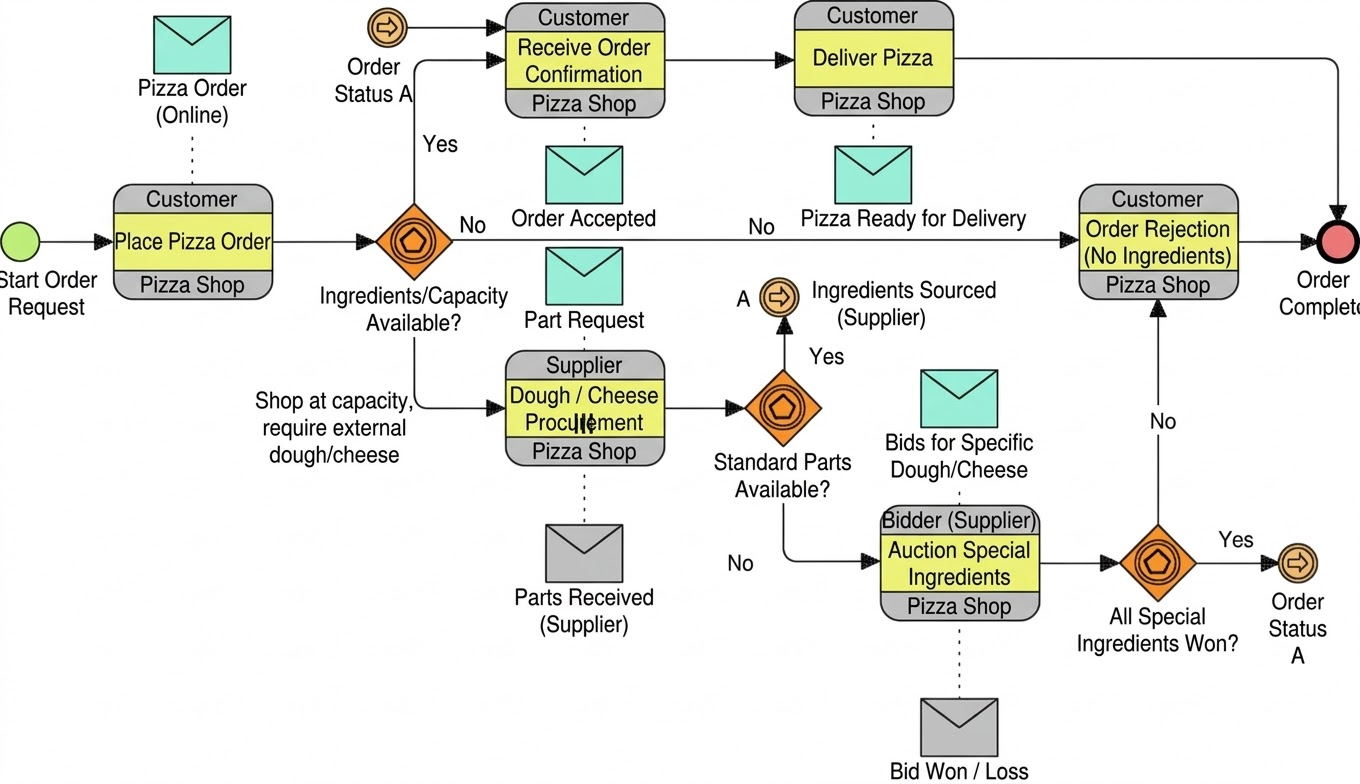
Key Participants in the Process
| Participant | Role | Interaction Type |
|---|---|---|
| The Pizza Shop | Process Owner & Internal Actor | Controls the main workflow; performs tasks and decisions. |
| Customer | External Stakeholder | Initiates the process via an online order; receives delivery updates. |
| Dough/Cheese Supplier | External Provider | Responds to procurement requests via message flows. |
| Bidders | External Market Participants | Compete in auctions for special ingredients. |
📌 Note: While pools and lanes are implied by task headers and message flows, the diagram uses message flows to explicitly define cross-organizational boundaries—highlighting BPMN’s strength in modeling inter-enterprise collaboration.
Core Business Objective
Fulfill the customer’s pizza order efficiently, or gracefully handle rejection when resources are unavailable.
This dual objective underscores the importance of resilience and adaptability—key themes in modern process design.
3. Core BPMN Concepts Illustrated
BPMN 2.0 provides a standardized visual language for modeling business processes. The Pizza Order diagram exemplifies its key components.
A. Flow Objects: The Skeleton of the Process
1. Events: Triggers and Outcomes
Events signal the beginning, end, or significant changes in a process.
-
Start Event (Green Circle):
Start Order Request
→ Triggered by aPizza Order (Online)message from the customer. This marks the official start of the process. -
End Event (Red/Thick Circle):
Order Complete
→ Final state, reached regardless of success or failure. This ensures every process path terminates properly. -
Intermediate Link Events (Circles with Right Arrows, Labeled ‘A’):
→ Used to jump between distant points in the diagram without crisscrossing lines.
→Order Status A(throwing) andOrder Status A(catching) act as “jump-to” markers, allowing seamless continuation of the flow after external procurement sub-processes.
✅ Why It Matters: These link events preserve readability in complex processes, avoiding tangled sequence flows that hinder understanding.
2. Activities: Work Performed
Activities represent work units—either atomic tasks or complex sub-processes.
-
Tasks (Rounded Rectangles):
-
Place Pizza Order -
Receive Order Confirmation -
Deliver Pizza -
Order Rejection (No Ingredients)
-
-
Sub-Processes (Rounded Rectangles with “+” Sign):
-
Dough / Cheese Procurement (Supplier)
→ Internal sub-process where the shop acts as a buyer to its supplier. -
Auction Special Ingredients (Bidder)
→ A sophisticated sub-process simulating a competitive bidding mechanism for rare or premium ingredients.
-
🔍 Insight: Sub-processes encapsulate complexity, allowing the main diagram to remain focused on high-level logic while hiding detailed implementation.
3. Gateways: Decision Points That Shape the Flow
Gateways control flow divergence and convergence. In this model, Exclusive Gateways (XOR) are used exclusively—only one path is taken per decision.
-
Decision 1:
Ingredients/Capacity Available?
→ Determines whether to proceed with in-house fulfillment or initiate procurement. -
Decision 2:
Standard Parts Available?
→ Evaluates whether the supplier can meet basic ingredient needs. -
Decision 3:
All Special Ingredients Won?
→ Final check after auction: Did the shop secure all required special items?
⚠️ Best Practice: Every XOR gateway must have clear, mutually exclusive labels (e.g., “Yes” / “No”). Ambiguity leads to confusion and modeling errors.
B. Connecting Objects: The Nervous System of the Process
1. Sequence Flow (Solid Line with Arrowhead)
-
Defines internal execution order within a single process.
-
Connects events, activities, and gateways within the Pizza Shop’s domain.
2. Message Flow (Dotted Line with Open Arrowhead)
-
Represents external communication across organizational boundaries.
-
Cannot connect two activities within the same process—this enforces separation between internal logic and external interaction.
Key Message Flows in the Diagram:
-
Pizza Order (Online)→Start Order Request(Message Start) -
Dough / Cheese Procurement→Supplier(Sends request) -
Auction Special Ingredients (Bidder)→Bidder(s)(Sends auction notice) -
Deliver Pizza→ Implicitly sends update toCustomer
✅ Rule of Thumb: Use sequence flow for internal steps; message flow for external interactions. Never mix them.
C. Data Objects: The Information Backbone
Data objects represent information consumed or produced during the process.
-
Envelopes (e.g.,
Order Accepted,Part Request,Bids for...,Bid Won/Loss) depict data structures or states. -
Connected via data associations (thin dotted lines) to indicate input/output dependencies.
Example:
-
The task
Receive Order Confirmationrequires input:Order Accepted -
The sub-process
Dough / Cheese ProcurementconsumesPart Requestand producesSupplier Response
💡 Design Tip: Explicitly show data dependencies to clarify when and what information is needed—preventing execution errors due to missing inputs.
D. Process Participants: Who Is Involved?
Although pools and lanes aren’t fully drawn, the message flows and task labels clearly define participant roles.
| Participant | Role in the Process |
|---|---|
| The Pizza Shop | Central orchestrator; performs tasks, makes decisions, manages sub-processes. |
| Customer | Initiates the process; receives delivery or rejection notification. |
| Supplier | Provides standard ingredients (dough, cheese); responds to procurement requests. |
| Bidder(s) | Compete in auctions for special ingredients; receive bid notifications and results. |
🔄 Collaboration Insight: The diagram demonstrates collaborative BPMN, where the shop interacts with external entities through well-defined message exchanges—mirroring real-world integration patterns.
4. Deep Dive: The Pizza Order Process Flow
Let’s walk through the full lifecycle of a pizza order, exploring both the “Happy Path” and exception handling scenarios.
Phase 1: Order Initiation & Triage
-
Start Event:
Start Order Requesttriggered byPizza Order (Online)message from the customer. -
Task:
Place Pizza Order– The shop records the order details (pizza type, toppings, delivery address). -
Decision:
Ingredients/Capacity Available?
→ This is the first critical fork in the process.
Phase 2A: The Happy Path – In-House Availability
When ingredients and kitchen capacity are sufficient:
-
“Yes” Path: Proceed to fulfillment.
-
Task:
Receive Order Confirmation
→ Input:Order Accepted(data dependency confirmed). -
Task:
Deliver Pizza– Kitchen prepares the pizza, delivery team dispatches. -
End Event:
Order Complete– The order lifecycle ends successfully.
✅ Outcome: Customer receives their pizza on time. No external dependencies required.
Phase 2B: The External Procurement Path – Capacity Constraints
When the shop is at capacity or lacks key ingredients:
-
“No” Path: Trigger external procurement.
-
Sub-Process:
Dough / Cheese Procurement (Supplier)
→ Sends message to external supplier. -
Decision:
Standard Parts Available?
Sub-Path 2B.1: Success via Supplier
-
“Yes” Path: Supplier confirms availability.
-
Link Event:
A - Order Status A(throwing)
→ Flow jumps to the catching link event at the top of the diagram. -
Continuation: Process resumes at
Receive Order Confirmation→Deliver Pizza→Order Complete.
🎯 Result: Procurement succeeded. Flow seamlessly integrates back into the main process.
Sub-Path 2B.2: Failure → Auction Initiation
-
“No” Path: Supplier cannot fulfill the request.
-
Sub-Process:
Auction Special Ingredients (Bidder)
→ The shop hosts or participates in an auction for premium ingredients (e.g., imported mozzarella, truffle oil). -
Message Flows:
-
Auction Special Ingredients→Bidder(s)(send auction notice) -
Bidder(s)→Auction Special Ingredients(send bids)
-
-
Final Decision:
All Special Ingredients Won?
Outcome A: Auction Success (“Yes”)
-
All required ingredients secured.
-
Link Event:
A - Order Status A(throwing) → jumps to catching event at top. -
Flow resumes at
Receive Order Confirmation→Deliver Pizza→Order Complete.
Outcome B: Auction Failure (“No”)
-
Not all special ingredients acquired.
-
Flow Jumps to:
Order Rejection (No Ingredients) -
Final Task:
Order Rejection– System generates a message to the customer. -
End Event:
Order Complete– Even in failure, the order lifecycle is closed.
🛑 Key Insight: The process never leaves the end state unaddressed. Every path leads to
Order Complete, ensuring auditability and closure.
5. Best Practices & Guidelines for BPMN Design
Based on the Pizza Order model, here are six essential guidelines for designing robust, maintainable BPMN processes:
| Guideline | Explanation | Why It Matters |
|---|---|---|
| 1. Ensure End-to-End Flow | Every process must have a clear start and at least one end event. | Prevents infinite loops and modeling errors. |
| 2. Label All XOR Gateway Outcomes | Always label paths as “Yes” and “No” (or meaningful alternatives). | Eliminates ambiguity and supports automated validation. |
| 3. Use Sequence Flow Internally, Message Flow Externally | Never mix them. Sequence flow = internal; message flow = cross-boundary. | Maintains clarity and enforces organizational boundaries. |
| 4. Use Sub-Processes for Complexity | Break down intricate workflows (e.g., auctions, approvals) into sub-processes. | Keeps main diagrams readable and modular. |
| 5. Leverage Intermediate Link Events | Use A-type link events to jump between distant points. |
Reduces visual clutter and improves diagram scalability. |
| 6. Visualize Data Dependencies | Show data inputs/outputs with envelopes and data associations. | Clarifies preconditions and enables integration testing. |
✅ Pro Tip: Use BPMN modeling tools (e.g., Camunda, Bizagi, Signavio) to validate these rules automatically. Many tools flag missing end events, unlabeled gateways, or incorrect flow types.
6. Strategic Implications: Beyond the Diagram
The Pizza Order model is more than a technical artifact—it’s a strategic asset for business transformation.
Operational Benefits
-
Faster Decision-Making: Clear decision points enable real-time responses.
-
Supply Chain Resilience: Auction mechanism provides a fallback when suppliers fail.
-
Scalability: Sub-processes can be reused across different product lines (e.g., burgers, desserts).
Digital Transformation Enablers
-
Integration Readiness: Message flows map directly to APIs, webhooks, or EDI systems.
-
Automation Potential: Tasks like
Receive Order Confirmationcan be automated via workflow engines. -
Analytics & Monitoring: Every path can be tracked, enabling KPIs like fulfillment rate, procurement time, and rejection reasons.
Future-Proofing the Process
-
Add Timers: Introduce
Intermediate Timer Eventsto auto-cancel orders if suppliers don’t respond. -
Introduce Compensation: If delivery fails, trigger a refund process.
-
Support Multiple Channels: Extend the model to include phone, app, and in-store orders.
7. Tooling: Leveraging Visual Paradigm for BPMN 2.0 Modeling Excellence
This whitepaper, based on the Pizza Order Fulfillment case study (Image 1), explores how enterprise modeling tools—specifically Visual Paradigm—transcend simple drawing tools (like MS Visio) to enforce the modeling excellence, semantic accuracy, and collaboration required by the Business Process Model and Notation (BPMN 2.0) standard.
We will analyze how a professional modeling environment transforms the static representation of the Pizza Order scenario into a high-fidelity, actionable process repository.
1. Introduction: The Need for Professional BPMN Tooling
BPMN 2.0 is not a set of passive icons; it is a complex modeling language with hundreds of rules governing which elements can connect to others. Simple graphics tools allow users to draw illegal flows, create deadlocks, or misrepresent semantics.
Professional tooling like Visual Paradigm offers semantic validation and standardized XML support, providing a bridge between logical business design (what the business wants) and technical execution (how IT implements it). By using the sophisticated Pizza Order model as our benchmark, we will trace how professional tooling ensures model quality, clarity, and reusability.
2. Ensuring Process Integrity: Semantic Validation in Practice
One of the greatest challenges in modeling the Pizza Order process is its complexity, which includes internal flows, external collaborations, intermediate link events (‘A’), and sub-processes. Visual Paradigm provides active guardrails.
Case Study Insight: Correct Flow Type Usage
-
The Scenario: The Pizza Shop must collaborate with external Suppliers and Bidders. In image_1.png, we see dotted lines for message flows (
Part Request) crossing organizational boundaries, and solid lines for sequence flows (Place Pizza Order->Capacity Decision) within the Shop. -
The Professional Tooling Advantage: Visual Paradigm provides a “Rule-Based Modeling” engine. A user cannot accidentally draw a solid sequence flow across pools (e.g., directly from the Pizza Shop to the Customer Pool). The tool will reject the connection or automatically convert it to a message flow.
-
Consequence of Simple Tools: Simple drawing tools would permit this error, resulting in a diagram that may look “clear” but is semantically invalid and cannot be automated.
Validating Start/End and Decision Branches
Professional tools actively enforce BPMN semantics:
-
Decision Logic Validation: When an XOR gateway is placed (e.g.,
Standard Parts Available?), Visual Paradigm forces the modeler to label the alternative outgoing paths (“Yes” and “No”). A static tool might allow leaving a gate with no outbound labels, creating execution uncertainty. -
End State Assurance: Every process path must trace to an end event. The tool can run a validation report that ensures no activity is a ‘dead-end’ or part of an infinite loop. The Pizza Order model correctly flows from
Start Order RequesttoOrder Completeon all paths.
3. Advanced Modeling Control: Sub-Processes and the ‘A’ Link
The complexity of the Pizza Order diagram relies heavily on advanced concepts like Sub-processes (indicated by the + plus sign) and Link Intermediate Events (the circles with arrows labeled ‘A’). Professional tooling is essential to manage these hierarchies.
Hierarchy and Decomposition
-
The Scenario:
Dough / Cheese ProcurementandAuction Special Ingredientsare represented as high-level collapsed sub-processes in image_1.png. These hide significant complexity (like bidding rules and logic for evaluating multiple suppliers). -
The Professional Tooling Advantage: In Visual Paradigm, these are not just images. You can “Drill Down” or double-click the
+sign to open a new, linked diagram that details the internal logic of that procurement phase. This hierarchical linkage maintains the readability of the main diagram while housing necessary detail elsewhere. -
Reusability: The
Auction Special Ingredientssub-process could be stored as a reusable component in the tool’s repository. It could be dropped into different business processes (e.g., sourcing new equipment) without having to redraw it.
Link Event Cohesion
-
The Scenario: The process uses three Link Throw events (marked ‘A’) at different points of success/failure, which all “jump” to the corresponding Link Catch event (marked ‘A’) near the start.
-
The Professional Tooling Advantage: Visual Paradigm ensures that Link Events are structurally paired. You cannot have a Throw Event ‘A’ without a corresponding Catch Event ‘A’. The tool can also navigate or “trace” the connection, allowing analysts to instantly jump between the linked sections during a review.
4. Documentation, Collaboration, and Traceability
Professional modeling tools transform a diagram into a living document and a core business asset.
Integrated Documentation and Metadata
While image_1.png provides clear activity labels, real-world execution requires deep detail.
-
Metadata Integration: When you select an activity like
Auction Special Ingredientsin Visual Paradigm, you are presented with a detailed properties panel. Here, analysts can document:-
Process Owner: Who is responsible for the auction?
-
KPIs: What are the expected cycle times?
-
Risks: What happens if zero bids are received?
-
Data Structure: What is the actual data schema of the
Bids for Special Dough/Cheesemessage flow?
-
-
Outcome: All documentation is stored with the model element, preventing a separate, disconnected stack of MS Word specifications. Reports can then be generated automatically from this metadata.
Shared Process Repository and Team Collaboration
-
Collaboration: Visual Paradigm allows multiple team members to work on the same model simultaneously through a centralized repository (cloud or on-premise). Versions can be managed, and changes can be tracked, which is critical when the fulfillment process is being updated by stakeholders from Operations, Procurement, and IT.
5. Model Execution and Traceability to Requirements
A crucial advantage of using sophisticated tooling is the integration with downstream engineering.
BPMN-to-IT Alignment
-
BPMN XML: The primary output of professional tooling is not a
.pngfile; it is standard BPMN 2.0 XML. This XML file can be directly imported into leading Business Process Management Systems (BPMS) and execution engines (e.g., Camunda, Appian). -
Process-Driven Development: The IT team uses the Pizza Order diagram as the initial development spec. They don’t have to decipher requirements from a manual document. They see exactly where the automated decisions lie (
Ingredients/Capacity Available?) and where human interactions occur.
Requirement Traceability
-
Traceability: Visual Paradigm allows modelers to link BPMN elements to foundational requirements (e.g., a “Customer Satisfaction Requirement” for the 30-minute delivery time can be explicitly linked to the
Deliver Pizzaactivity). If the requirement changes, the impact on the process model can be instantly visualized.
The Pizza Order Fulfillment model (Image 1) serves as an ideal test case for professional tooling. It proves that comprehensive process modeling is more than an aesthetic exercise. Professional platforms like Visual Paradigm act as essential partners in modeling excellence, moving diagrams from passive visualizations to accurate, executable, and valuable business assets. Investing in proper tooling is not an optional expense but a foundational requirement for any organization serious about process automation and digital transformation.
Conclusion: BPMN as a Catalyst for Operational Excellence
The Pizza Order case study demonstrates that even a seemingly simple business process can benefit from rigorous modeling with BPMN 2.0. By applying core principles—clear events, logical gateways, structured flows, and explicit data dependencies—the Pizza Shop transforms chaos into clarity.
More than just a diagram, this model becomes:
-
A training tool for new staff.
-
A communication framework between IT, operations, and suppliers.
-
A foundation for automation and continuous improvement.
In an era where customer expectations are sky-high and supply chains are volatile, BPMN is not just a notation—it’s a competitive advantage.
🍕 Final Thought:
Just as a perfect pizza requires the right balance of ingredients, a perfect process requires the right balance of structure, clarity, and adaptability. BPMN provides that balance—one flow at a time.
Appendix: Quick Reference – BPMN 2.0 Symbols
| Symbol | Name | Meaning |
|---|---|---|
| 🟢 Circle | Start Event | Process begins |
| 🔴 Circle | End Event | Process ends |
| 🟡 Circle with arrow | Intermediate Link Event | Jump marker for flow continuity |
| 📝 Rounded Rectangle | Task | Single work step |
| 📦 Rounded Rectangle with “+” | Sub-Process | Complex internal workflow |
| ⚖️ Diamond | Gateway | Decision point |
| ➝ Solid Line | Sequence Flow | Internal execution order |
| ➜ Dotted Line | Message Flow | External communication |
| 📥/📤 Envelope | Data Object | Input/Output data |
| 🧩 Pool/Lane (implied) | Participant | Organizational role |

