


Introduction
In today’s fast-paced software development and business analysis environments, the gap between ideation and documentation has long been a significant bottleneck. Teams struggle with translating abstract concepts into visual models, then manually transferring those visuals into documentation systems—a process fraught with inefficiencies, version control issues, and quality degradation. The emergence of AI-powered diagramming tools promised to accelerate the creation phase, but without seamless integration into documentation platforms, the overall workflow remained fragmented.
This case study examines Visual Paradigm’s groundbreaking integration that connects the AI Chatbot directly to OpenDocs through the Pipeline infrastructure. This innovation represents more than just a feature update; it embodies a fundamental shift in how technical teams approach visual knowledge management. By eliminating manual file handling, screenshots, and upload processes, organizations can now achieve true end-to-end automation from conversational AI prompts to professional documentation. This study explores the implementation, benefits, and real-world applications of this integrated workflow, demonstrating how it transforms the documentation process from a burdensome task into a streamlined, intelligent operation.
The Challenge: Traditional Documentation Workflows
Software engineers, business analysts, and project leads have long faced a common frustration: the disconnect between rapid diagram creation and professional documentation. Traditional workflows typically involve:
-
Creating diagrams in modeling tools
-
Exporting files to local storage
-
Taking screenshots or converting formats
-
Manually uploading to documentation systems
-
Managing version control manually
-
Dealing with resolution loss and formatting issues
This multi-step process introduces friction, increases the likelihood of errors, and consumes valuable time that could be better spent on core development and analysis tasks. The need for a unified, automated solution became increasingly critical as teams adopted AI-powered tools for rapid prototyping and visualization.
The Solution: Visual Paradigm’s Integrated Ecosystem
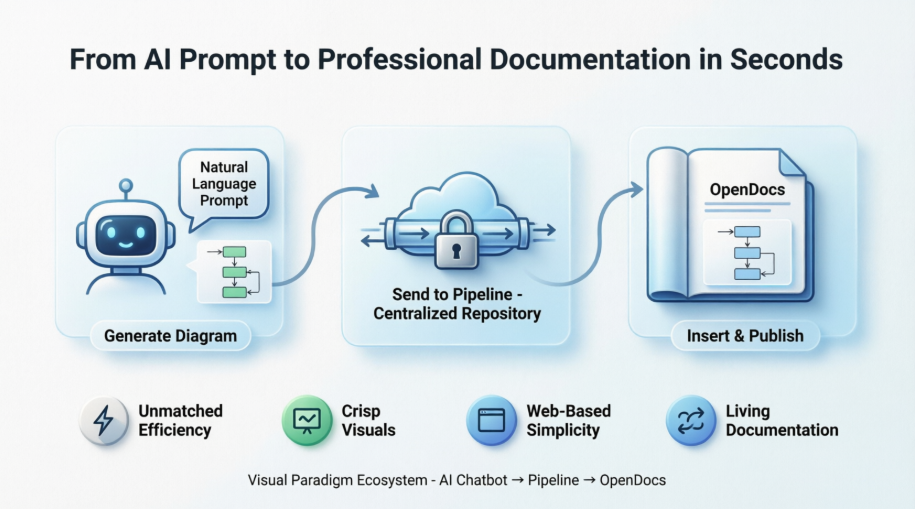
Visual Paradigm addressed this challenge by creating a seamless bridge between three powerful components:
Visual Paradigm AI Chatbot
An intelligent conversational interface that generates professional diagrams (UML, flowcharts, architecture diagrams, BPMN) through natural language prompts.
Visual Paradigm Pipeline
A secure, centralized cloud repository that serves as the connective tissue between modeling tools and documentation platforms, managing artifacts and their revisions.
OpenDocs
A specialized knowledge management platform designed for visual-heavy documentation, capable of embedding live diagrams directly within document pages.
Implementation: The Three-Step Workflow
Step 1: Generate Your Diagram
The process begins in the Visual Paradigm AI Chatbot, where users create or refine diagrams through simple conversation. Whether designing a UML class diagram for an online learning platform or mapping out a complex business process, the AI handles the technical drawing aspects.
Once satisfied with the generated visual, users click Export and select Send to OpenDocs Pipeline. A popup appears allowing for an optional name entry to help identify the artifact later.
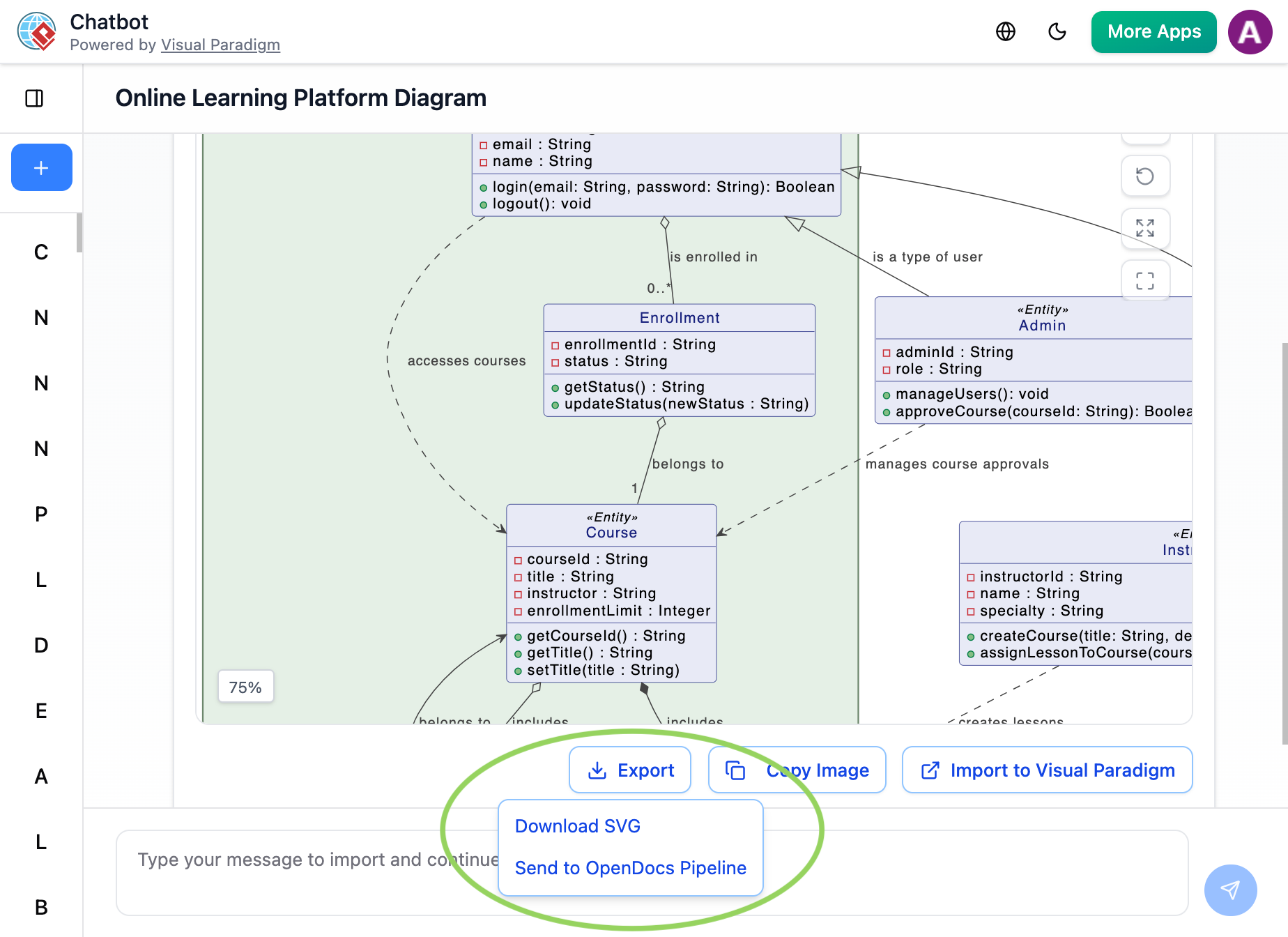
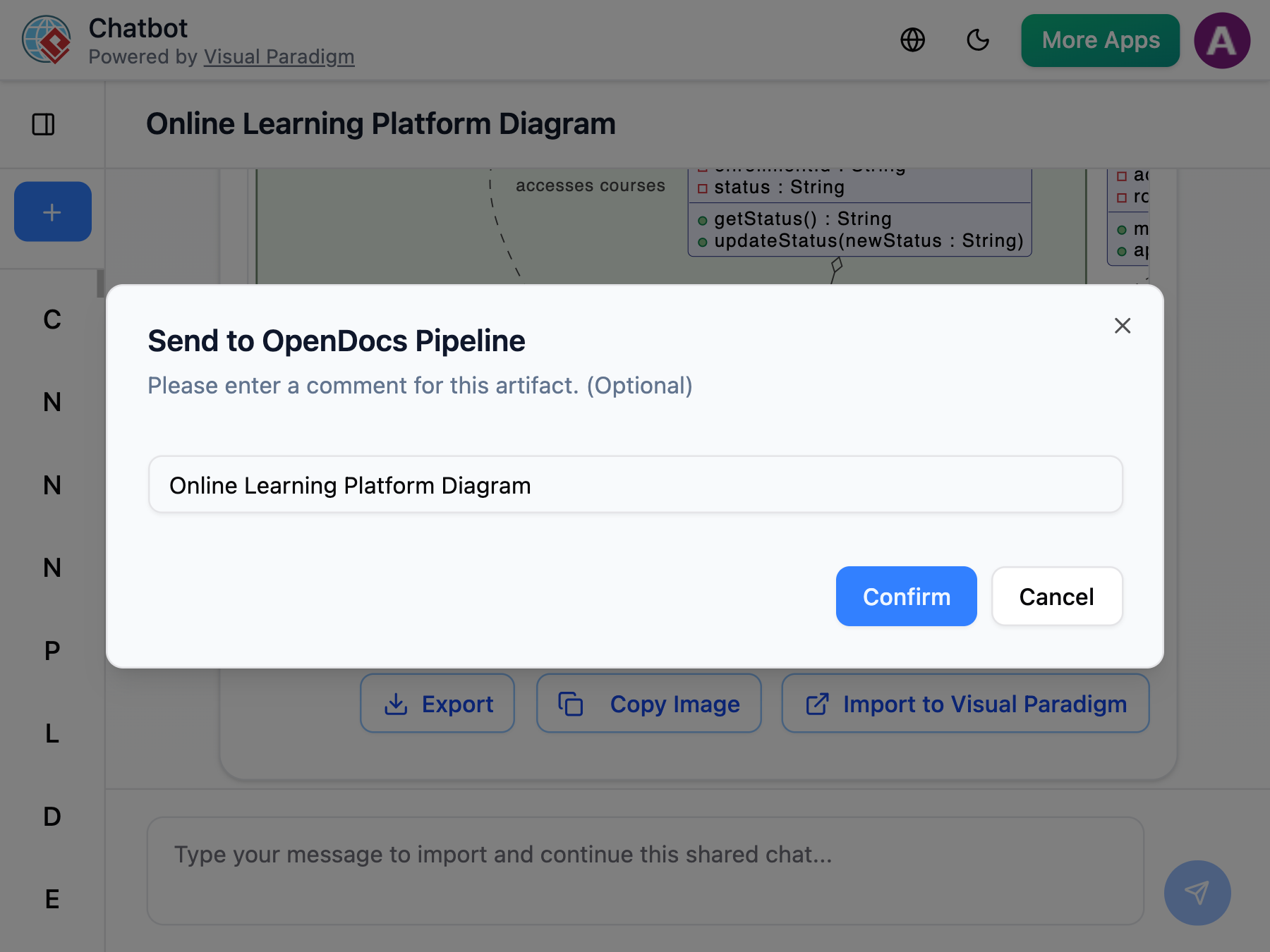
This single action publishes the diagram to the centralized Pipeline, where it becomes instantly available across the Visual Paradigm ecosystem.
Step 2: Insert into OpenDocs
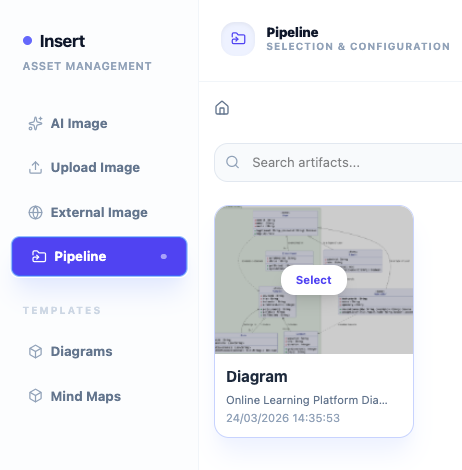
Navigating to the desired document page in OpenDocs, users enter edit mode and position their cursor at the exact location where the visual should appear. Clicking Insert on the toolbar reveals the Pipeline option in the left-hand sidebar menu.
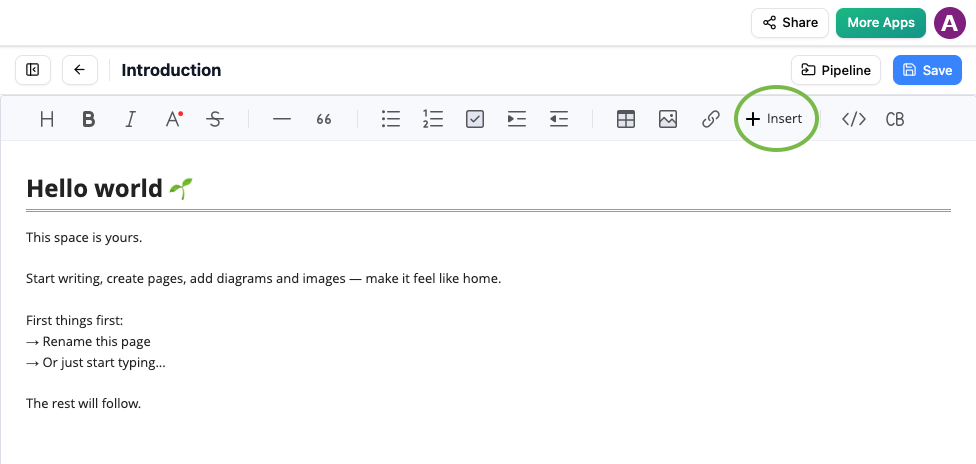
The Pipeline panel displays all available artifacts, including the recently sent AI-generated diagram, ready for immediate insertion.
Step 3: Finalize Your Document
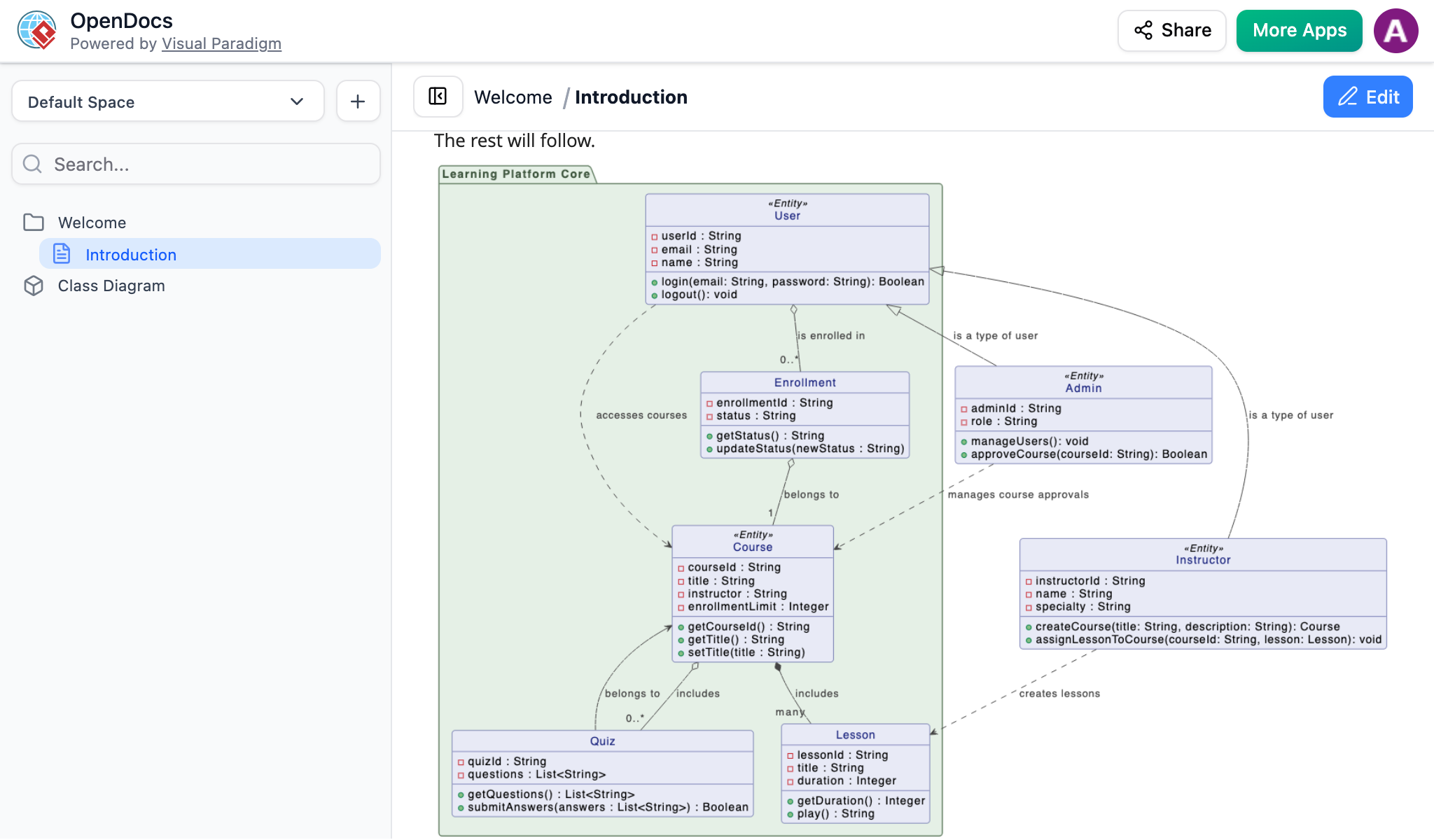
Users simply click on the corresponding artifact thumbnail to embed it instantly at the cursor position. The result is a crisp, professional visual perfectly integrated into the knowledge base without any manual file handling.
Advanced Features: Maintaining Sync and Managing Revisions
The true power of this integration extends beyond initial insertion. The Pipeline provides sophisticated version control and synchronization capabilities:
Traceability
Users can click the Edit icon on any embedded diagram within OpenDocs to copy its direct model link. Pasting this link into Visual Paradigm Desktop opens the exact source project, maintaining complete traceability between documentation and models.
Automated Version Tracking
When diagrams are modified in Visual Paradigm Desktop, every future project commit automatically triggers and tracks a new revision in the cloud pipeline. This ensures documentation never becomes stale or disconnected from current models.
One-Click Swapping
If a diagram changes, an indicator light flags it in OpenDocs. Users can open the Pipeline panel on their document page, review the revisions history, and click the newest revision to instantly update the image page-wide—no re-uploading required.
Multi-Platform Accessibility
The Pipeline integration supports three main entry points, ensuring flexibility across different user preferences and licensing levels:
From Visual Paradigm Desktop: Professional users can open diagrams, access the right drawer or right-click the diagram, select Export > Send to OpenDocs Pipeline, add an optional comment, and confirm.
From Visual Paradigm Online: Cloud-based users can open designs in their web browser, click Export at the top right, and select Send to Open Docs Pipeline.
From the AI Chatbot: Users can leverage natural language to draw flowcharts or UML diagrams inside the Visual Paradigm AI Chatbot and click the Send to OpenDocs Pipeline button.
This multi-platform approach ensures that regardless of whether teams work with desktop installations or cloud-based tools, they benefit from the same seamless integration.
Key Benefits and Outcomes
Unmatched Efficiency
Organizations report going from abstract ideas to perfectly placed diagrams in seconds, eliminating the traditional multi-step export-upload-insert workflow that previously consumed 10-15 minutes per diagram.
Crisp Visuals
The Pipeline maintains high-resolution clarity without the blurriness associated with manual screenshots or format conversions, ensuring professional-quality documentation every time.
Web-Based Simplicity
No installation required for the core workflow—everything works directly in the browser, making it accessible to distributed teams and reducing IT overhead.
Living Documentation
The Pipeline enables true living documentation that evolves with projects. Diagrams are no longer static images but dynamic artifacts that maintain their connection to source models.
Centralized Asset Management
All creative assets are stored in a secure, centralized repository, eliminating scattered files across local drives, email attachments, and shared folders.
Real-World Applications
This integrated workflow proves particularly valuable for:
Software Architecture Documentation: Teams can rapidly prototype system architectures through AI prompts and immediately embed them in technical specifications.
Business Process Modeling: Business analysts can document BPMN diagrams directly in knowledge bases, ensuring processes remain current and accessible.
Agile Development: Sprint planning and retrospective documentation benefit from quick generation of flowcharts and UML diagrams that stay synchronized with evolving codebases.
Educational Content Creation: Instructors can generate teaching materials on-the-fly, creating visual explanations that integrate seamlessly into course documentation.
Technical Requirements and Availability
This feature is available to users with a Visual Paradigm Online (Combo Edition) or Visual Paradigm Professional Edition license, ensuring that organizations invested in Visual Paradigm’s ecosystem can immediately leverage these capabilities without additional costs.
The web-based nature of the workflow means no additional software installation is required beyond existing Visual Paradigm licenses, and the cloud-based Pipeline ensures accessibility from any device with an internet connection.
Conclusion
Visual Paradigm’s integration of AI Chatbot, Pipeline, and OpenDocs represents a paradigm shift in technical documentation workflows. By addressing the long-standing friction between diagram creation and documentation, this solution delivers tangible benefits: reduced time-to-documentation, improved visual quality, automated version control, and enhanced collaboration.
The elimination of manual file handling and the introduction of living documentation that stays synchronized with source models addresses critical pain points that have plagued software development and business analysis teams for years. Organizations adopting this workflow can expect not just incremental improvements but transformative changes in how they approach visual knowledge management.
As AI continues to reshape software development tools, integrations like this demonstrate that the true value lies not in isolated AI capabilities but in seamless ecosystems that connect creation, management, and documentation into unified workflows. Visual Paradigm’s approach provides a blueprint for the future of intelligent documentation—one where the barrier between idea and implementation dissolves, enabling teams to focus on innovation rather than administrative overhead.
For organizations seeking to modernize their documentation practices, reduce technical debt in knowledge bases, and empower teams with AI-assisted workflows, this integrated solution offers a proven path forward. The combination of conversational AI, cloud-based asset management, and purpose-built documentation platforms creates a foundation for scalable, maintainable, and professional technical communication.
References
- Visual Paradigm’s Pipeline: Hands-On Review of Visual Paradigm’s Desktop to OpenDocs Integration: Comprehensive review and analysis of Visual Paradigm Pipeline’s integration capabilities between Desktop and OpenDocs platforms
- Syncing AI Diagrams to OpenDocs Pipeline Guide: Official release guide detailing the process of synchronizing AI-generated diagrams with OpenDocs through the Pipeline infrastructure
- AI Diagram to OpenDocs Pipeline Integration: Release announcement and documentation for the AI Chatbot to OpenDocs Pipeline integration feature
- Visual Paradigm OpenDocs: The Complete Guide to AI-Powered Knowledge Management: Comprehensive guide exploring AI-powered features and knowledge management capabilities in Visual Paradigm OpenDocs
- Visual Paradigm OpenDocs: The Complete Developer’s Guide to AI-Powered Technical Documentation: Developer-focused guide to implementing AI-powered technical documentation solutions using Visual Paradigm OpenDocs
- Visual Paradigm Pipeline Integration Tutorial: Video tutorial demonstrating the Pipeline integration workflow between Visual Paradigm tools and OpenDocs
- From Model to Manual: A Software Engineer’s Guide to Syncing Visual Paradigm Desktop Diagrams with OpenDocs: Practical guide for software engineers on synchronizing desktop diagrams with OpenDocs documentation
- Visual Paradigm AI Chatbot to Pipeline Workflow: Video demonstration of the AI Chatbot to Pipeline workflow for diagram generation and documentation
- My Journey to Seamless Documentation: Sending Visual Paradigm Creations Directly to OpenDocs: Personal case study and journey documenting the implementation of seamless documentation workflows
- Mastering the Pipeline in Visual Paradigm OpenDocs: A Complete Guide to Streamlined Knowledge Management: Advanced guide to mastering Pipeline features for streamlined knowledge management in Visual Paradigm OpenDocs

