Working with legacy systems often feels like navigating a maze without a map. You have lines of code, but understanding the underlying structure can be a daunting task. This is where reverse engineering UML comes into play. It transforms raw code into visual representations, specifically UML class diagrams, making complex logic accessible and understandable.
This guide walks you through the process of converting code back into structured diagrams. We will explore the mechanics, the patterns, and the practical steps involved. By the end, you will understand how to visualize object-oriented structures without relying on guesswork. Let’s dive into the details.
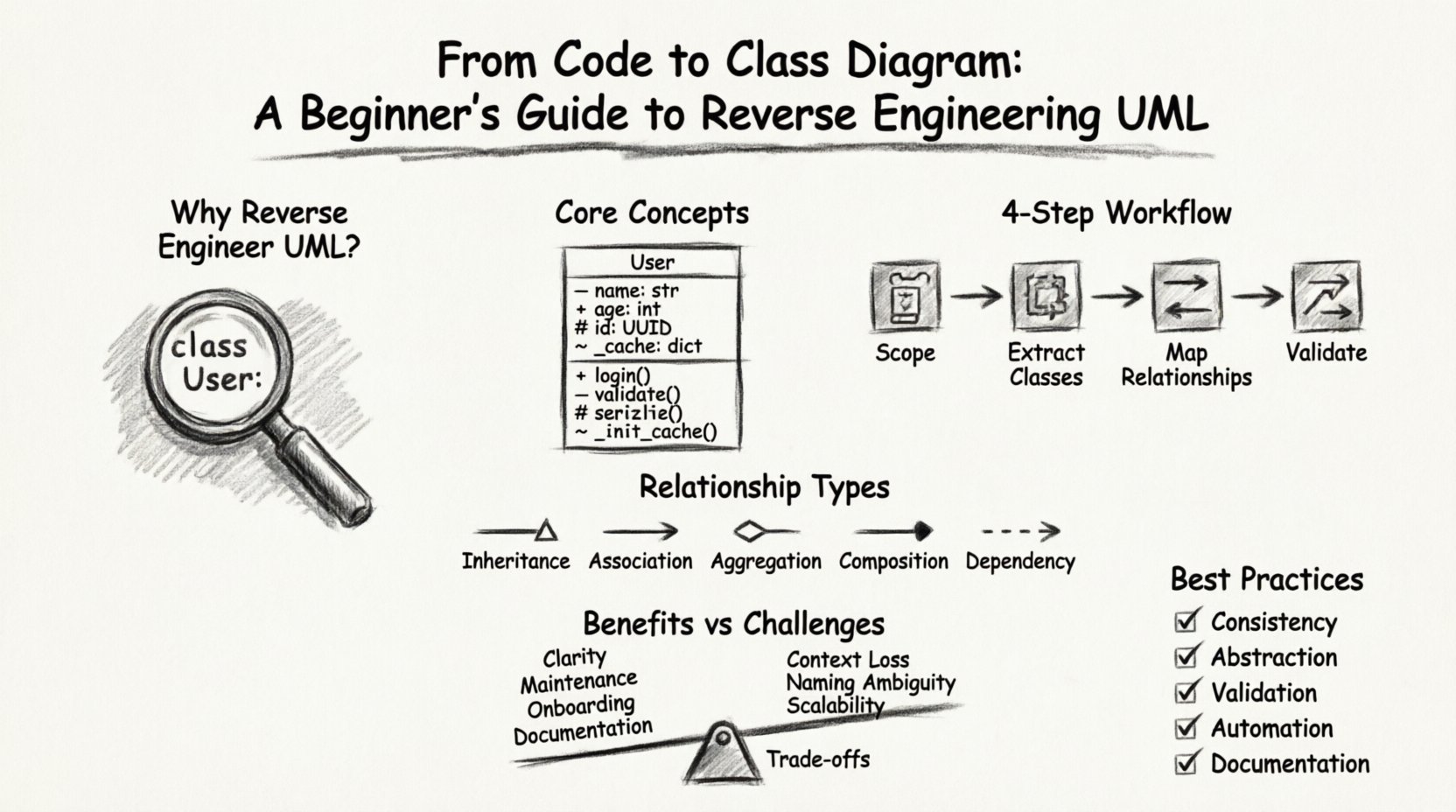
What is Reverse Engineering in the Context of UML? 🤔
Reverse engineering in software development is the process of analyzing a system to identify its components and their relationships. When applied to Unified Modeling Language (UML), it means deriving a model from the source code. Instead of writing code first and diagramming later (forward engineering), you start with the implementation and extract the design.
Why is this necessary? Often, documentation falls out of sync with the code. Teams grow, features change, and the original diagrams become obsolete. Reverse engineering restores the link between the implementation and the design.
- Clarity: Visual diagrams explain relationships faster than text.
- Maintenance: Understanding dependencies helps in refactoring.
- Onboarding: New developers grasp the system architecture quicker.
- Documentation: Creates an up-to-date record of the current state.
Core Concepts: Understanding the Building Blocks 🧱
Before diving into the process, you must understand what elements make up a class diagram. These diagrams represent the static structure of a system. Every element in the code has a corresponding representation in the model.
1. Classes and Objects
A class is a blueprint for creating objects. In reverse engineering, you identify classes by looking for type definitions. In many languages, these are explicit keywords. In others, they are inferred from usage patterns.
- Class Name: Usually matches the file name or the main identifier.
- Attributes: Variables declared within the class scope.
- Methods: Functions or procedures belonging to the class.
2. Visibility and Modifiers
Not all members of a class are accessible everywhere. UML uses specific symbols to denote visibility. Understanding these is crucial for accurate diagramming.
| Symbol | Visibility | Code Equivalent |
|---|---|---|
| + | Public | public / default |
| – | Private | private |
| # | Protected | protected |
| ~ | Package/Friend | internal / package-private |
3. Types and Data Structures
Attributes have types. In the diagram, this appears next to the attribute name. Distinguishing between primitive types and reference types is vital for understanding data flow.
- Primitive: int, boolean, string. Simple values.
- Reference: Objects, interfaces, or other classes. These create connections.
The Step-by-Step Workflow 🚀
Converting code to a diagram is not instantaneous. It requires a systematic approach. Here is a logical flow for performing the analysis manually or via automated tools.
Step 1: Inventory and Scoping 📋
Start by defining the boundaries. Are you analyzing a single module, a library, or the entire application? Scoping prevents the diagram from becoming too large to read.
- List all entry points (main functions, controllers).
- Identify core domains (e.g., User, Order, Product).
- Exclude external dependencies where possible to reduce noise.
Step 2: Class Extraction 🧩
This is the core task. You scan the codebase to find definitions.
- Identify Definitions: Look for
class,interface, orstructkeywords. - Extract Members: Pull out all variables and methods inside these definitions.
- Categorize: Separate static members from instance members.
Step 3: Relationship Mapping 🔗
Classes rarely exist in isolation. They interact. You must identify how one class uses another.
- Instantiation: If Class A creates an instance of Class B, there is a link.
- Method Arguments: If a method takes Class C as an argument, there is a dependency.
- Return Types: If a method returns Class D, there is a relationship.
- Inheritance: Look for
extendsorimplementskeywords.
Step 4: Validation and Cleanup 🧹
The initial extraction often contains noise. You need to refine the model.
- Remove implementation details that do not affect structure.
- Check for circular dependencies that might indicate design flaws.
- Ensure naming conventions are consistent across the diagram.
Diving Deep into Relationships 🔍
Understanding relationships is the most critical part of reverse engineering UML. A class diagram without relationships is just a list of classes. The connections tell the story of the system.
1. Inheritance (Generalization) 🌳
This represents an “is-a” relationship. A specific class inherits from a more general one. In code, this is explicit syntax.
- Visual: A solid line with a hollow triangle arrow pointing to the parent.
- Code:
class Child extends Parent. - Implication: The child class possesses all attributes and methods of the parent.
2. Association 💼
An association is a structural relationship where objects are connected. It is often the default relationship when one object references another.
- Visual: A solid line connecting two classes.
- Code: A field in one class holding a reference to another.
- Cardinality: Is it one-to-one? One-to-many? Many-to-many?
3. Aggregation vs. Composition 🧱
These are specific types of associations regarding ownership and lifecycle.
| Type | Meaning | Visual Symbol | Code Example |
|---|---|---|---|
| Aggregation | Whole-Part relationship. Parts can exist independently. | Line with hollow diamond | Class A has an instance of Class B passed in. |
| Composition | Strong ownership. Part cannot exist without the Whole. | Line with filled diamond | Class A creates and destroys Class B internally. |
4. Dependency 📉
A dependency is a weaker relationship. It means changes in one class might affect the other, but they are not permanently linked.
- Visual: A dashed line with an open arrow.
- Code: A method parameter, a local variable, or a static method call.
- Usage: Class A uses Class B temporarily to perform a task.
Handling Complex Scenarios 🏗️
Real-world codebases are messy. They contain patterns that complicate reverse engineering. Here is how to handle common challenges.
1. Interfaces and Abstract Classes 🕸️
These define contracts rather than implementations. In reverse engineering, it is easy to confuse an implementation with an interface.
- Check for the
interfacekeyword or abstract method definitions. - Mark them distinctly in the diagram (often with a stereotype <<interface>>).
- Note that multiple classes may implement the same interface, creating a convergence point.
2. Generics and Templates 📦
Modern languages use generics to create flexible classes. A List<String> is different from a List<Integer>.
- For UML diagrams, you often simplify this to the raw type (e.g., just
List). - Add notes or stereotypes to indicate specific type constraints if necessary.
- Do not clutter the diagram with every generic parameter unless they are crucial to the logic.
3. Dynamic Typing and Reflection 🔄
In dynamically typed languages, types are not always known at compile time. Reflection allows code to inspect itself.
- This makes static analysis harder. You might see a variable assigned different types.
- Look for the most common usage patterns to infer the primary type.
- Use comments in the code to clarify intent if the type is ambiguous.
4. Frameworks and Libraries 📚
Code often relies heavily on external frameworks. You do not want to diagram the entire framework.
- Ignore standard libraries (e.g., IO, Math, String utilities).
- Focus on the classes your project extends or implements from the framework.
- Use a “black box” representation for external dependencies to keep the diagram clean.
Benefits for Maintenance and Refactoring 🛠️
Why go through the effort of reverse engineering? The immediate benefit is documentation, but the long-term value is in system health.
1. Identifying Coupling Issues 🎯
High coupling makes systems fragile. When one part breaks, many others break. A class diagram reveals this visually.
- Look for classes with too many incoming arrows. These are “God Classes”.
- Identify tight loops where classes depend on each other cyclically.
- Use these insights to plan refactoring efforts.
2. Facilitating Onboarding 🎓
When a new developer joins, reading code is slow. Reading a diagram is fast.
- Provide the generated diagram as a first-step resource.
- Highlight the core modules first, then the peripheral ones.
- Reduce the time it takes to understand the architecture.
3. Supporting Legacy Modernization 🔄
When moving from an old language to a new one, you need to preserve the logic.
- The UML model acts as a language-agnostic specification.
- You can translate the model into the new language structure.
- This ensures business logic is not lost during migration.
Challenges and Limitations ⚠️
While powerful, this process is not perfect. You must be aware of what reverse engineering cannot do.
1. Loss of Context
A class diagram shows structure, not behavior. It does not show the order of operations or the flow of data through time.
- Sequence diagrams are needed to understand behavior.
- Comments and logic descriptions are not captured in the model.
- State machines are often hidden in complex if-else blocks.
2. Ambiguity in Naming
Code often uses cryptic variable names. The diagram will reflect these poor names unless you rename them.
- Renaming during reverse engineering is a judgment call.
- It is safer to keep original names and add notes explaining them.
- Refactoring names should happen in the code, not just the diagram.
3. Scalability
Large systems can produce massive diagrams that are unreadable on a screen.
- Use clustering to group related classes.
- Focus on specific views (e.g., “Database View”, “UI View”) rather than one giant map.
- Accept that the diagram is a subset of reality, not a mirror.
Best Practices for Accurate Modeling ✅
To ensure your reverse-engineered diagrams are useful, follow these guidelines.
- Consistency: Use the same notation style throughout. Do not mix solid and dashed lines for the same relationship type.
- Abstraction: Do not include every single method. Group related methods or omit getters/setters if they clutter the view.
- Validation: Cross-check the diagram with the code. If the code changes, update the diagram.
- Automation: Where possible, use tools to generate the initial draft. Do not rely solely on manual drawing.
- Documentation: Add notes to the diagram to explain complex logic that the visual model cannot show.
Final Thoughts on Visualizing Logic 💡
Reverse engineering UML from code is a bridge between the abstract design and concrete implementation. It requires patience and attention to detail. By understanding the relationships, visibility, and structure, you gain control over complex systems.
The goal is not perfection. It is clarity. A slightly imperfect diagram is better than no diagram at all. Start small, focus on the core classes, and expand as you understand the dependencies. This approach builds a sustainable documentation practice that supports long-term development.
Remember, the code is the truth. The diagram is the map. Ensure the map matches the territory. With consistent effort, you can maintain a clear view of your architecture, regardless of how much the code evolves over time.