In the world of Business Process Model and Notation (BPMN), precision is paramount. A single symbol change can alter the execution logic, impact automation rules, and confuse stakeholders. Among the most common points of confusion for process architects and analysts lies the distinction between a Task and an Activity. While these terms are often used interchangeably in casual conversation, within the BPMN 2.0 specification, they represent distinct modeling constructs with different implications for process execution and analysis. 📊
Understanding the nuance between these elements is not merely academic; it determines how software interprets work, how humans understand their roles, and how metrics are calculated. This guide explores the technical and practical differences, ensuring your process models remain accurate, maintainable, and executable. Let us dive into the mechanics of process modeling without the fluff. 🛠️
Defining the Core Constructs 🔍
To model a process effectively, one must first understand the building blocks. BPMN defines a set of graphical elements that represent specific behaviors. Two of the most fundamental are the Task and the Activity. While they appear similar visually, their internal structure and handling differ significantly.
What is a Task? ⚙️
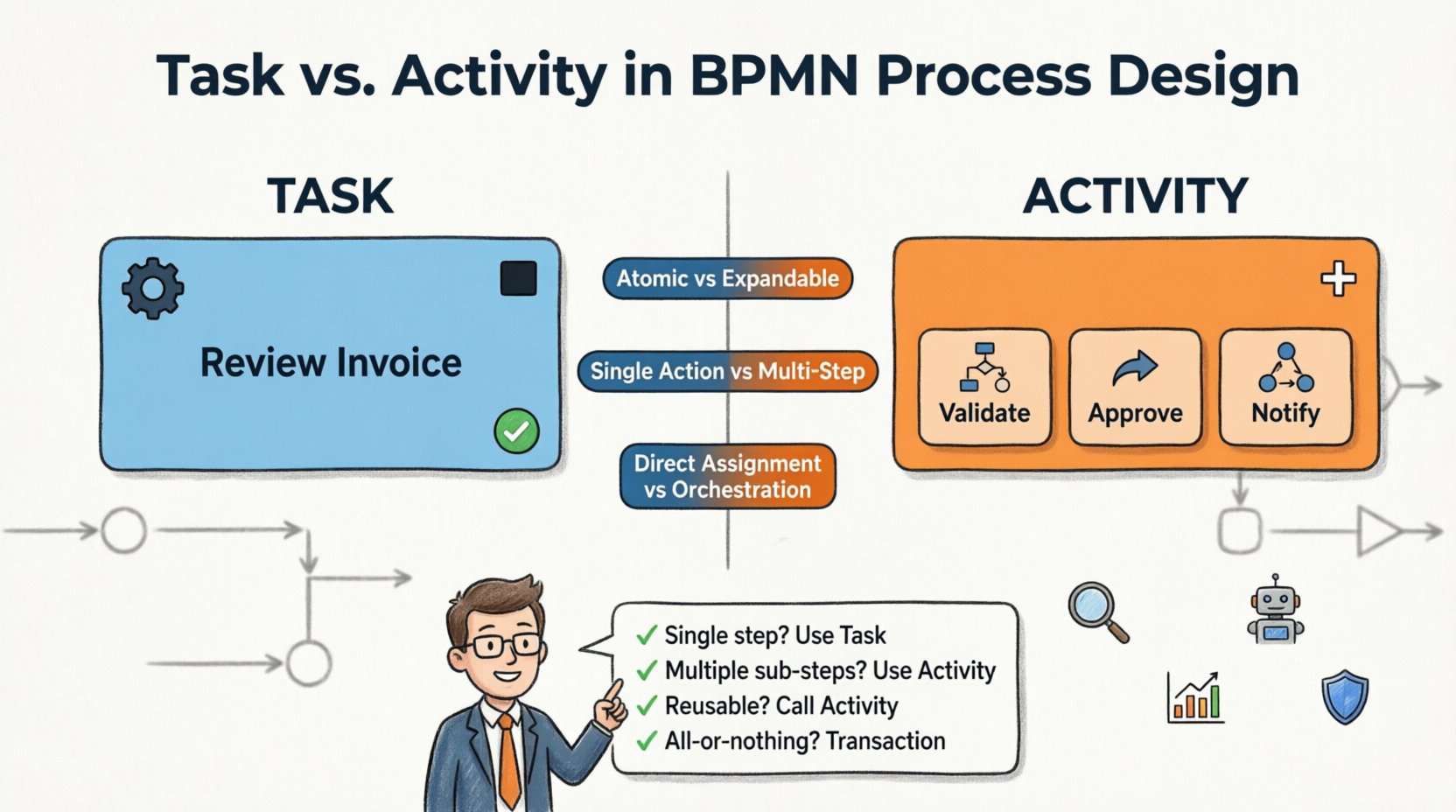
A Task represents a single unit of work. It is atomic in nature, meaning it has no internal structure within the context of the process diagram. When a process reaches a Task, the engine or human performer knows exactly what needs to be done, but the model does not describe how it is done in detail. The complexity is hidden behind the box.
- Atomicity: A Task cannot contain other elements. It is a leaf node in the process tree.
- Abstraction: It assumes the work is completed as a whole without needing to break it down further in this specific view.
- Execution: It is the smallest unit of work assigned to a resource or system.
Think of a Task as a black box. You input data, and the Task outputs a result. The internal steps are either irrelevant to the current scope or documented elsewhere. 📦
What is an Activity? 🔄
An Activity is a broader term in BPMN terminology. It encompasses Tasks but also includes more complex structures that can contain internal logic. While a Task is always an Activity, not every Activity is a Task. In the BPMN specification, an Activity is the generic term for any behavior that can contain sub-processes or be expanded.
- Expandability: An Activity can be modeled as a sub-process, revealing its internal components.
- Scope: It represents a broader chunk of work that may require coordination or decomposition.
- Types: This category includes Tasks, Sub-processes, Call Activities, and Event Sub-processes.
When you see the general term “Activity” in documentation or specifications, it refers to the parent category. However, in practice, when distinguishing between “Task” and “Activity,” we are often comparing an atomic Task against a complex Activity structure like a Sub-process. 🧱
The Granularity Gap: A Comparative Analysis 📊
The decision to use a Task or an Activity depends on the level of detail required for the process model. Using the wrong element can lead to models that are either too cluttered or too vague. The following table outlines the structural and functional differences.
| Feature | Task | Activity (Complex) |
|---|---|---|
| Internal Structure | None (Atomic) | Can contain other elements |
| Decomposition | Not modeled inside the box | Can be expanded into sub-processes |
| Complexity | Simple, single action | Complex, multi-step logic |
| Execution Context | Direct assignment | May require orchestration |
| Visual Representation | Rounded Rectangle | Rounded Rectangle (with icon) |
Why the Distinction Matters for Process Design 💡
Choosing between these elements is not just about drawing shapes; it affects the lifecycle of the process. Here is why getting this right is critical for your architecture.
1. Clarity and Readability 📖
If every sub-step is modeled as a separate Task connected by sequence flows, the diagram becomes a spaghetti of lines that is difficult to navigate. By grouping related tasks into a complex Activity (or Sub-process), you maintain a high-level view. This allows stakeholders to understand the flow without getting lost in the weeds.
Conversely, if you use a complex Activity where a simple Task suffices, you introduce unnecessary abstraction. The stakeholder sees a black box but expects to see the work. Balance is key. 🎯
2. Execution and Automation 🤖
Process execution engines handle these elements differently. A Task is often mapped directly to a service, a human form, or a script. A complex Activity might represent a workflow that triggers multiple services or waits for external events before completing.
If you model a complex logic flow as a single Task, the automation engine might struggle to handle intermediate states, errors, or retries. Breaking it down into an Activity allows for better error handling at the sub-process level. 🛑
3. Performance Monitoring 📈
Key Performance Indicators (KPIs) are often calculated at the Task level. If you group multiple steps into a single Activity, tracking the duration of specific sub-steps becomes harder. You might know the Activity took 10 minutes, but not how long each internal step took.
For audit trails and compliance, granularity matters. Regulators may require evidence of specific sub-actions. A Task provides a clear checkpoint. An Activity might require drilling down into the sub-process logs to find the proof. 🔍
Common Pitfalls in Modeling ⚠️
Even experienced analysts make mistakes when defining these boundaries. Being aware of these common errors can save hours of rework.
- The Over-Abstraction Trap: Modeling a critical step as a generic Task when it actually involves multiple approvals. This hides the complexity and makes risk assessment difficult.
- The Over-Engineering Trap: Breaking every single click into a Task. This makes the process map unreadable and overwhelms the resource with unnecessary detail.
- Inconsistent Naming: Calling one element a “Task” and another “Activity” without a clear pattern. Use consistent terminology to avoid confusion during reviews.
- Ignoring Gateways: Assuming an Activity handles all logic. Sometimes, a Task is simple, but the flow around it involves complex Gateways. Ensure the Activity boundaries align with the decision points.
Deep Dive: Call Activities and Transactions 🔄
Beyond the basic Task and Sub-process, BPMN introduces specialized Activity types that further complicate the distinction.
Call Activities
A Call Activity allows you to invoke a reusable process from another diagram. It is an Activity because it references an external definition. Unlike a Task, which is defined inline, a Call Activity is a reference. It is essential for modular design. If a process appears in multiple places, model it once and Call it. This reduces duplication and ensures consistency across the organization. 🔄
Transaction Sub-processes
A Transaction is a specific type of Activity that ensures all internal steps are executed atomically. If one step fails, the entire Activity rolls back. This is distinct from a standard Sub-process. It is crucial for financial or data-critical processes. Using a standard Task here would be insufficient because you need the atomicity guarantee. ⚖️
Best Practices for Naming and Categorization 🏷️
Clear communication relies on clear labels. When naming your elements, follow these guidelines to maintain a high standard of documentation.
- Verb-Noun Format: Start with an action verb followed by the object (e.g., “Review Invoice”, “Approve Request”).
- Consistent Granularity: If you have a Task “Send Email”, do not have a Task “Check Email” next to it if one is a sub-process of the other. Keep levels consistent.
- Contextual Labels: If a Task is complex, add a label indicating it is a “System Task” or “Human Task” to clarify the execution type.
- Avoid Ambiguity: Do not name an Activity “Process” or “Work”. Be specific about what is happening inside the box.
Impact on Stakeholder Communication 🗣️
Process models serve different audiences. Executives need high-level overviews, while developers need low-level logic.
- For Executives: Use Activities and Sub-processes to show the flow of value. Hide the atomic Tasks. They care about the outcome, not the clicks.
- For Developers: Expand the Activities. Show the Tasks. They need to know the sequence of operations to code the logic correctly.
- For Operators: Focus on the Tasks. They perform the work. They need to know exactly what to click, not the business logic behind the Activity.
Audit and Compliance Considerations 📜
In regulated industries, every action must be traceable. A Task is a perfect point for logging. When a Task is completed, the system records the timestamp, the user, and the outcome.
However, if a Task is hidden inside a complex Activity, the audit trail must still capture the internal events. Ensure your modeling standards require that all Tasks within an Activity are logged individually. Do not let the Activity boundary obscure the compliance requirements. 🔒
Summary of Modeling Decisions 🧭
Deciding between a Task and an Activity is a continuous judgment call based on the needs of the model. Use the following checklist to guide your decisions:
- Is the work a single, indivisible step? ➡️ Use a Task.
- Does the work involve multiple sub-steps that need to be visible? ➡️ Use an Activity (Sub-process).
- Is the work reusable across multiple processes? ➡️ Use a Call Activity.
- Does the work require atomic execution (all or nothing)? ➡️ Use a Transaction.
- Is the internal detail irrelevant to the current view? ➡️ Use a Task.
By adhering to these distinctions, you create models that are robust, clear, and ready for execution. The goal is not to use the most complex symbol, but to use the correct symbol for the job. Precision in design leads to precision in delivery. 🚀