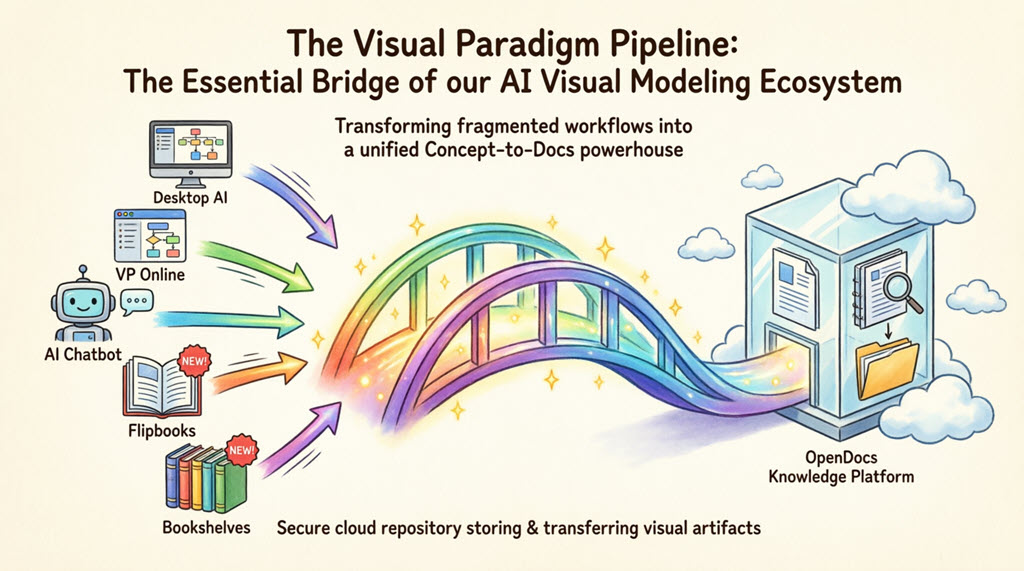
Transforming fragmented workflows into a unified, “Concept-to-Docs” powerhouse for modern teams.
What is the Pipeline?
The Pipeline is the high-speed connective tissue of the Visual Paradigm ecosystem. It is a secure, cloud-based centralized repository designed to store, manage, and transfer artifacts—the valuable visual assets you create across our various platforms.
In the context of Visual Paradigm’s AI Visual Modeling Ecosystem, the Pipeline acts as the vital bridge between our four core pillars:
-
Visual Paradigm Desktop AI Diagram Generation
It ensures that a diagram created in one “pillar” doesn’t stay trapped there; instead, it flows instantly to where it’s needed most: your documentation and publication hub.
A Single Source of Truth: The Pipeline eliminates the friction of manual downloads and uploads. It preserves the editability of your models and ensures that every stakeholder is looking at the most recent revision of a design.
The Gateway to OpenDocs: Your Publication Powerhouse
While the Pipeline is the vehicle, Visual Paradigm OpenDocs is the destination. OpenDocs is our premier knowledge management platform, specifically engineered to be “diagram-aware.” By utilizing the Pipeline, you can move work from any Visual Paradigm feature directly into a professional document, technical manual, or knowledge base.
This “Work-to-Publish” workflow allows you to:
-
Model with Precision: Use high-end desktop or online tools to create complex system architectures.
-
Generate with Speed: Use AI to brainstorm and visualize ideas instantly.
-
Publish with Authority: Seamlessly embed those visuals into OpenDocs to create living documentation that evolves alongside your project.
The 5 Core Connections: What You Can Send to the Pipeline
We are constantly encircling our apps with deeper connectivity. Here are the five critical ways you can currently leverage the Pipeline to streamline your workflow:
1. Visual Paradigm Desktop to OpenDocs
For the power user. Create intricate UML, BPMN, or SysML models in our professional desktop modeling software and export to OpenDocs via the pipeline. This moves your local modeling expertise into a global, accessible knowledge base.
How to send a diagram from Visual Paradigm Desktop to OpenDocs
-
In Visual Paradigm Desktop, open the diagram you wish to send.
-
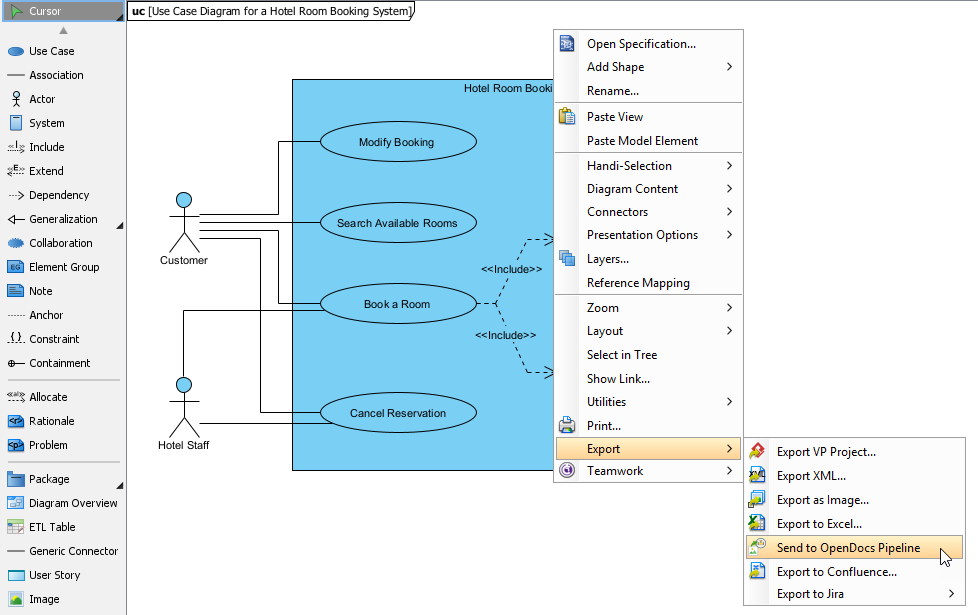
Right-click on the diagram and select Export > Send to OpenDocs Pipeline.
-
When prompted, save your project by clicking OK.
-
(Optional) Enter a comment. This will be visible in the Pipeline pane within OpenDocs to help you identify the version or purpose of the artifact.
-
Confirm the export to output your diagram to the cloud.
-
Once your diagram is in the Pipeline, you can place it anywhere in your knowledge base: Open any document page in OpenDocs and click Edit. Click on the page where you want to insert the diagram. On the toolbar, click Insert. In the Insert window, select Pipeline from the left-hand sidebar. Your sent diagrams will appear here.
Extended Reading: New Feature: Seamlessly Export Visual Paradigm Desktop Diagrams to OpenDocs
2. Visual Paradigm Online to OpenDocs
The 100% cloud workflow. Whether you are designing a technical flowchart or a high-impact marketing graphic in your browser, the Pipeline passes your work directly to your documentation in OpenDocs without a single local download.
How to send a diagram from Visual Paradigm Online to OpenDocs
-
Open your diagram or graphic in Visual Paradigm Online.
-
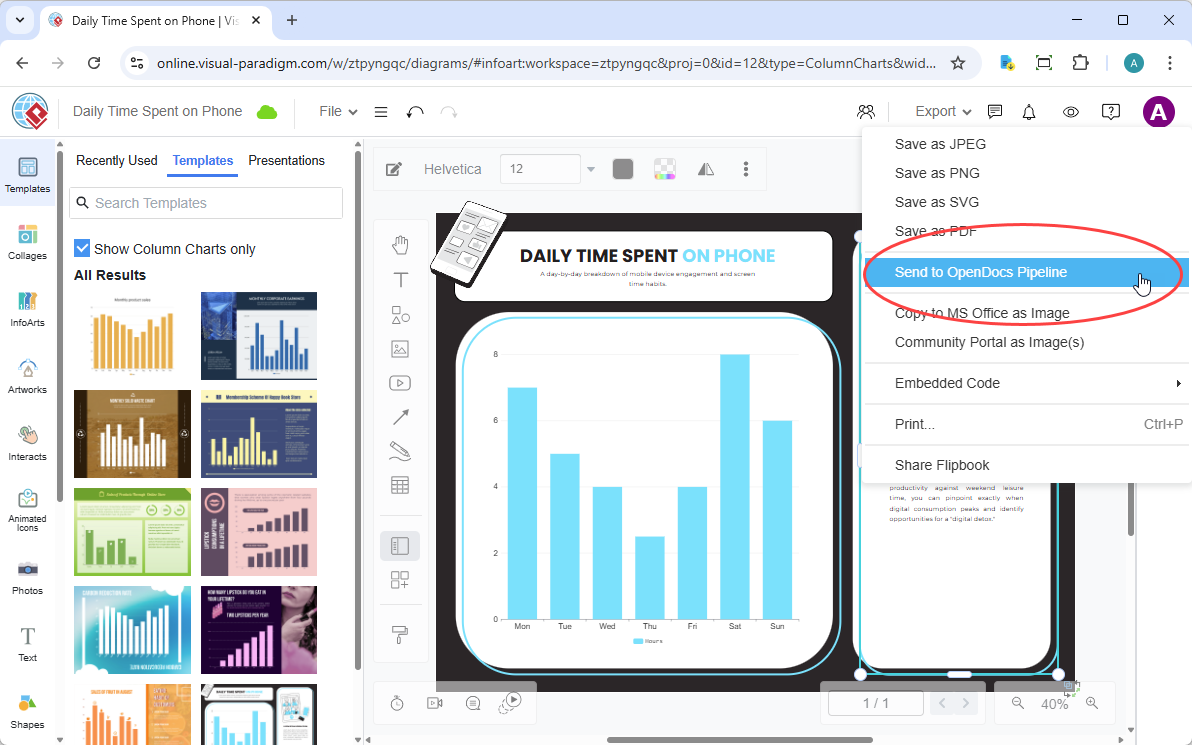
In the top menu, select Export > Send to OpenDocs Pipeline.
-
(Optional) Add a comment to describe the artifact. This makes it easier to find later in the Pipeline pane.
-
Confirm the export. Your visual is now securely stored in the Pipeline.
-
Once your diagram is in the Pipeline, you can place it anywhere in your knowledge base: Open any document page in OpenDocs and click Edit. Click on the page where you want to insert the diagram. On the toolbar, click Insert. In the Insert window, select Pipeline from the left-hand sidebar. Your sent diagrams will appear here.
Extended Reading: New Feature: Send Your Visual Paradigm Online Creations Directly to OpenDocs
3. AI Chatbot to OpenDocs
Conversational documentation. Ask our AI Chatbot to generate a system architecture or a business process diagram. With one click, that AI-generated artifact is ready to be inserted into your OpenDocs pages.
How to send a diagram from Visual Paradigm AI Chatbot to OpenDocs
-
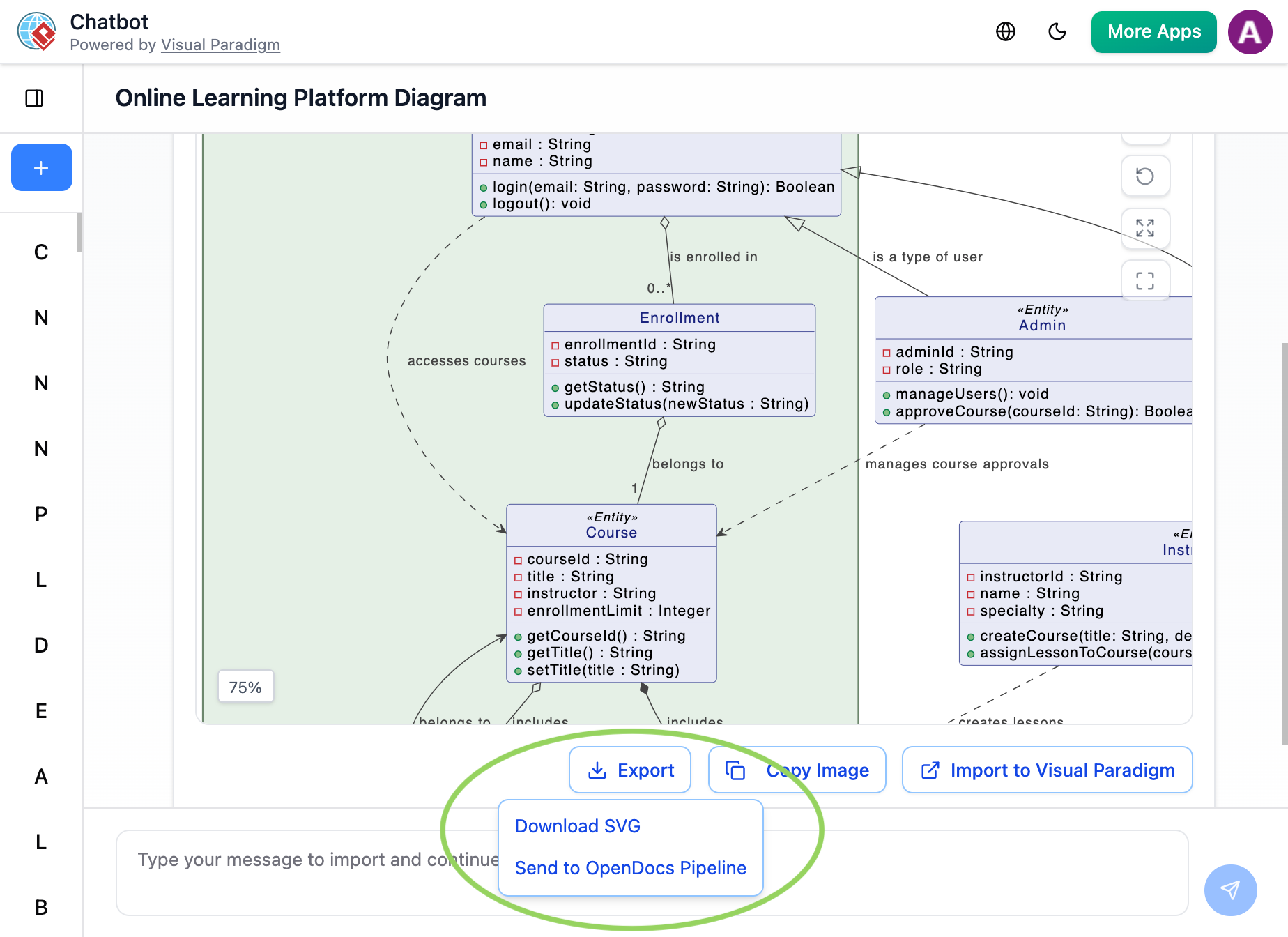
Generate Your Diagram: Create or refine your diagram (UML, flowchart, architecture, BPMN, etc.) in the AI Chatbot.
-
Once the AI has produced the visual you need, click Export and select Send to OpenDocs Pipeline.
-
Go to your desired document page in OpenDocs and enter the editor. Click Insert on the toolbar and select Pipeline. Your AI-generated diagram will be waiting for you in the asset list.
Extended Reading: New Feature Alert: Send Diagrams from Visual Paradigm AI Chatbot Directly to OpenDocs!
4. Flipbooks to OpenDocs (New!)
Bring interactive media into your knowledge management. You can now send your digital Flipbooks through the Pipeline, allowing you to embed rich, flippable catalogs or brochures directly within your OpenDocs pages. Perfect for product catalogs, training materials, or interactive presentations that need to live alongside your technical documentation.
5. Bookshelves to OpenDocs (New!)
Organize and publish at scale. Send entire Bookshelves to OpenDocs to create a centralized library of resources within your documentation workspace, making it easier than ever to manage large volumes of information. Ideal for teams managing multi-project documentation suites or enterprise knowledge bases.
Why the Pipeline is a Game-Changer
| Traditional Workflow | The Pipeline Workflow |
|---|---|
| Manual Export (PNG/JPG) | Instant “Send to Pipeline” |
| Manual Re-uploading on changes | “Update to Latest Revision” in one click |
| Disconnected, static images | Deep-linked, editable artifacts |
| Scattered files on local drives | Centralized cloud repository |
| Version confusion across teams | Single source of truth with revision history |
| Time-consuming asset management | Automated artifact synchronization |
Key Benefits at a Glance
✅ Preserve Editability: Unlike exported PNGs or JPGs, Pipeline artifacts maintain their model structure, allowing future edits in the source application.
✅ One-Click Updates: When a diagram changes in Desktop or Online, update your OpenDocs instance with a single click—no re-exporting or re-uploading required.
✅ Team Collaboration: Modelers work in their preferred environment while documentation specialists publish in OpenDocs; the Pipeline bridges the gap seamlessly.
✅ AI-Ready Workflow: AI-generated diagrams from the Chatbot flow directly into professional documentation, accelerating the concept-to-publication cycle.
✅ Secure & Centralized: All artifacts are stored in a secure cloud repository with access controls, ensuring your intellectual property stays protected.
Understanding the Pipeline Architecture
In Visual Paradigm’s OpenDocs, the Pipeline functions as a secure, centralized repository—often called an “Asset Transit Hub”—designed to bridge the gap between visual modeling and technical documentation. It stores diagrams, graphics, and models as “artifacts,” allowing them to be shared seamlessly between different applications in the Visual Paradigm ecosystem.
Purpose of the Pipeline
The primary purpose of the Pipeline is to create a streamlined “Concept-to-Docs” workflow. It eliminates the friction of manually exporting image files and re-uploading them every time a model changes. Instead, diagrams remain “living” components of your documentation that can be synchronized with a single click.
The Role it Plays in Knowledge Management
The Pipeline serves several critical roles:
🔗 Connective Tissue: Links Visual Paradigm Desktop or Online (where you build models) to OpenDocs (where you build documentation), ensuring that outputs from one tool become inputs for another.
🔄 Version Control Hub: Automatically tracks and manages revisions for every diagram sent to it. If a model is updated in the desktop app, a new revision is created in the Pipeline, which can then be swapped into the document instantly.
🎯 Single Source of Truth: By centralizing all artifacts, it ensures that teams always work with the most current versions of their visuals, preventing outdated information from lingering in technical manuals.
🤝 Collaboration Enabler: Allows modelers to work in their preferred professional environment (Desktop) while documentation specialists work in the browser-based OpenDocs, with the Pipeline handling the secure transfer of assets between them.
⚡ AI Workflow Accelerator: Supports AI-generated diagrams by allowing users to instantly push diagrams created via the AI chatbot directly into their documentation.
Getting Started: Your First Pipeline Transfer
Prerequisites
-
Active Visual Paradigm account with OpenDocs access
-
Visual Paradigm Desktop (v17.0+) or Visual Paradigm Online account
-
Diagram or artifact ready for export
Quick Start Checklist
-
Create or open your diagram in Desktop, Online, or AI Chatbot
-
Use the Export > Send to OpenDocs Pipeline command
-
Add an optional comment for version tracking
-
Navigate to your OpenDocs document and click Edit
-
Use Insert > Pipeline to place your artifact
-
Publish your documentation with confidence
Pro Tips
💡 Use descriptive comments when sending artifacts to the Pipeline—they help you identify versions later.
💡 Organize artifacts by project using OpenDocs folder structures to keep your knowledge base tidy.
💡 Leverage revision history to roll back to previous diagram versions if needed.
💡 Combine multiple artifacts on a single OpenDocs page to create comprehensive technical guides.
Troubleshooting Common Pipeline Questions
Q: My diagram isn’t appearing in the Pipeline pane in OpenDocs.
A: Ensure you’ve completed the export process fully and that you’re logged into the same Visual Paradigm account in both applications. Refresh the Pipeline pane if needed.
Q: Can I edit a diagram after sending it to the Pipeline?
A: Yes! Edit the source diagram in Desktop or Online, then re-export to the Pipeline. In OpenDocs, use the “Update to Latest Revision” option to refresh the embedded artifact.
Q: Is there a limit to how many artifacts I can store?
A: Pipeline storage limits depend on your Visual Paradigm subscription tier. Check your account settings or contact support for details.
Q: Can I share Pipeline artifacts with team members who don’t have Visual Paradigm?
A: Artifacts embedded in published OpenDocs pages are viewable by anyone with access to that document. Editing requires appropriate Visual Paradigm permissions.
The Future is Connected
The Pipeline is a critical component of our commitment to a seamless AI Visual Modeling experience. As we continue to expand the Visual Paradigm ecosystem, the Pipeline will only grow stronger, encircling more apps and providing even more ways to bridge the gap between creative modeling and professional publication.
What’s Next?
-
🚀 Integration with additional third-party tools
-
🤖 Enhanced AI-assisted artifact tagging and search
-
🌐 Cross-platform mobile access to Pipeline assets
-
📊 Analytics dashboard for artifact usage and collaboration metrics
Stay tuned—we are just getting started.
Reference List
- New Feature: Seamlessly Export Visual Paradigm Desktop Diagrams to OpenDocs: Official release guide detailing step-by-step instructions for exporting Desktop diagrams to OpenDocs via the Pipeline, including screenshots and best practices.
- Mastering the Pipeline in Visual Paradigm OpenDocs: A Complete Guide to Streamlined Knowledge Management: Comprehensive third-party tutorial covering Pipeline setup, artifact management, version control strategies, and team collaboration workflows.
- Complete Guide: Sending Visual Paradigm Creations to OpenDocs via Pipeline: Practical walkthrough for transferring diagrams from Desktop, Online, and AI Chatbot into OpenDocs, with troubleshooting tips and use case examples.
- New Feature: Send Your Visual Paradigm Online Creations Directly to OpenDocs: Official announcement and user guide for the cloud-based export workflow from Visual Paradigm Online to OpenDocs Pipeline.
- Visual Paradigm OpenDocs: The Complete Guide to AI-Powered Knowledge Management: In-depth exploration of OpenDocs capabilities, including Pipeline integration, AI-assisted documentation, and enterprise knowledge base strategies.
- Visual Paradigm OpenDocs Features Overview: Official product page detailing OpenDocs core functionalities, pricing tiers, and integration capabilities with the Visual Paradigm ecosystem.
- New Feature Alert: Send Diagrams from Visual Paradigm AI Chatbot Directly to OpenDocs!: Release notes and tutorial for the AI Chatbot-to-OpenDocs Pipeline export feature, enabling conversational diagram generation and instant documentation embedding.
- Visual Paradigm Pipeline Tutorial Video: Official video demonstration showing the end-to-end workflow of sending diagrams from Desktop and Online to OpenDocs via the Pipeline, with real-time commentary.
- Visual Paradigm OpenDocs: The Complete Guide to AI-Powered Knowledge Management and Diagram Generation: Expert analysis of OpenDocs and Pipeline integration, featuring advanced use cases for technical writers, solution architects, and DevOps teams.
-
Ready to transform your documentation workflow? Start sending your first diagram to the Pipeline today and experience the power of seamless Concept-to-Docs publishing. 🚀